Docker-transmission-openvpn: Container stops/restarts after few minutes with "latest" Tag/build (NORDVPN)
Using NordVPN. Seems like OpenVPN doesn't get to start and container stops/restarts. This does not occur when ovpn has been set mannualy with OPENVPN_CONFIG.
Same issue with latest-armhf (workaround for missing unzip: openvpn-pre-start.sh mounted in scripts wich installs unzip again)
Hosts:
ARM ODROID HC2 running openmediavault (updated) and Intel Atom N330 board also running openmediavault (updated). Docker version: 18.09.3 for both.
Log1.txt
Log2.txt
Log3-ARM.txt
Screenshots from Atom board:

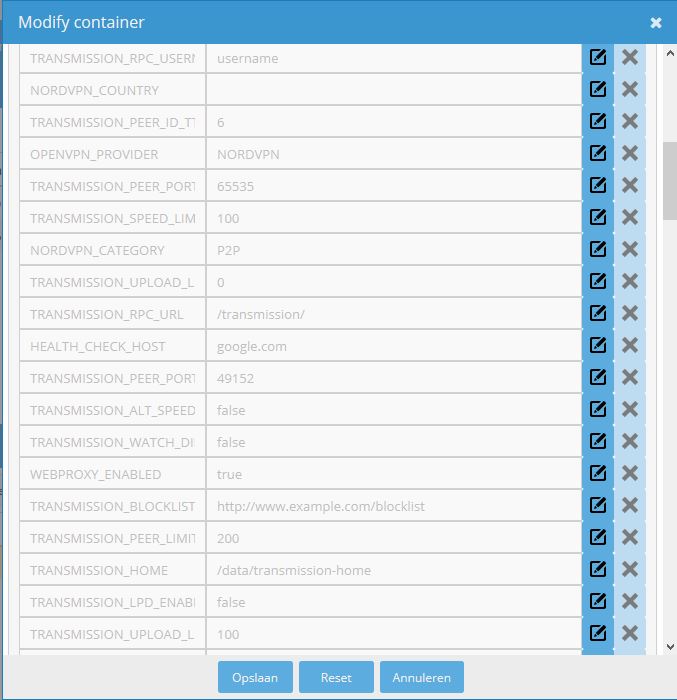
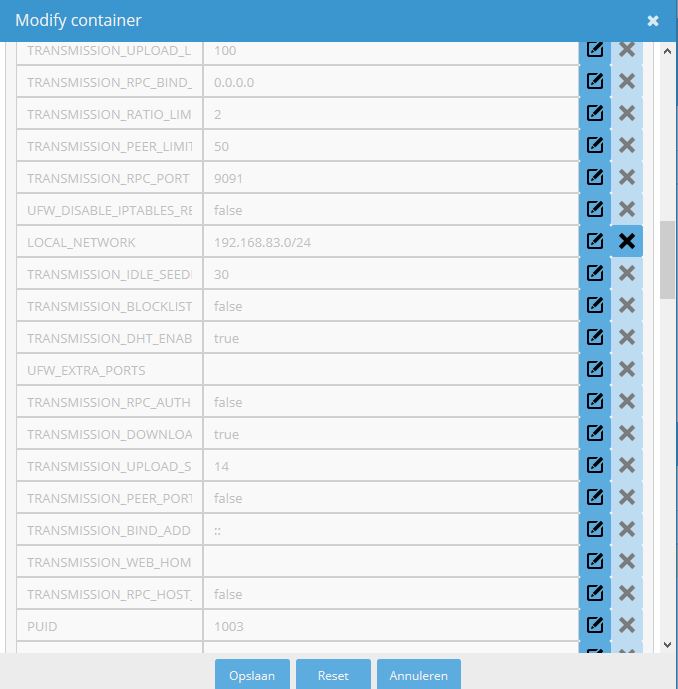
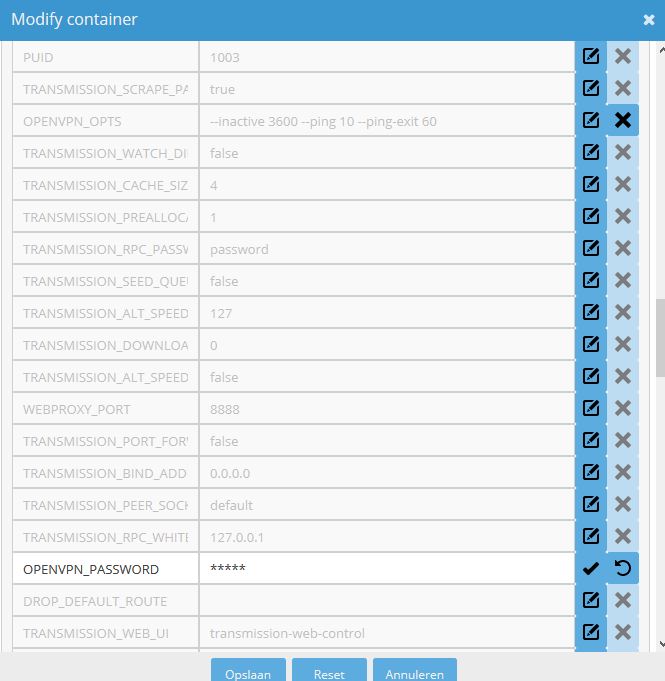
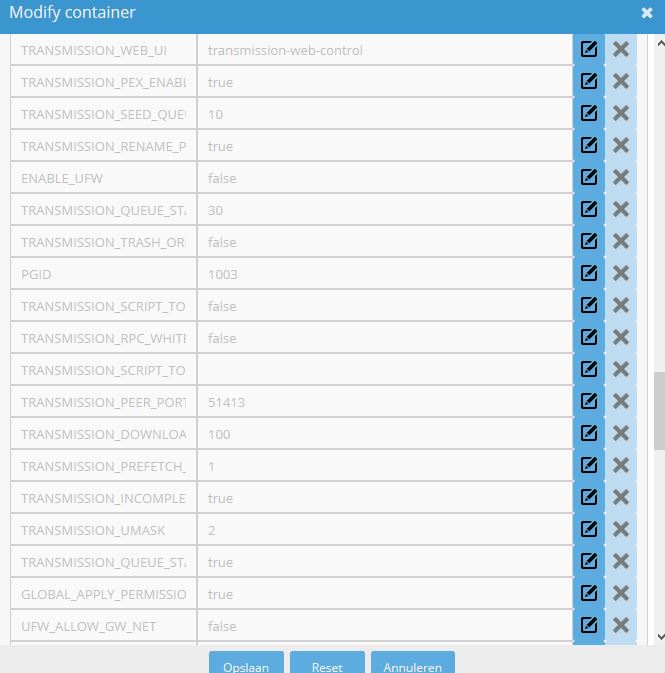

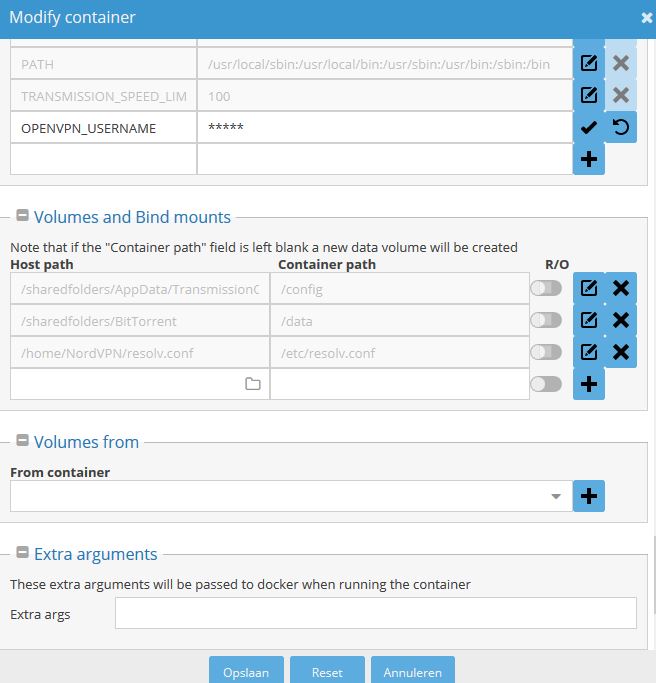
 sm0ke83
All 23 comments
Hey. I've merged #755 and #757 today to fix some issues with NordVPN on the latest release.
But this might seem to be a different issue. Could you check again in some hours (Docker Hub is sometimes very slow on the builds), and if it doesn't work then try to exec into the container and post the contents of the .ovpn file that is used?
Want to compare that with the previous configs. The RTNETLINK stuff is usually route adding. Is that the last of the logs before it exits?
 haugene
on 26 Mar 2019
haugene
on 26 Mar 2019
First of all, thanks for all the great work, very nice docker image!
Seems to be the same issue as #753 ...
757 is a nice improvement though!
Will check in a few minutes. When no changes, I'll check again tomorrow in morning.
Also going to check the with NORDVPN_COUNTRY set (do i use "NETHERLANDS", is it case-sensitive?). Want to check this with current not woking build and new/updated one.
If it doesn't work, I'll use WinSCP to pull out the .ovpn when container is running, Hope I don't need to ;-)
sm0ke83
on 26 Mar 2019
Great, thanks for debugging it. Pretty sure I saw in the code from the PR that it's converted to lowercase, so the option should be case insensitive.
You can also use "docker cp" from the command line on the host. That can copy files out from the container. Or just exec in and cat the file and then copy paste the output.
Hopefully the new build will work for you, although not sure it's the same issue.
haugene
on 26 Mar 2019
I read #757 again. Question about that (maybe better to write comment there).
When only NORDVPN_COUNTRY is set (and not OPENVPN_CONFIG), it will use NordVPN's API and download only one .ovpn, correct?
Once succesfully connected, does the script stop after that? Mean it doesn't rerun the "best provider API", does it? Would be a cool option though :-) Variable for timer for when to rerun script again. And/or when speed drops significantly.
...Just an idea :P
sm0ke83
on 26 Mar 2019
Yeah, connects to VPN!
Also no warnings "bad package" or "could not connect to tracker".
Only slow speed, need to check some things tomorrow. Wasn't able to try anything with old build, as Watchtower installed the new build for me (will disable this for a while). As I'm writing downloading stoped? Still running and connected, Transmission web-control still responding.
Checked log, connected to nl-onion3.nordvpn.com? Saw this a couple of times now the last few days.
Didn't use NORDVPN_COUNTRY. Also because I don't understand completely. You said converted to lowercase and case sensitive. If it converts, I would say it's not case sensitive... Anyway, what to enter, lowercase or uppercase? Or just uppercase the first caracter?
sm0ke83
on 27 Mar 2019
For the detailed questions on how it works I would either read the script or ask in #757 as you say.
It will now only download one .ovpn file in any case as far as I understood. Either it will be the one you specify in OPENVPN_CONFIG or it will be based on the filters you set for country (and/or group?).
As for the re-run of the script. This is triggered by the startup-scripts, doing preparations before starting openvpn and then handing the shell over to OpenVPN. As it is structured now it can't be re-run. Once openvpn starts it has it's config. Stopping the openvpn process would kill the container.
And yes. I meant "it's converting and therefore is case insentivite" editing my previous post.
Can close this one then?
haugene
on 27 Mar 2019
All right, thanx, will do that.
And it's not consistently working ok, it sometimes connects to an onion server (tor i guess, see Log-4.txt in my previous post). The log says protocol is set for UDP, but didn't see an variable in my web-interface which sets that (I did in previous builds).
I'm going to delete my container and setup new one, make sure Watchtower didn't mess things up. Then restart container a couple of times. When it connects to onion server, I'll pull out the .ovpn.
I noticed that when container is running, server can't reach anything outside local network. Probably due setting up resolv.conf to use NordVPN's DNS. Contacted them a few days ago, advised me to do so... Will check that. Could this maybe be linked to the problem above (onion server)?
Maybe close this issue and when above occurs I'll make new one?
sm0ke83
on 27 Mar 2019
The variables aren't showing up in your GUI because there is no default values set anymore.
Not sure how we'll manage this in a good way, but NordVPN is just the first provider. If all providers would have exposed configs like that it would quickly become very messy.
Youn can still set the variables though. They are still there and will still be read: https://github.com/haugene/docker-transmission-openvpn/blob/master/openvpn/nordvpn/updateConfigs.sh
Can't really see why your server can't reach anything outside local network. The reason for putting it in a container is to avoid it's networking affecting the host. Are you running in network=host mode?
haugene
on 27 Mar 2019
Ok clear...
And yes run in host mode, you mean that's the issue than? I followed Techno Dad Life's guide for setting up container...
sm0ke83
on 27 Mar 2019
Had another issue a couple of weeks ago, same thing. Some guide said to use network=host.
Have a look at the thread here: #730
Running it in that mode is not the way the container is intended to be used, and will defeat parts of the purpose of putting it in a container. The binaires, config and running process will still be containerized but from a networking point of view it would be like installing OpenVPN directly on the system.
If that's what you want, then it's cool, but it sounds like the side effects should be described better in the guide. Googled it, and it's the youtube video I guess?
haugene
on 27 Mar 2019
That makes sense...
Yess, youtube:
https://www.youtube.com/watch?v=MRgZ9oZQ7ds
Thinking about it.. Somewhere in the video he mentioned something about running other containers through VPN of the container, maybe that's why he set it to host? Not possible otherwise? Don't need that anyway though... Will post a few thing on his topic on openmediavault forum, might be of use for someone...
When set to bridged mode, do I need to specify anything else as far as you know? Thanx!

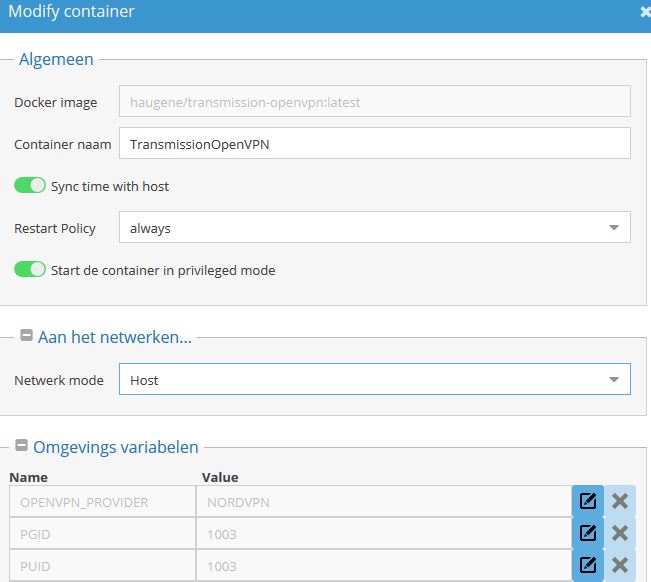
sm0ke83
on 27 Mar 2019
No. The LOCAL_NETWORK variable might be more important than before. But I see he covered that.
You can also run other containers network through the VPN by setting their network=container:<transmission container>. That would attach that containers network to the existing network stack of the transmission-openvpn container.
haugene
on 27 Mar 2019
NordVPN no longer works for me either, even the 2.6 tag.
Options error: Unrecognized option or missing or extra parameter(s) in /etc/openvpn/nordvpn/ca99.nordvpn.com.tcp.ovpn:1: html (2.4.7)
Doesn't matter which end point I try and use, same error.
 scottjl
on 27 Mar 2019
scottjl
on 27 Mar 2019
Merged #760, try again soon
haugene
on 27 Mar 2019
Also see discussion in #755
haugene
on 27 Mar 2019
In terms of setting NORDVPN_COUNTRY it converts it to lower case so shouldn't matter whether you enter it as upper or lower case. Also, you can either use the country name or the country code to set it e.g. Netherlands or nl
 Troubadoure
on 27 Mar 2019
Troubadoure
on 27 Mar 2019
Hi all,
My first Github comment. Thanks to @haugene and @Troubadoure for your ongoing work. Just wanted to post my observations with regard to this issue. My container stopped working when updating to the latest build a day ago. I tried fixing the restart issue by including NORDVPN_COUNTRY and removing OPENVPN_CONFIG but had no luck.
Looking through the logs for the latest version I get an Error 502 for nordcdn.com, and this appears to be related to the issue, although it is beyond my knowledge. Happy to retry if anyone wants me to diagnose but I presume nobody is having any trouble precipitating this issue.
For anyone reading, I reverted to tag 2.6 and with the attached configurations and can confirm the container is currently working for me. I believe that 2.6 precedes the new NordVPN configuration changes. @scottjl
 andre-abadi
on 29 Mar 2019
andre-abadi
on 29 Mar 2019
@dancingborg In your settings.env file you've still got NORDVPN_COUNTRY set and also OPENVPN_CONFIG. At the moment, you'll only be able to choose one config script so try setting OPENVPN_CONFIG with only one config (also make sure it is still a valid one and not a legacy one)
Troubadoure
on 30 Mar 2019
Hi @Troubadoure, read your comment above. My issue is NordVPN often connects to an onion-server #762. The last half hour only onion-server on both latest-armhf and latest build.
Do not have OPENVPN_CONFIG set, but my log mentions "Searching for group: legacy_p2p". Might this be related to this? If so, is there a variable I can set to change this? Thnx.
sm0ke83
on 31 Mar 2019
Hi @Troubadoure thanks for the feedback. I pulled a fresh image, moved back to the :latest tag with NORDVPN_COUNTRY=au and confirm it's working like a charm, per your instructions. I have removed OPENVPN_CONFIG also as you recommended. Thanks for the reply and for your work on the NordVPN matter for this container.
andre-abadi
on 31 Mar 2019
@Troubadoure, just read #764. This answers my question above about variable (will do some digging in script in future before asking). Nevertheless, I'm not sure if this solves #762. Log is the same and mentions legacy_p2p. Also can't reproduce issue #762, as it seems to occur randomly.
sm0ke83
on 31 Mar 2019
This issue has been automatically marked as stale because it has not had recent activity. It will be closed if no further activity occurs. Thank you for your contributions.
![stale[bot] picture](https://avatars3.githubusercontent.com/in/1724?v=4&s=40) stale[bot]
on 5 Apr 2020
stale[bot]
on 5 Apr 2020
Note: The stale bot was recently added to this project to help weed out outdated issues. This will help us to focus time and energy on issues that are important and move the others out of the way. There could however be many issues that are still relevant but have gotten old without ever being fixed. As this is the first round of cleaning it might have been too eager. Feel free to re-open this issue if you think it deserves another look.
stale[bot]
on 13 Apr 2020
Related issues
 ovizii
·
3Comments
ovizii
·
3Comments
 Esteidinger
·
3Comments
Esteidinger
·
3Comments
 Jafalex
·
3Comments
Jafalex
·
3Comments
 holger8080
·
4Comments
holger8080
·
4Comments
 PriamX
·
3Comments
PriamX
·
3Comments