Docker-transmission-openvpn: Can't connect using Windscribe VPN
Looks like the negotiated parameters are not a match. Can't get it to work with default configs or the country specific ones.
Heres a log file:
openvpn-log.txt
 nbgr
nbgr
All 24 comments
Don't know if it's useful but i used to have some issues with free acount
 egobiah
on 4 May 2018
egobiah
on 4 May 2018
Thanks for weighing in. I have an unlimited Pro account.. not sure if it has some kind of limitation though since I got the membership through a humble indie bundle.
nbgr
on 4 May 2018
Try using the username and password from https://windscribe.com/getconfig/openvpn
 playertuan
on 18 May 2018
playertuan
on 18 May 2018
using the config page has worked for me. Thank you @playertuan
 madnlooney
on 30 May 2018
madnlooney
on 30 May 2018
Looks like @playertuan seems to have fixed the issue. Closing for now.
 mrjackyliang
on 6 Jun 2018
mrjackyliang
on 6 Jun 2018
Please document @playertuan 's solution. It took me an hour trying to figure out what was wrong, by researching for the error message I got:
AUTH: Received control message: AUTH_FAILED
SIGTERM[soft,auth-failure] received, process exiting
 zoispag
on 10 May 2019
zoispag
on 10 May 2019
@zoispag Only @playertuan would know. But it seems he set OPENVPN_USERNAME and OPENVPN_PASSWORD to whatever he found on https://windscribe.com/getconfig/openvpn
I don't use windscribe so I can't log in and see.
Seems like you are getting an auth-failure message, which points to a wrong username and/or password being used. If you want help with this please document what you've tried and what your docker run command looks like.
 haugene
on 3 Jun 2019
haugene
on 3 Jun 2019
@haugene I managed to connect to the VPN, using the username and password provided from windscribe.com/getconfig/openvpn instead of the actual username and password.
I still have an issue though, that torrent gets added but download never starts.
zoispag
on 3 Jun 2019
@haugene I am running it as
docker run --cap-add=NET_ADMIN -d \
              --name torrents \
              -p 9091:9091 \
              -p 51415:51415 \
              -p 51415:51415/udp \
              -e PGID=1001 -e PUID=1001 \
              -v ~/Downloads/transmission:/data \
              -e CREATE_TUN_DEVICE=true \
              -e OPENVPN_PROVIDER=WINDSCRIBE \
              -e OPENVPN_USERNAME=${WINDSCRIBE_USERNAME_FROM_GETCONFIG} \
              -e OPENVPN_PASSWORD=${WINDSCRIBE_PASSWORD_FROM_GETCONFIG} \
              -e WEBPROXY_ENABLED=false \
              -e TRANSMISSION_WEB_UI=combustion \
              -e LOCAL_NETWORK=`ifconfig | grep "inet " | grep -Fv 127.0.0.1 | awk '{print $2}'` \
              --log-driver json-file \
              --log-opt max-size=10m \
              --sysctl net.ipv6.conf.all.disable_ipv6=0 \
              haugene/transmission-openvpn
Yes this is also how I got it to work using that URL.
For static IP you use Show Credentials in the settings you set up.
Also this has to be edited
OPENVPN_PROVIDER=CUSTOM
OPENVPN_CONFIG=config
The static IP config file has to be linked
Don't use login info
I use the dockerenv file
madnlooney
on 3 Jun 2019
@madnlooney dockerenv? Or ovpn config?
Could you paste your docker run command please?
zoispag
on 3 Jun 2019
The DockerEnv contains the VPN settings so you don't need to write them in the command line when making the docker, you just link to it and it uses what you have changed and uncommmented
Ovpn is only needed for using a staticIP from windscribe
madnlooney
on 3 Jun 2019
@madnlooney did you use the .ca at all?
What do you mean by The static IP config file has to be linked ?
zoispag
on 3 Jun 2019
@zoispag Ok, so you're seeing the WebUI? Then the container is probably starting up correctly.
Was a bit surprised to see the subshell setting LOCAL_NETWORK. It's not a CIDR range, but just your host IP? Would expect it to have to be x.y.z.x/16 or something.
Weird that they don't start downloading, have you checked the transmission log?
Is DNS working inside the container? Does this apply to any torrent from any tracker?
haugene
on 3 Jun 2019
No I use the config ovpn and in the
OPENVPN_PROVIDER=CUSTOM
OPENVPN_CONFIG=config
Config is the file name and as it's in the same location as DockerEnv only file name needed. If you use a standard location you only need to put the provider in as per instructions.
madnlooney
on 3 Jun 2019
@madnlooney how do you mount the ovpn? I mean where?
It should be in your docker run command. Somehting like -v ./config.ovpn:/etc/openvpn/custom/config.ovpn
What is the location inside the container?
zoispag
on 3 Jun 2019
@madnlooney @haugene
with
docker run -dt \
              --name torrents \
              --cap-add=NET_ADMIN \
              --env-file ~/Downloads/dockerenv \
              -v ~/Downloads/config.ovpn:/etc/openvpn/custom/config.ovpn \
              -v ~/Downloads/transmission:/data \
              -p 19091:9091 \
              haugene/transmission-openvpn
~/Downloads/config.ovpn is the file as downloaded from the windscribe page.
dockerenv has only:
OPENVPN_PROVIDER=CUSTOM
OPENVPN_CONFIG=config
I get
$ docker logs torrents

Using OpenVPN provider: CUSTOM
Starting OpenVPN using config config.ovpn
Setting OPENVPN credentials...
Mon Jun  3 14:14:13 2019 OpenVPN 2.4.7 x86_64-pc-linux-gnu [SSL (OpenSSL)] [LZO] [LZ4] [EPOLL] [PKCS11] [MH/PKTINFO] [AEAD] built on Feb 19 2019
Mon Jun  3 14:14:13 2019 library versions: OpenSSL 1.0.2g  1 Mar 2016, LZO 2.08
The run command has -t. This is because without it, I get:
Using OpenVPN provider: CUSTOM
Starting OpenVPN using config config.ovpn
Setting OPENVPN credentials...
Mon Jun  3 14:17:30 2019 OpenVPN 2.4.7 x86_64-pc-linux-gnu [SSL (OpenSSL)] [LZO] [LZ4] [EPOLL] [PKCS11] [MH/PKTINFO] [AEAD] built on Feb 19 2019
Mon Jun  3 14:17:30 2019 library versions: OpenSSL 1.0.2g  1 Mar 2016, LZO 2.08
Mon Jun  3 14:17:30 2019 neither stdin nor stderr are a tty device and you have neither a controlling tty nor systemd - can't ask for 'Enter Auth Username:'.  If you used --daemon, you need to use --askpass to make passphrase-protected keys work, and you can not use --auth-nocache.
Mon Jun  3 14:17:30 2019 Exiting due to fatal error
You need to change the auth-user-pass line to point to the file containing
the credentials.
Whatever is given as environment variables will be persisted to file and
then read from there by openvpn. Have a look in any of the config files in
pia folder for example.
On my phone on a train so impractical to pull up an example.
On Mon, Jun 3, 2019, 16:17 Zois Pagoulatos notifications@github.com wrote:
@madnlooney https://github.com/madnlooney @haugene
https://github.com/haugene
withdocker run -dt \
--name torrents \
--cap-add=NET_ADMIN \
--env-file ~/Downloads/dockerenv \
-v ~/Downloads/config.ovpn:/etc/openvpn/custom/config.ovpn \
-v ~/Downloads/transmission:/data \
-p 19091:9091 \
haugene/transmission-openvpn~/Downloads/config.ovpn is the file as downloaded from the windscribe page.
dockerenv has only:
OPENVPN_PROVIDER=CUSTOM
OPENVPN_CONFIG=configI get
$ docker logs torrents
Using OpenVPN provider: CUSTOM
Starting OpenVPN using config config.ovpn
Setting OPENVPN credentials...
Mon Jun 3 14:14:13 2019 OpenVPN 2.4.7 x86_64-pc-linux-gnu [SSL (OpenSSL)] [LZO] [LZ4] [EPOLL] [PKCS11] [MH/PKTINFO] [AEAD] built on Feb 19 2019
Mon Jun 3 14:14:13 2019 library versions: OpenSSL 1.0.2g 1 Mar 2016, LZO 2.08The run command has -t. This is because without it, I get:
Using OpenVPN provider: CUSTOM
Starting OpenVPN using config config.ovpn
Setting OPENVPN credentials...
Mon Jun 3 14:17:30 2019 OpenVPN 2.4.7 x86_64-pc-linux-gnu [SSL (OpenSSL)] [LZO] [LZ4] [EPOLL] [PKCS11] [MH/PKTINFO] [AEAD] built on Feb 19 2019
Mon Jun 3 14:17:30 2019 library versions: OpenSSL 1.0.2g 1 Mar 2016, LZO 2.08
Mon Jun 3 14:17:30 2019 neither stdin nor stderr are a tty device and you have neither a controlling tty nor systemd - can't ask for 'Enter Auth Username:'. If you used --daemon, you need to use --askpass to make passphrase-protected keys work, and you can not use --auth-nocache.Mon Jun 3 14:17:30 2019 Exiting due to fatal error—
You are receiving this because you were mentioned.
Reply to this email directly, view it on GitHub
https://github.com/haugene/docker-transmission-openvpn/issues/498?email_source=notifications&email_token=AAH5ODVURFIDXXKUPT7WY6LPYURZJA5CNFSM4E57NRAKYY3PNVWWK3TUL52HS4DFVREXG43VMVBW63LNMVXHJKTDN5WW2ZLOORPWSZGODWZRM6Q#issuecomment-498275962,
or mute the thread
https://github.com/notifications/unsubscribe-auth/AAH5ODRMTPH4CNJLAKTAWFTPYURZJANCNFSM4E57NRAA
.
haugene
on 3 Jun 2019
Thanks even for spending your time to check @haugene :)
Using WINDSCRIBE and credentials I get
$  docker logs torrents
Using OpenVPN provider: WINDSCRIBE
No VPN configuration provided. Using default.
Setting OPENVPN credentials...
Mon Jun  3 14:20:32 2019 OpenVPN 2.4.7 x86_64-pc-linux-gnu [SSL (OpenSSL)] [LZO] [LZ4] [EPOLL] [PKCS11] [MH/PKTINFO] [AEAD] built on Feb 19 2019
Mon Jun  3 14:20:32 2019 library versions: OpenSSL 1.0.2g  1 Mar 2016, LZO 2.08
Mon Jun  3 14:20:32 2019 NOTE: the current --script-security setting may allow this configuration to call user-defined scripts
Mon Jun  3 14:20:32 2019 Outgoing Control Channel Authentication: Using 512 bit message hash 'SHA512' for HMAC authentication
Mon Jun  3 14:20:32 2019 Incoming Control Channel Authentication: Using 512 bit message hash 'SHA512' for HMAC authentication
Mon Jun  3 14:20:32 2019 TCP/UDP: Preserving recently used remote address: [AF_INET]45.121.210.208:1194
Mon Jun  3 14:20:32 2019 UDP link local: (not bound)
Mon Jun  3 14:20:32 2019 UDP link remote: [AF_INET]45.121.210.208:1194
Mon Jun  3 14:20:32 2019 WARNING: this configuration may cache passwords in memory -- use the auth-nocache option to prevent this
Mon Jun  3 14:20:32 2019 VERIFY OK: depth=1, C=CA, ST=ON, L=Toronto, O=Windscribe Limited, OU=Operations, CN=Windscribe Node CA
Mon Jun  3 14:20:32 2019 VERIFY KU OK
Mon Jun  3 14:20:32 2019 Validating certificate extended key usage
Mon Jun  3 14:20:32 2019 ++ Certificate has EKU (str) TLS Web Server Authentication, expects TLS Web Server Authentication
Mon Jun  3 14:20:32 2019 VERIFY EKU OK
Mon Jun  3 14:20:32 2019 VERIFY OK: depth=0, C=CA, ST=ON, O=Windscribe Limited, OU=Operations, CN=Windscribe Node Server 4096
Mon Jun  3 14:20:33 2019 WARNING: 'link-mtu' is used inconsistently, local='link-mtu 1602', remote='link-mtu 1550'
Mon Jun  3 14:20:33 2019 WARNING: 'cipher' is used inconsistently, local='cipher AES-256-CBC', remote='cipher AES-256-GCM'
Mon Jun  3 14:20:33 2019 WARNING: 'auth' is used inconsistently, local='auth SHA512', remote='auth [null-digest]'
Mon Jun  3 14:20:33 2019 Control Channel: TLSv1.2, cipher TLSv1/SSLv3 ECDHE-RSA-AES256-GCM-SHA384, 4096 bit RSA
Mon Jun  3 14:20:33 2019 [Windscribe Node Server 4096] Peer Connection Initiated with [AF_INET]45.121.210.208:1194
Mon Jun  3 14:20:34 2019 Data Channel: using negotiated cipher 'AES-256-GCM'
Mon Jun  3 14:20:34 2019 Outgoing Data Channel: Cipher 'AES-256-GCM' initialized with 256 bit key
Mon Jun  3 14:20:34 2019 Incoming Data Channel: Cipher 'AES-256-GCM' initialized with 256 bit key
Mon Jun  3 14:20:34 2019 TUN/TAP device tun0 opened
Mon Jun  3 14:20:34 2019 /sbin/ip link set dev tun0 up mtu 1500
Mon Jun  3 14:20:34 2019 /sbin/ip addr add dev tun0 10.116.34.9/23 broadcast 10.116.35.255
Mon Jun  3 14:20:35 2019 /etc/openvpn/tunnelUp.sh tun0 1500 1553 10.116.34.9 255.255.254.0 init
Up script executed with tun0 1500 1553 10.116.34.9 255.255.254.0 init
Updating TRANSMISSION_BIND_ADDRESS_IPV4 to the ip of tun0 : 10.116.34.9
Generating transmission settings.json from env variables
sed'ing True to true

-------------------------------------
Transmission will run as
-------------------------------------
User name:   root
User uid:    0
User gid:    0
-------------------------------------

STARTING TRANSMISSION
NO PORT UPDATER FOR THIS PROVIDER
Transmission startup script complete.
Mon Jun  3 14:20:35 2019 Initialization Sequence Completed
UI opens up but cannot connect to any tracker
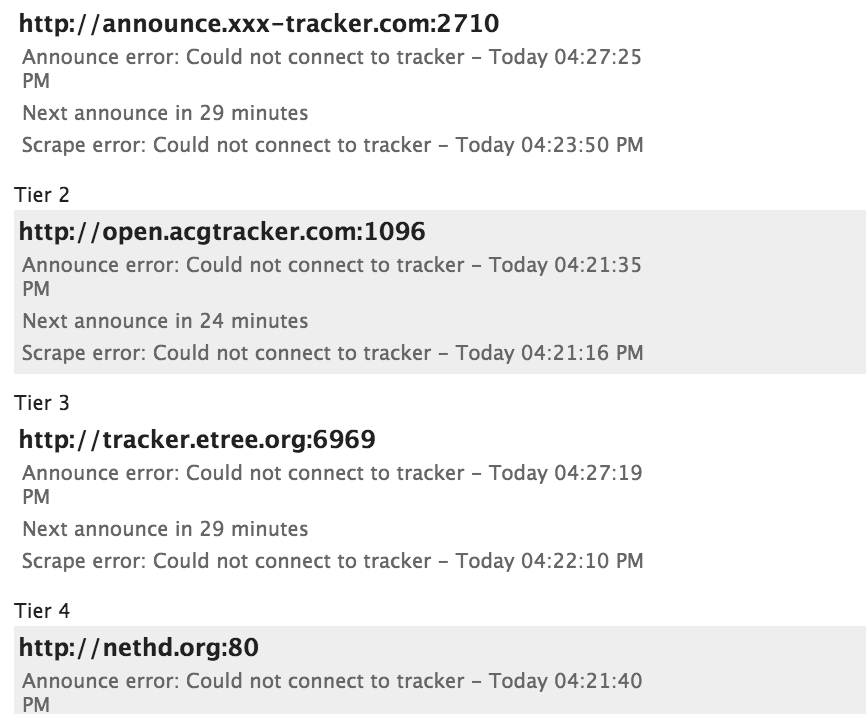
zoispag
on 3 Jun 2019
Cool, getting closer :) Then DNS. If your config is set up with a remote
using IP address it could all start up fine even without a valid DNS server
config.
If you exec into the container and run ping google.com.
What happens then?
On Mon, Jun 3, 2019, 16:28 Zois Pagoulatos notifications@github.com wrote:
Thanks even for spending your time to check @haugene
https://github.com/haugene :)Using WINDSCRIBE and credentials I get
$ docker logs torrents
Using OpenVPN provider: WINDSCRIBE
No VPN configuration provided. Using default.
Setting OPENVPN credentials...
Mon Jun 3 14:20:32 2019 OpenVPN 2.4.7 x86_64-pc-linux-gnu [SSL (OpenSSL)] [LZO] [LZ4] [EPOLL] [PKCS11] [MH/PKTINFO] [AEAD] built on Feb 19 2019
Mon Jun 3 14:20:32 2019 library versions: OpenSSL 1.0.2g 1 Mar 2016, LZO 2.08
Mon Jun 3 14:20:32 2019 NOTE: the current --script-security setting may allow this configuration to call user-defined scripts
Mon Jun 3 14:20:32 2019 Outgoing Control Channel Authentication: Using 512 bit message hash 'SHA512' for HMAC authentication
Mon Jun 3 14:20:32 2019 Incoming Control Channel Authentication: Using 512 bit message hash 'SHA512' for HMAC authentication
Mon Jun 3 14:20:32 2019 TCP/UDP: Preserving recently used remote address: [AF_INET]45.121.210.208:1194
Mon Jun 3 14:20:32 2019 UDP link local: (not bound)
Mon Jun 3 14:20:32 2019 UDP link remote: [AF_INET]45.121.210.208:1194
Mon Jun 3 14:20:32 2019 WARNING: this configuration may cache passwords in memory -- use the auth-nocache option to prevent this
Mon Jun 3 14:20:32 2019 VERIFY OK: depth=1, C=CA, ST=ON, L=Toronto, O=Windscribe Limited, OU=Operations, CN=Windscribe Node CA
Mon Jun 3 14:20:32 2019 VERIFY KU OK
Mon Jun 3 14:20:32 2019 Validating certificate extended key usage
Mon Jun 3 14:20:32 2019 ++ Certificate has EKU (str) TLS Web Server Authentication, expects TLS Web Server Authentication
Mon Jun 3 14:20:32 2019 VERIFY EKU OK
Mon Jun 3 14:20:32 2019 VERIFY OK: depth=0, C=CA, ST=ON, O=Windscribe Limited, OU=Operations, CN=Windscribe Node Server 4096
Mon Jun 3 14:20:33 2019 WARNING: 'link-mtu' is used inconsistently, local='link-mtu 1602', remote='link-mtu 1550'
Mon Jun 3 14:20:33 2019 WARNING: 'cipher' is used inconsistently, local='cipher AES-256-CBC', remote='cipher AES-256-GCM'
Mon Jun 3 14:20:33 2019 WARNING: 'auth' is used inconsistently, local='auth SHA512', remote='auth [null-digest]'
Mon Jun 3 14:20:33 2019 Control Channel: TLSv1.2, cipher TLSv1/SSLv3 ECDHE-RSA-AES256-GCM-SHA384, 4096 bit RSA
Mon Jun 3 14:20:33 2019 [Windscribe Node Server 4096] Peer Connection Initiated with [AF_INET]45.121.210.208:1194
Mon Jun 3 14:20:34 2019 Data Channel: using negotiated cipher 'AES-256-GCM'
Mon Jun 3 14:20:34 2019 Outgoing Data Channel: Cipher 'AES-256-GCM' initialized with 256 bit key
Mon Jun 3 14:20:34 2019 Incoming Data Channel: Cipher 'AES-256-GCM' initialized with 256 bit key
Mon Jun 3 14:20:34 2019 TUN/TAP device tun0 opened
Mon Jun 3 14:20:34 2019 /sbin/ip link set dev tun0 up mtu 1500
Mon Jun 3 14:20:34 2019 /sbin/ip addr add dev tun0 10.116.34.9/23 broadcast 10.116.35.255
Mon Jun 3 14:20:35 2019 /etc/openvpn/tunnelUp.sh tun0 1500 1553 10.116.34.9 255.255.254.0 init
Up script executed with tun0 1500 1553 10.116.34.9 255.255.254.0 init
Updating TRANSMISSION_BIND_ADDRESS_IPV4 to the ip of tun0 : 10.116.34.9
Generating transmission settings.json from env variables
sed'ing True to true-------------------------------------Transmission will run as-------------------------------------User name: rootUser uid: 0User gid: 0-------------------------------------STARTING TRANSMISSIONNO PORT UPDATER FOR THIS PROVIDERTransmission startup script complete.Mon Jun 3 14:20:35 2019 Initialization Sequence CompletedUI opens up but cannot connect to any tracker
[image: image]
https://user-images.githubusercontent.com/21138205/58809628-92b43280-861c-11e9-800c-4437153d412e.png—
You are receiving this because you were mentioned.
Reply to this email directly, view it on GitHub
https://github.com/haugene/docker-transmission-openvpn/issues/498?email_source=notifications&email_token=AAH5ODXAXLMGFU747TBTFPLPYUS75A5CNFSM4E57NRAKYY3PNVWWK3TUL52HS4DFVREXG43VMVBW63LNMVXHJKTDN5WW2ZLOORPWSZGODWZSNYY#issuecomment-498280163,
or mute the thread
https://github.com/notifications/unsubscribe-auth/AAH5ODT74KUYQJIEHAEMMTLPYUS75ANCNFSM4E57NRAA
.
haugene
on 3 Jun 2019
$ docker exec -it torrents ping www.google.com
ping: unknown host www.google.com
So it must be a DNS issue.
zoispag
on 3 Jun 2019
Then add the dns options as described in the readme. Fingers crossed ;)
On Mon, Jun 3, 2019, 16:37 Zois Pagoulatos notifications@github.com wrote:
$ docker exec -it torrents ping www.google.com
ping: unknown host www.google.comSo it must be a DSN issue.
—
You are receiving this because you were mentioned.
Reply to this email directly, view it on GitHub
https://github.com/haugene/docker-transmission-openvpn/issues/498?email_source=notifications&email_token=AAH5ODUV4VXX75I25KOINADPYUUAZA5CNFSM4E57NRAKYY3PNVWWK3TUL52HS4DFVREXG43VMVBW63LNMVXHJKTDN5WW2ZLOORPWSZGODWZTK4Y#issuecomment-498283891,
or mute the thread
https://github.com/notifications/unsubscribe-auth/AAH5ODR47WRYEHV6MXVMLT3PYUUAZANCNFSM4E57NRAA
.
haugene
on 3 Jun 2019
@haugene
$ docker exec -it torrents ping www.google.com
PING www.google.com (172.217.25.164) 56(84) bytes of data.
64 bytes from syd09s13-in-f164.1e100.net (172.217.25.164): icmp_seq=1 ttl=56 time=407 ms
64 bytes from syd09s13-in-f164.1e100.net (172.217.25.164): icmp_seq=2 ttl=56 time=344 ms
64 bytes from syd09s13-in-f164.1e100.net (172.217.25.164): icmp_seq=3 ttl=56 time=334 ms
64 bytes from syd09s13-in-f164.1e100.net (172.217.25.164): icmp_seq=4 ttl=56 time=334 ms
^C
--- www.google.com ping statistics ---
4 packets transmitted, 4 received, 0% packet loss, time 3002ms
rtt min/avg/max/mdev = 334.765/355.500/407.600/30.360 ms
😄
Thanks a lot for your time.
Shall I open a PR, to add the solution to the READ.ME?
I am referring to my original question, The one related to the windscribe site that you need to visit to generate proper credentials.
zoispag
on 3 Jun 2019
Great! Glad you got it working.
About the README, I'm actually not sure. It's getting too big and already starting to contain platform specific or provider specific things. Then again there should be a place to put provider specific details as well. There are several providers that have small caveats due to some config tweaks or separate username/password pairs.
The plan is to migrate much of the README into a wiki, and there have subpages per provider.
I'll link this issue to #362 so I can remember to add it when the time comes :)
haugene
on 3 Jun 2019
Related issues
 ovizii
·
3Comments
ovizii
·
3Comments
 kyxap
·
3Comments
kyxap
·
3Comments
 lorgio
·
4Comments
lorgio
·
4Comments
 jsloan117
·
3Comments
jsloan117
·
3Comments
 avDownloads
·
4Comments
avDownloads
·
4Comments
Most helpful comment
Try using the username and password from https://windscribe.com/getconfig/openvpn