Docker-sync: Synchronization stops.
Hello,
I use a pretty simple docker sync setup with these three files:
docker-compose-dev.yml
version: "2"
services:
  apache:
    volumes:
      - ./docker-config/vhost:/etc/apache2/sites-enabled/000-default.conf
      - rr-sync:/var/www/html:nocopy # nocopy is important

volumes:
  rr-sync:
    external: true
docker-compose.yml
version: '2'
services:
  apache:
    image: bylexus/apache-php7
    ports:
      - 80:80

  db:
    image: orchardup/mysql
    ports:
      - 3306:3306
    environment:
      MYSQL_ROOT_PASSWORD: root
      MYSQL_DATABASE: rr
docker-sync.yml
version: "2"

options:
  verbose: true
syncs:
  rr-sync: # tip: add -sync and you keep consistent names as a convention
    src: './src'
    sync_excludes: ['.git']
Now it happens that the sync does start and I can visit the website on my local mashine. However when I change something nothing get's synced. When I then stop the synchronization and start the sync again with docker-sync-stack start, the latest changes are synced, but why is this not consistently the case and how I can change it?
I use MacOS Sierra 10.12.6 with the Docker version Version 17.09.0-ce-mac35 (19611) and unison sync. Thanks!
 torbentschechne
All 160 comments
please try to reproduce this with https://github.com/EugenMayer/docker-sync-boilerplate
in the folder 'default'
 EugenMayer
on 3 Jan 2018
EugenMayer
on 3 Jan 2018
Hello Eugen,
thanks for your quick response. I have used the default example and I see this:
Every 3s: cat /var/www/index.html                           2018-01-03 18:08:54
app-native-osx_1  |
app-native-osx_1  | inital, now change app/index.html and see if this will change me
When I change the file index.html, I do not see the change in the terminal. Sometimes I see a spinner in the terminal, but no change on the screen.
torbentschechne
on 3 Jan 2018
I restarted my Mac and tried the default example again - this one is working now. Also my other configuration seems to work now. I do not know what happened here before my restart...
torbentschechne
on 4 Jan 2018
I am also seeing this issue, it works for a short time and then can stop randomly.
 jameshalsall
on 8 Jan 2018
jameshalsall
on 8 Jan 2018
are you using docker4mac edge?
EugenMayer
on 8 Jan 2018
Yeah (Version 17.12.0-ce-mac45 (21669))
jameshalsall
on 8 Jan 2018
that should be your problem use stable
EugenMayer
on 8 Jan 2018
@EugenMayer I'm guessing the problem lies with 17.12.0-ce, which is currently the new stable.
 jonaswouters
on 9 Jan 2018
jonaswouters
on 9 Jan 2018
i cannot work on those issues because all ppl give as information is 'it does' not work, fixing it by doing either nothing (just waiting), doing upgrades, some do downgrades, some do restarts
and nobody can make any sense about all this. there is litterellay no information or debuging in those reports. It's more a 'its broken, how to fix it/can somebody fix it for me'
the short answer to this is: no
Reasons vary from:
- not reproducible on other systems and/or projects
- way to much information is missing to make any assumption
- no effort has been put into deducting or reducing to nail down or circle in
- time. thats an free OSS project - get yourself involved or wait for the wonder
For example, i am running the latest docker4mac edge here:
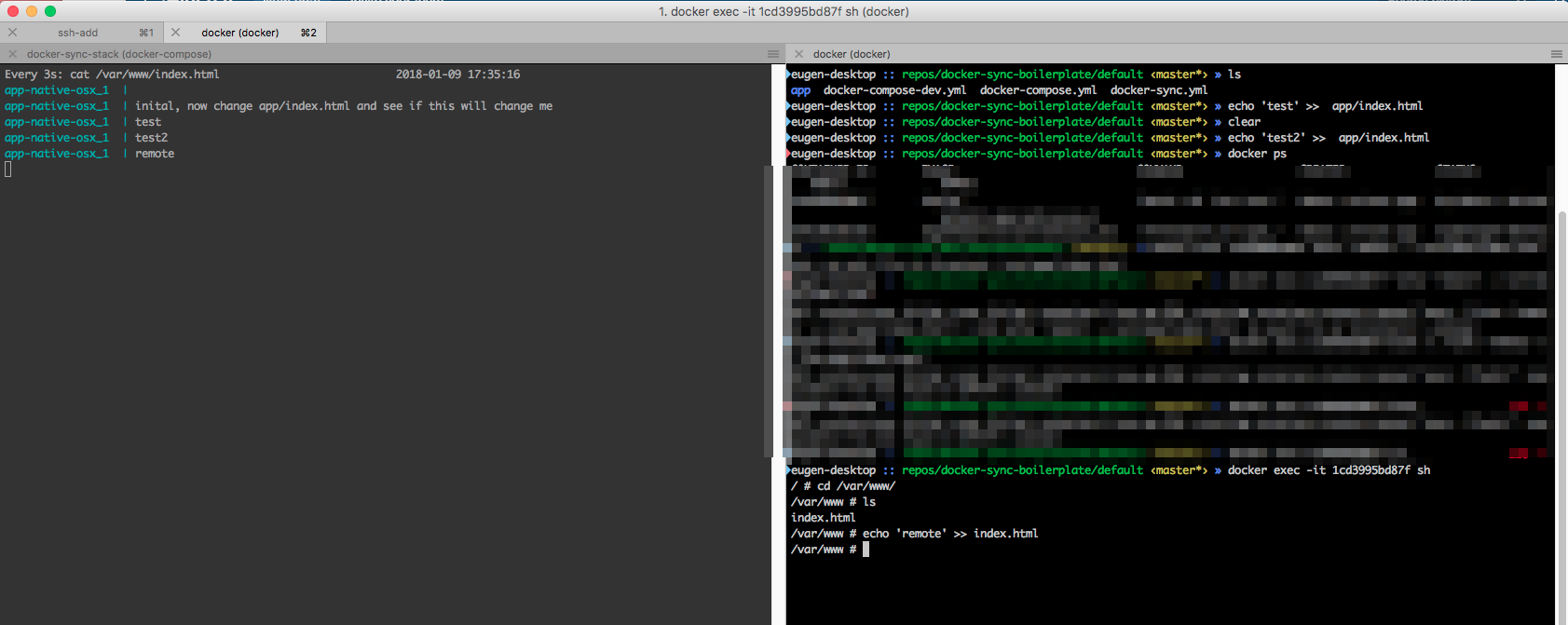
no problems in either direction. Doing the same with the current stable, same result.
So if you expect me to magically getting involved, creating OSX VMs with your particular APFS/High Sierra and some project, you will wait forever.
Guys, take you time and finally start debugging that. You disagree on basically any matter, be it the d4m version, down or upgrading fixes it, be it a FS issue or a project issue. Get yourself a shell, use https://github.com/EugenMayer/docker-sync/wiki/8.-Strategies#native_osx-osx and
https://github.com/EugenMayer/docker-sync/wiki/8.1.-native_osx-sync-strategy-debugging-guide and start acting
We did not create this for the matter of too much time - rather you getting involved and being able to help yourself when you need it most with the timeframe you are in urge or not.
But just opening a new issue after issue with "it does not work / any longer" and thats it - will not do it.
EugenMayer
on 9 Jan 2018
@EugenMayer The debugging guide did not help me sadly. And I don't think we disagree on anything, just confusion. The edge version became stable only very recently. That is why we have this edge/stable confusion.
I'm trying more stuff, but I've been debugging this for too long this night with no results. I'm now downgrading to the previous stable to confirm at least that it is the latest release.
As for replicating. After a docker-sync clean, and running it again, it works for me. But after restarting the stack, it no longer works.
I do agree that it is not your responsibility. This is OSS, and you've been very helpful so far. Thanks for that
jonaswouters
on 10 Jan 2018
Yesterday, there was Docker for Mac update which I installed Version 17.12.0-ce-mac46 (21698) Stable and there was also an auto-update suggestion to 0.52. Until yesterday, I was working on docker-sync 0.46. It has half "failed" half "succeed" when I agreed to upgrade due to some permissions problems.
desktop-r9kn7ds:docker kuba$ docker-sync-stack start
     warning  There is an update (0.5.2) available (current version 0.4.6
). Please update before you continue
Shall I update docker-sync to 0.5.2 for you? yes
Updating installed gems
Updating docker-sync
ERROR:  While executing gem ... (Gem::FilePermissionError)
    You don't have write permissions for the /Library/Ruby/Gems/2.0.0 directory.
     success  Successfully updated, please restart docker-sync and check the changelog at https://github.com/EugenMayer/docker-sync/wiki/5.-Changelog
So this looks like the beginning of the problems as in one line it says "success" just after "ERROR".
I've tried to give it a try and here are the results:
desktop-r9kn7ds:docker kuba$ docker-sync-stack start
        info  Not running any precondition checks since you have no brew and that is unsupported. Is all up to you know.
       note:  You can also run docker-sync in the background with docker-sync --daemon
        info  Not running any precondition checks since you have no brew and that is unsupported. Is all up to you know.
        info  Not running any precondition checks since you have no brew and that is unsupported. Is all up to you know.
        info  Not running any precondition checks since you have no brew and that is unsupported. Is all up to you know.
        info  Not running any precondition checks since you have no brew and that is unsupported. Is all up to you know.
          ok  Starting unison for sync web-sync
          ok  web-sync container not running
          ok  starting web-sync container
     command  docker start web-sync && docker exec web-sync supervisorctl restart unison
          ok  starting initial sync of web-sync
     command  docker inspect --format='{{(index (index .NetworkSettings.Ports "5000/tcp") 0).HostPort}}' web-sync
     command  docker inspect --format='{{(index (index .NetworkSettings.Ports "5000/tcp") 0).HostPort}}' web-sync
       error  Error getting mapped port, exit code 0
     message  Template parsing error: template: :1:3: executing "" at <index (index .Networ...>: error calling index: index of untyped nil
     command  unison -testserver /app_sync "socket://:"
/Library/Ruby/Gems/2.0.0/gems/docker-sync-0.4.6/lib/docker-sync/sync_strategy/unison.rb:191:in `block in start_container': Failed to start unison container in time, try to increase max_attempt in your configuration. See https://github.com/EugenMayer/docker-sync/wiki/2.-Configuration for more informations (RuntimeError)
    from /Library/Ruby/Gems/2.0.0/gems/docker-sync-0.4.6/lib/docker-sync/sync_strategy/unison.rb:187:in `loop'
    from /Library/Ruby/Gems/2.0.0/gems/docker-sync-0.4.6/lib/docker-sync/sync_strategy/unison.rb:187:in `start_container'
    from /Library/Ruby/Gems/2.0.0/gems/docker-sync-0.4.6/lib/docker-sync/sync_strategy/unison.rb:39:in `run'
    from /Library/Ruby/Gems/2.0.0/gems/docker-sync-0.4.6/lib/docker-sync/sync_process.rb:87:in `run'
    from /Library/Ruby/Gems/2.0.0/gems/docker-sync-0.4.6/lib/docker-sync/sync_manager.rb:100:in `block in run'
    from /Library/Ruby/Gems/2.0.0/gems/docker-sync-0.4.6/lib/docker-sync/sync_manager.rb:99:in `each'
    from /Library/Ruby/Gems/2.0.0/gems/docker-sync-0.4.6/lib/docker-sync/sync_manager.rb:99:in `run'
    from /Library/Ruby/Gems/2.0.0/gems/docker-sync-0.4.6/tasks/stack/stack.thor:47:in `start'
    from /Library/Ruby/Gems/2.0.0/gems/thor-0.19.4/lib/thor/command.rb:27:in `run'
    from /Library/Ruby/Gems/2.0.0/gems/thor-0.19.4/lib/thor/invocation.rb:126:in `invoke_command'
    from /Library/Ruby/Gems/2.0.0/gems/thor-0.19.4/lib/thor.rb:369:in `dispatch'
    from /Library/Ruby/Gems/2.0.0/gems/thor-0.19.4/lib/thor/base.rb:444:in `start'
    from /Library/Ruby/Gems/2.0.0/gems/docker-sync-0.4.6/bin/docker-sync-stack:15:in `<top (required)>'
    from /usr/local/bin/docker-sync-stack:23:in `load'
    from /usr/local/bin/docker-sync-stack:23:in `<main>'
I'm not sure if problem with port 5000 could be a source of the problem or maybe it is the result of half failed/broken upgrade installation?
Similar errors when stopping it:
desktop-r9kn7ds:docker kuba$ docker ps
CONTAINER ID        IMAGE                            COMMAND                  CREATED             STATUS              PORTS               NAMES
82cde2d87f98        eugenmayer/unison:hostsync_0.2   "/entrypoint.sh supe…"   4 weeks ago         Up 57 seconds       500/tcp             web-sync

desktop-r9kn7ds:docker kuba$ docker-sync stop
        info  Not running any precondition checks since you have no brew and that is unsupported. Is all up to you know.
        info  Not running any precondition checks since you have no brew and that is unsupported. Is all up to you know.
        info  Not running any precondition checks since you have no brew and that is unsupported. Is all up to you know.
        info  Not running any precondition checks since you have no brew and that is unsupported. Is all up to you know.
        info  Not running any precondition checks since you have no brew and that is unsupported. Is all up to you know.
          ok  Stopping sync container web-sync
/Library/Ruby/Gems/2.0.0/gems/docker-sync-0.4.6/lib/docker-sync/watch_strategy/unison.rb:30:in `kill': no implicit conversion from nil to integer (TypeError)
    from /Library/Ruby/Gems/2.0.0/gems/docker-sync-0.4.6/lib/docker-sync/watch_strategy/unison.rb:30:in `stop'
    from /Library/Ruby/Gems/2.0.0/gems/docker-sync-0.4.6/lib/docker-sync/sync_process.rb:93:in `stop'
    from /Library/Ruby/Gems/2.0.0/gems/docker-sync-0.4.6/lib/docker-sync/sync_manager.rb:135:in `block in stop'
    from /Library/Ruby/Gems/2.0.0/gems/docker-sync-0.4.6/lib/docker-sync/sync_manager.rb:134:in `each'
    from /Library/Ruby/Gems/2.0.0/gems/docker-sync-0.4.6/lib/docker-sync/sync_manager.rb:134:in `stop'
    from /Library/Ruby/Gems/2.0.0/gems/docker-sync-0.4.6/tasks/sync/sync.thor:65:in `stop'
    from /Library/Ruby/Gems/2.0.0/gems/thor-0.19.4/lib/thor/command.rb:27:in `run'
    from /Library/Ruby/Gems/2.0.0/gems/thor-0.19.4/lib/thor/invocation.rb:126:in `invoke_command'
    from /Library/Ruby/Gems/2.0.0/gems/thor-0.19.4/lib/thor.rb:369:in `dispatch'
    from /Library/Ruby/Gems/2.0.0/gems/thor-0.19.4/lib/thor/base.rb:444:in `start'
    from /Library/Ruby/Gems/2.0.0/gems/docker-sync-0.4.6/bin/docker-sync:14:in `<top (required)>'
    from /usr/local/bin/docker-sync:23:in `load'
    from /usr/local/bin/docker-sync:23:in `<main>'
I've decided to force it this time and run again full installation command gem install docker-sync. It failed with some permission error so I had to repeat it as sudoer (I'm not sure if this is a proper way?)
desktop-r9kn7ds:docker kuba$ gem install docker-sync
ERROR:  While executing gem ... (Gem::FilePermissionError)
    You don't have write permissions for the /Library/Ruby/Gems/2.0.0 directory.
desktop-r9kn7ds:docker kuba$ sudo !!
sudo gem install docker-sync
Password:
Fetching: docker-compose-1.1.7.gem (100%)
Successfully installed docker-compose-1.1.7
Fetching: terminal-notifier-2.0.0.gem (100%)
Successfully installed terminal-notifier-2.0.0
Fetching: docker-sync-0.5.2.gem (100%)
Successfully installed docker-sync-0.5.2
Parsing documentation for docker-compose-1.1.7
Installing ri documentation for docker-compose-1.1.7
Parsing documentation for terminal-notifier-2.0.0
Installing ri documentation for terminal-notifier-2.0.0
Parsing documentation for docker-sync-0.5.2
Installing ri documentation for docker-sync-0.5.2
3 gems installed
desktop-r9kn7ds:docker kuba$ docker-sync -v
0.5.2
After this everything seemed to be fine, maybe even a little bit faster than usual, but only for a few minutes. The changes from the host have stopped to be populated into the container. It was confusing as I started to use docker-sync-stack start command to watch the log for sync output and I've seen something but I found that it works only in one direction from /app_sync to /host_sync.
I've stopped and restarted it and everything was fine again but just for a while.
After next restart, I wanted to measure the time but everything was fine and /host_sync to /app_syncwas working fine when I was saving the changes back and forth for the same file (and nothing else) for a few minutes.
Suddenly it stopped to sync and I realised that it was not time-related but it stopped to work after I started to use application and opposite direction sync has happened from /app_sync to /host_sync. After that host to the app has stopped to react to changes of the file.
I've followed your advice and wanted to provide some debugging details using directions from https://github.com/EugenMayer/docker-sync/wiki/8.1.-native_osx-sync-strategy-debugging-guide
Unfortunately I've got no output from the this debugging command which is the reason why there is no sync triggered. Basically the changes on the host files become undetected
desktop-r9kn7ds:web kuba$ echo $DEBUG_DOCKER_FILE
docroot/includes/commerce/DiscountManager.php
desktop-r9kn7ds:web kuba$ echo $DEBUG_DOCKER_SYNC
web-sync
desktop-r9kn7ds:web kuba$ diff -q "$DEBUG_DOCKER_FILE" <(docker exec "$DEBUG_DOCKER_SYNC" cat "/host_sync/$DEBUG_DOCKER_FILE")
Some time ago I've asked to provide instructions how to downgrade docker-sync to the previous version. I'm not familiar with this whole gem installation and as I guess it works with some remote URL to get recent version there should be some URLs provided with older one. I can't find anything on the wiki how to install from the downloaded zip files as well.
Can someone provide such details and update the Wiki, please?
 Krzysiaczek-at-theFoundry
on 10 Jan 2018
Krzysiaczek-at-theFoundry
on 10 Jan 2018
I've just downgraded DFM to Version 17.09.0-ce-mac35 (19611) and it seems to work with docker-sync 0.5.2 for now.
Krzysiaczek-at-theFoundry
on 10 Jan 2018
@Krzysiaczek-at-theFoundry finally someone doing the whole round-robbin with a conclusion.
So we have a bug in the latest stable, but after some time. downgrading to 17.09.0-ce-mac35 stable helps - while using 0.5.2 - that sounds like a good solution.
One questions @Krzysiaczek-at-theFoundry are you using APFS?
EugenMayer
on 10 Jan 2018
Nope, I'm still on (low) Sierra.
Krzysiaczek-at-theFoundry
on 10 Jan 2018
same here, so beside your findings, AFPS could be still a variant
means anybody with AFPS and this issue who can verify that that downgrade helps him too?
EugenMayer
on 10 Jan 2018
Also having the same issue here after updating to 17.12.0-cs-mac46. Spent almost an hour trying to downgrade Docker (with little success) so far to see if that resolves the issue.
 phillipsnick
on 10 Jan 2018
phillipsnick
on 10 Jan 2018
Downgraded to 17.09.0-ce-mac33 2017-10-03 (Stable) from https://docs.docker.com/docker-for-mac/release-notes/
Synchronisation working again with docker-sync 0.5.2
phillipsnick
on 10 Jan 2018
@phillipsnick great news, APFS / high sierra?
EugenMayer
on 10 Jan 2018
I've also downgraded to 17.09.0-ce-mac33 and I've used it all day. It is definitely more stable, but I am able to break it by mounting the same docker-sync volume by 2 containers :) I'll skip the 2nd container tomorrow and see if it keeps working.
jonaswouters
on 10 Jan 2018
I'm running 10.13 with APFS and Docker 17.12.0 and docker-sync 0.5.2.
I ran some tests and I'm finding the initial sync takes almost twice as long as it used to for the same codebase (~11 minutes versus ~6 minutes), and fs events are not being captured at all.
Even restarting after an initial sync takes just over 2 minutes, even though there's no changes to sync. I don't know how long it used to take, but it was quick enough that I never bothered measuring it.
@EugenMayer thanks for your work on this to date, and hopefully this is a helpful datapoint.
 kudos
on 10 Jan 2018
kudos
on 10 Jan 2018
@phillipsnick care to share how you successfully downgraded docker, and save the rest of us an hour?
 brianbrownton
on 10 Jan 2018
brianbrownton
on 10 Jan 2018
Alright I took the 20 minutes and figured it out myself. There are a couple of quick-ish ways.
The docker release notes now include links to older versions (after much arguing on github):
https://docs.docker.com/docker-for-mac/release-notes/
This 3rd party site is listing the releases:
https://jsok.github.io/docker-for-mac-versions/
If you know the build number you want, you can get the dmg yourself. For example, 21090 is for 17.09.1-ce-mac42 which is what I will be trying out right now to see if this fixes my issue. The URL pattern is:
https://download.docker.com/mac/stable/{{build}}/Docker.dmg
So for 21090 it is:
https://download.docker.com/mac/stable/21090/Docker.dmg
If you don't know the build number you want, somebody posted a handy little bash script that programmatically tries all build numbers to see if the build exists and lets you know:
channel=stable
for build in $(seq 21581 19125); do
  if curl -X HEAD -fsSL -I https://download.docker.com/mac/$channel/$build/Docker.dmg >/dev/null 2>/dev/null; then
    echo "Found build: $build"
    curl -X HEAD -fsSL -I https://download.docker.com/mac/$channel/$build/Docker.dmg
  fi
done
Change the sequence numbers on line 2 to define your range. You can set the first number to your currently broken build number (which you can find by using the menubar widget > about docker) and you can probably leave the second number alone unless you want a really old build.
I hope this helps others.
brianbrownton
on 10 Jan 2018
Or if you use homebrew and you want the easy way:
brew cask uninstall docker
brew cask install https://raw.githubusercontent.com/caskroom/homebrew-cask/61f1d33be340e27b91f2a5c88da0496fc24904d3/Casks/docker.rb
The second command just installs the version of docker before the homebrew recipe was updated to include the latest, so you will still get build 21090 by doing this.
brianbrownton
on 10 Jan 2018
@EugenMayer El Capitan 10.11.1 (I know old ha), won't be APFS due to not updating in so long.
docker-sync.yml
version: '2'

options:
  verbose: true
  max-attempt: 30
syncs:
  admin-sync:
    src: './admin'
    sync_strategy: 'native_osx'
    sync_userid: '33'
@brianmorton nice find with the 3rd party site. Any idea why theres so many different builds per version?
phillipsnick
on 10 Jan 2018
@phillipsnick they most likely run a build for each merge to master.
kudos
on 11 Jan 2018
Had the same issue after upgrading: syncing wasn't working. Worked after downgrading. On Sierra.
 arjun810
on 11 Jan 2018
arjun810
on 11 Jan 2018
Okay, I'll do my best to provide some extra context.
I've been having this issue when changing between git branches in other words when lots of files change at the same time.
Figuring out certain directories to add to sync_excludes seems to help but I have a hunch this is happening because of memory limits. I'm running the older docker4mac as proposed previously in this thread
__OSX Sierra__
__Docker-Sync:__ 0.5.2
__Docker4Mac:__
- Version 17.09.1-ce-mac42 (21090)
- Channel: stable
- 3176a6af01
- __CPU's:__ 4
- __Memory:__ 8gb
Following https://github.com/EugenMayer/docker-sync/wiki/8.1.-native_osx-sync-strategy-debugging-guide
I discovered the issue only affected one of the syncs for some reason. So I followed the steps provided and discovered this in the /app_sync. Logs:
❯ diff -q "$DEBUG_DOCKER_FILE" <(docker exec "$DEBUG_DOCKER_SYNC" cat "/app_sync/$DEBUG_DOCKER_FILE")
Files src/controllers/base/some_base_controller.js and /dev/fd/63 differ
Here's the output of docker exec "$DEBUG_DOCKER_SYNC" tail -n70 /tmp/unison.log
https://hastebin.com/oronuxupod.sql
Then I:
docker-sync-stack clean|started with thesync_args: "-copyonconflict -debug verbose"git checkout develop- wait a second or two?
git checkout my-feature-branch
Latest output of docker exec "$DEBUG_DOCKER_SYNC" tail -n70 /tmp/unison.log
https://hastebin.com/ifitasapul.sql
That's about the best I have for now.
Let me know if there's anything else I can provide to help track down what might be causing this issue.
Cheers! 🍻
 erlandsona
on 11 Jan 2018
erlandsona
on 11 Jan 2018
@erlandsona FWIW,
I am on High Sierra ( 10.13.2 (17C205)) with docker-sync 0.5.2 and the same d4m version as you (17.09.1-ce-mac42 21090) and this is my known good configuration. I have no problematic output from the debug commands.
Updating d4m to the Jan 9 update (17.09.12) was what broke syncing for me, so I had to revert to this.
brianbrownton
on 11 Jan 2018
@brianmorton, generally speaking the sync's work great for small changes, it's when I switch branches and it tries to sync changes for a large number of files where I notice the sync stop working. Sometime's I notice it after I've deleted or added a file but that's less consistently reproducible.
This means I have to stop my sync's before I switch branches.
It'd be nice not to have to do this.
But I also realize that switching branches might just be an inherent data integrity issue for container software anyways. EG: my container depends on a docker-sync.yml and if all of a sudden that file disappears then what? Should the sync just stop or should it just keep running on in the background? 🤷♂️
It'd just be nice to know exactly what causes the syncs to stop so there could be code to warn about the issue when it happens and potentially how to avoid it.
erlandsona
on 11 Jan 2018
@erlandsona ah that makes sense. I am able to switch branches without problem (the project is not huge, but not small either)... however my docker-compose* files never change as they are not version controlled in the same repo as the code for which I frequently switch branches. That may provide some insight into your problem.
brianbrownton
on 11 Jan 2018
Interesting. That said, I was just using the docker-compose.yml / docker-sync files as a hypothetical.
In reality our's are pretty well built out and don't change branch to branch.
erlandsona
on 11 Jan 2018
Had the same problem with stopping the sync functionality. Downgrading Docker to 17.09.1-ce-mac42 has helped.
 ikvasnica
on 12 Jan 2018
ikvasnica
on 12 Jan 2018
Just to split out some thing here, i try to keep it compact:
branch switches:
Assuming a branch switch does not change docker-compose / docker-sync files ( which would be off the chart, restart it all then ), you get different issues.
The problem is the amount of stacked FS at a very short time. The d4m process handling that, does not handle that well, this big Queue of FS events blow it up.
That said, what you get then is a broken host -> container sync, the only way to fix that is restarting d4m
d4m mac42+
Not entirely sure under which cases, if AFPS or High Sierra does play a role ( seems not ), that effect described above does happen a lot faster, if not directly. Same effect, same cause, same "we cannot do anything about that"
Fix it by downgrade to docker for mac mac42: https://download.docker.com/mac/stable/21090/Docker.dmg
big projects
if you run big projects or huge node/gulp based build, you can run into that queue issue - same reasons. OSXFS cannot handle the amount of events and stucks forever.
fix: run the big build before you start the sync + use proper excludes to not watch node_modules folder and DO NOT SYNC NODE_MODULES . If you do not understand why the latter, read it up.
We cannot do _anything_ about that in docker-sync. This would happen without docker-sync or with it, we benchmarked and tried that. Also see the long issue here for more of those https://github.com/EugenMayer/docker-sync/issues/410
I know opened https://github.com/docker/for-mac/issues/2417 in d4m and hope to push some fixes or at least better ways on restarting the d4m FS layer without restarting d4m completely, which is very disruptive
EugenMayer
on 12 Jan 2018
@EugenMayer one more thing to consider, maybe it's not High Sierra/APFS that's the differentiator, maybe it's whatever patches Apple shipped for Meltdown/Spectre?
kudos
on 12 Jan 2018
@kudos Installed the patches Apple shipped for Meltdown/Spectre. I had the same issue everyone is reporting and downgrading to 17.09.1-ce-mac42 fixed it.
 gorandev
on 12 Jan 2018
gorandev
on 12 Jan 2018
@kudos We've had reports from people that the sync stops way before Meltdown / Spectre was announced.
Our team personally had this problem for far longer, but always spotty. Sometimes a restart of the docker engine fixed it. Sometimes a computer restart did...
We were on the "edge" channel before the 17.09.1-ce-mac42 release (which was 2017-12-11).
 MatthiasKuehneEllerhold
on 12 Jan 2018
MatthiasKuehneEllerhold
on 12 Jan 2018
@MatthiasKuehneEllerhold that sounds like a different problem, like how changing branches can cause Unison to stop syncing. The problem here is that file system events never work. The first sync happens because it doesn't depend on file system events, but no live changes get propagated after that. See the previous issue.
kudos
on 12 Jan 2018
Docker 17.12.0-ce-mac47 came out just now and in my tests fs events are working again.
kudos
on 12 Jan 2018
I have:
Docker version 17.12.0-ce, build c97c6d6
docker-sync -v 0.5.2
macOS 10.13.2 (17c205)
After watching the sync log for a bit it did start to sync the files. I had added and deleted a file which errored.
[2018-01-12 13:53:27 -0600] Sync Log:  Failed: Error in copying locally:
[2018-01-12 13:53:27 -0600] Sync Log:  /host_sync/bob.txt: No such file or directory
 michaelpporter
on 12 Jan 2018
michaelpporter
on 12 Jan 2018
please do not use this issue as "dump for everything". Sync does stop and "something does throw an error" are not the same thing.
@kudos those are interesting news.. according to the release notes https://docs.docker.com/docker-for-mac/release-notes/ nothing really specific. The only thing we see here is, the reason while 46+ is having issues - it a complete rebuild
- VM entirely built with Linuxkit
EugenMayer
on 13 Jan 2018
@EugenMayer my commit might have been worded wrong. We have 3 people in our office with sync issues. The error was from me testing the sync. I made a file, did not see it in the log. Removed the file, still nothing. Then, after 5-10 min the sync happened, the error was that could not find the file I removed. This is still a sync issue with the latest D4M.
michaelpporter
on 13 Jan 2018
docker Version 17.12.0-ce-mac47 (21805) just came out and sync is working again for me.
michaelpporter
on 14 Jan 2018
Same problem here using:
docker version 17.12.0-ce-mac47 (21805)
docker-sync -v 0.5.2
macOS: 10.12.6
Installing previous version 17.09.1-ce-mac42 solved the problem.
https://download.docker.com/mac/stable/21090/Docker.dmg
warning: backup your database before uninstall docker.
I removed docker by clicking on docker->Preferences->Reset->Uninstall
after this I installed the above dmg.
EDITED: With docker version 17.12.0-ce-mac47 (21805) the files are syncronized just after docker-sync-stack starts (docker-sync-stack start). New changes does not syncronize. If I stop and start docker-sync-stack again last changes are shown. Hope it helps, @kudos
 espurnes
on 15 Jan 2018
espurnes
on 15 Jan 2018
@espurnes please go into detail on what "same problem here" means exactly. Plenty of people on this issue are describing unrelated problems already, and you're countering two people who've found the upgrade fixes this particular issue for them.
kudos
on 15 Jan 2018
Downgrading my d4m to version 17.09.1-ce-mac42 (21090) solved my sync issues, thank you very much @espurnes !
 zedtux
on 16 Jan 2018
zedtux
on 16 Jan 2018
@EugenMayer what's the best working d4m version for you?
zedtux
on 16 Jan 2018
Thanks @brianmorton for the d4m version. Uninstalling my d4m and installing this version fixed syncing for me on High Sierra:
https://download.docker.com/mac/stable/21090/Docker.dmg
 stuyam
on 16 Jan 2018
stuyam
on 16 Jan 2018
I'm using _Docker CE Version 17.12.0-ce-mac49 (21995)_ and _docker-sync gem 0.5.2_
Here is my docker-sync.yml:
version: '2'

syncs:
  code_sync:
    src: '.'
    sync_excludes: ['*.swp', 'tmp', 'log', '.docker-sync', 'coverage', '.git']
    sync_userid: 501

  ruby2.3_bundle_sync:
    src: '/Users/user/workspace/ruby2.3/bundle'
    sync_userid: 501
and docker-compose.yml:
version: '3'

volumes:
  code_sync:
    external: true
  ruby2.3_bundle_sync:
    external: true

services:
  web:
    environment:
      USER_ID: 501
    volumes:
      - code_sync:/app:nocopy
      - ruby2.3_bundle_sync:/usr/local/bundle:nocopy
All works fine at first start. When I do _docker-sync stop_ and _docker-sync start_ again synchronisation stops working and I have to rerun docker-sync.
Is my issue related to this?
 evserykh
on 22 Jan 2018
evserykh
on 22 Jan 2018
@evserykh read the upper comments, there is an issue with version docker version 17.12.0-ce-mac47 (21805), I dont know if version 17.12.0-ce-mac49 (21995) still has the problem, but downgrading to version 17.09.1-ce-mac42 solves the problem.
check the following comment if you want to install this previous version: https://github.com/EugenMayer/docker-sync/issues/517#issuecomment-357656575
espurnes
on 22 Jan 2018
Has anybody had success getting a build since mac42 (21090) running?
brianbrownton
on 23 Jan 2018
I have it working on:
- Docker Version 17.12.0-ce-mac49 (21995)
- macOS 10.13.2 (17C205) APFS
- MacBook Pro (13-inch, 2016, Four Thunderbolt 3 Ports)
- docker-sync --version 0.5.2
Edit: it stopped working after I posted this.
michaelpporter
on 23 Jan 2018
@michaelpporter haha, feel your pain man.
- Docker Version Version 17.12.0-ce-mac49 (21995)
- macOS 10.13.3 APFS
- MacBook Pro (Retina, 13-inch, Early 2015)
- docker-sync --version 0.5.2
I've been running into similar issues as everyone else. The first initial import works, but then stops syncing after that.
I was able to get this to work (so far), by removing the volume override in my docker compose files.
To be specific, when it wasn't working, my compose setup was:
# docker-compose.yml
services:
  my-service:
    volumes:
      - ./:/var/www/html
services:
  my-service:
    volumes:
      - coedition-magento-sync:/var/www/html:nocopy
volumes:
  my-service-sync:
    external: true
What ended up working for me was to remove the line:
- ./:/var/www/html
from my main compose file so that it wasn't overriding the /var/www/html directory.
UPDATE: This ended up not working like I originally showed. It would sync for a short period of time, but then just stop.
 ragboyjr
on 24 Jan 2018
ragboyjr
on 24 Jan 2018
Based on my experience, I believe the docker-sync problem exists with docker4mac version 17.12.0-ce-mac49 also (running docker-sync 0.5.2).
 lizdenhup
on 26 Jan 2018
lizdenhup
on 26 Jan 2018
Something I've found helpful:
1) Stop all your running containers, and docker-sync. docker ps should be an empty list.
2) Run docker-sync clean.
3) If 2) prints unable to remove volume and returns a container ID, run docker rm <id> and re-run 2).
4) docker-sync start (wait a while)
5) This is the most useful command: docker-sync logs -f and leave that running in a terminal somewhere.
If it stops syncing in the log stream, rinse and repeat the above.
 seanhandley
on 27 Jan 2018
seanhandley
on 27 Jan 2018
@seanhandley are you saying with this approach you do not have the "stops working after a short period of time" problem, or just that you have better information about when it does stop syncing?
brianbrownton
on 29 Jan 2018
@brianmorton The second thing - I find that inevitably it will stop syncing, but the sooner I see it happening the sooner I can clean/restart and get back to writing code. Not ideal, but tolerable in the interim while the underlying issue is identified and dealt with.
seanhandley
on 30 Jan 2018
@seanhandley does docker-sync-stack start contain docker-sync logs -f I get the following error.
error docker-sync is not running in daemon mode for this configuration
Assuming, yes.
If so the flow would be:
docker-compose stop
docker-sync stop
docker-sync clean
docker-sync-stack start
correct?
michaelpporter
on 30 Jan 2018
Sorry, I'm not sure @michaelpporter - I haven't used docker-sync-stack.
seanhandley
on 30 Jan 2018
The issue may be related to time drift inside the docker vm. running this solves it _sometimes_ :)
docker run --rm --privileged alpine hwclock -s
 el
on 5 Feb 2018
el
on 5 Feb 2018
guys, please stay on mac42 and do not upgrade. the amount of different issues with anything above that, including the edge version, is enormous. I am currently considering releasing 0.5.3 including a version check for mac42+ which tells you, that this is not going to work and you have to manually put a value into the global config to opt-out from this error message.
I cannot see a sane reason to be forced to upgrade right now, so all we need to tell our users is, which version actually works. This will safe far more time, then actually the "inconvinience" not running the latest one ( which is broken by any definition ).
If any, please offer your concerns.
EugenMayer
on 6 Feb 2018
Sounds good. But, while risking to be the party pooper, mac42 has the same issue concerning FS event propagation. It just doesn't appear that often. Currently my Docker setup has been running for about a week, which is amazingly good. Usually I get between 2 and 3 days, which is still much, much, much better than using versions after mac42.
 ktruehl
on 6 Feb 2018
ktruehl
on 6 Feb 2018
P.S.: Thanks for the great work @EugenMayer.
ktruehl
on 6 Feb 2018
I am actually using mac49 and I don't seem to have a lot of issues with it. Have to restart it maybe twice a day. I am however developing (triggering file events) the entirety of the day.
 wesselvdv
on 6 Feb 2018
wesselvdv
on 6 Feb 2018
Not sure if this just adds to the noise, but I followed @EugenMayer's suggestion and downgraded to mac42, which fixed the issue. However, my coworker doesn't have this issue using mac49.
mac49: had to restart docker sync with every file change
mac42: works seemlessly
Additional insights on it working for my coworker:
He was having the same issue as I was and he would periodically go into docker for mac and purge all data when it would crash. Then he would do a docker-sync clean, docker-sync start and then docker-compose up.
 ericp96
on 7 Feb 2018
ericp96
on 7 Feb 2018
I had the same problem and tried all possible solutions but couldn't make it work then I checked this file ~/Library/Containers/com.docker.docker/Data/com.docker.driver.amd64-linux/Docker.qcow2 and saw that its size was > 60GB. After that, I did the reset and it worked normally again. Hope it helps.
 anhchienhoang
on 13 Feb 2018
anhchienhoang
on 13 Feb 2018
@anhchienhoang what do you mean by this
did the reset
?
brianbrownton
on 13 Feb 2018
@brianmorton please go to Docker Preferences -> Reset tab -> Remove all data (of course it will clean all your images, containers... and you have to pull again)
anhchienhoang
on 14 Feb 2018
@anhchienhoang OK so just to confirm, you are using a release GREATER THAN mac42, and you are saying that doing the reset you have described above allows you to use docker with docker-sync and the files do not stop syncing after a period of time?
brianbrownton
on 14 Feb 2018
I have personally found that 17.12.0-ce-mac49 on macOS 10.13.3 with ssd and Docker running the image as raw that I do not need docker-sync. This may not be true for everyone but, we have 6 developers here that moved to this setup and are not having sync issues.
michaelpporter
on 14 Feb 2018
@michaelpporter how is the performance? The whole reason for using docker-sync is to fix the performance issues...
brianbrownton
on 14 Feb 2018
I have not seen a difference from when I was using docker-sync. we have a few sites with 500MB sql files that are almost instant. From what I have read raw will only be available if you are in High Sierra and have APFS enabled.
michaelpporter
on 14 Feb 2018
i have locked the conversation since this has become a dump for everything, be it "it does not run fast enough" or is macX faster then macY and any other issue.
This issue was about mac42+ stopping to sync very fast and we identified that the issues is infact that yet mac42+ <= mac49 is problemematic and only works for few, while mac42 works for most(all).
I will take this issue as a task to release the next version and error out on start if macX > 42 and people will have to manually opt in with "i am aware and will not create a single issue on github related to sync not working, crashing or partially not synced".
For anybody else with all the other topics, open issues with proper description and discucss your finding there anytime, or meet in gitter if you like
EugenMayer
on 14 Feb 2018
Unlocked conversion. With mac54 this happend"
Revert the default disk format to qcow2 for users running macOS 10.13 (High Sierra). There are confirmed reports of file corruption using the raw format which uses sparse files on APFS. Note this change only takes effect after a reset to factory defaults (from the Whale menu -> Preferences -> Reset). Related to docker/for-mac#2625
This could reduce errors for some of you but this not the general issue we have spoken about here, since we have non HS users and non APFS users here, having "fast sync stop" issues. I just wanted to inform you that this is not yet a relief to itself
EugenMayer
on 1 Mar 2018
Hey,
I just wanted to ask if someone already tested Docker Sync with the Version 18.x of docker for Mac? :)
I am currently on mac version 42 which works quite well. I came from version 48 and this thread pointed me to downgrade which actually helped very good, so thanks to everyone for the investigation!
I will also give version 18.x a test and will post my results here.
 sgurlt
on 6 Mar 2018
sgurlt
on 6 Mar 2018
To put it succinctly for others (because I missed it), 17.12.0-ce-mac55 does not fix the issue.
Thanks @EugenMayer for working on this. 👍👍
 nilbus
on 8 Mar 2018
nilbus
on 8 Mar 2018
I've created a PR to the underlying unison:hostsync image here, updating to a newer version of unison, which claims to fix some APFS issues. Not sure if it'll help, but it seems relevant
 exchgr
on 9 Mar 2018
exchgr
on 9 Mar 2018
In my case there's a clear pattern:
5 minutes after startup, osxfs Volume.stop's the shared docker-sync volume. Sync stops working immediately and does not resume.
syslog output (yes I know syncing .ivy2 is probably an unwise thing to do, but contents are not changing for these tests):
Mar 14 17:10:09 HOSTNAME Docker[com.docker.osxfs][22058
: Logging to Apple System Log
... snip ...
Mar 14 17:11:00 HOSTNAME Docker[com.docker.osxfs][22058
: Volume.start ivy-native-osx-sync (paths = [ivy-native-osx-sync:state=default, /Users/myname/.ivy2:state=default])
Mar 14 17:11:00 HOSTNAME Docker[com.docker.osxfs][22058
: Volume.start ivy-native-osx-sync (watches [/Users/jwalker/.ivy2 -> /Users/jwalker/.ivy2 > (state=default)])
..snip...
: Volume.start e3394f941a754803aad4575158925339c814f1808fa43f1f4fbd983f0e76d45a (paths = [ivy-native-osx-sync:state=default])
Mar 14 17:11:06 HOSTNAME Docker[com.docker.osxfs][22058
: Volume.start > e3394f941a754803aad4575158925339c814f1808fa43f1f4fbd983f0e76d45a (watches [])
Mar 14 17:15:35 HOSTNAME Docker[com.docker.osxfs][22058
: Volume.stop ivy-native-osx-sync (paths = [/Users/myname/.ivy2:state=default])
docker --version
Docker version 17.12.0-ce, build c97c6d6
(aka mac49)
Logs obtained using:
syslog -w -F '$Time $Host $(Sender)[$(Facility)][$(PID)\n<$((Level)(str))>: $Message' -k Sender Seq Docker
 johnw
on 15 Mar 2018
johnw
on 15 Mar 2018
@johnw is the same happening when using mac42?
 michalkleiner
on 15 Mar 2018
michalkleiner
on 15 Mar 2018
I now running Docker "Version 17.12.0-ce-mac55 (23011)" since about 9 days (see my post above) and only had once an issue that the syncing was a bit slow, but in general it works very well for me.
I am using MacOS 10.13.3 (17D102).
sgurlt
on 15 Mar 2018
@michalkleiner I was running mac42 most of the day today and didn't have any sync issues. However, I was not making many changes and did not try putting the mac to sleep and waking it up. I'll post more info after I've road tested mac42 for awhile.
johnw
on 16 Mar 2018
@johnw mac42 is known to be good...
brianbrownton
on 16 Mar 2018
I am thinking that if osxfs has bugs related to event propagation maybe is worth considering doing the host mount in the native strategy with NFS directly to the container. I don't if this makes any sense.
 rodrigoaguilera
on 20 Mar 2018
rodrigoaguilera
on 20 Mar 2018
I had this issue on:
- Docker: Version 17.12.0-ce-mac49
- macOS: Version 10.13.3 High Sierra
Then I upgraded to d4m mac55 but issue still present.
So I followed @EugenMayer comment ( https://github.com/EugenMayer/docker-sync/issues/517#issuecomment-357219512 ) where the suggestion is to downgrade to mac42.
After downgrade by installing https://download.docker.com/mac/stable/21090/Docker.dmg I am still facing the exact same issue: docker-sync is not working properly, automatically synchronization does not work and a docker-sync sync command must be executed each time we need to reflect changes.
This is a huge pain.
 diegodurante
on 20 Mar 2018
diegodurante
on 20 Mar 2018
@diegodurante be sure to reset all your data (which should have happened with the upgrade ). Be sure to upgrade to 0.5.6 since you are running HS (unison bug) and be sure to restart your computer once.
EugenMayer
on 20 Mar 2018
I already had 0.5.6 version but checking it with command gem list | grep docker-sync I saw also older versions present, so I uninstalled them and left only 0.5.6 version.
I also restarted my computer but no luck.
Maybe now I am facing another issue, because inside .docker-sync/daemon.log I have this error message:
Fatal error: File monitoring helper program not running
I am trying to follow this https://github.com/EugenMayer/docker-sync/issues/119 but still no luck.
Any suggestions?
````
➜ git:(develop) ✗ where python
/usr/bin/python
➜ git:(develop) ✗ where python3
/usr/local/bin/python3
➜ git:(develop) ✗ gem list | grep docker-sync
docker-sync (0.5.6)
➜ git:(develop) ✗ brew install unison
Warning: unison 2.51.2 is already installed
➜ git:(develop) ✗ pip install MacFSEvents
Collecting MacFSEvents
Using cached MacFSEvents-0.8.1.tar.gz
Installing collected packages: MacFSEvents
Running setup.py install for MacFSEvents ... error
Complete output from command /usr/bin/python -u -c "import setuptools, tokenize;__file__='/private/var/folders/nt/8zl979xd24l0fydvtk8ffyth0000gn/T/pip-build-3Pmv1S/MacFSEvents/setup.py';f=getattr(tokenize, 'open', open)(__file__);code=f.read().replace('\r\n', '\n');f.close();exec(compile(code, __file__, 'exec'))" install --record /var/folders/nt/8zl979xd24l0fydvtk8ffyth0000gn/T/pip-bBJzzp-record/install-record.txt --single-version-externally-managed --compile:
running install
running build
running build_py
creating build
creating build/lib.macosx-10.13-intel-2.7
copying fsevents.py -> build/lib.macosx-10.13-intel-2.7
running build_ext
building '_fsevents' extension
creating build/temp.macosx-10.13-intel-2.7
cc -fno-strict-aliasing -fno-common -dynamic -arch x86_64 -arch i386 -g -Os -pipe -fno-common -fno-strict-aliasing -fwrapv -DENABLE_DTRACE -DMACOSX -DNDEBUG -Wall -Wstrict-prototypes -Wshorten-64-to-32 -DNDEBUG -g -fwrapv -Os -Wall -Wstrict-prototypes -DENABLE_DTRACE -arch i386 -arch x86_64 -pipe -I/System/Library/Frameworks/Python.framework/Versions/2.7/include/python2.7 -c _fsevents.c -o build/temp.macosx-10.13-intel-2.7/_fsevents.o
_fsevents.c:66:43: warning: implicit conversion loses integer precision: 'const uint64_t' (aka 'const unsigned long long') to 'long' [-Wshorten-64-to-32]
PyObject *id = PyInt_FromLong(eventIDs[i]);
~~~~ ^~~
_fsevents.c:278:56: warning: implicit conversion from 'unsigned long long' to 'long' changes value from 18446744073709551615 to -1 [-Wconstant-conversion]
PyModule_AddIntConstant(mod, "FS_EVENTIDSINCENOW", kFSEventStreamEventIdSinceNow);
~~~~~ ^~~~~~~~~
2 warnings generated.
cc -fno-strict-aliasing -fno-common -dynamic -arch x86_64 -arch i386 -g -Os -pipe -fno-common -fno-strict-aliasing -fwrapv -DENABLE_DTRACE -DMACOSX -DNDEBUG -Wall -Wstrict-prototypes -Wshorten-64-to-32 -DNDEBUG -g -fwrapv -Os -Wall -Wstrict-prototypes -DENABLE_DTRACE -arch i386 -arch x86_64 -pipe -I/System/Library/Frameworks/Python.framework/Versions/2.7/include/python2.7 -c compat.c -o build/temp.macosx-10.13-intel-2.7/compat.o
cc -bundle -undefined dynamic_lookup -arch x86_64 -arch i386 -Wl,-F. build/temp.macosx-10.13-intel-2.7/_fsevents.o build/temp.macosx-10.13-intel-2.7/compat.o -o build/lib.macosx-10.13-intel-2.7/_fsevents.so -framework CoreFoundation -framework CoreServices
running install_lib
copying build/lib.macosx-10.13-intel-2.7/_fsevents.so -> /Library/Python/2.7/site-packages
error: could not delete '/Library/Python/2.7/site-packages/_fsevents.so': Permission denied
----------------------------------------
Command "/usr/bin/python -u -c "import setuptools, tokenize;__file__='/private/var/folders/nt/8zl979xd24l0fydvtk8ffyth0000gn/T/pip-build-3Pmv1S/MacFSEvents/setup.py';f=getattr(tokenize, 'open', open)(__file__);code=f.read().replace('\r\n', '\n');f.close();exec(compile(code, __file__, 'exec'))" install --record /var/folders/nt/8zl979xd24l0fydvtk8ffyth0000gn/T/pip-bBJzzp-record/install-record.txt --single-version-externally-managed --compile" failed with error code 1 in /private/var/folders/nt/8zl979xd24l0fydvtk8ffyth0000gn/T/pip-build-3Pmv1S/MacFSEvents/
```
N.B.
Command
pip install MacFSEventsit is failing also if I execute it withsudoorsudo -H`.
diegodurante
on 20 Mar 2018
@diegodurante you are obviously using unison and not native_osx, so this issue is not the right one for you. check the docs and the installation and open a new issue. Just in case, any python related issues i cannot help you with - beside that your issue is pretty bold and its in the logs right in front of you. Permissions denied..
EugenMayer
on 20 Mar 2018
Yes you are right, I was doing some test with unison strategy but with no luck. Sorry for the confusion.
Now I reverted to native_osx strategy and finally it is working as expected! 🎉
I confirm that no issue is present for synchronization and everything is working fine with version 17.09.1-ce-mac42
Many thanks @EugenMayer
diegodurante
on 20 Mar 2018
Has anyone tried if it's resolved with version 18.03-ce-mac59 ?
 WebBeest
on 26 Mar 2018
WebBeest
on 26 Mar 2018
mac59 includes this
- Support NFS Volume sharing.
so probably a build-in, non OSXFS based volume share with better performance. The current solutions base on NFS are about 5-8 times slower then native ( docker-sync speed ) so i am suggesting that will also be the case here - but at least d4m now has some movement in that sector.
Other then that, some kernel / AUFS updates which i would not indicate from, that this issue has been fixed somehow
EugenMayer
on 27 Mar 2018
Unlocked again. Please keep this issue about when macX fixes the issue that the synchronisation suddenly stops are even instantly stops, or at least stop very soon compared to mac42
Please do not use this issue for anything else or other issues, or questions about performance of macX - just open new issues for that and people are happy to discuss this i bet - but not here, or we derail this important issue. I try to keep an eye on every macX release and if any progress is made towards this issue and keep you posted - if any other findings appear, please post them here so people are aware.
EugenMayer
on 28 Mar 2018
Wanting to share my mac59 results: TLTR: catastrophic - please use mac42
What happens is, the sync stop in terms that the whole sync-container becomes kind of stalled, what means, you can stop it, but you cannot start it, neither you can remove it ( it hangs during removing ). So that leads you to restart the whole docker4mac engine, so restarting your whole work.
It happened very soon for me, typical npm based project.
So i would judge, since not even cleanup is working, this is even worse then mac42> version -- Being aware you are not satisfied with that, i ask myself right now, for development, why should we even run for the newest version at all? Its for develompent, we do neither need the latest docker-engine tweaks / options, nor the newest docker-compose glances, or swarm features. For what its worth, we want to develop under OSX - with docker - and run under Linux in production. so hunting for the most up2date d4m version wont give us anything, does it?
EugenMayer
on 30 Mar 2018
I'm only missing the disk resizing option :/
zedtux
on 30 Mar 2018
Unison works out of the box with > mac42. Maybe adding a check to alert synchronization issues with native osx with these versions would be a good idea.
 pedrospdc
on 3 Apr 2018
pedrospdc
on 3 Apr 2018
Hi,
I'm having the same issue with sudden sync breakdown. If I understood correctly from comment https://github.com/EugenMayer/docker-sync/issues/517#issuecomment-357219512 this is normal behaviour if you switch the git branches? After d4mac is restarted sync is starting to work again but it is kinda frustrating when you are working with multiple projects and branches. So solution for this problem is currently not available?
Regards
 vzlatev
on 3 Apr 2018
vzlatev
on 3 Apr 2018
Did anybody try Docker 18.03.0-ce-mac60? Is it affected by the issue?
evserykh
on 7 Apr 2018
@evserykh I updated recently and docker sync stops syncing after a while, so yeah, it seems affected. I haven't had the chance to investigate yet tho. I had to restart every 30/40 minutes more or less.
 Rheed
on 10 Apr 2018
Rheed
on 10 Apr 2018
What I experimented (18.03.0-ce-mac60 (23751)) is it stops syncing just after I delete one or more files inside my project. (I read that someone also had this happening).
It may just not be strictly related to the issue but it's what happens to me.
Hope it helps solving the issue
 sangio90
on 11 Apr 2018
sangio90
on 11 Apr 2018
I am using mac60, latest Macos version 10.13.4 and still have this error
I tried to remove mac60 to install mac42 (downloaded above)
but can not start mac42, it hangs there and not responding
is this due to not remove mac60 correctly?
I only replace mac42 to mac60 😢
[UPDATED]
I used this script https://raw.githubusercontent.com/docker/toolbox/master/osx/uninstall.sh
to remove all related files of docker, then reinstall mac42
but no help, still not responding
Updated2
I install mac62: Version 18.04.0-ce-mac62 (23965)
after 1 hour until now, it works very well with sync
continue to update.....
update3
after stop sync, start again, it not works anymore.
So it doesnt work for mac62 edge 😭
 h-dang
on 20 Apr 2018
h-dang
on 20 Apr 2018
Hi @h-dang , can you be more specific about your setup? You mean mac62 is working for you with unison strategy or out of the box volume mount?
Also, where did you get it from? Not mentioned in the release notes https://docs.docker.com/docker-for-mac/release-notes/
Edit: Ah, you're on the edge branch, got it.
michalkleiner
on 20 Apr 2018
@michalkleiner hi,
I updated answer, its not working actually.
I want to downgrade to mac42, but it keep not responding when I start mac42.
any hint or notice about this? many thanks
h-dang
on 20 Apr 2018
@michalkleiner install latest version of docker for Mac then once started choose uninstall from its pref panel. Then you can safely install older (working) version
 DamienHarper
on 20 Apr 2018
DamienHarper
on 20 Apr 2018
Looks like latest edge version (18.05.0-ce-rc1-mac63) attempts to fix a bug regarding the event stream from osxfs, see https://github.com/docker/for-mac/issues/2417#issuecomment-384711277
DamienHarper
on 27 Apr 2018
We have movement, anybody willing to be the test-baloon for mac63 on edge? https://github.com/docker/for-mac/issues/2417#issuecomment-384711277 seems like we can have some improvements here.
Please do not follow up with "has anybody now tested it". Please just paste results like "running for 2 days no stops yet with 63". Thanks!
update: Sorry @DamienHarper , we overlapped. What he said!
EugenMayer
on 27 Apr 2018
Been good for an entire day for me. Used to require resetting every few minutes
 scottferg
on 30 Apr 2018
scottferg
on 30 Apr 2018
Sync broke for me using macOS 10.13.4, and latest DfM edge (mac63), I was using native_osx sync and after initial container start up the sync stopped working within 60 seconds. I was able to replicate this multiple times.
jameshalsall
on 2 May 2018
@jameshalsall if you can reproduce it, could you please ensure to use a .raw image type, not qcow and try? There are reports that raw fixes that issue
EugenMayer
on 2 May 2018
Absolutely, I will try that today no problem.
jameshalsall
on 2 May 2018
Been great for me on latest docker-sync (0.5.7) and latest DfM edge (mac63) with .raw format 👍
jameshalsall
on 3 May 2018
Just tested on docker-sync (0.5.7) with D4M (mac65) stable with .raw format and it's still crashing.
In my case:
- it takes a moment to start syncing, but it does;
- syncs for a while;
- then it stops altogether, even if I wait a few minutes without making any changes before testing again.
It only comes back to life if I ssh into the unison container and kill the unison process. Tailing unison.log before doing it, I get the following:
UNISON 2.51.2 (OCAML 4.06.1) started propagating changes at 09:36:16.70 on 08 May 2018
[BGN] Updating file .docker-sync/daemon.log from /host_sync to /app_sync
[END] Updating file .docker-sync/daemon.log
[BGN] Updating file app/controllers/payments/application_controller.rb from /host_sync to /app_sync
Failed: The source file /host_sync/app/controllers/payments/application_controller.rb
has been modified during synchronization.  Transfer aborted.
UNISON 2.51.2 (OCAML 4.06.1) finished propagating changes at 09:36:16.72 on 08 May 2018
Synchronization incomplete at 09:36:16  (1 item transferred, 0 skipped, 1 failed)
  failed: app/controllers/payments/application_controller.rb
UNISON 2.51.2 (OCAML 4.06.1) started propagating changes at 09:36:17.78 on 08 May 2018
[BGN] Updating file app/controllers/payments/application_controller.rb from /host_sync to /app_sync
[END] Updating file app/controllers/payments/application_controller.rb
UNISON 2.51.2 (OCAML 4.06.1) finished propagating changes at 09:36:17.78 on 08 May 2018
Synchronization complete at 09:36:17  (1 item transferred, 0 skipped, 0 failed)
I don't know much about FS events, any advice on how to get started? (anything that adds to my googling and reading stuff will be appreciated)
 tdtadeu
on 8 May 2018
tdtadeu
on 8 May 2018
So while mac65 stable, even with same docker-sync version and .raw disk image was breaking within a few seconds, I'm now running on mac63 edge (same everything) and it's been running nonstop for 15 minutes now - obviously too soon to confirm it's golden.
Going to come back tomorrow or the day after to let you know how it's doing.
tdtadeu
on 8 May 2018
I would suggest for now, the bottom line, stay with mac42 still - its the safe choice.
By the way, mac65 does not include the FS fixes, only mac63 .. but really do not ask my how a edge can be behind a stable in semver .. thats beyond me :)
EugenMayer
on 9 May 2018
@EugenMayer I agree. mac63 failed for me after a while, took a good while longer than the previous versions to fail, but it did fail eventually. (I was using .raw format)
wesselvdv
on 9 May 2018
Ok so we have a winner ( and that is none ). So its still mac42 if you can, if you need a newer docker, whysoever, the best guess right now is mac63 edge + raw. I have seen more reports that mac63+qcow is even worse then anything before.
I would say the testing round should be over by now, lets seem what they come up in the next releases i guess.
EugenMayer
on 9 May 2018
with Edge 18.05.0-ce-rc1-mac63 (24246) and docker-sync 0.5.7 sync broke after few minutes...
I've recently update from Stable 17.09.1-ce-mac42 and the startup from zero (pull images, first sync, build containers) of the same project runs with mac42 in 11 minutes and with mac63 in 6 minutes...
so... "stay with mac42 still" seems me a bit frustrating... I will try to test osxfs...
 maio1980
on 9 May 2018
maio1980
on 9 May 2018
As EugenMayer says, mac42 seems the most reliable version so far (https://download.docker.com/mac/stable/21090/Docker.dmg). My experience in the past 3 days is that mac63 edge seems to work OK (2 days with the container up and no glitches in the sync), but mac65 fails with one or two edits.
 pcambra
on 10 May 2018
pcambra
on 10 May 2018
i took the freedom ( sorry ) and deleted the last 3 comments. They have either no content or they have nothing to do with this case at all and will just make this thread longer to read without informations.
EugenMayer
on 18 May 2018
I am using MacOS Sierra (10.12) and not Hight Sierra. I have exact the same behaviour as @maio1980. I have downgraded to Docker 17.09.1-ce-mac42, it works for a while and then stops syncing...
 perarg
on 21 May 2018
perarg
on 21 May 2018
We've tested the (new) :cached and :delegated flags (see https://github.com/docker/for-mac/issues/1592) with mac65 and the raw format: this setup is almost as fast as docker-sync (with "unison") and a lot more stable.
MatthiasKuehneEllerhold
on 24 May 2018
@MatthiasKuehneEllerhold Can you share some benchmarks? probably different workloads yield different results
rodrigoaguilera
on 24 May 2018
If you want to have reliable data please try it for yourself.
We're using d4m and docker-sync only in dev-mode and each request to the website takes about 500 ms. This is quite long for a website, but keep in mind that (php-) xdebug is turned on and no optimizations are in place.
Using :cached instead of docker-sync yields request times of about 550 ms (roughly 10 % slower) but without any sync problems. A docker factory reset was key to the speed up (1.6 secs => 550 ms).
MatthiasKuehneEllerhold
on 24 May 2018
@MatthiasKuehneEllerhold thx for the tip, I tried the cached earlier when it was release, but wasn't happy with the performance never tried the delegated one. Really made a difference! And now when I read about it, thats the one that makes sense for our use case. I reset my docker to get the .raw image format and set delegated and now my MacBook feels alive again.
 Zakay
on 24 May 2018
Zakay
on 24 May 2018
So it sounds like the takeaway here is that sync seems broken for docker-sync after mac42, and if you want to use a current version of docker you maybe don't need docker-sync if you can use either the :cached or :delegated flags and do a fresh install / factory reset.
brianbrownton
on 25 May 2018
@brianmorton for me that has been the case now. If you do the benchmarks that are documented in the wiki even with these flags, it still falls short. But in our use case running docker with a web framework with a watcher, and all the typical stuff, we are now getting same speeds without the overhead of another tool, nor the syncing issues. Also my computer is no longer heating as it did earlier. My cpu stats are much lower now and I barely hear the fans.
Zakay
on 25 May 2018
@Zakay sounds like you're getting somewhere! You said you reset docker to get the .raw format - can you describe how you do this? I've tried factory reset button, totally uninstalling and fresh install, manually renaming the image file, whatever I've tried it still restarts with a .qcow2 image....
 watermanio
on 25 May 2018
watermanio
on 25 May 2018
Preferences -> Reset -> Factory Reset
After the daemon has restarted look Preferences -> Disk: is the file ending in .raw or in .qcow2?
If its still a qcow2 edit this in ~/Library/Group\ Containers/group.com.docker/settings.json and restart the daemon.
MatthiasKuehneEllerhold
on 25 May 2018
@MatthiasKuehneEllerhold with your native D4M approach, are you still able to achieve the granularity of sync ignores that docker-sync provides?
 NickBeukema
on 25 May 2018
NickBeukema
on 25 May 2018
@NickBeukema
You can configure volumes like this:
    volumes:
            - .:/var/www/app:cached
            - /var/www/app/node_modules
            - /var/www/app/foo/bar/cache
So everything is synced between host an guest, besides node_modules and foo/bar/cache folders. They are kept between container restarts, but they're not synced. In order to use such overrides you have to make sure, that these folders exist. An .gitkeep file or mkdir command in the dockerfile will do.
It's not as good as patterns in docker-sync configuration, but it's something. Enough to ignore folders, that need it most.
 l-bujakowski
on 26 May 2018
l-bujakowski
on 26 May 2018
I am running on Docker CE Edge 18.05.0-ce-mac66 (24545) since last week without any sync problems.
They have some bugfixes in there which tempted me to give it a try:
- Use Simple NTP to minimise clock drift between the VM and the host. Fixes docker/for-mac#2076
- Fix filesystem event notifications for Swarm services and those using the new-style --mount option. Fixes docker/for-mac#2216, docker/for-mac#2375
- Fix filesystem event delivery to Kubernetes pods when the path to the bind mount is a symlink.
I did a factory reset and am using a RAW image.
Would be interesting if this works for any of you as well.
 derschatta
on 28 May 2018
derschatta
on 28 May 2018
Noting I am running mac66 since about a week without any sync problems. docker-sync never failed to sync any changes so far.
I am running docker-sync with native strategy, not the native d4m mount.
derschatta
on 31 May 2018
Anyone else can confirm mac66 is working fine?
zedtux
on 31 May 2018
I am using Version 18.05.0-ce-mac66 (24545) Channel: Edge with RAW image since yesterday and I am really surprised.
The synchronization works fine (using :cached atm) and the speed is really good (working on a drupal 7 project).
I had problems with com.docker.hyperkit before (going over 150% cpu), maybe this is generally fixed in this version, but I can say I don't have them anymore and nothing is heating up.
 SilberMa
on 31 May 2018
SilberMa
on 31 May 2018
Hi @SilberMa, do you use docker-sync or native synchronisation with the
:cached flag? I am curious if mac66 fixes the synchronisation using
docker-sync as I am still not satisfied with the native speed of d4m. They
improved the performance a lot but it is still about 8 times slower than
using docker-sync in my tests.
On Thu, 31 May 2018, 5:40 PM SilberMa, notifications@github.com wrote:
I am using Version 18.05.0-ce-mac66 (24545) Channel: Edge with RAW image
since yesterday and I am really surprised.The synchronization works fine (using :cached atm) and the speed is really
good (working on a drupal 7 project).I had problems with com.docker.hyperkit before (going over 150% cpu),
maybe this is generally fixed in this version, but I can say I don't have
them anymore and nothing is heating up.—
You are receiving this because you are subscribed to this thread.
Reply to this email directly, view it on GitHub
https://github.com/EugenMayer/docker-sync/issues/517#issuecomment-393410817,
or mute the thread
https://github.com/notifications/unsubscribe-auth/AGNkv_mCpP-v6VlX5v2Bh8hzg-VvCRoGks5t34JkgaJpZM4RR4SI
.
derschatta
on 31 May 2018
@derschatta I am using the native synchronization of d4m.
Maybe it is just a lucky punch.
I will test it with a symfony 3.4.8 project during the day and will give a report.
SilberMa
on 31 May 2018
Thanks for your reports @derschatta.
@SilberMa It’s good to know that there’s an alternative that is performant enough for some people, and I think that is well-understood now. :thumbsup: This thread is for reporting on how docker-sync is working with recent versions of d4m. Please keep the comments relevant, per @EugenMayer’s requests.
nilbus
on 31 May 2018
I'm running a Symfony 3.4.11 project (MySQL, Redis, Elasticsearch, NPM-Watch) on Docker CE Edge 18.05.0-ce-mac66 (24545) since 4 days with :cached flag, the cpu-usage, speed and the synchronization are just tip-top.
 oachoor
on 1 Jun 2018
oachoor
on 1 Jun 2018
I tried running on :cached flag but there's still a huge difference in speed compared to using docker-sync (cached = 2s loading time vs. docker-sync: 0.5s loading time). It might be ok to work with it but actually I rather see docker-sync working as expected. For now mac66 works fine with my docker-sync setup 👍
derschatta
on 1 Jun 2018
My Specs: Sierra, raw, mac66 edge
Important, eventhough i run with raw image on Sierra, there are reports that this stuck in the start process. Maybe just upgrade to HS then
I am running mac66[edge] for 2 days now on a fairly big project and i can second that several things are changing:
TLTR: docker-sync seems to work very stable with mac66 edge for now
But there are a lot more changes:
docker-compose is much more performant now and seems to have no timeouts anymore ( about 4 minute stall on commands after about 20 dc commands. This happens for anything, like
dc psordc execwhile at the same timedocker ps/execwas working fine. All this thing are goneThe rather big delay on shutting down a stack with
CTRL+Chas goneThe big delay on doing
dc downon bigger stack is gonethe very long delay on
creating serviceis entirely gone for bigger stack. Starts instantly as under linuxThe overall CPU usage on file IP like
docker cpinto the containers and from is significant lowerThe CPU usage overall seems for less laggy
dchas been significanly updated including all the fixes and glitches of current linux-related stacks ( thats good for consistency )
8. dc pull works a lot faster now, seems the same i/o benefit as seen above
Bottom line is, that mac66 edge can be really a good release for a switch. It is fixing this very issue for stopping sync but also includes significant improvments overall esp. in terms of performance
@derschatta @SilberMa @watermanio @MatthiasKuehneEllerhold please stop discussing any issue not related to docker-sync synchronization stops with post mac42 in here. I understand that you have important findings you want to share - create a new issue in docker-sync or d4m and share your insight, benchmarks and things - but stop taking the people in this issue as hostages for a different topic. I can comment on a new issue discussing in skipping docker-sync entirely, but i wont here.
EugenMayer
on 1 Jun 2018
I've been testing mac66 edge for nearly a week now. It's not as bad as anything in between mac42 and mac66 edge, and indeed synchronization has only stopped once for me in the last week. However, regularly the Docker process starts hogging CPU. We're using docker for huge projects (Magento, and even worse Magento 2), and switching a branch or recompiling in Magento 2 can cause the Docker process to suddenly start using around 250% CPU (quad core i7 with hyperthreading and whatever that feature is called that overclocks one or two cores). I have noticed that with mac42, too, but much more rarely than with mac66 edge.
So, once the container CPU usage stayed high (I used docker stats to identify the guilty container) even after more than 30 minutes (yes, I gave unison plenty of time to finish syncing whatever it needed to sync), I checked out the processes within the affected container. Unison was running at full CPU. I restarted unison with supervisorctl and after the initialization the unison process went down to about 3% CPU usage. However, the Docker process was still using around 250% CPU. So I waited some more. No improvement. So I stopped the guilty container. And voilà, Docker CPU usage went down to normal. I restarted the affected container, and unfortunately the CPU usage went up to around 250% again. The only thing that fixes it, is docker-compose stop && docker-sync stop and then restarting docker (this is apparently not always necessary) and then docker-sync-stack start.
Conclusion for our setup: While I could use mac42 for days at end without having to completely restart Docker, I have to restart Docker at least once but usually several times a day with mac66 edge. So mac42 is still a lot better for me.
ktruehl
on 1 Jun 2018
@ktruehl thank you for the elaborated report. In general, branch switches, with our without docker-sync will cause troubles with mac42+ when you do not take care.
if, the next time, this happens again, try to connect to your xhyve VM:
screen ~/Library/Containers/com.docker.docker/Data/com.docker.driver.amd64-linux/tty
2x enter
use top to identify which process is running wild. AFAIU its not unison of docker-sync since you restarted it, right. so it might be something in the xhyve VM ( which gets restarted when you restart docker ).
Probably /etc/init.d/020-containerd is for the docker-engine, i am not sure
Its an alpine vm but we cannot modify anything
apk add --update htop
ERROR: Unable to lock database: Read-only file system
ERROR: Failed to open apk database: Read-only file system
there is a docker-engine up and running (obviously) - but it is nicely transparent to us.
ps aux | grep dockerd
 1163 root       0:52 /usr/local/bin/dockerd -H unix:///var/run/docker.sock --config-file /run/config/docker/daemon.json --swarm-default-advertise-addr=eth0 --userland-proxy-path /usr/bin/vpnkit-expose-port
Maybe you can find at leat the service / binary this is cause by and we either can report this to d4m or we could try to gracefully restart it with a HUP or similar.
EugenMayer
on 1 Jun 2018
@EugenMayer thanks for testing mac66 for yourself. Regarding discussing not related topics: I never discussed anything else than docker-sync on mac66. I emphasized the performance difference to make clear why I use docker-sync and want to find a way to use it with anything newer than mac42. Seems we found it :).
derschatta
on 1 Jun 2018
If Docker mac66 continues to generate .qcow2 file after Reset to factory defaults, don't "hack" it by manually changing the .json file as described above! Upgrade your OS X instead to at least 10.13.4!
I've spent a lot of hours not understanding why there are so many success stories when I either got docker-sync missing a lot of files or randomly exiting containers with "Segmentation fault", with .raw enabled. Then finally I decided to upgrade OS X and it worked!
As you can see in this comment: https://github.com/docker/for-mac/issues/2625#issuecomment-384910369 they had disabled .raw format by default for older OS X versions because of an APFS corruption bug with sparse files and then after the bug was fixed in OS X 10.13.4 they have re-enabled it.
Now I have working docker-sync so fingers crossed it'll be more stable than mac42 on our heavy Symfony project!
P.S. @EugenMayer, that might be misleading:
Important, even if you are on Sierra and not High Sierra you need to use .raw and not .qcow2 - its broken for non AFPS filesystem as well - just never use qcow2
Maybe you'd want to edit it a bit, as I expect most people to prefer reading your comments (at least I do).
 grigoryosifov
on 6 Jun 2018
grigoryosifov
on 6 Jun 2018
@grigoryosifov thank you for the elaboration, really nice work gets done here nowdays! Interestingly i had this raw-image issue only on 1 of 4 of my devices - but i had it. Changed my comment above, better safe then sorry, right :)
@derschatta i maybe just got you wrong - excuse myself. Probably lost in the ether of comments. Sorry!
Mac67 is out with some promising additional fixes:
- CPU usage of supervisor https://github.com/docker/for-mac/issues/2923 https://github.com/docker/for-mac/issues/2967
- not sure this fixes raw on sierra https://github.com/docker/for-mac/issues/2934
i have no real field test, so people do not just upgrade production instances. Test it first, add some comments. I expect 67 to be just a little polished 66, so no real issues added, rather some fixed
EugenMayer
on 7 Jun 2018


Maybe the CPU problems don't was fixed... (Docker-EDGE-18.05.0-ce-mac67)
maio1980
on 11 Jun 2018
Running successfully on 10.13.5 (High Sierra) using .raw (default) with D4M edge version mac67 since 6/8/2018, syncing a large (40k synced files) Rails app. 👍🎉
It works at least as well as mac42 did for me as an end user. I had not benchmarked mac42 CPU usage, so I can't compare. Docker is averaging maybe 25% CPU on 1 core with containers largely idle (according to ctop), but CPU usage does not change when I'm not using docker-sync. This thread is about sync performance though, not docker CPU usage (likely) unrelated to docker-sync.
I will post if I have any problems later.
nilbus
on 12 Jun 2018
Also running successfully on mac67 on 10.13.5 with .raw - even without docker-sync, the file events propagation is immediate and performance is perceived as native. Happy for this comment to be deleted as it's only vaguely docker-sync related. I'm so happy about the current status with mac67 that I had to share it as well.
michalkleiner
on 13 Jun 2018
After this _never_ working for me before, I finally have it working consistently with a large PHP + React app (~43k files), but only with the following setup.
- MacOS 10.3.5 (High Sierra) _This is the most important part. 10.3.3 did __not__ work well_.
- Latest version of
docker-sync0.5.7. - Docker for Mac (
mac67). This is currently an edge version, but I'm sure it will make it to stable shortly enough. - A
.rawdocker disk image. I'm not sure if it would work with the other format. Once this version of D4M hits stable, I'll have another member of my team with the old format try it out. - A re-created my docker-sync volume from scratch. Conflicts caused by previous syncing issues were breaking sync for me.
- We are excluding
node_modulesand.gitfrom syncing (We have ~20 repos total syncing which each have their own).
The latency of our app running is almost equal to native with this setup. We also run our unit tests in the container, and they run ~3x faster than without docker sync.
 charrondev
on 20 Jun 2018
charrondev
on 20 Jun 2018
I can confirm it works well, at least for a few hours, after upgrading to mac67.
 norpan
on 21 Jun 2018
norpan
on 21 Jun 2018
@charrondev you just have been a little quicker and those are great news! :
Indeed we did the same transition across the company the last 3 weeks.
- we migrated to High Sierra APFS
- edge mac67
The overall result was fairly impressive, the performance is a lot better overall with d4m, still docker-sync is a must and helps significant. We run docker-sync all day, yet we had only to restart it once over the last whole week - that is a very good result for now.
Its a huge project, over 50k files.
The reason we mirgrate to High Sierra were, that mac67 edge does not work in RAW with HFS, it can crash and stuck a very ugly way, destroy the whole d4m installation and does no longer allow you to start it now matter what you do. this happens with 1 of 2 boxes with Sierra, not with every box, but the impact was significant enough for us to switch. Especially our High Sierra pilot was very promising since the overall performance with APFS + raw is a huge boost
EugenMayer
on 21 Jun 2018
Things are doing good on my end working on some of the same projects as @nilbus, but I'm on the Sierra + qcow + D4M 67 + docker-sync 0.5.7 combo. I can also confirm that it works after sleep / resume for 2 / 3 days in a row (which used to brake syncing for me in some old version > mac42)
 fgrehm
on 21 Jun 2018
fgrehm
on 21 Jun 2018
Today on day 10, sync started failing. It would sync the files (after a short delay) each time I started docker sync, but subsequent changes were not detected and synced. See my setup above.
Update: I found that changes were not being synced by Docker to the volume mount inside the sync container. Restarting Docker resolved the problem this time… I'm not sure what the problem was.
Edit: I was mistakenly looking in app_sync instead of host_sync, which means I know even less about what the state of things was. I'll know where to look next time if this happens again.
nilbus
on 22 Jun 2018
I am closing this issue since I think we have a winner: we are working with d4m edge for weeks now, with a sync stop per week. also other reports here were pretty positive. I will open up a new issue to implement a notice that people should upgrade to the latest edge when the run d4m, so people do not get into trouble that often, without knowing that.
EugenMayer
on 22 Jul 2018
What version is the edge that is working?
brianbrownton
on 23 Jul 2018
edge 67 .. but you just would have to read 2 posts above.
EugenMayer
on 23 Jul 2018
@EugenMayer you should consider updating the README.md to inform people about this, don't you?
zedtux
on 8 Aug 2018
@zedtux not the readme, since it kind of content-less but the wiki for sure.
Mostly people do not read the docs anyhow, so my first action is rather a dependency test when starting docker-sync and/or a confirmation that "i know that.." .. this helps more and people have an easier time finding it.
Feel free to help with PRs if you find any free time right now, i am currently too busy, sorry
EugenMayer
on 8 Aug 2018
Seems fair to me.
zedtux
on 8 Aug 2018
Anyone still has any problems with this? For a while it worked for me but recently this issue came back. Can't tell yet with which version. But I tried an older version, I believe edge 18.05.0-ce-mac67 and the newest stable 2.0.0.3. With both synchronisation stops a some point. CPU load goes up and I can only get it back working by shutting down all containers, stopping docker-sync and start both up again. Then it works for a while and then stops again. Quite annoying.
I've upgraded Mac OS to Mojave recently but if I remember correctly the issue was already there before.
derschatta
on 25 Feb 2019
Everybody has this issue and it will never stop. Especially when using npm based projects where during watch/rebuilds a lot of files are created/removed, this one gets problematic.
In most cases, this has nothing to do with docker-sync at all, but with OSXFS getting stucked in the FS event queue, which then also stops events for unison in our docker image ( linux, so inode events ) and thus breaks syncing.
There is no fix to that - sometimes restarting docker sync helps, this means, that is an actual unison "too many events" issue, which can also happen for unison.
So what we have here:
a) OSXFS gets stuck -> docker for mac restart ist the only option, sometimes even only OS restart
b) unsion gets stuck -> restarting docker-sync with docker-sync stop && docker-sync clean && docker-sync start helps
There might be a way to auto-detect case b) since we already have monit ( AFAIK some already do that ) and then auto-heal itself.
We neither can avoid nor fix b) in general - it's not even sure it would need reimplemenation in Unison or its actually a OSXFS vs Inode event propagation related issue.
EugenMayer
on 25 Feb 2019
created https://github.com/EugenMayer/docker-sync/issues/646 to maybe follow up for a fix for b)
EugenMayer
on 25 Feb 2019
One more possible reason:
I ran into sync stop problem, and only clean command could help me (sometimes had to reboot the machine). Then I just saw logs of docker-sync and saw something like Not enough permission to copy (some tmp file). So I decided to get UID and GID and set them in the config. It helped magically, and all the problems were resolved since that adding.
Example of config:
# only for mac users

version: "2"

options:
  compose-dev-file-path: 'docker-compose.macos.yml'

syncs:
  auth-service-sync:
    sync_strategy: 'native_osx'
    src: '../some-proj-dir'
    sync_userid: ${UID}
    sync_groupid: ${GID}
Note: UID you have and GID you have to run next export GID=$(id -g).
 NikitaKharkov
on 27 Mar 2019
NikitaKharkov
on 27 Mar 2019
Related issues
 Nomafin
·
5Comments
Nomafin
·
5Comments
 donnykurnia
·
8Comments
donnykurnia
·
8Comments
 tiefenb
·
6Comments
tiefenb
·
6Comments
 markglenn
·
7Comments
markglenn
·
7Comments
 radmiraal
·
4Comments
radmiraal
·
4Comments
Most helpful comment
My Specs: Sierra, raw, mac66 edge
Important, eventhough i run with raw image on Sierra, there are reports that this stuck in the start process. Maybe just upgrade to HS then
I am running mac66[edge] for 2 days now on a fairly big project and i can second that several things are changing:
TLTR: docker-sync seems to work very stable with
mac66 edgefor nowBut there are a lot more changes:
docker-compose is much more performant now and seems to have no timeouts anymore ( about 4 minute stall on commands after about 20 dc commands. This happens for anything, like
dc psordc execwhile at the same timedocker ps/execwas working fine. All this thing are goneThe rather big delay on shutting down a stack with
CTRL+Chas goneThe big delay on doing
dc downon bigger stack is gonethe very long delay on
creating serviceis entirely gone for bigger stack. Starts instantly as under linuxThe overall CPU usage on file IP like
docker cpinto the containers and from is significant lowerThe CPU usage overall seems for less laggy
dchas been significanly updated including all the fixes and glitches of current linux-related stacks ( thats good for consistency )8.
dc pullworks a lot faster now, seems the same i/o benefit as seen aboveBottom line is, that mac66 edge can be really a good release for a switch. It is fixing this very issue for stopping sync but also includes significant improvments overall esp. in terms of performance
@derschatta @SilberMa @watermanio @MatthiasKuehneEllerhold please stop discussing any issue not related to docker-sync
synchronization stops with post mac42in here. I understand that you have important findings you want to share - create a new issue in docker-sync or d4m and share your insight, benchmarks and things - but stop taking the people in this issue as hostages for a different topic. I can comment on a new issue discussing in skipping docker-sync entirely, but i wont here.