Docker-stacks: The docker kernal always dead after about 30 minutes training
What docker image you are using?
tensorflow-notebook
Example: jupyter/scipy-notebook
What complete docker command do you run to launch the container (omitting sensitive values)?
docker run -it --name tensorflow_notebook --restart always -p 8887:8888 -v /root/code:/home/jovyan/work -d jupyter/tensorflow-notebook
Example: docker run -it --rm -p 8889:8888 jupyter/all-spark-notebook:latest
What steps do you take once the container is running to reproduce the issue?
1, docker exec -it tensorflow_notebook bash
- git clone https://github.com/michaelrzhang/Char-RNN
- enter Char-RNN dir
- python train_model.py
What do you expect to happen?
It should be training for hours and work well without kernel died
What actually happens?
"Error response from daemon: Bad response from Docker engine"
and the engine is restarting
...
Other info:
macOS Sierra Version 10.12.6
Docker: Version 17.12.0-ce-mac49 (21995)
Processor 2.5G Intel Core i7
Memory 16GB
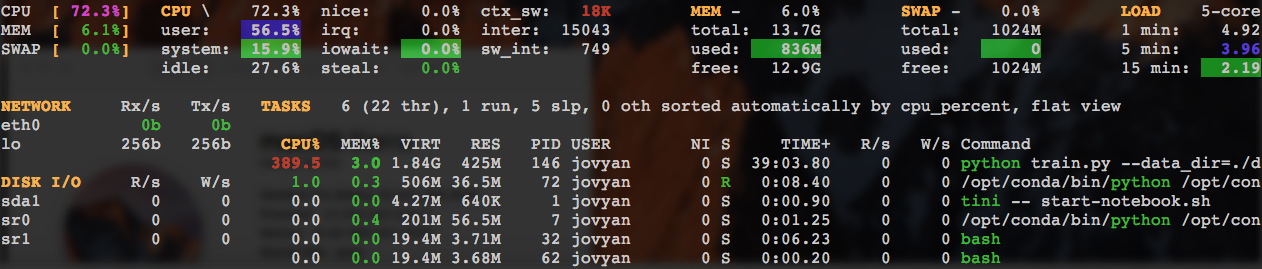
before the kernel died, about 2G memory and 400% CPU consumed (monitor by glances)
 tonywangcn
All 4 comments
And it died after 39 mins with this repo too. https://github.com/sherjilozair/char-rnn-tensorflow (python train.py)
Monitor data:
tonywangcn
on 21 Feb 2018
The Bad response from Docker engine message you receive makes me think this is unrelated to the jupyter images or possibly even tensorflow, and more with the environment in which the training is running.
In your Docker for Mac settings, how much memory do you have allocated for the VM that runs Docker? Does the Mac go to sleep while the training is running, potentially pausing the Docker VM?
 parente
on 26 Feb 2018
parente
on 26 Feb 2018
Nope. Mem 14 GB. The same image and model works well in a linux machine about 24 cores. I think it's killed by some service of MacOS because of high cpu usage. But didn't have any proof yet.
tonywangcn
on 26 Feb 2018
This issue has been idle for a few months now. If you found a root cause or solution, @tonywangcn, it would be great to get it posted as a comment here. Based on the error message, I don't think there's a jupyter-related problem that we can address here so I'm going to close this out.
parente
on 30 Jun 2018
Related issues
 akhmerov
·
4Comments
akhmerov
·
4Comments
 sgloutnikov
·
4Comments
sgloutnikov
·
4Comments
 osobh
·
3Comments
osobh
·
3Comments
 codingbutstillalive
·
3Comments
codingbutstillalive
·
3Comments
 maresb
·
4Comments
maresb
·
4Comments