Docker-selenium: Running both chrome and firefox in same node in docker-compose.yml fille
Meta -
Image(s):
Selenium hub , node-chrome,node-firefox
OS:
Linux
How I run selenium node chrome and firefox on the same node in docker selenium in docker-compose.yml file configuration?
Expected Behavior -
Single node has chrome and firefox session and browser instance.
Actual Behavior -
ERROR: no such image: selenium/node-chrome+,+selenium/node-firefox: invalid reference format
 KathiresanRamkumar95
All 8 comments
As of now there is no image with the name you have given. Refer the git here
You can create you own docker image with both in it.
Use chrome as base image and add firefox to it? something like below ?
FROM selenium/node-chrome:3.4.0
...
...
...
#====================================================
#install firefox
#=====================================================
RUN apt-get update -qqy \
  && apt-get -qqy --no-install-recommends install firefox \
  && rm -rf /var/lib/apt/lists/* /var/cache/apt/* \
  && wget --no-verbose -O /tmp/firefox.tar.bz2 https://download-installer.cdn.mozilla.net/pub/firefox/releases/$FIREFOX_VERSION/linux-x86_64/en-US/firefox-$FIREFOX_VERSION.tar.bz2 \
  && apt-get -y purge firefox \
  && rm -rf /opt/firefox \
  && tar -C /opt -xjf /tmp/firefox.tar.bz2 \
  && rm /tmp/firefox.tar.bz2 \
  && mv /opt/firefox /opt/firefox-$FIREFOX_VERSION \
  && ln -fs /opt/firefox-$FIREFOX_VERSION/firefox /usr/bin/firefox
#====================
above lines adds firefox. On similar lines add gecko driver to image......
You just have to merge some lines from docker files of selenium/chrome and selenim firefox.
Thanks
Shankar
 AribaOpensource
on 5 Sep 2017
AribaOpensource
on 5 Sep 2017
But I need Chrome and Firefox in same and single node?
Thanks in advance!
KathiresanRamkumar95
on 6 Sep 2017
@AribaOpensource
KathiresanRamkumar95
on 6 Sep 2017
Yes thats what it is doing. Isnt this what you are interested in? The solution I gave will result in a grid like the one in image
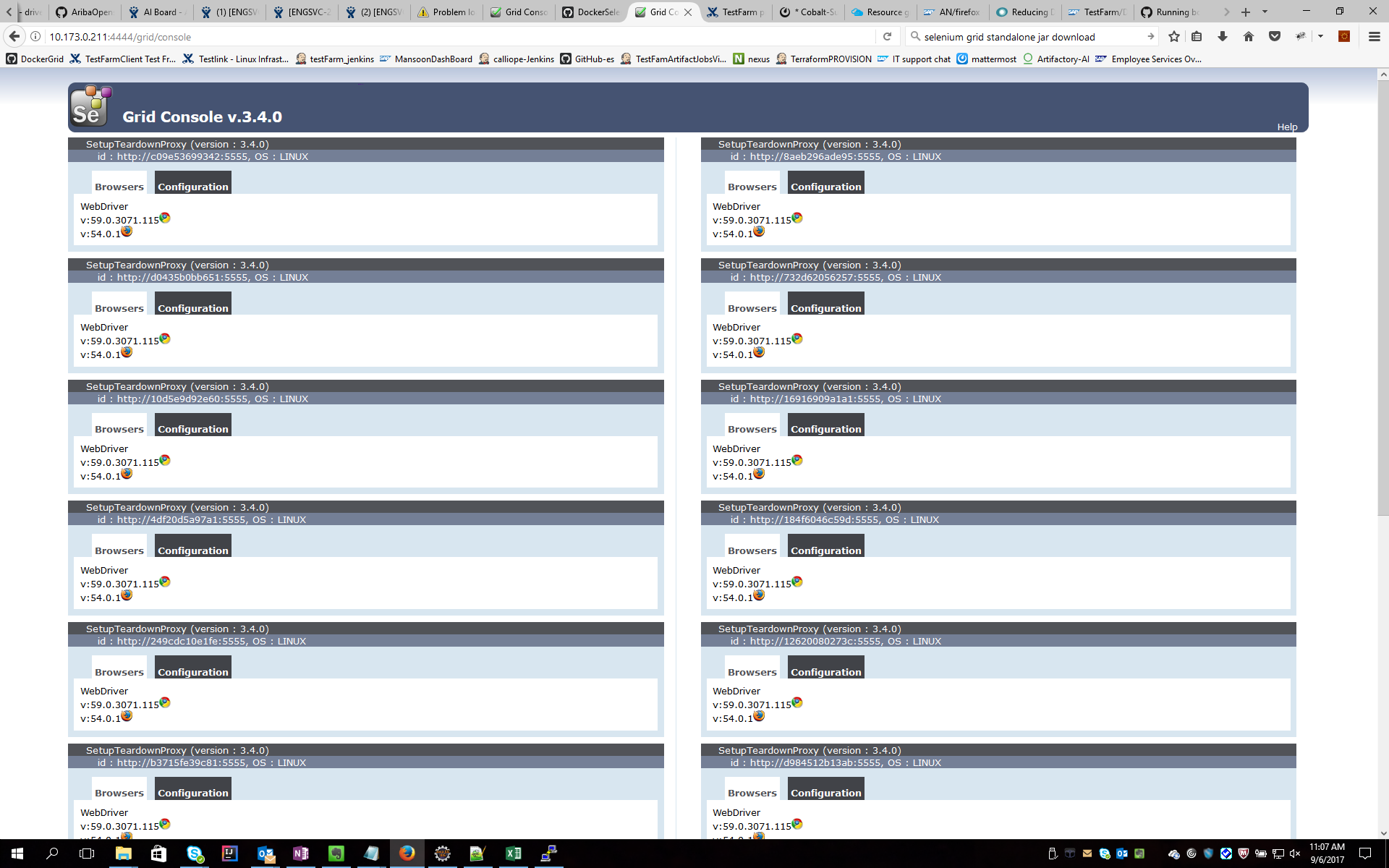
What I am praposing as a solution is take chrome as your base image and add firefox to it. Now you have an image with both ff and chrome. I have done it for my personal use. refer attached image.
 shankarkc
on 6 Sep 2017
shankarkc
on 6 Sep 2017
Yes. This is am interested. Great @shankarkc . But How it is possible? What is the structure of your YML file?
Thanks.
KathiresanRamkumar95
on 6 Sep 2017
I am using docker selenium grid
https://github.com/SeleniumHQ/docker-selenium
I took node-chrome:3.4.0 as my base docker image and added firefox and its webdriver to it. It resulted in new docker image with both ff and chrome as shown in image.
shankarkc
on 6 Sep 2017
I have 1 machines with label hub and 3 machines with label node
How to do it?
For ubunti 14

echo DOCKER_OPTS=\""--label seleniumNodeType=hub --registry-mirror=https://registry.myOrg.corp:5000\"" | sudo tee /etc/default/docker
echo DOCKER_OPTS=\""--label seleniumNodeType=node --registry-mirror=https://registry.myOrg.corp:5000\"" | sudo tee /etc/default/docker


For Ubuntu16
echo {  \"labels\": [\"seleniumNodeType=hub\"]  , \"registry-mirrors\": [\"https://registry.myOrg.corp:5000\"] }  | sudo tee /etc/docker/daemon.json
echo {  \"labels\": [\"seleniumNodeType=node\"]  , \"registry-mirrors\": [\"https://registry.myOrg.corp:5000\"] }  | sudo tee /etc/docker/daemon.json
I created a docker file as mentioned and used it like this....I dont use yml
docker network create -d overlay --subnet 10.0.9.0/24 --attachable overlayNet

 docker service create   --name SeleniumHub  --network overlayNet --constraint engine.labels.seleniumNodeType==hub   --publish 4444:4444 --publish 3000:3000  registry.myOrg.corp:5004/ai/hub:0.0.46

 docker service create  --replicas 20 --name SeleniumNode --limit-memory 1536M    --restart-condition any --restart-delay 5s --stop-grace-period 10s  --constraint engine.labels.seleniumNodeType==node --network overlayNet --env hub_name=SeleniumHub   --env  node_max_memory=1250  registry.myOrg.corp:5004/ai/node:0.0.46
Here registry.myOrg.corp:5004/ai/XXXXX:0.0.46 are the docker hub/node images i created as mentioned above
shankarkc
on 6 Sep 2017
I'll close this issue since the community provided the answer for it.
Thanks for helping @AribaOpensource and @shankarkc!
 diemol
on 3 Oct 2017
diemol
on 3 Oct 2017
Related issues
 vikramvi
·
6Comments
vikramvi
·
6Comments
 rosskevin
·
5Comments
rosskevin
·
5Comments
 minhnguyenvan95
·
5Comments
minhnguyenvan95
·
5Comments
 geekdave
·
4Comments
geekdave
·
4Comments
 achung89
·
4Comments
achung89
·
4Comments