Docker-nginx: TLSv1.3 support and OpenSSL 1.1.1
I saw that your current image is build on top of OpenSSL 1.0.2k.
Any plan to move to the newest one, in order to enable support for TLS 1.3?
//EDIT: Sorry, I saw it now that is still to be released ( https://www.openssl.org/news/changelog.html#x0 ). Can you please keep this issue anyway in your future plans? Would be nice to have support for TLS 1.3.
 julianxhokaxhiu
All 99 comments
There are no plans for that; It'd be automatically available when distributions we use (namely Debian and Alpine) will import openssl-1.1.1.
 thresheek
on 22 Aug 2017
thresheek
on 22 Aug 2017
Good to know :) Thank you!
julianxhokaxhiu
on 23 Aug 2017
Hi @julianxhokaxhiu
In the meantime it works:
nginx -v
nginx version: nginx/1.14.0
nginx -V
nginx version: nginx/1.14.0
built by gcc 4.8.5 20150623 (Red Hat 4.8.5-16) (GCC)
built with OpenSSL 1.1.1-dev xx XXX xxxx
TLS SNI support enabled
configure arguments: --prefix=/etc/nginx --sbin-path=/usr/sbin/nginx --modules-path=/usr/lib64/nginx/modules --conf-path=/etc/nginx/nginx.conf --error-log-path=/var/log/nginx/error.log --http-log-path=/var/log/nginx/access.log --pid-path=/var/run/nginx.pid --lock-path=/var/run/nginx.lock --http-client-body-temp-path=/var/cache/nginx/client_temp --http-proxy-temp-path=/var/cache/nginx/proxy_temp --http-fastcgi-temp-path=/var/cache/nginx/fastcgi_temp --http-uwsgi-temp-path=/var/cache/nginx/uwsgi_temp --http-scgi-temp-path=/var/cache/nginx/scgi_temp --user=nginx --group=nginx --with-compat --with-file-aio --with-threads --with-http_addition_module --with-http_auth_request_module --with-http_dav_module --with-http_flv_module --with-http_gunzip_module --with-http_gzip_static_module --with-http_mp4_module --with-http_random_index_module --with-http_realip_module --with-http_secure_link_module --with-http_slice_module --with-http_ssl_module --with-http_stub_status_module --with-http_sub_module --with-http_v2_module --with-mail --with-mail_ssl_module --with-stream --with-stream_realip_module --with-stream_ssl_module --with-stream_ssl_preread_module --with-openssl=openssl --with-openssl-opt=enable-tls1_3
openssl version
OpenSSL 1.1.1-pre5 (beta) 17 Apr 2018
Today, there is even a newer version out:
https://www.openssl.org/source/openssl-1.1.1-pre6.tar.gz
Haven't tested OpenSSL 1.1.1 pre6 so far! :-)
Hope it helps!
 McKinleyGroup
on 1 May 2018
McKinleyGroup
on 1 May 2018
Unfortunately it doesn't work for the Alpine image yet because Alpine does not ship with openssl > 1.1.1 yet..
 Archcry
on 9 Jun 2018
Archcry
on 9 Jun 2018
What about using libressl on Alpine? I saw Nginx can compile just fine with it.
julianxhokaxhiu
on 10 Jun 2018
Does libressl on alpine offer support for the new TLSv3?
Archcry
on 10 Jun 2018
Looking at this issue ( https://github.com/libressl-portable/portable/issues/228 ), the official documentation ( https://man.openbsd.org/TLS_method.3 ) and the Wikipedia page ( https://en.wikipedia.org/wiki/Comparison_of_TLS_implementations ) it seems it doesn't. I was too optimistic.
But boringssl does ( https://github.com/google/boringssl ). and it seems Nginx can be compiled with it too ( https://github.com/cloudflare/sslconfig/issues/87 ). Actually this looks like to me the best option as BoringSSL is a fork of OpenSSL ( most compatible actually then LibreSSL could be )
An example of Nginx with BoringSSL using Alpine: https://github.com/nginx-modules/docker-nginx-boringssl
julianxhokaxhiu
on 10 Jun 2018
Hmm, in my opinion we should stick with one of the official versions even if that means we have to wait, libressl and openssl sound good in that regard, boringssl not so much..
Archcry
on 11 Jun 2018
Hi all:
Nginx 1.14 and 1.1.5 can be compiled with support for TLS 1.3. Reportedly Nginx 1.13 should work to, but I haven't tested it...
nginx -V
nginx version: nginx/1.14.0
built by gcc 4.8.5 20150623 (Red Hat 4.8.5-28) (GCC)
built with OpenSSL 1.1.1-dev xx XXX xxxx
TLS SNI support enabled
configure arguments: --prefix=/etc/nginx --sbin-path=/usr/sbin/nginx --modules-path=/usr/lib64/nginx/modules --conf-path=/etc/nginx/nginx.conf --error-log-path=/var/log/nginx/error.log --http-log-path=/var/log/nginx/access.log --pid-path=/var/run/nginx.pid --lock-path=/var/run/nginx.lock --http-client-body-temp-path=/var/cache/nginx/client_temp --http-proxy-temp-path=/var/cache/nginx/proxy_temp --http-fastcgi-temp-path=/var/cache/nginx/fastcgi_temp --http-uwsgi-temp-path=/var/cache/nginx/uwsgi_temp --http-scgi-temp-path=/var/cache/nginx/scgi_temp --user=nginx --group=nginx --with-compat --with-file-aio --with-threads --with-http_addition_module --with-http_auth_request_module --with-http_dav_module --with-http_flv_module --with-http_gunzip_module --with-http_gzip_static_module --with-http_mp4_module --with-http_random_index_module --with-http_realip_module --with-http_secure_link_module --with-http_slice_module --with-http_ssl_module --with-http_stub_status_module --with-http_sub_module --with-http_v2_module --with-mail --with-mail_ssl_module --with-stream --with-stream_realip_module --with-stream_ssl_module --with-stream_ssl_preread_module --with-openssl=openssl --with-openssl-opt=enable-tls1_3
McKinleyGroup
on 11 Jun 2018
Hi @julianxhokaxhiu
https://csrc.nist.gov/CSRC/media/Publications/sp/800-52/rev-2/draft/documents/sp800-52r2-draft.pdf
In (DRAFT) of NIST Special Publication 800-52, Revision 2
Guidelines for the Selection, Configuration, and Use of Transport Layer Security (TLS) Implementations
it states: "(...) shall be configured to use TLS 1.2, and should be configured to use TLS 1.3. These servers should not be configured to use TLS 1.1, and shall not use TLS 1.0, SSL 3.0, or SSL 2.0."
So, TLS 1.2 and TLS 1.3 are allowed and any older protocol is forbidden... :-)
@Archcry
Hmm, in my opinion we should stick with one of the official versions even if that
means we have to wait, (...)
Like you would stick with Linux Kernel 3.10 in CentOS 7 / RHEL 7?
In the era of GDPR I would suggest to take cyber security finally more seriously and switch to Linux Kernel 4.16.14 and switch to TLS 1.2 and TLS 1.3... :-)
McKinleyGroup
on 11 Jun 2018
I don't think you get the point, Nginx will work just fine with TLSv1.3 but the problem lies with openssl in alpine not being up to date.
In the era of GDPR I would suggest to take cyber security finally more seriously and switch to Linux Kernel 4.16.14 and switch to TLS 1.2 and TLS 1.3... :-)
you're talking about an extreme scenario here, it's not like we need TLSv1.3 because alternatives aren't safe. TLSv1.2 is safe so I don't see why we can't wait for Alpine to update openssl. You're talking as if TLSv1.3 is the only safe piece of software at the moment.
Archcry
on 11 Jun 2018
@Archcry
TLS 1.2 actually isn't safe... and that's the problem!
Please read e.g. Cisco's blog:
https://blogs.cisco.com/security/tls-1-3-and-forward-secrecy-count-us-in-and-heres-why
Security Fans are Forward Secrecy Fans
The goal of forward secrecy is to protect the secrecy of past sessions so that a session stays secret going forward. With TLS 1.2 and earlier versions, a bad actor who discovered a server’s private key could use it to decrypt network traffic that had been sent earlier. For example, suppose someone started recording encrypted traffic in our network on January 1st and then discovered a server’s private key on January 31st. That person could decrypt all of the server’s traffic and make off with the credit card numbers we entered yesterday, our lab results from last week, and our team’s patent application from the week before.
With the forward secrecy in TLS 1.3, there’s no longer a single secret value that will decrypt multiple sessions. Instead, TLS 1.3 uses the Ephemeral Diffie-Hellman key exchange protocol, which generates a one-time key that’s used only for the current network session. At the end of the session, the key is discarded. While attackers can still record and store encrypted network traffic, to decode it they need the unique key for each session. A session key won’t decode data sent during an earlier session or help an attacker discover future session keys.
Forward secrecy is a best practice for security—which is why we’re all for it.
McKinleyGroup
on 11 Jun 2018
But still, the issue lies with Alpine, they should update their openssl
Archcry
on 11 Jun 2018
@Archcry
But still, the issue lies with Alpine, they should update their openssl
I agree with you on that of course! :-)
McKinleyGroup
on 11 Jun 2018
Anyways, I though boringssl was some kind of shady fork of openssl but it turns out it's forked by Google. So if boringssl is upt-do-date in Alpine and supports TLSv1.3 for Nginx it would be an option to use that for the Alpine docker image.
Archcry
on 11 Jun 2018
It's just me or even nginx 1.15.0 image doesn't have openssl 1.1.1, which i'm waiting for to enable TLS1.3?
$ docker run --rm -it nginx:1.15.0 nginx -V

nginx version: nginx/1.15.0
built by gcc 6.3.0 20170516 (Debian 6.3.0-18+deb9u1)
built with OpenSSL 1.1.0f  25 May 2017
TLS SNI support enabled
 tnguyenns1
on 11 Aug 2018
tnguyenns1
on 11 Aug 2018
Some alpine + TLS1.3 images available here -- using OpenSSL 1.1.1-beta9. (It supports TLS 1.3 final, _not the draft version_. Currently non-nightly browsers don't support the final version)
 ghadishayban
on 4 Sep 2018
ghadishayban
on 4 Sep 2018
OpenSSL 1.1.0 is now available in the edge branch of Alpine Linux:
https://pkgs.alpinelinux.org/packages?name=openssl1.1&branch=edge
The upgrade from 1.1.0 to 1.1.1 shouldn't break any APIs. So I'm looking forward to get TLS 1.3 with the next Alpine Linux release and Debian backports, once 1.1.1 has been released.
 J0WI
on 8 Sep 2018
J0WI
on 8 Sep 2018
Ye the final release should not be far away now.
Archcry
on 8 Sep 2018
What about re-opening this issue until is really fixed?
julianxhokaxhiu
on 16 Sep 2018
"11-Sep-2018 | Final version of OpenSSL 1.1.1 (LTS) is now available: please download and upgrade!"
Let's hope it'll make its way into alpine soon.
Archcry
on 16 Sep 2018
You can track it here:
https://github.com/alpinelinux/aports/pull/5143
https://tracker.debian.org/pkg/openssl/news/
@thresheek would you accept a PR for an image based on a backports/edge/testing base, due the high interest in OpenSSL 1.1.1 support?
J0WI
on 17 Sep 2018
No, and until nginx supports 0RTT I dont see any point in moving to openssl 1.1.1.
thresheek
on 17 Sep 2018
pros:
1) New crypto algorithms
2) Crypted handshakes
So 1.3 is more secure than 1.2 by default
cons:
No
 Santinell
on 17 Sep 2018
Santinell
on 17 Sep 2018
Another pro is openssl 1.1.1 supports early callback which allows us to use different ssl_protocols on a per virtual host level: https://trac.nginx.org/nginx/ticket/844
 gfrankliu
on 21 Sep 2018
gfrankliu
on 21 Sep 2018
Hi @gfrankliu
Another pro is openssl 1.1.1 supports early callback which allows us to use different
ssl_protocols on a per virtual host level: https://trac.nginx.org/nginx/ticket/844
mydomain.com and www.mydomain.com both support TLS1.0, TLS1.1 and TLS1.2:
ssl_protocols TLSv1 TLSv1.1 TLSv1.2;
aaa.mydomain.com and bbb.mydomain.com however should only use TLS1.2
Why don't use you just TLS 1.2 (as fallback) and TLS 1.3 (otherwise)? Just one config and move on?
Why would you want to use protocols (TLS 1.0 and 1.1) which have been hacked & or are hackable?
https://www.infoworld.com/article/2620383/security/red-alert--https-has-been-hacked.html
In my experience, straddling too many different configs never works well...
McKinleyGroup
on 21 Sep 2018
Hi @gfrankliu
It's time for TLS 1.0 and 1.1 to die (die, die) • The Register Forums
https://forums.theregister.co.uk/forum/1/2018/06/19/ietf_calls_for_formal_tls_1_0_1_1_deprecation/
I think it's time to let TLS 1.0 and TLS 1.1 RIP.
McKinleyGroup
on 21 Sep 2018
There are reasons 1.0/1.1 still there. Only PCI sites deprecated TLSv1.0 for now.
Why do you think you still see 1.0/1.1 in this report: https://www.ssllabs.com/ssltest/analyze.html?d=www.google.com
gfrankliu
on 21 Sep 2018
Hi @gfrankliu
There are reasons 1.0/1.1 still there.
Like what? To keep sites hackable? Seriously?!!
There are reasons 1.0/1.1 still there. Only PCI sites deprecated TLSv1.0 for now.
Why do you think you still see 1.0/1.1 in this report: https://www.ssllabs.com/ssltest/analyze.html?d=www.google.com
Google frequently screws up cyber security and has minor hacks only, or shall we say admits only to minor hacks? Regardless, Yahoo had a similar disregard for cyber security and got all 3 billions accounts hacked!
Yahoo says all three billion accounts hacked in 2013 data theft
https://www.reuters.com/article/us-yahoo-cyber/yahoo-says-all-three-billion-accounts-hacked-in-2013-data-theft-idUSKCN1C82O1
McKinleyGroup
on 21 Sep 2018
Hi @gfrankliu
Why do you think you still see 1.0/1.1 in this report:
https://www.ssllabs.com/ssltest/analyze.html?d=www.google.com
Why do you think that in the Google config mentioned above, SSLlabs marked TLS 1.2 GREEN and TLS 1.0 RED?
Faulty SSL/TLS configs don't get right, if enough websites repeat it. Just look at Yahoo, how well that worked!
Red alert: HTTPS has been hacked
https://www.infoworld.com/article/2620383/security/red-alert--https-has-been-hacked.html
---QUOTE---
BEAST cannot break the latest version of TLS -- the current standard based on SSL -- but most browsers and nearly all websites that support secure connections rely on earlier versions of the SSL and TLS protocols, which are vulnerable to BEAST attack. Browser vendors and websites that host secure connections are already scrambling to upgrade to TLS 1.1 or 1.2. How quickly that occurs depends on how many attacks occur in the wild.
The BEAST tool, presented last Friday at the 2011 Ekoparty Security Conference in Argentina, made real a theoretical SSL/TLS vulnerability first documented 10 years ago.
---UNQUOTE---
Using TLS 1.0 and TLS 1.1 is irresponsible and we know that since 2011... :-(
Isn't it finally about time to act on this conclusion in 2018?
It's time to move to TLS 1.2 and TLS 1.3 and forget the rest... half-backed things never get right...
By the way, in Firefox I also implemented this as a default:
TLS tune-up: how to restrict Firefox to TLS v1.3 and v1.2 to protect from phishing attacks
https://www.cloudinsidr.com/content/restricting-firefox-to-tls-version-1-3-and-tls-1-2-makes-browsing-safer/
But obviously it's a lot better to do it on the server side, because this way you:
- avoid as an admin that your website gets hacked
- fix it once and for all...
McKinleyGroup
on 21 Sep 2018
You don't have to convince me. I am totally onboard. But we live in the real world. Do you see latest openssl still supports TLSv1.0/1.1? Do you see none of the top 10 sites (from alexa.com) disabled TLSv1.0/1.1? You need to go convince them.
You brought up a good point about firefox. We server admins try to support more clients, but that doesn't mean client can't block all lower protocols and only speak latest.
gfrankliu
on 21 Sep 2018
Can we re-open this issue, the amount of comments suggest that this is still more than relevant.
Archcry
on 22 Sep 2018
Hi @Archcry
Can we re-open this issue, the amount of comments suggest that this is still more than relevant.
I agree! We should re-open this! :-)
McKinleyGroup
on 23 Sep 2018
I agree this should be reopened
 CaptainGlac1er
on 23 Sep 2018
CaptainGlac1er
on 23 Sep 2018
Hi @CaptainGlac1er
I agree! We should re-open this! :-)
True, it's now more relevant than ever! Now is the time to fix things and to do so, we should re-open this issue!
McKinleyGroup
on 23 Sep 2018
By the way, BoringSSL doesn't have versions as far as I know. You have a chromium-stable branch but it doesn't seem suitable for maintaining a project based on BoringSSL.
Also, their README discourages using BoringSSL:
Although BoringSSL is an open source project, it is not intended for general use, as OpenSSL is. We don't recommend that third parties depend upon it. Doing so is likely to be frustrating because there are no guarantees of API or ABI stability.
 Exagone313
on 25 Sep 2018
Exagone313
on 25 Sep 2018
Hi @Exagone313
Although BoringSSL is an open source project, it is not intended for general use, as OpenSSL is.
We don't recommend that third parties depend upon it. Doing so is likely to be frustrating
because there are no guarantees of API or ABI stability.
According to Akamai's Rich Salz, OpenSSL 1.1.0 is API- and ABI-compatible to OpenSSL 1.1.1.
It's in fact drop-in-capable. You can just replace OpenSSL 1.1.0 with 1.1.1
TLS 1.3 FTW
By Rich Salz January 25, 2017 12:09 PM
https://blogs.akamai.com/2017/01/tls-13-ftw.html
---QUOTE---
At a face-to-face team meeting in October 2016, the OpenSSL development team decided that TLS 1.3 would be the focus of the next release and that it would be 1.1.1 to maintain API/ABI compatibility with the then-current 1.1.0 release. The effort in 1.1.0 to make data structures opaque is an important factor in being able to ensure this compatibility.
---UNQUOTE---
I hope this explanation is helpful.
McKinleyGroup
on 26 Sep 2018
@julianxhokaxhiu julianxhokaxhiu
I saw that your current image is build on top of OpenSSL 1.0.2k.
Any plan to move to the newest one, in order to enable support for TLS 1.3?
The most recent version is OpenSSL 1.1.1 (LTS) as you know:
Latest News
11-Sep-2018 | Final version of OpenSSL 1.1.1 (LTS) is now available: please download and upgrade!
https://www.openssl.org/
Downloads
https://www.openssl.org/source/openssl-1.1.1.tar.gz
Since you closed it, you should re-open it. ;-)
Thank you!
McKinleyGroup
on 26 Sep 2018
@McKinleyGroup I didn't close it. @thresheek did. He has the power to re-open it.
julianxhokaxhiu
on 27 Sep 2018
We might just have to wait for alpine to update.
CaptainGlac1er
on 27 Sep 2018
@McKinleyGroup 1.1.1 was just merged into master for alpine. https://git.alpinelinux.org/cgit/aports/commit/?id=a57932244b45177d81afdefc4a207ba34d939d9a
CaptainGlac1er
on 27 Sep 2018
So alpine testing will include it now. I wonder how long it would take for it to become available in the stable version.
Archcry
on 28 Sep 2018
Hi @CaptainGlac1er
@McKinleyGroup 1.1.1 was just merged into master for alpine. https://git.alpinelinux.org/cgit/aports/commit/?id=a57932244b45177d81afdefc4a207ba34d939d9a
Thank you so much for the info about OpenSSL 1.1.1 in Alpine! :-)
I wish you a nice weekend!
McKinleyGroup
on 28 Sep 2018
Note that it has only been merged into the testing repo, but not yet not stable.
However, if you want to use it right now, here is a working patch:
diff --git a/mainline/alpine/Dockerfile b/mainline/alpine/Dockerfile
index 4245032..6c63e4c 100644
--- a/mainline/alpine/Dockerfile
+++ b/mainline/alpine/Dockerfile
@@ -1,4 +1,4 @@
-FROM alpine:3.8
+FROM alpine:edge

 LABEL maintainer="NGINX Docker Maintainers <[email protected]>"

@@ -52,11 +52,12 @@ RUN GPG_KEYS=B0F4253373F8F6F510D42178520A9993A1C052F8 \
        " \
        && addgroup -S nginx \
        && adduser -D -S -h /var/cache/nginx -s /sbin/nologin -G nginx nginx \
+       && echo "http://dl-cdn.alpinelinux.org/alpine/edge/testing" >> /etc/apk/repositories \
        && apk add --no-cache --virtual .build-deps \
                gcc \
                libc-dev \
                make \
-               openssl-dev \
+               openssl1.1-dev \
                pcre-dev \
                zlib-dev \
                linux-headers \
Use docker build --pull --tag nginx:alpine mainline/alpine for a drop-in replacement of an existing nginx:alpine setup.
J0WI
on 28 Sep 2018
Ubuntu 18.10 has OpenSSL 1.1.1. I hope pre-built packages will be available soon.
 lubo
on 20 Oct 2018
lubo
on 20 Oct 2018
This image is based on Debian and they can't backport OpenSSL so far:
https://bugs.debian.org/907015
J0WI
on 21 Oct 2018
However, if you want to use it right now, here is a working patch:
@J0WI
Thank you for the patch! :-)
McKinleyGroup
on 21 Oct 2018
Alpine Linux is preparing to switch from LibreSSL to OpenSSL 1.1.
The plan is now to merge main/openssl1.0, testing/openssl1.1 and
testing/openssl into a single main/openssl, rebuild all packages that
currently is linked to libssl against openssl, and finally move
main/libressl to community/libressl.
~ https://lists.alpinelinux.org/alpine-devel/6334.html
So here is an updated patch, but be aware that things change again in near future:
diff --git a/mainline/alpine/Dockerfile b/mainline/alpine/Dockerfile
index 112b81d..9bce7a9 100644
--- a/mainline/alpine/Dockerfile
+++ b/mainline/alpine/Dockerfile
@@ -1,4 +1,4 @@
-FROM alpine:3.8
+FROM alpine:edge

 LABEL maintainer="NGINX Docker Maintainers <[email protected]>"

@@ -52,6 +52,7 @@ RUN GPG_KEYS=B0F4253373F8F6F510D42178520A9993A1C052F8 \
        " \
        && addgroup -S nginx \
        && adduser -D -S -h /var/cache/nginx -s /sbin/nologin -G nginx nginx \
+       && echo "http://dl-cdn.alpinelinux.org/alpine/edge/testing" >> /etc/apk/repositories \
        && apk add --no-cache --virtual .build-deps \
                gcc \
                libc-dev \
@J0WI
I think that's a very good idea, which will streamline the development! :-)
McKinleyGroup
on 25 Oct 2018
TLS 1.3 not work
perales@perales-HP-EliteDesk-700-G1-SFF:~$ date && docker run --rm -it nginx:mainline nginx -V
jue nov 15 19:23:14 CST 2018
nginx version: nginx/1.15.6
built by gcc 6.3.0 20170516 (Debian 6.3.0-18+deb9u1)
built with OpenSSL 1.1.0f  25 May 2017
TLS SNI support enabled
configure arguments: --prefix=/etc/nginx --sbin-path=/usr/sbin/nginx --modules-path=/usr/lib/nginx/modules --conf-path=/etc/nginx/nginx.conf --error-log-path=/var/log/nginx/error.log --http-log-path=/var/log/nginx/access.log --pid-path=/var/run/nginx.pid --lock-path=/var/run/nginx.lock --http-client-body-temp-path=/var/cache/nginx/client_temp --http-proxy-temp-path=/var/cache/nginx/proxy_temp --http-fastcgi-temp-path=/var/cache/nginx/fastcgi_temp --http-uwsgi-temp-path=/var/cache/nginx/uwsgi_temp --http-scgi-temp-path=/var/cache/nginx/scgi_temp --user=nginx --group=nginx --with-compat --with-file-aio --with-threads --with-http_addition_module --with-http_auth_request_module --with-http_dav_module --with-http_flv_module --with-http_gunzip_module --with-http_gzip_static_module --with-http_mp4_module --with-http_random_index_module --with-http_realip_module --with-http_secure_link_module --with-http_slice_module --with-http_ssl_module --with-http_stub_status_module --with-http_sub_module --with-http_v2_module --with-mail --with-mail_ssl_module --with-stream --with-stream_realip_module --with-stream_ssl_module --with-stream_ssl_preread_module --with-cc-opt='-g -O2 -fdebug-prefix-map=/data/builder/debuild/nginx-1.15.6/debian/debuild-base/nginx-1.15.6=. -specs=/usr/share/dpkg/no-pie-compile.specs -fstack-protector-strong -Wformat -Werror=format-security -Wp,-D_FORTIFY_SOURCE=2 -fPIC' --with-ld-opt='-specs=/usr/share/dpkg/no-pie-link.specs -Wl,-z,relro -Wl,-z,now -Wl,--as-needed -pie'
 ripper2hl
on 16 Nov 2018
ripper2hl
on 16 Nov 2018
@ripper2hl did you try pulling the latest image of nginx mainline?
CaptainGlac1er
on 16 Nov 2018
The comment in https://github.com/nginxinc/docker-nginx/issues/190#issuecomment-324017600 still stands true. There is no TLS 1.3 support in images yet.
thresheek
on 16 Nov 2018
What about opening this issue? Keeping it close gives a false sense of "resolved" while this is not true.
julianxhokaxhiu
on 16 Nov 2018
Hi @julianxhokaxhiu
What about opening this issue?
Keeping it close gives a false sense of "resolved" while this is not true.
I completely agree with you! Especially since the GDPR (2018-05-25) is in force cyber sec matters more than ever before. After all a fine of 20 Mill. Euro or 4% of the turnover of the last year (whatever is higher)... it's quite a lot I'd say!
https://www.ssllabs.com/ssltest/analyze.html?d=www.cloudinsidr.com
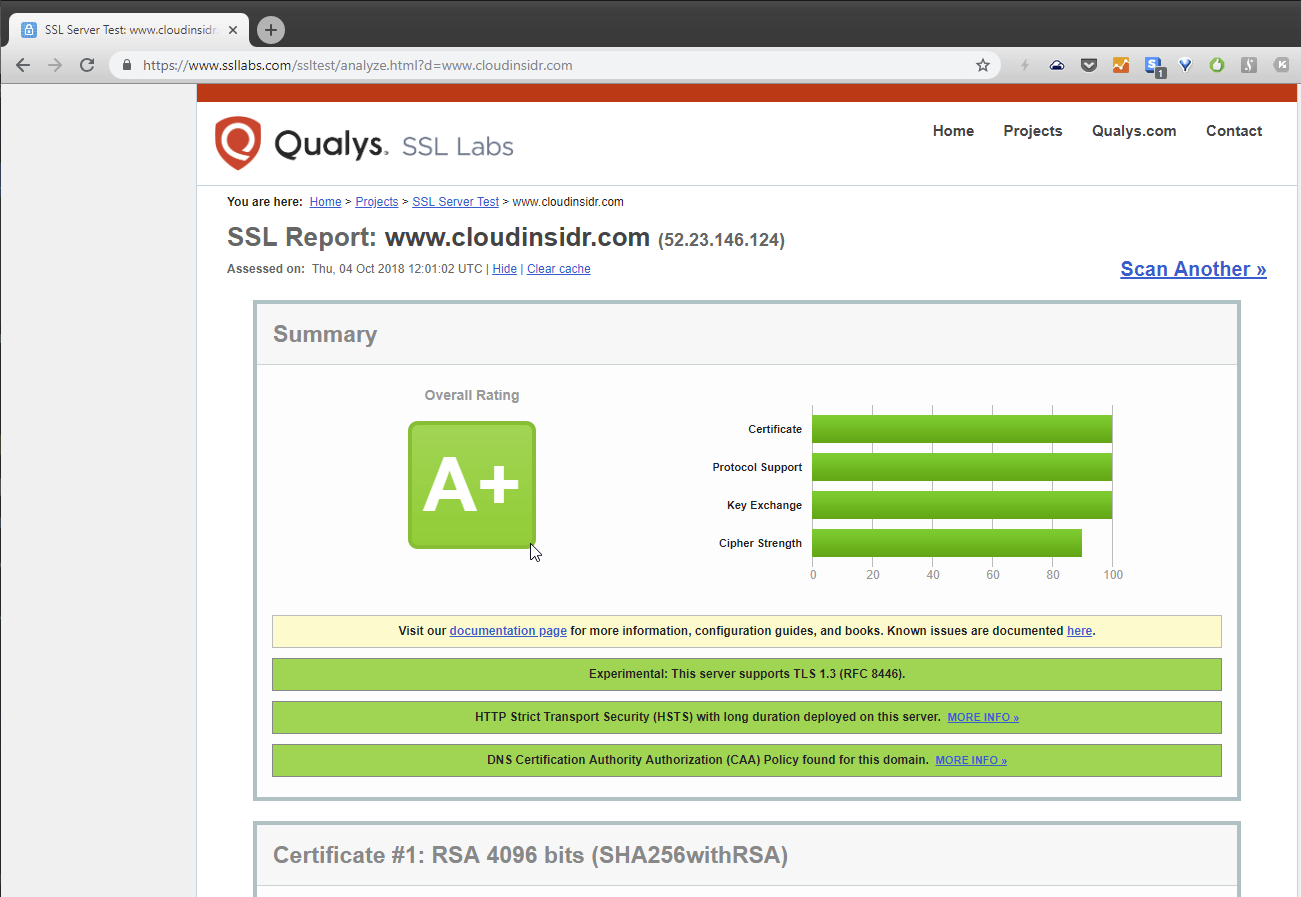
Once the web browsers caught up to the final TLS 1.3 specification, it seems to work...
We have also some blog posts about the topic, for instance:
How to Activate HTTP/2 with TLS 1.3 Encryption in NGINX for Secure Connections without a Performance Penalty
https://www.cloudinsidr.com/content/how-to-activate-http2-with-ssltls-encryption-in-nginx-for-secure-connections/#more-123
I hope it helps.
McKinleyGroup
on 16 Nov 2018
HI @julianxhokaxhiu
https://github.com/julianxhokaxhiu
Impossibile is Nothing
Awesome! I like your pragmatic attitude! :-)
McKinleyGroup
on 16 Nov 2018
I've just found out that pre-built Nginx package for Ubuntu 18.10 is finally available. Is there somebody willing to create the image based on Ubuntu 18.10?
lubo
on 24 Nov 2018
Is there somebody willing to create the image based on Ubuntu 18.10?
Just use the following patch:
diff --git a/mainline/stretch/Dockerfile b/mainline/stretch/Dockerfile
index dfe575e..be0e93c 100644
--- a/mainline/stretch/Dockerfile
+++ b/mainline/stretch/Dockerfile
@@ -1,9 +1,9 @@
-FROM debian:stretch-slim
+FROM ubuntu:cosmic

 LABEL maintainer="NGINX Docker Maintainers <[email protected]>"

-ENV NGINX_VERSION 1.15.7-1~stretch
-ENV NJS_VERSION   1.15.7.0.2.6-1~stretch
+ENV NGINX_VERSION 1.15.7-1~cosmic
+ENV NJS_VERSION   1.15.7.0.2.6-1~cosmic

 RUN set -x \
        && apt-get update \
@@ -33,13 +33,13 @@ RUN set -x \
        && case "$dpkgArch" in \
                amd64|i386) \
 # arches officialy built by upstream
-                       echo "deb https://nginx.org/packages/mainline/debian/ stretch nginx" >> /etc/apt/sources.list.d/nginx.list \
+                       echo "deb https://nginx.org/packages/mainline/ubuntu/ cosmic nginx" >> /etc/apt/sources.list.d/nginx.list \
                        && apt-get update \
                        ;; \
                *) \
 # we're on an architecture upstream doesn't officially build for
 # let's build binaries from the published source packages
-                       echo "deb-src https://nginx.org/packages/mainline/debian/ stretch nginx" >> /etc/apt/sources.list.d/nginx.list \
+                       echo "deb-src https://nginx.org/packages/mainline/ubuntu/ cosmic nginx" >> /etc/apt/sources.list.d/nginx.list \
                        \
 # new directory for storing sources and .deb files
                        && tempDir="$(mktemp -d)" \
But a Ubuntu based version has a slightly bigger footprint than a Debian or Alpine based image:
nginx:cosmic 128MB
nginx:stretch 109MB
nginx:alpine 17.8MB
@J0WI I meant if somebody could build, publish and maintain the image. Currently, I don't have resources to do this myself.
lubo
on 25 Nov 2018
We'll just have to wait for alpine to have the new openssl version or use the patch provided above. Making and maintaining an additional image next to stretch and alpine wouldn't be useful in my opinion.
I guess alpine will release a new stable in january.
Archcry
on 26 Nov 2018
@Archcry what about providing an "edge" based one? I mean, it doesn't harm anyone in providing it. It's up to the users to use it, but in this case it would greatly enhance the possibility for integration from any other team in the world willing to build up something on top of it.
A nice trade-off between "official" and "not production ready" :)
julianxhokaxhiu
on 26 Nov 2018
Ye, that would be awesome, though I am not the person to talk to about that :P I am not involved in this docker image xD
Archcry
on 26 Nov 2018
Sorry. What to you think @thresheek ?
julianxhokaxhiu
on 26 Nov 2018
Hi @thresheek
Maybe this helps you with Debian.... & Nginx
There are no plans for that; It'd be automatically available when distributions we use (namely Debian and Alpine) will import openssl-1.1.1.
Nextcloud 14, NGINX 1.15.6, OpenSSL 1.1.1 and TLS 1.3
https://www.c-rieger.de/ubuntu-18-04-and-openssl-1-1-1/
McKinleyGroup
on 26 Nov 2018
@julianxhokaxhiu we will not provide images based on non-stable distros.
thresheek
on 27 Nov 2018
I don't see edge as non-stable, but instead as bleeding edge which is something various users like and tend to use ( see Arch Linux, Gentoo, etc. ). Does this mean they are doing it wrong? I don't think so.
Open Source is beautiful because it's full of options, based on your taste. And I truly believe it would greatly enhance your user base as well by providing this option.
It would be seriously bad at this point in time to create forks just to push an "unofficial" container for TLS 1.3. Especially in a period of time where all the big companies announced officially that they will shutdown TLS 1.0 and 1.1, in favor of 1.2 and 1.3.
Give the users the options to use without the need to compile from scratch.
julianxhokaxhiu
on 27 Nov 2018
Maintaining images for non-stable releases is too much of a maintenance burden.
thresheek
on 27 Nov 2018
@thresheek I agree with you. Also, I see that you've reopened this issue. What's the next step? Are you going to add Ubuntu-based image or just wait until openssl 1.1.1 makes it into Stretch backports or the next Alpine release?
lubo
on 27 Nov 2018
@lubo Yeah, the plan is to wait until Alpine publishes it for the first step. Regarding stretch, even if openssl111 makes into backports, we will not build images based on that. The biggest reason for that is the lack of security updates for backports.d.o packages. However if openssl111 makes it into stretch-updates (which I very much doubt, tbh), we will use it. Sadly, it looks like that there is no other option than waiting for buster to be released to have a debian-based image with tls 1.3.
Regarding Ubuntu, 18.10 is not LTS so it serves little purpose making an image on it, since it will be EOLed in 8 months.
thresheek
on 27 Nov 2018
How is having an image based on edge a maintenance burden? Edge will be frozen into a stable every 6 months. So you could say that the burden you had with an edge release will help you with the next stable release.
Archcry
on 27 Nov 2018
I also don't see the burden sorry. If all you need is a PR I'll be happy to do it. It's just one line away.
julianxhokaxhiu
on 27 Nov 2018
Please note that the alpine:latest tag is more frequently (re)build than the alpine:edge tag. So a edge image hosted on DockerHub might not trigger rebuilds for security updates.
I meant if somebody could build, publish and maintain the image. Currently, I don't have resources to do this myself.
If you're using Docker with systemd or docker-compose it's easy to build the image yourself before it starts (make sure you use the --no-cache flag to prevent the issue with outdated dependencies).
J0WI
on 27 Nov 2018
@julianxhokaxhiu
I don't see
edgeas non-stable, but instead asbleeding edge
I agree with you. edge is stable for me, too! :-)
For Americans and Europeans complying with the GDPR – and trying to have the highest level of cyber sec possible – is kind of important, but this is lost on the Nginx team.
I prefer Nginx over Apache any time. No question. However, you can't get the Nginx team excited to speed up things... :-( It just won't happen. Sad, but true.
So I did my own thing and moved on...
https://www.ssllabs.com/ssltest/analyze.html?d=www.cloudinsidr.com
McKinleyGroup
on 3 Dec 2018
@McKinleyGroup It's all waiting on the alpine team to release their next build. :(
CaptainGlac1er
on 4 Dec 2018
It has been released in the edge version of Alpine as stated earlier. I still don't see how having an edge basis nginx image can be a burden because eventually you'd have to apply the same fixes to stable and edge. So the fixes you made for edge can be ported straight to stable. It will also help in having minor and well tested adjustments to the image rather than one major change every 6 months when a stable Alpine rolls out thereby giving stability a boost.
Archcry
on 4 Dec 2018
Feel free to use the provided patches. AFAIK all images in the official docker library depend on stable image. Same discussion for apache btw: https://github.com/docker-library/httpd/issues/116#issuecomment-433210357.
J0WI
on 5 Dec 2018
Looks like OpenSSL 1.1.1 is coming to Ubuntu 18.04.
@thresheek 18.04 is a LTS release and it's scheduled to be around for another decade.
lubo
on 18 Dec 2018
@lubo
Looks like OpenSSL 1.1.1 is coming to Ubuntu 18.04.
Wow, finally some progress!!!! :-)
McKinleyGroup
on 19 Dec 2018
Alpine 3.9.0 has just been released, so as soon as the base image is build this can be fixed. :tada:
J0WI
on 30 Jan 2019
Hi @J0WI
Alpine 3.9.0 has just been released, so as soon as the base image is build this can be fixed.
Wow, that's truly amazing! :-)
McKinleyGroup
on 30 Jan 2019
NGINX has webinar which might be useful:
TLS 1.3 and Other New Features in NGINX Plus R17 and NGINX Open Source:
https://twitter.com/RealPro4Real/status/1090564669117353985
McKinleyGroup
on 30 Jan 2019
I tried with the new image but could not get it to work.
The relevant parts of my nginx config:
ssl_protocols TLSv1.2 TLSv1.3;
ssl_ciphers TLS_CHACHA20_POLY1305_SHA256:ECDHE-ECDSA-CHACHA20-POLY1305:ECDHE-RSA-CHACHA20-POLY1305:DHE-RSA-CHACHA20-POLY1305:ECDHE-ECDSA-AES256-GCM-SHA384:ECDHE-ECDSA-AES256-CCM:ECDHE-ECDSA-AES256-CCM8:ECDHE-ECDSA-ARIA256-GCM-SHA384:ECDHE-ECDSA-AES128-GCM-SHA256:ECDHE-ECDSA-AES128-CCM:ECDHE-ECDSA-AES128-CCM8:ECDHE-ECDSA-ARIA128-GCM-SHA256:ECDHE-RSA-AES256-GCM-SHA384:ECDHE-ARIA256-GCM-SHA384:ECDHE-RSA-AES128-GCM-SHA256:ECDHE-ARIA128-GCM-SHA256:DHE-RSA-AES256-GCM-SHA384:DHE-RSA-AES256-CCM:DHE-RSA-AES256-CCM8:DHE-RSA-ARIA256-GCM-SHA384:DHE-RSA-AES128-GCM-SHA256:DHE-RSA-AES128-CCM:DHE-RSA-AES128-CCM8:DHE-RSA-ARIA128-GCM-SHA256:ECDHE-ECDSA-AES256-SHA384;
ssl_ecdh_curve X25519:secp521r1:secp384r1;
ssl_prefer_server_ciphers on;
It doesn't seem to give me TLS 1.3
$ openssl s_client -tls1_3 my-domain-replaced-here:443
CONNECTED(00000005)
140577738282816:error:1409442E:SSL routines:ssl3_read_bytes:tlsv1 alert protocol version:../ssl/record/rec_layer_s3.c:1528:SSL alert number 70
---
no peer certificate available
---
No client certificate CA names sent
---
SSL handshake has read 7 bytes and written 250 bytes
Verification: OK
---
New, (NONE), Cipher is (NONE)
Secure Renegotiation IS NOT supported
Compression: NONE
Expansion: NONE
No ALPN negotiated
Early data was not sent
Verify return code: 0 (ok)
---
My nginx is this:
# nginx -V
nginx version: nginx/1.15.8
built by gcc 8.2.0 (Alpine 8.2.0)
built with OpenSSL 1.1.1a  20 Nov 2018
TLS SNI support enabled
configure arguments: --prefix=/etc/nginx --sbin-path=/usr/sbin/nginx --modules-path=/usr/lib/nginx/modules --conf-path=/etc/nginx/nginx.conf --error-log-path=/var/log/nginx/error.log --http-log-path=/var/log/nginx/access.log --pid-path=/var/run/nginx.pid --lock-path=/var/run/nginx.lock --http-client-body-temp-path=/var/cache/nginx/client_temp --http-proxy-temp-path=/var/cache/nginx/proxy_temp --http-fastcgi-temp-path=/var/cache/nginx/fastcgi_temp --http-uwsgi-temp-path=/var/cache/nginx/uwsgi_temp --http-scgi-temp-path=/var/cache/nginx/scgi_temp --user=nginx --group=nginx --with-http_ssl_module --with-http_realip_module --with-http_addition_module --with-http_sub_module --with-http_dav_module --with-http_flv_module --with-http_mp4_module --with-http_gunzip_module --with-http_gzip_static_module --with-http_random_index_module --with-http_secure_link_module --with-http_stub_status_module --with-http_auth_request_module --with-http_xslt_module=dynamic --with-http_image_filter_module=dynamic --with-http_geoip_module=dynamic --with-threads --with-stream --with-stream_ssl_module --with-stream_ssl_preread_module --with-stream_realip_module --with-stream_geoip_module=dynamic --with-http_slice_module --with-mail --with-mail_ssl_module --with-compat --with-file-aio --with-http_v2_module
Can someone confirm, that the new alpine nginx image really works with TLS 1.3?
 aiomaster
on 1 Feb 2019
aiomaster
on 1 Feb 2019
@aiomaster, I checked this yesterday and pulled the latest image, turns out it was still running on the old version of Alpine (3.8) which does not have openssl 1.1.1. I pulled nginx:alpine this morning (9 hours old at that time) and this one does run the latest alpine version making TLS1.3 available! Have fun pulling the latest image and enjoy TLS1.3!
Archcry
on 1 Feb 2019
As of this commit now Nginx can finally run on TLS 1.3.
Closing the issue as this is no more :)
julianxhokaxhiu
on 1 Feb 2019
Same as @aiomaster above, same config, pulled the latest image but nginx won't serve TLS1.3 despite having the required versions to do so 😩 pulling from nginx:alpine
nginx version: nginx/1.15.8
built by gcc 8.2.0 (Alpine 8.2.0)
built with OpenSSL 1.1.1a  20 Nov 2018
 samkelleher
on 1 Feb 2019
samkelleher
on 1 Feb 2019
Works for me like a charm.
Please note that TLSv1.3 is not enabled by default, so you need to adjust your ssl_protocols:
https://nginx.org/en/docs/http/ngx_http_ssl_module.html#ssl_protocols
J0WI
on 1 Feb 2019
As you can see in my config, I did that, but could not get it to work.
But if it works for you maybe there is another problem somewhere in my config. I tried to find it but with no luck atm.
aiomaster
on 1 Feb 2019
Hype! It worked for me! :)
CaptainGlac1er
on 1 Feb 2019
@CaptainGlac1er @J0WI @julianxhokaxhiu if it works for you can you provide a snippet of your nginx config to use as an example?
samkelleher
on 1 Feb 2019
You can use https://www.ssllabs.com/ssltest/ to verify your config.
Not all ciphers are compatible with TLSv1.3, so make sure that TLS_CHACHA20_POLY1305_SHA256, TLS_AES_256_GCM_SHA384 or TLS_AES_128_GCM_SHA256 are supported.
J0WI
on 1 Feb 2019
@samkelleher will do when I get home
CaptainGlac1er
on 1 Feb 2019
if it works for you can you provide a snippet of your nginx config to use as an example?
Yes, of course! :-)
https://www.ssllabs.com/ssltest/analyze.html?d=cloudinsidr.com
How to Activate HTTP/2 with TLS 1.3 Encryption in NGINX for Secure Connections without a Performance Penalty
https://www.cloudinsidr.com/content/how-to-activate-http2-with-ssltls-encryption-in-nginx-for-secure-connections/#more-123
McKinleyGroup
on 1 Feb 2019
maybe there is another problem somewhere in my config
@aiomaster What else is there in the config, global, other servername bindings.
The below config reports running normally, but any request to it remains TLS1.2.
```
server {
listen 443 ssl http2;
listen [::]:443 ssl http2;
server_name abc.example.com;
ssl_certificate /etc/letsencrypt/live/abc.example.com/fullchain.pem;
ssl_certificate_key /etc/letsencrypt/live/abc.example.com/privkey.pem;
ssl_trusted_certificate /etc/letsencrypt/live/abc.example.com/chain.pem;
ssl_session_timeout 1d;
ssl_session_cache shared:SSL:50m;
ssl_session_tickets off;
ssl_stapling on;
ssl_stapling_verify on;
ssl_protocols TLSv1.3 TLSv1.2;
ssl_ciphers TLS13-CHACHA20-POLY1305-SHA256:TLS-AES-256-GCM-SHA384:TLS-AES-128-GCM-SHA256:EECDH+CHACHA20:EECDH+AESGCM:EECDH+AES;
ssl_prefer_server_ciphers on;
ssl_dhparam /etc/nginx/ssl/dhparams.pem;
proxy_pass_header Server;
location / {
    proxy_set_header Host $http_host;
    proxy_set_header Upgrade $http_upgrade;
    proxy_set_header Connection $proxy_connection;
    proxy_set_header X-Real-IP $remote_addr;
    proxy_set_header X-Real-Port $remote_port;
    proxy_set_header X-Forwarded-For $proxy_add_x_forwarded_for;
    proxy_set_header X-Forwarded-Proto $proxy_x_forwarded_proto;
    proxy_set_header X-Forwarded-Host $http_host;
    proxy_set_header X-SSL-Cipher $ssl_cipher;
    proxy_set_header X-SSL-Protocol $ssl_protocol;
    proxy_set_header X-SSL-SNI $ssl_server_name;
    proxy_set_header X-SSL-SessionId $ssl_session_id;
    proxy_set_header X-SSL-SessionReused $ssl_session_reused;
    proxy_set_header X-HTTP-Proto $server_protocol;
    proxy_set_header X-HTTP2-Proto $http2;
    proxy_set_header X-Connection-Serial $connection;
    proxy_set_header X-Connection-Requests $connection_requests;
    proxy_pass http://web:8080;
}
}
```
samkelleher
on 2 Feb 2019
@samkelleher This shows up as TLSv1.3 on ssllabs (fyi just don't copy and paste the entire thing as this one is more strict and I haven't fully optimized for 1.3 yet)
https://github.com/CaptainGlac1er/serverFramework/blob/master/proxy/includes/ssl.conf
CaptainGlac1er
on 2 Feb 2019
If anyone is interested (I know this is not a support forum, but maybe it is helpfull):
My problem was, that I did not specified a default_server so the behaviour of nginx is to use the first defined server. This is important cause ssllabs does not use SNI for its tests and so your "default server" answers. And if you don't have you ssl settings right there, it seems that TLS1.3 is not enabled.
Sorry for the noise.
aiomaster
on 2 Feb 2019
If anyone is interested (I know this is not a support forum, but maybe it is helpfull):
My problem was, that I did not specified a default_server so the behaviour of nginx is to use the first defined server. This is important cause ssllabs does not use SNI for its tests and so your "default server" answers. And if you don't have you ssl settings right there, it seems that TLS1.3 is not enabled.
Sorry for the noise.
ssllabs does support SNI. Your issue is nginx doesn't support ssl_protocols settings on the per server level. The default ssl_protocols overrides all virtual hosts. See my comment above https://github.com/nginxinc/docker-nginx/issues/190#issuecomment-423370359
gfrankliu
on 2 Feb 2019
Many thanks @aiomaster for your feedback regarding default_server settings. I had same problem than you.
 AnatomicJC
on 7 Feb 2019
AnatomicJC
on 7 Feb 2019
Thanks, it works
docker run --rm -it nginx:1.15-alpine  nginx -V
Unable to find image 'nginx:1.15-alpine' locally
1.15-alpine: Pulling from library/nginx
Digest: sha256:e0292d158b6b353fde34909243a4886977cb9d1abb8a8a5fef9e0ff7138dd3e2
Status: Downloaded newer image for nginx:1.15-alpine
nginx version: nginx/1.15.8
built by gcc 8.2.0 (Alpine 8.2.0)
built with OpenSSL 1.1.1a  20 Nov 2018
TLS SNI support enabled
configure arguments: --prefix=/etc/nginx --sbin-path=/usr/sbin/nginx --modules-path=/usr/lib/nginx/modules --conf-path=/etc/nginx/nginx.conf --error-log-path=/var/log/nginx/error.log --http-log-path=/var/log/nginx/access.log --pid-path=/var/run/nginx.pid --lock-path=/var/run/nginx.lock --http-client-body-temp-path=/var/cache/nginx/client_temp --http-proxy-temp-path=/var/cache/nginx/proxy_temp --http-fastcgi-temp-path=/var/cache/nginx/fastcgi_temp --http-uwsgi-temp-path=/var/cache/nginx/uwsgi_temp --http-scgi-temp-path=/var/cache/nginx/scgi_temp --user=nginx --group=nginx --with-http_ssl_module --with-http_realip_module --with-http_addition_module --with-http_sub_module --with-http_dav_module --with-http_flv_module --with-http_mp4_module --with-http_gunzip_module --with-http_gzip_static_module --with-http_random_index_module --with-http_secure_link_module --with-http_stub_status_module --with-http_auth_request_module --with-http_xslt_module=dynamic --with-http_image_filter_module=dynamic --with-http_geoip_module=dynamic --with-threads --with-stream --with-stream_ssl_module --with-stream_ssl_preread_module --with-stream_realip_module --with-stream_geoip_module=dynamic --with-http_slice_module --with-mail --with-mail_ssl_module --with-compat --with-file-aio --with-http_v2_module
Aaand nginx 1.14 is now stable, and not even mainline debian build is built against OpenSSL 1.1.1.
When can we expect the debian-mainline to be able to use TLSv1.3?
 Amunak
on 23 May 2019
Amunak
on 23 May 2019
bash-4.3# nginx -V
nginx version: nginx/1.18.0
built by gcc 6.2.1 20160822 (Alpine 6.2.1)
built with OpenSSL 1.0.2q 20 Nov 2018
TLS SNI support enabled
How i will update OpenSSL 1.0.2q to 1.1.1 inside alpine container? Please help me out.
 chand3257
on 9 Jul 2020
chand3257
on 9 Jul 2020
Related issues
 HeyRobb
·
5Comments
HeyRobb
·
5Comments
 jsdevel
·
5Comments
jsdevel
·
5Comments
 seagleNet
·
5Comments
seagleNet
·
5Comments
 lucacome
·
3Comments
lucacome
·
3Comments
 nightlyone
·
4Comments
nightlyone
·
4Comments
Most helpful comment
pros:
1) New crypto algorithms
2) Crypted handshakes
So 1.3 is more secure than 1.2 by default
cons:
No