Docker-mailserver: Thunderbird simple client configuration needed
Subject
139 is my IP address
mail    | Sep 23 16:51:57 mail postfix/postscreen[3815]: CONNECT from [119.76.34.139]:22175 to [192.168.16.2]:25
mail    | Sep 23 16:51:57 mail postfix/postscreen[3815]: HANGUP after 0 from [119.76.34.139]:22175 in tests before SMTP handshake
mail    | Sep 23 16:51:57 mail postfix/postscreen[3815]: DISCONNECT [119.76.34.139]:22175
mail    | Sep 23 16:51:57 mail postfix/dnsblog[3820]: addr 119.76.34.139 listed by domain b.barracudacentral.org as 127.0.0.2
mail    | Sep 23 16:51:57 mail postfix/dnsblog[3819]: addr 119.76.34.139 listed by domain zen.spamhaus.org as 127.0.0.10
docker-compose.yml
version: '2'

services:
  mail:
    image: tvial/docker-mailserver:latest
    hostname: mail
    domainname: elcolie.com
    container_name: mail
    restart: always
    ports:
    - "25:25"
    - "143:143"
    - "587:587"
    - "993:993"
    volumes:
    - maildata:/var/mail
    - mailstate:/var/mail-state
    - ./config/:/tmp/docker-mailserver/
    - /etc/letsencrypt=/etc/letsencrypt
    environment:
    - ENABLE_SPAMASSASSIN=1
    - ENABLE_CLAMAV=1
    - ENABLE_FAIL2BAN=1
    - ENABLE_POSTGREY=1
    - ENABLE_FETCHMAIL=0
    - ONE_DIR=1
    - DMS_DEBUG=0
    - SSL_TYPE=letsencrypt
    cap_add:
    - NET_ADMIN

volumes:
  maildata:
    driver: local
  mailstate:
    driver: local
I had tried pepmadon setup in the picture, but does not work
I had tried 17Halbe regarding fail2ban. Also not work
Description
Here is my setup
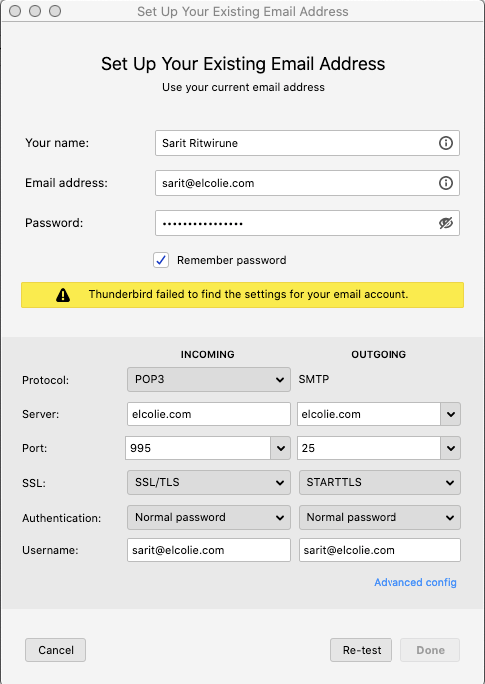
Question
What is the correct setup for Thunderbird?
 elcolie
All 7 comments
That is probably a DNS Blacklist issue.
To rule that out, you can create config/postfix-main.cf with the following:
postscreen_dnsbl_sites =

# DNS blacklists removed
smtpd_recipient_restrictions = permit_sasl_authenticated, permit_mynetworks, reject_unauth_destination, check_policy_service unix:private/policyd-spf, reject_unauth_pipelining, reject_invalid_helo_hostname, reject_non_fqdn_helo_hostname, reject_unknown_recipient_domain
Then restart the container (docker-compose down; docker-compose up -d mail) and see if that works.
See also: https://github.com/tomav/docker-mailserver/wiki/Override-Default-Postfix-Configuration
 casperklein
on 23 Sep 2020
casperklein
on 23 Sep 2020
In addition to what @casperklein proposed (which I can only support as I see it the same way), provide feedback here in case you solved the issue @elcolie, so we can properly close this issue.
 aendeavor
on 23 Sep 2020
aendeavor
on 23 Sep 2020
@elcolie, Sawasdee khrap! 587 for STARTTLS my man. Port 25 is blocked by most ISPs.
 NorseGaud
on 24 Sep 2020
NorseGaud
on 24 Sep 2020
@NorseGaud It
How come AWS EC2 block my port, but anyway it is not secure though
elcolie
on 24 Sep 2020
@aendeavor Please several moment. At here in my office it has board game activity ;p
elcolie
on 24 Sep 2020
Things to check after you try 587:
- Security group has the ports open to all incoming IPs
- Fail2ban hasn’t banned your IP
NorseGaud
on 24 Sep 2020
@casperklein I have added your given file and also correct volume line
- /etc/letsencrypt=/etc/letsencrypt
to
- /etc/letsencrypt:/etc/letsencrypt
It works now. Thank you very much
@NorseGaud Thank you for your attention too
With Thunderbird I just use let it detect everything and change username. That's all now it works
You are awesome guys 👍
IMAP: 143
Connection security: STARTTLS
Authentication method: Normal password
SMTP: 587
Connection Security: STARTTLS
Authentication method: Normal password
Related issues
 capi
·
4Comments
capi
·
4Comments
 42wim
·
4Comments
42wim
·
4Comments
 H4R0
·
3Comments
H4R0
·
3Comments
 m-a-v
·
4Comments
m-a-v
·
4Comments
 ShuP1
·
4Comments
ShuP1
·
4Comments