Docker-letsencrypt-nginx-proxy-companion: Using ports other than 80/443 on the proxy
All 7 comments
Here is my docker-compose - I am also using ports 8282 for HTTP and 30443 for HTTPS (currently using OS X server on 80 and 443):
version: '3'

services:
  db:
    image: mariadb
    command: --transaction-isolation=READ-COMMITTED --binlog-format=ROW
    restart: always
    volumes:
      - db:/var/lib/mysql
    environment:
      - MYSQL_ROOT_PASSWORD=passowrd
    env_file:
      - db.env

  redis:
    image: redis
    restart: always

  app:
    build: ./app
    restart: always
    volumes:
      - nextcloud:/var/www/html
    environment:
      - VIRTUAL_HOST=nc.example.com
      - LETSENCRYPT_HOST=nc.example.com
      - [email protected]
      - MYSQL_HOST=db
    env_file:
      - db.env
    depends_on:
      - db
      - redis
    networks:
      - proxy-tier
      - default

  cron:
    build: ./app
    restart: always
    volumes:
      - nextcloud:/var/www/html
    entrypoint: /cron.sh
    depends_on:
      - db
      - redis

  proxy:
    build: ./proxy
    restart: always
    ports:
      - 8282:80
      - 30443:443
    labels:
      com.github.jrcs.letsencrypt_nginx_proxy_companion.nginx_proxy: "true"
    volumes:
      - certs:/etc/nginx/certs:ro
      - vhost.d:/etc/nginx/vhost.d
      - html:/usr/share/nginx/html
      - /var/run/docker.sock:/tmp/docker.sock:ro
    networks:
      - proxy-tier

  letsencrypt-companion:
    image: jrcs/letsencrypt-nginx-proxy-companion
    restart: always
    volumes:
      - certs:/etc/nginx/certs
      - vhost.d:/etc/nginx/vhost.d
      - html:/usr/share/nginx/html
      - /var/run/docker.sock:/var/run/docker.sock:ro
    networks:
      - proxy-tier
    depends_on:
      - proxy

volumes:
  db:
  nextcloud:
  certs:
  vhost.d:
  html:

networks:
  proxy-tier:
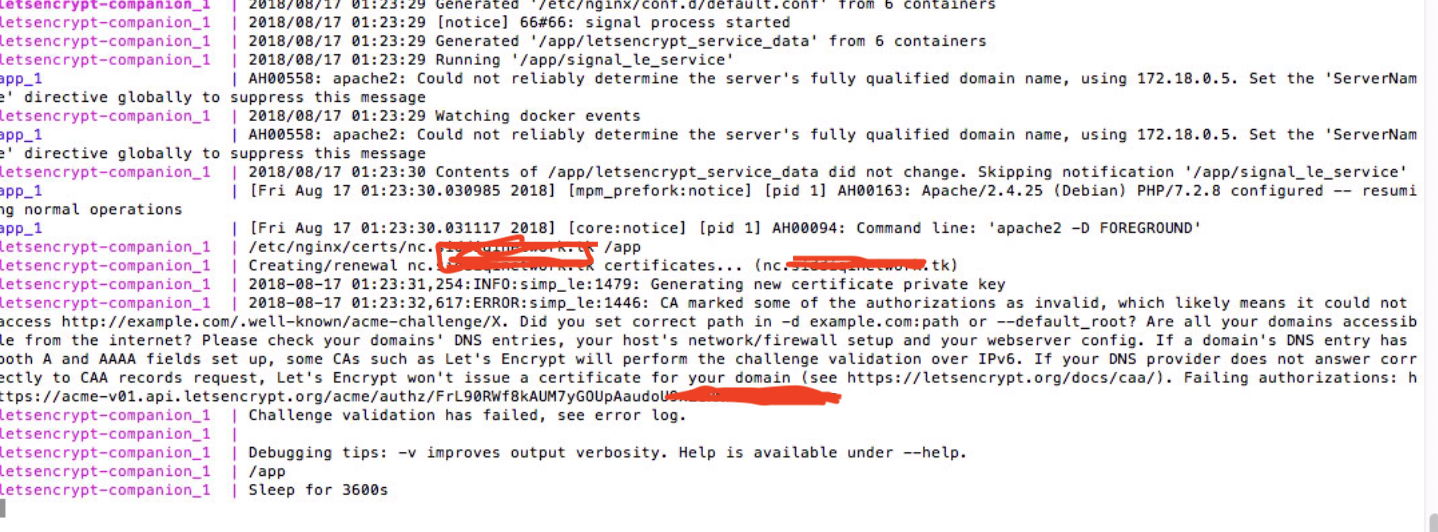
Here is what I get when I run the compose.
 K-MTG
on 17 Aug 2018
K-MTG
on 17 Aug 2018
Hi. Letsencrypt http-01 challenge can only happen over ports 80 and 443, there is no way to obtain a certificate with this container if your proxy container can't use those ports.
 buchdag
on 17 Aug 2018
buchdag
on 17 Aug 2018
Hi, is it possible I can modify something or is there another (docker-compose) setup I can use to get this working. I heard about virtual ports...but not sure how to use them or what they do. I am basically using this config with the ports changed:
https://github.com/nextcloud/docker/tree/master/.examples/docker-compose/with-nginx-proxy/mariadb-cron-redis/apache
Thanks
K-MTG
on 17 Aug 2018
This is a Letsencrypt hard requirement, there is nothing you can do to change this, your only alternative if you can't clear and use ports 80 and 443 is to get your certificate through another LE client that supports other challenges methods. This container only work with http-01 challenge.
buchdag
on 17 Aug 2018
Thanks for the info. Do you know of any clients that will allow me to do this? I am fairly new to docker and nextcloud so I am not sure.
Are they any major issues of not using SSL? I should be fine as long as I only connect on a secured connection right?
Alternatively I am using port 80 and 443 since I am running profile manager on OS X server...it also has a web service (apache) built in and I can have the base URL forward to the ports.
K-MTG
on 17 Aug 2018
You can take a look at traefik, which supports dns-01 challenges.
Regarding using or not using SSL, well I tend to use it no matter what, with self generated certificate if the service is not public and if I can't get a trusted cert and/or setup automated renewal of a trusted cert for this service. I won't go into the details of why SSL by default, there are a lot of people who already wrote about it way better than I would.
If you want to use a self generated certificate and need help, don't hesitate to ask.
If you can configure OSX Server to use SNI and redirect incoming request to the nginx proxy when needed, that would work too but you'll lose the automation when spinning up new containers with other VIRTUAL_HOST / LETSENCRYPT_HOST, as you'll need to append OSX Server Apache's configuration each time.
If you can configure OSX Server to use ports others than 80 and 443, you could also do the reverse, ie adding a static configuration to nginx proxy and having it forward traffic to OSX Server ports.
buchdag
on 20 Aug 2018
Closing due to inactivity.
buchdag
on 29 Oct 2018
Related issues
 mossholderm
·
6Comments
mossholderm
·
6Comments
 SuperRoach
·
5Comments
SuperRoach
·
5Comments
 erikverheij
·
5Comments
erikverheij
·
5Comments
 muehle28
·
3Comments
muehle28
·
3Comments
 bassail
·
4Comments
bassail
·
4Comments