Docker-jitsi-meet: Jibri Recording Fails to Start
I am not sure if this is the same as https://github.com/jitsi/docker-jitsi-meet/issues/240 - please close if it is. My logs look different, and I will try to highlight what is wrong. This is a brand new docker-installation. And rest of the system (meetings etc) work well. Only the recording fails, and I cannot seem to get the root cause.
To reproduce -
- When I start recording from here:

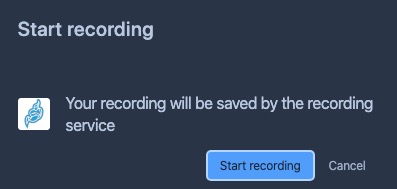
And confirm here to start:
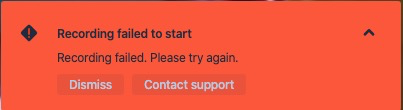
About a second later the error here shows at the bottom left of the screen:
I guess this part of the log is the issue, but I do not know what localStorage means, or how to resolve this:
SEVERE: [138] org.jitsi.jibri.selenium.JibriSelenium.run() An error occurred while joining the call: org.openqa.selenium.WebDriverException: <unknown>: Failed to read the 'localStorage' property from 'Window': Access is denied for this document.
I have loopback activated properly as per # lsmod | grep snd:
snd_aloop              28672  0
snd_pcm               114688  1 snd_aloop
snd_timer              36864  1 snd_pcm
snd                    94208  3 snd_timer,snd_aloop,snd_pcm
soundcore              16384  1 snd
Any help to resolve would be appreciated.
Full logs here:
2020-04-05 11:34:50.276 FINE: [127] org.jitsi.xmpp.mucclient.MucClient.log() Received an IQ with type set: IQ Stanza (jibri http://jitsi.org/protocol/jibri) [[email protected]/lUhrIbqf,[email protected]/focus,id=amlicmlAYXV0aC5tZWV0LmppdHNpL2xVaHJJYnFmADh4a2RVLTI1OTcAXn8rV1Ezx+RbEg8tm7AlVQ==,type=set,]
2020-04-05 11:34:50.276 INFO: [127] org.jitsi.jibri.api.xmpp.XmppApi.handleJibriIq() Received JibriIq <iq to='[email protected]/lUhrIbqf' from='[email protected]/focus' id='amlicmlAYXV0aC5tZWV0LmppdHNpL2xVaHJJYnFmADh4a2RVLTI1OTcAXn8rV1Ezx+RbEg8tm7AlVQ==' type='set'><jibri xmlns='http://jitsi.org/protocol/jibri' action='start' recording_mode='file' room='[email protected]' session_id='fggawaddtkkcksbu' app_data='{"file_recording_metadata":{"share":true}}'/></iq> from environment [MucClient id=xmpp.meet.jitsi hostname=xmpp.meet.jitsi]
2020-04-05 11:34:50.277 INFO: [127] org.jitsi.jibri.api.xmpp.XmppApi.handleStartJibriIq() Received start request
2020-04-05 11:34:50.277 INFO: [127] org.jitsi.jibri.api.xmpp.XmppApi.handleStartJibriIq() Sending 'pending' response to start IQ
2020-04-05 11:34:50.277 INFO: [128] org.jitsi.jibri.api.xmpp.XmppApi.run() Starting service
2020-04-05 11:34:50.285 INFO: [128] org.jitsi.jibri.api.xmpp.XmppApi.handleStartService() Parsed call url info: CallUrlInfo(baseUrl=https://meet.jitsi, callName=stippy, urlParams=[])
2020-04-05 11:34:50.286 INFO: [128] org.jitsi.jibri.JibriManager.startFileRecording() Starting a file recording with params: FileRecordingRequestParams(callParams=CallParams(callUrlInfo=CallUrlInfo(baseUrl=https://meet.jitsi, callName=stippy, urlParams=[])), sessionId=fggawaddtkkcksbu, callLoginParams=XmppCredentials(domain=recorder.meet.jitsi, username=recorder, password=passw0rd)) finalize script path: /config/finalize.sh and recordings directory: /config/recordings
2020-04-05 11:34:50.782 INFO: [128] org.openqa.selenium.remote.ProtocolHandshake.createSession() Detected dialect: OSS
2020-04-05 11:34:50.797 INFO: [128] org.jitsi.jibri.selenium.JibriSelenium.<init>() Starting empty call check with a timeout of PT30S
2020-04-05 11:34:50.798 FINE: [128] org.jitsi.jibri.capture.ffmpeg.FfmpegCapturer.<init>() Detected os as OS: LINUX
2020-04-05 11:34:50.799 INFO: [128] org.jitsi.jibri.service.impl.FileRecordingJibriService.<init>() Writing recording to /config/recordings/fggawaddtkkcksbu
2020-04-05 11:34:50.800 FINE: [128] org.jitsi.jibri.statsd.JibriStatsDClient.incrementCounter() Incrementing statsd counter: start:recording
2020-04-05 11:34:50.801 INFO: [128] org.jitsi.jibri.status.JibriStatusManager.log() Busy status has changed: IDLE -> BUSY
2020-04-05 11:34:50.802 INFO: [128] org.jitsi.jibri.api.xmpp.XmppApi.updatePresence() Jibri reports its status is now JibriStatus(busyStatus=BUSY, health=OverallHealth(healthStatus=HEALTHY, details={})), publishing presence to connections
2020-04-05 11:34:50.802 INFO: [128] org.jitsi.xmpp.mucclient.MucClientManager.log() Setting a presence extension: org.jitsi.xmpp.extensions.jibri.JibriStatusPacketExt@44df241e
2020-04-05 11:34:50.802 FINE: [128] org.jitsi.xmpp.mucclient.MucClientManager.log() Replacing presence extension: org.jitsi.xmpp.extensions.jibri.JibriStatusPacketExt@29d95ada
2020-04-05 11:34:50.819 FINE: [31] org.jitsi.xmpp.extensions.DefaultPacketExtensionProvider.parse() Could not add a provider for element busy-status from namespace http://jitsi.org/protocol/jibri
2020-04-05 11:34:50.822 FINE: [31] org.jitsi.xmpp.extensions.DefaultPacketExtensionProvider.parse() Could not add a provider for element health-status from namespace http://jitsi.org/protocol/health
2020-04-05 11:34:50.982 SEVERE: [138] org.jitsi.jibri.selenium.JibriSelenium.run() An error occurred while joining the call: org.openqa.selenium.WebDriverException: <unknown>: Failed to read the 'localStorage' property from 'Window': Access is denied for this document.
  (Session info: chrome=80.0.3987.149)
  (Driver info: chromedriver=80.0.3987.106 (f68069574609230cf9b635cd784cfb1bf81bb53a-refs/branch-heads/3987@{#882}),platform=Linux 4.19.0-8-amd64 x86_64) (WARNING: The server did not provide any stacktrace information)
Command duration or timeout: 0 milliseconds
Build info: version: 'unknown', revision: 'unknown', time: 'unknown'
System info: host: '1ef039547df7', ip: '172.19.0.6', os.name: 'Linux', os.arch: 'amd64', os.version: '4.19.0-8-amd64', java.version: '1.8.0_242'
Driver info: org.openqa.selenium.chrome.ChromeDriver
Capabilities {acceptInsecureCerts: false, acceptSslCerts: false, applicationCacheEnabled: false, browserConnectionEnabled: false, browserName: chrome, chrome: {chromedriverVersion: 80.0.3987.106 (f68069574609..., userDataDir: /tmp/.com.google.Chrome.w6cvTJ}, cssSelectorsEnabled: true, databaseEnabled: false, goog:chromeOptions: {debuggerAddress: localhost:37453}, handlesAlerts: true, hasTouchScreen: false, javascriptEnabled: true, locationContextEnabled: true, mobileEmulationEnabled: false, nativeEvents: true, networkConnectionEnabled: false, pageLoadStrategy: normal, platform: LINUX, platformName: LINUX, proxy: Proxy(), rotatable: false, setWindowRect: true, strictFileInteractability: false, takesHeapSnapshot: true, takesScreenshot: true, timeouts: {implicit: 0, pageLoad: 300000, script: 30000}, unexpectedAlertBehaviour: ignore, unhandledPromptBehavior: ignore, version: 80.0.3987.149, webStorageEnabled: true}
Session ID: 5c30f395caf60c28f276849b58ed53a0 with stack:
sun.reflect.NativeConstructorAccessorImpl.newInstance0(Native Method)
sun.reflect.NativeConstructorAccessorImpl.newInstance(NativeConstructorAccessorImpl.java:62)
sun.reflect.DelegatingConstructorAccessorImpl.newInstance(DelegatingConstructorAccessorImpl.java:45)
java.lang.reflect.Constructor.newInstance(Constructor.java:423)
org.openqa.selenium.remote.ErrorHandler.createThrowable(ErrorHandler.java:214)
org.openqa.selenium.remote.ErrorHandler.throwIfResponseFailed(ErrorHandler.java:166)
org.openqa.selenium.remote.http.JsonHttpResponseCodec.reconstructValue(JsonHttpResponseCodec.java:40)
org.openqa.selenium.remote.http.AbstractHttpResponseCodec.decode(AbstractHttpResponseCodec.java:80)
org.openqa.selenium.remote.http.AbstractHttpResponseCodec.decode(AbstractHttpResponseCodec.java:44)
org.openqa.selenium.remote.HttpCommandExecutor.execute(HttpCommandExecutor.java:158)
org.openqa.selenium.remote.service.DriverCommandExecutor.execute(DriverCommandExecutor.java:83)
org.openqa.selenium.remote.RemoteWebDriver.execute(RemoteWebDriver.java:543)
org.openqa.selenium.remote.RemoteWebDriver.executeScript(RemoteWebDriver.java:480)
org.jitsi.jibri.selenium.JibriSelenium.setLocalStorageValues(JibriSelenium.kt:175)
org.jitsi.jibri.selenium.JibriSelenium.access$setLocalStorageValues(JibriSelenium.kt:112)
org.jitsi.jibri.selenium.JibriSelenium$joinCall$1.run(JibriSelenium.kt:255)
java.util.concurrent.Executors$RunnableAdapter.call(Executors.java:511)
java.util.concurrent.FutureTask.run(FutureTask.java:266)
java.util.concurrent.ThreadPoolExecutor.runWorker(ThreadPoolExecutor.java:1149)
java.util.concurrent.ThreadPoolExecutor$Worker.run(ThreadPoolExecutor.java:624)
java.lang.Thread.run(Thread.java:748)

2020-04-05 11:34:50.983 INFO: [138] org.jitsi.jibri.selenium.JibriSelenium.onSeleniumStateChange() Transitioning from state Starting up to Error: SESSION Failed to join call
2020-04-05 11:34:50.983 INFO: [138] org.jitsi.jibri.service.impl.FileRecordingJibriService.onServiceStateChange() File recording service transitioning from state Starting up to Error: SESSION Failed to join call
2020-04-05 11:34:50.984 INFO: [138] org.jitsi.jibri.api.xmpp.XmppApi.invoke() Current service had an error, sending error iq <iq to='[email protected]/focus' id='M5GH0-191' type='set'><jibri xmlns='http://jitsi.org/protocol/jibri' status='off' failure_reason='error'/></iq>
2020-04-05 11:34:50.984 FINE: [138] org.jitsi.jibri.statsd.JibriStatsDClient.incrementCounter() Incrementing statsd counter: stop:recording
2020-04-05 11:34:50.985 INFO: [138] org.jitsi.jibri.JibriManager.stopService() Stopping the current service
2020-04-05 11:34:50.985 INFO: [138] org.jitsi.jibri.service.impl.FileRecordingJibriService.stop() Stopping capturer
2020-04-05 11:34:50.986 INFO: [138] org.jitsi.jibri.util.JibriSubprocess.ffmpeg.stop() Stopping ffmpeg process
2020-04-05 11:34:50.986 INFO: [138] org.jitsi.jibri.util.JibriSubprocess.ffmpeg.stop() ffmpeg exited with value null
2020-04-05 11:34:50.987 INFO: [138] org.jitsi.jibri.service.impl.FileRecordingJibriService.stop() Quitting selenium
2020-04-05 11:34:51.006 INFO: [138] org.jitsi.jibri.service.impl.FileRecordingJibriService.stop() Participants in this recording: []
2020-04-05 11:34:51.022 INFO: [138] org.jitsi.jibri.selenium.JibriSelenium.leaveCallAndQuitBrowser() Got 0 log entries for type browser
2020-04-05 11:34:51.037 INFO: [138] org.jitsi.jibri.selenium.JibriSelenium.leaveCallAndQuitBrowser() Got 109 log entries for type driver
2020-04-05 11:34:51.072 INFO: [138] org.jitsi.jibri.selenium.JibriSelenium.leaveCallAndQuitBrowser() Got 0 log entries for type client
2020-04-05 11:34:51.072 INFO: [138] org.jitsi.jibri.selenium.JibriSelenium.leaveCallAndQuitBrowser() Leaving web call
2020-04-05 11:34:51.097 INFO: [138] org.jitsi.jibri.selenium.JibriSelenium.leaveCallAndQuitBrowser() Quitting chrome driver
2020-04-05 11:34:51.169 INFO: [138] org.jitsi.jibri.selenium.JibriSelenium.leaveCallAndQuitBrowser() Chrome driver quit
2020-04-05 11:34:51.170 INFO: [138] org.jitsi.jibri.service.impl.FileRecordingJibriService.stop() Finalizing the recording
2020-04-05 11:34:51.172 SEVERE: [138] org.jitsi.jibri.service.impl.FileRecordingJibriService.finalize() Failed to run finalize script: java.io.IOException: Cannot run program "/config/finalize.sh": error=2, No such file or directory with stack:
java.lang.ProcessBuilder.start(ProcessBuilder.java:1048)
org.jitsi.jibri.util.ProcessWrapper.start(ProcessWrapper.kt:87)
org.jitsi.jibri.service.impl.FileRecordingJibriService.finalize(FileRecordingJibriService.kt:205)
org.jitsi.jibri.service.impl.FileRecordingJibriService.stop(FileRecordingJibriService.kt:190)
org.jitsi.jibri.JibriManager.stopService(JibriManager.kt:254)
org.jitsi.jibri.JibriManager$startService$1.invoke(JibriManager.kt:205)
org.jitsi.jibri.JibriManager$startService$1.invoke(JibriManager.kt:84)
org.jitsi.jibri.util.StatusPublisher$addStatusHandler$1.invoke(StatusPublisher.kt:37)
org.jitsi.jibri.util.StatusPublisher$addStatusHandler$1.invoke(StatusPublisher.kt:29)
org.jitsi.jibri.util.StatusPublisher$publishStatus$1.invoke(StatusPublisher.kt:53)
org.jitsi.jibri.util.StatusPublisher$publishStatus$1.invoke(StatusPublisher.kt:29)
kotlin.collections.CollectionsKt__MutableCollectionsKt.filterInPlace$CollectionsKt__MutableCollectionsKt(MutableCollections.kt:191)
kotlin.collections.CollectionsKt__MutableCollectionsKt.retainAll(MutableCollections.kt:182)
org.jitsi.jibri.util.StatusPublisher.publishStatus(StatusPublisher.kt:53)
org.jitsi.jibri.service.impl.StatefulJibriService.onServiceStateChange(StatefulJibriService.kt:40)
org.jitsi.jibri.service.impl.StatefulJibriService.access$onServiceStateChange(StatefulJibriService.kt:26)
org.jitsi.jibri.service.impl.StatefulJibriService$1.invoke(StatefulJibriService.kt:35)
org.jitsi.jibri.service.impl.StatefulJibriService$1.invoke(StatefulJibriService.kt:26)
org.jitsi.jibri.util.NotifyingStateMachine.notify(NotifyingStateMachine.kt:26)
org.jitsi.jibri.service.JibriServiceStateMachine.access$notify(JibriServiceStateMachine.kt:46)
org.jitsi.jibri.service.JibriServiceStateMachine$stateMachine$1$5.invoke(JibriServiceStateMachine.kt:100)
org.jitsi.jibri.service.JibriServiceStateMachine$stateMachine$1$5.invoke(JibriServiceStateMachine.kt:46)
com.tinder.StateMachine.notifyOnTransition(StateMachine.kt:65)
com.tinder.StateMachine.transition(StateMachine.kt:23)
org.jitsi.jibri.service.JibriServiceStateMachine.transition(JibriServiceStateMachine.kt:112)
org.jitsi.jibri.service.impl.StatefulJibriService$registerSubComponent$1.invoke(StatefulJibriService.kt:46)
org.jitsi.jibri.service.impl.StatefulJibriService$registerSubComponent$1.invoke(StatefulJibriService.kt:26)
org.jitsi.jibri.util.StatusPublisher$addStatusHandler$1.invoke(StatusPublisher.kt:37)
org.jitsi.jibri.util.StatusPublisher$addStatusHandler$1.invoke(StatusPublisher.kt:29)
org.jitsi.jibri.util.StatusPublisher$publishStatus$1.invoke(StatusPublisher.kt:53)
org.jitsi.jibri.util.StatusPublisher$publishStatus$1.invoke(StatusPublisher.kt:29)
kotlin.collections.CollectionsKt__MutableCollectionsKt.filterInPlace$CollectionsKt__MutableCollectionsKt(MutableCollections.kt:191)
kotlin.collections.CollectionsKt__MutableCollectionsKt.retainAll(MutableCollections.kt:182)
org.jitsi.jibri.util.StatusPublisher.publishStatus(StatusPublisher.kt:53)
org.jitsi.jibri.selenium.JibriSelenium.onSeleniumStateChange(JibriSelenium.kt:181)
org.jitsi.jibri.selenium.JibriSelenium.access$onSeleniumStateChange(JibriSelenium.kt:112)
org.jitsi.jibri.selenium.JibriSelenium$1.invoke(JibriSelenium.kt:166)
org.jitsi.jibri.selenium.JibriSelenium$1.invoke(JibriSelenium.kt:112)
org.jitsi.jibri.util.NotifyingStateMachine.notify(NotifyingStateMachine.kt:26)
org.jitsi.jibri.selenium.SeleniumStateMachine.access$notify(SeleniumStateMachine.kt:34)
org.jitsi.jibri.selenium.SeleniumStateMachine$stateMachine$1$5.invoke(SeleniumStateMachine.kt:79)
org.jitsi.jibri.selenium.SeleniumStateMachine$stateMachine$1$5.invoke(SeleniumStateMachine.kt:34)
com.tinder.StateMachine.notifyOnTransition(StateMachine.kt:65)
com.tinder.StateMachine.transition(StateMachine.kt:23)
org.jitsi.jibri.selenium.SeleniumStateMachine.transition(SeleniumStateMachine.kt:84)
org.jitsi.jibri.selenium.JibriSelenium$joinCall$1.run(JibriSelenium.kt:266)
java.util.concurrent.Executors$RunnableAdapter.call(Executors.java:511)
java.util.concurrent.FutureTask.run(FutureTask.java:266)
java.util.concurrent.ThreadPoolExecutor.runWorker(ThreadPoolExecutor.java:1149)
java.util.concurrent.ThreadPoolExecutor$Worker.run(ThreadPoolExecutor.java:624)
java.lang.Thread.run(Thread.java:748)

2020-04-05 11:34:51.172 INFO: [138] org.jitsi.jibri.status.JibriStatusManager.log() Busy status has changed: BUSY -> IDLE
2020-04-05 11:34:51.173 INFO: [138] org.jitsi.jibri.api.xmpp.XmppApi.updatePresence() Jibri reports its status is now JibriStatus(busyStatus=IDLE, health=OverallHealth(healthStatus=HEALTHY, details={})), publishing presence to connections
2020-04-05 11:34:51.173 INFO: [138] org.jitsi.xmpp.mucclient.MucClientManager.log() Setting a presence extension: org.jitsi.xmpp.extensions.jibri.JibriStatusPacketExt@40386897
2020-04-05 11:34:51.173 FINE: [138] org.jitsi.xmpp.mucclient.MucClientManager.log() Replacing presence extension: org.jitsi.xmpp.extensions.jibri.JibriStatusPacketExt@44df241e
2020-04-05 11:34:51.177 FINE: [31] org.jitsi.xmpp.extensions.DefaultPacketExtensionProvider.parse() Could not add a provider for element busy-status from namespace http://jitsi.org/protocol/jibri
2020-04-05 11:34:51.177 FINE: [31] org.jitsi.xmpp.extensions.DefaultPacketExtensionProvider.parse() Could not add a provider for element health-status from namespace http://jitsi.org/protocol/health
 maltokyo
All 15 comments
It is the same issue, localstorage error is in that issues first message. This seems to be due to cert and chrome interaction.
 morphles
on 6 Apr 2020
morphles
on 6 Apr 2020
Thank you. I am not sure how to mark as duplicate.. please could an admin mark that?
Claims they have fixed this with simply:
replace meet.jitsi with my domain.com in .env file
Can anyone verify?
maltokyo
on 6 Apr 2020
Replacing meet.jitsi in the .env file with domain.com only seems to works if you don't use an external HTTPS handler ( means HTTPS is handled directly in the jitsi/web container).
In case of an external handler for HTTPS like traefik or an external nginx is used, the TLS certificate of this external HTTPS handler should also be configured in the nginx of the jitsi/web container.
Even if meet.jitsi in the .env file is replaced with domain.com jibri still will access the nginx of the jitsi/web container. So the chrome in the Jibri should either accept all certificates or learn to trust the self generated certificate of the jitsi/web container by importing.
If we can mange that Jibri will accept all certificates or trust the self generated certificate of the jitsi/web container there will be no need to change meet.jitsi in the .env file with domain.com anymore.
 dotnetautor
on 6 Apr 2020
dotnetautor
on 6 Apr 2020
I might add, that if you set DISABLE_HTTPS=1 in your .env file, there is basically no way to launch jibri, since https in hardcoded in jibri
( see https://github.com/jitsi/jibri/blob/78258b63aeb24be9abf8bda518dcf328f1e98854/src/main/kotlin/org/jitsi/jibri/util/XmppUtils.kt#L43 )
 KenN7
on 6 Apr 2020
KenN7
on 6 Apr 2020
I think that it would not work with http anyway, since AFAIK WebRTC is limited to https, so chrome would not be able to receive video/audio.
morphles
on 6 Apr 2020
But most people running docker will likely have a reverse proxy enabled that handles Https. So I have turned Https off for jitsi otherwise it simply won't work. This seems like something that needs fixing specific to the docker implementation.
maltokyo
on 6 Apr 2020
You do not need to turn of https, for proxying, I'm doing it. Read projects README, quickstart section:
Note that HTTP (not HTTPS) is also available (on port 8000, by default), but that's e.g. for a reverse proxy setup; direct access via HTTP instead HTTPS leads to WebRTC errors such as Failed to access your microphone/camera: Cannot use microphone/camera for an unknown reason. Cannot read property 'getUserMedia' of undefined or navigator.mediaDevices is undefined.
So you just need to direct traffic to other port (8000)
morphles
on 6 Apr 2020
ok, will give a few things a try then. Thank you
maltokyo
on 6 Apr 2020
How can we change this setting without a GUI, can anyone help?
maltokyo
on 6 Apr 2020
You do not need to turn of https, for proxying, I'm doing it. Read projects README, quickstart section:
Note that HTTP (not HTTPS) is also available (on port 8000, by default), but that's e.g. for a reverse proxy setup; direct access via HTTP instead HTTPS leads to WebRTC errors such as Failed to access your microphone/camera: Cannot use microphone/camera for an unknown reason. Cannot read property 'getUserMedia' of undefined or navigator.mediaDevices is undefined.
So you just need to direct traffic to other port (8000)
This didnt work unfortunately, same error. But link above looks promising, just cant find a way to change that without GUI
maltokyo
on 6 Apr 2020
Well it didn't work cause issue is not resolved :) I actually think that option is set already via command line, but it still a problem. I'm also hoping for some resolution for this soon :)
morphles
on 6 Apr 2020
This is the same as #240.
 saghul
on 6 Apr 2020
saghul
on 6 Apr 2020
Thank you. I am not sure how to mark as duplicate.. please could an admin mark that?
Claims they have fixed this with simply:
replace meet.jitsi with my domain.com in .env file
Can anyone verify?
Confirmed it fixed the recording problem.
 kelvinyasu
on 6 Apr 2020
kelvinyasu
on 6 Apr 2020
This didn't fix it for me at all. Same situation.
maltokyo
on 6 Apr 2020
My understanding and how I got it working here:
- docker jibri is hardcoded (read: no way to changewithout recompile/rebuild) to connect to "https://$XMPP_DOMAIN" and
- this must be the same URL and serve the same content as the clients see (*) and
- this URL must be served with a valid cert.
I my case, I reenabled the https listener of nginx (DISABLE_HTTPS=0), changed all "meet.jitsi" in .env to match the external FQDN, copied the external cert/key to the nginx config and made the internal DNS resolve the FQDN to the internal nginx ip. Now the external proxy does the ssl termination for the clients and proxy to http of web container. And jibri connects to https of web container and gets the same content.
Works, except, that the recording crashes if someone start screen sharing but I don't think this is related.
(*) at least until the make the URL that jibri connects to configurable
 ahinrichs
on 7 Apr 2020
ahinrichs
on 7 Apr 2020
Related issues
 badsmoke
·
5Comments
badsmoke
·
5Comments
 bkempe
·
12Comments
bkempe
·
12Comments
 albe
·
9Comments
albe
·
9Comments
 ccoenen
·
5Comments
ccoenen
·
5Comments
 mrWodoo
·
5Comments
mrWodoo
·
5Comments
Most helpful comment
Replacing meet.jitsi in the .env file with domain.com only seems to works if you don't use an external HTTPS handler ( means HTTPS is handled directly in the jitsi/web container).
In case of an external handler for HTTPS like traefik or an external nginx is used, the TLS certificate of this external HTTPS handler should also be configured in the nginx of the jitsi/web container.
Even if meet.jitsi in the .env file is replaced with domain.com jibri still will access the nginx of the jitsi/web container. So the chrome in the Jibri should either accept all certificates or learn to trust the self generated certificate of the jitsi/web container by importing.
If we can mange that Jibri will accept all certificates or trust the self generated certificate of the jitsi/web container there will be no need to change meet.jitsi in the .env file with domain.com anymore.