Docker-images: kernel-headers-3.10.0-1127.19.1.el7 - Package does not match intended download
Building Docker image for 12.1.0.2-se2, I've encountered this error:
https://yum.oracle.com/repo/OracleLinux/OL7/latest/x86_64/getPackage/kernel-headers-3.10.0-1127.19.1.el7.x86_64.rpm: [Errno -1] Package does not match intended download. Suggestion: run yum --enablerepo=ol7_latest clean metadata
Trying other mirror.
Error downloading packages:
kernel-headers-3.10.0-1127.19.1.el7.x86_64: [Errno 256] No more mirrors to try.
This was working fine before August 2020.
 catam1976
All 9 comments
I can confirm that I have the same error.
Running the suggested command did not help.
 europemaster
on 24 Aug 2020
europemaster
on 24 Aug 2020
Same here.
There was a package update on the 20th. Might be the problem?!
 barrynorman
on 24 Aug 2020
barrynorman
on 24 Aug 2020
Same happens when trying to build a docker image with Oracle 19c. I have tried adding the following command to the Dockerfile (as suggested):
RUN run yum --enablerepo=ol7_latest clean metadata
Unfortunately, that made no difference.
 InfectoOne
on 24 Aug 2020
InfectoOne
on 24 Aug 2020
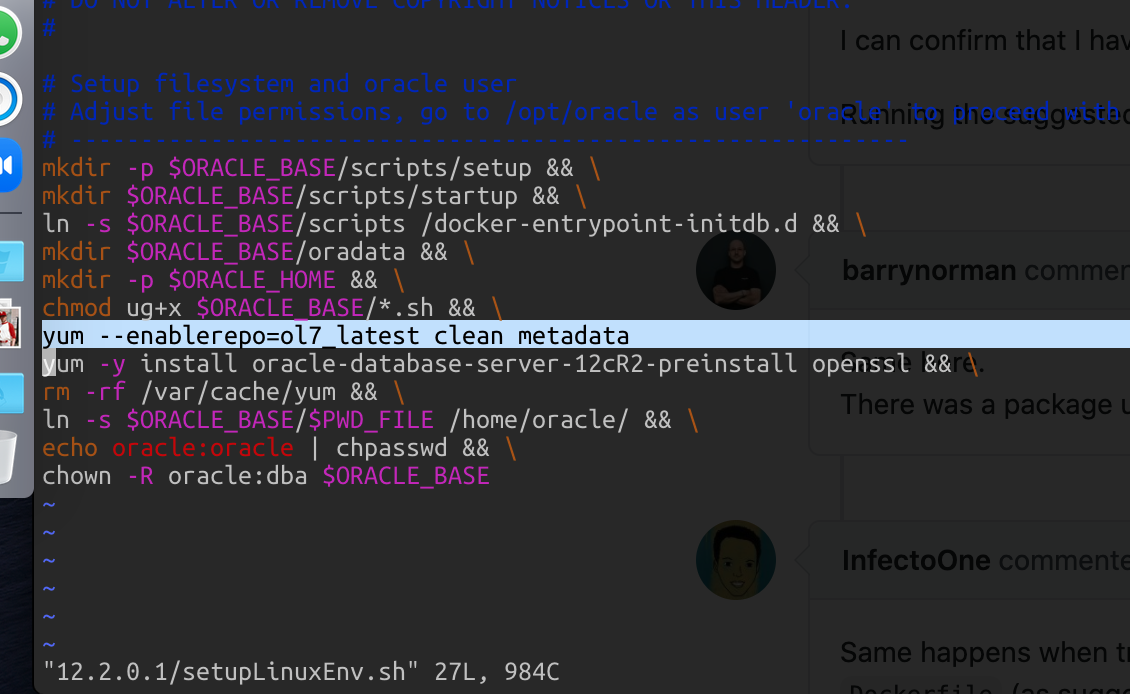
I've changed the setupLinuxEnv.sh from 12.1.0.2 by adding
yum -y install kernel-headers && \
before
yum -y install oracle-rdbms-server-12cR1-preinstall tar openssl && \
And the build fails with that 'yum -y install kernel-headers'. I am not a Linux expert but it looks like that package is wrong.
catam1976
on 24 Aug 2020
This worked for me
 ltamaster
on 24 Aug 2020
ltamaster
on 24 Aug 2020
This worked for me
Thanks. Just this line?
yum --enablerepo=ol7_latest clean metadata
Unfortunately I still get the same error.
I can see the output from the command...
Cleaning repos: ol7_latest
0 metadata files removed
0 sqlite files removed
0 metadata files removed
This worked for me
Thanks. Just this line?
yum --enablerepo=ol7_latest clean metadataUnfortunately I still get the same error.
I can see the output from the command...Cleaning repos: ol7_latest 0 metadata files removed 0 sqlite files removed 0 metadata files removed
I purged all the images created then reran the operation with the changes to the setupLinuxEnv.sh. Worked already.
 sappysaplala
on 24 Aug 2020
sappysaplala
on 24 Aug 2020
@sappysaplala I forgot to delete all the images. Now it works.
Thanks!
barrynorman
on 24 Aug 2020
Hey folks, we had to republish the kernel-3.10.0-1127.19.1 and all of its associated packages and it took a while for the metadata to sync accordingly. This is not a Docker issue, but something the yum.oracle.com team are taking care of. It should all be back up and running again ASAP.
 Djelibeybi
on 24 Aug 2020
Djelibeybi
on 24 Aug 2020
Related issues
 montge
·
5Comments
montge
·
5Comments
 jamataran
·
3Comments
Djelibeybi
·
4Comments
jamataran
·
3Comments
Djelibeybi
·
4Comments
 skoky
·
4Comments
skoky
·
4Comments
 ORESoftware
·
4Comments
ORESoftware
·
4Comments
Most helpful comment
Hey folks, we had to republish the
kernel-3.10.0-1127.19.1and all of its associated packages and it took a while for the metadata to sync accordingly. This is not a Docker issue, but something the yum.oracle.com team are taking care of. It should all be back up and running again ASAP.