Docker-gitlab: Says "No repository" after restarting containers using fig
Hi.
I rebooted host OS without shutting down containers in proper way. After starting the host, I tried to start containers using fig up and they started with no errors, however, Gitlab says message as shown in the picture below when I access to repositories.
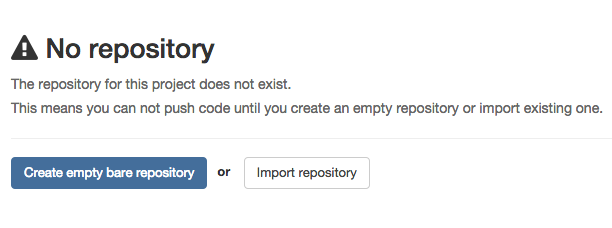
In fact, repositories does exist under /opt/gitlab/data/repositories and they work properly (tried git clone directly).
I tried restoring from backups but could not resolve this problem.
Do you know the cause of this problem? Could you help me please?
 xeno14
All 28 comments
@xeno1991
- does gitlab list all of your projects? If yes, then the database connection is fine.
- after the container is started, gain access to the shell of the container
docker exec -it gitlab bashand inspect the contents of/home/git/data/repositories. Are all your repositories listed in there? If not then it would mean that the correct data volume is not mounted. In which case you would need to edit your fig.yml file to mount/opt/gitlab/data/repositoriesat/home/git/data. Assuming that this already is the case, then maybe the gitlab container was started before the/optpartition was mounted by the host.
edit:
additionally you can also inspect the paths of the volumes mounted using docker inspect gitlab
 sameersbn
on 28 Jan 2015
sameersbn
on 28 Jan 2015
@sameersbn
According to docker inspect gitlab, the directory seems to be mounted. In my case /home/git/data/repositories was not empty but it looked different from /opt/gitlab/data/repositories.
Finally, it works by following steps:
- stop containers
- remove existing containers
docker ps -a | grep gitlab | cut -d" " -f1 | xargs -I{} docker rm {} - restore backup
- start containers
fig up
Thank you very much.
xeno14
on 28 Jan 2015
I've encounter same issue after restore.
One point to check is make sure /home/git/data has proper permission. After I run chown -R git:git /home/git on gitlab container after restore backup, I were able to solve the "No repository" issue.
 siuying
on 30 Jan 2015
siuying
on 30 Jan 2015
@siuying there is a sub command named app:sanitize and is the preferred way of fixing file and directory permissions. That being said the issue faced by @xeno1991 is that the /home/git/data volume was not pointing to the right location in the first place, while means the error "The repository for this project does not exist" was in fact true.
sameersbn
on 30 Jan 2015
Thanks for the tips!
siuying
on 30 Jan 2015
Well, I just upgraded from Gitlab 7.10 to 7.11.1-4 and experience the same behaviour unfortunately. All my repositories seem to be gone. I checked my command to fire up the container, which seems fine for me and worked previously without a flaw:
docker run --name=gitlab -d --restart=always -h my.host -v /scratch/gitlab:/home/git/data -p 82:80 -e 'GITLAB_HOST=my.host' --env="USERMAP_UID=$(id -u git)" --env="USERMAP_GID=$(id -g git)" -e 'GITLAB_RELATIVE_URL_ROOT=/gitlab' -e '[email protected]' -e 'SMTP_PASS=password' --link postgresql:postgresql --link redis:redisio sameersbn/gitlab:latest
The folder /scratch/gitlab looks like this:
backups
gitlab-satellites
repositories
ssh
tmp
uploads
and the content of the repositories is actually fine. However, they're shown as "empty" in my Gitlab Instance. Any clue what might have gone wrong? Removed the container, reinstalled it and restarted - never worked :-1:
 apeltzer
on 21 Jun 2015
apeltzer
on 21 Jun 2015
@apeltzer are you able to clone the repos?
sameersbn
on 22 Jun 2015
Hi Sameer,
I don't know what just happened - rebootet the host machine and everything went back to normal behaviour?! All repositories are back online, no issues at all - didn't do anything other than rebooting the host. Weird to be honest, but at least my 20 repos are back online ;-)
apeltzer
on 22 Jun 2015
@apeltzer ok great to hear that the issue no longer exists :wink:
sameersbn
on 22 Jun 2015
I actually encountered same problem after like 6 months and completely forget it. I panic, restored and create new container and spend hours to figure out what happened. This is a reminder to my future self: app:santize.
siuying
on 10 Jul 2015
@siuying generally speaking you should not have to run app:sanitize. If you have to run it, it means that something or someone changed the permissions of the data volume contents.
sameersbn
on 10 Jul 2015
@sameersbn thanks! I could not think anything that might have changed the permissions, but I'd try to see if I can reproduce this.
siuying
on 10 Jul 2015
I have to update the readme to indicate this option
On Friday 10 July 2015 09:23 PM, Francis Chong wrote:
@sameersbn thanks! I could not think anything that might have changed the permissions, but I'd try to see if I can reproduce this.
Reply to this email directly or view it on GitHub:
https://github.com/sameersbn/docker-gitlab/issues/244#issuecomment-120442730
Sameer Naik
sameersbn
on 10 Jul 2015
Hi, I am having the same problem after trying to upgrade from 7.5.1 to 7.12.0. I can not find the repositories anywhere, but disk space does not seem to be freed, so I am probably not looking at the correct place. The directories /opt/gitlab/data/ and /srv/docker/gitlab/gitlab/ on the host running docker are empty. In the container, /home/git/repositories/ is empty and /home/git/data/repositories/ only contains wikis...
 charles-plessy
on 7 Aug 2015
charles-plessy
on 7 Aug 2015
@charles-plessy the repositories should reside in /srv/docker/gitlab/gitlab/repositories on the host. The images does not make any changes to this directory by itself. If this directory or /srv/docker/gitlab/gitlab is empty it probably indicates something wrong when you first setup the image. If at all you had enabled automatic backups and can find the backups in /srv/docker/gitlab/gitlab/backups then you can try restoring a backup.
sameersbn
on 9 Aug 2015
I had the same error. Check ovnership of all files in /home/git inside the docker image. Change it if needed
sudo chown -R git:git /home/git/
That fixed my problem
 pozgo
on 6 Jan 2016
pozgo
on 6 Jan 2016
@pozgo p.s. launching the container with app:sanitize argument will fix the permissions of files and directories as required by gitlab.
sameersbn
on 7 Jan 2016
@pozgo thank you this really helped.
 NemSavic
on 27 Feb 2016
NemSavic
on 27 Feb 2016
@sameersbn I have this exact same issue after moving Gitlab to a new server (and moving the /srv/docker/gitlab folder with it). I'm running the exact same version of Gitlab as on the old server (8.6.2) and everything except showing repositories works.
I ran app:sanitize with a UID/GID that exist on the host system (2000/2000). Inside the gitlab container, /home/git/data/repositories shows all the repository folders that I would expect, so the host folder is properly mounted. The UIDs/GIDs on the repository folders are 2000/2000, as expected.
However, Gitlab still refuses to show me the contents of these repositories, instead showing the "No repository" alert.
Also, when attempting a git push to the repo, this warning is shown:
GitLab: A repository for this project does not exist yet.
fatal: Could not read from remote repository.
Is there anything else I can do to debug/fix this?
 marceldegraaf
on 17 Apr 2016
marceldegraaf
on 17 Apr 2016
Ah, found it! Apparently Gitlab caches the result of the "repository exists?" check. So even with my repositories existing and having the correct permissions, Gitlab thought they were missing because the check was never re-run.
A docker exec -ti gitlab bash followed by bundle exec rake cache:clear RAILS_ENV=production fixed the issue for me.
marceldegraaf
on 18 Apr 2016
Nice find!
On Apr 18, 2016 5:31 AM, "Marcel de Graaf" [email protected] wrote:
Ah, found it! Apparently Gitlab caches the result
https://github.com/gitlabhq/gitlabhq/blob/v8.6.2/app/models/repository.rb#L44-L54
of the "repository exists?" check. So even with my repositories existing
and having the correct permissions, Gitlab thought they were missing
because the check was never re-run.A docker exec -ti gitlab bash followed by bundle exec rake cache:clear
RAILS_ENV=production fixed the issue for me.—
You are receiving this because you are subscribed to this thread.
Reply to this email directly or view it on GitHub
https://github.com/sameersbn/docker-gitlab/issues/244#issuecomment-211294690
 ragaar
on 19 Apr 2016
ragaar
on 19 Apr 2016
@pozgo THANK YOU! I just uninstalled and installed the whole setup three times...
 ahofmeister
on 4 Sep 2016
ahofmeister
on 4 Sep 2016
Thanks.
Solution for me: gitlab-rake cache:clear RAILS_ENV=production
 dexterns88
on 21 Oct 2016
dexterns88
on 21 Oct 2016
Thanks to marceldegraaf. That fixed my problem:
bundle exec rake cache:clear RAILS_ENV=production
 jasionwa
on 3 Jan 2017
jasionwa
on 3 Jan 2017
Migrated to sameersbn docker from source installation for Gitlab 8.15
bundle exec rake app:sanitize RAILS_ENV=production
Don't know how to build task 'app:sanitize' (see --tasks)
But
bundle exec rake cache:clear RAILS_ENV=production
helped. Thanks!
 vabue
on 13 Aug 2017
vabue
on 13 Aug 2017
@vabue app:sanitize is not a rake command. It's only available via the entrypoint.sh for this
you can use docker-compose run --rm gitlab /sbin/entrypoint.sh app:sanitize
 solidnerd
on 13 Aug 2017
solidnerd
on 13 Aug 2017
The following command save my day too
bundle exec rake cache:clear RAILS_ENV=production
 Kamaradeivanov
on 26 Jan 2018
Kamaradeivanov
on 26 Jan 2018
cd /home/git/gitlab/bin
./rake cache:clear RAILS_ENV=production
 hausenism
on 13 Jul 2018
hausenism
on 13 Jul 2018
Related issues
 Nepoxx
·
5Comments
Nepoxx
·
5Comments
 Daxten
·
4Comments
Daxten
·
4Comments
 GJRTimmer
·
4Comments
GJRTimmer
·
4Comments
 martinspaeth
·
3Comments
martinspaeth
·
3Comments
 STOIE
·
4Comments
STOIE
·
4Comments
Most helpful comment
Ah, found it! Apparently Gitlab caches the result of the "repository exists?" check. So even with my repositories existing and having the correct permissions, Gitlab thought they were missing because the check was never re-run.
A
docker exec -ti gitlab bashfollowed bybundle exec rake cache:clear RAILS_ENV=productionfixed the issue for me.