Docker-gitlab: How do you access the gitlab-rails console?
I tried using docker exec -it myContainer bash and gitlab-rails was not on the path, what would be the best way to do it? (I want to test my SMTP settings)
 Nepoxx
All 8 comments
After connecting to the container, try this:
bin/bundle exec rake gitlab:env:info RAILS_ENV=production
 cat5
on 18 Oct 2017
cat5
on 18 Oct 2017
Awesome, merci!
Nepoxx
on 18 Oct 2017
Once in the container, where is the rails gitlab folder ?
 bsylvain
on 2 Feb 2018
bsylvain
on 2 Feb 2018
docker exec -it myContainer bin/rails console
 Wicowyn
on 28 Feb 2018
Wicowyn
on 28 Feb 2018
After connecting to the container, try this:
bin/bundle exec rake gitlab:env:info RAILS_ENV=production
I don't know what this command does. When I tried it, it did not start the console. It just printed out some interesting information about the runtime environment.
I'm running the "official" Synology Docker install from its Package Center. Currently is installs version 11.0.4. I connected to the Gitlab container using docker exec as root.
To test the SMTP mail configuration as described here , running
bin/bundle exec rails console gave me access to the console.
 herrmanthegerman
on 15 Oct 2018
herrmanthegerman
on 15 Oct 2018
I was able that way:
search for your Docker CONTAINER_ID
docker ps -all
eg

docker exec -it d0bbe0e1e3db bash <-- with your CONTAINER_ID
$ gitlab-rails console production
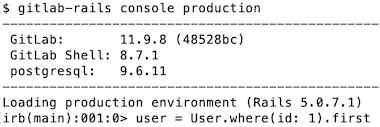
...
exit
 hannesa2
on 18 Apr 2019
hannesa2
on 18 Apr 2019
None of the above solutions worked for me. As mentioned in this GitLab issue, the correct command should be gitlab-rails console -e production.
So go into your Docker container with
docker exec -it CONTAINER_ID/NAME bin/bash
and then execute
gitlab-rails console -e production
It could take some time until the command line appears.
 mhellmeier
on 22 Oct 2020
mhellmeier
on 22 Oct 2020
docker exec -it gitlab_gitlab_1 gitlab-rails console
and wait
 CSRedRat
on 5 Feb 2021
CSRedRat
on 5 Feb 2021
Related issues
 tomastzn
·
4Comments
Nepoxx
·
5Comments
tomastzn
·
4Comments
Nepoxx
·
5Comments
 rakesh-k
·
3Comments
rakesh-k
·
3Comments
 laoshancun
·
5Comments
laoshancun
·
5Comments
 tarach
·
5Comments
tarach
·
5Comments
Most helpful comment
docker exec -it myContainer bin/rails console