Docker-gitlab: Reset Root Password
I am running gitlab from default docker-compose script and need to reset the root password...
Gitlab docs say
gitlab-rails console production
but I get
bash: gitlab-rails: command not found
Alternatively, here I found
sudo -u git -H bundle exec rails console production
but I get
Rails Error: Unable to access log file. Please ensure that /home/git/gitlab/log/production.log exists and is writable (ie, make it writable for user and group: chmod 0664 /home/git/gitlab/log/production.log). The log level has been raised to WARN and the output directed to STDERR until the problem is fixed.
/home/git/gitlab/config/initializers/6_validations.rb:6:in 'realpath': No such file or directory @ realpath_rec - /home/git/repositories (Errno::ENOENT)
The log 'folder' is a link to an inexistant folder, but that isn't the critical error.
I also found #904 suggesting setting up GITLAB_ROOT_PASSWORD and running
bin/rake gitlab:setup
but get the same error...
Tried 8.12.4 & 8.12.5
Any and all help appreciated.
 msmarino
All 9 comments
I had this problem yesterday. I succeeded in setting custom gitlab root password with GITLAB_ROOT_PASSWORD (it must be >= 8 characters long) and then run in gitlab container as git user: bundle exec rake gitlab:setup RAILS_ENV=production.
 xmik
on 15 Oct 2016
xmik
on 15 Oct 2016
Thx for the reply!!
Unfortunately when I run
docker-compose exec gitlab sudo -u git -H bundle exec rake gitlab:setup RAILS_ENV=production
it asks for confirmation and wipes out the whole database!
And with
docker-compose exec gitlab sudo -u git -H bundle exec rake gitlab:setup production
I get
D, [2016-10-15T14:42:02.656332 #549] DEBUG -- sentry: ** [Raven] cannot load such file -- haml_lint/rake_task excluded from capture due to environment or should_capture callback
rake aborted!
As you cas see, rails is NOT my thing.
msmarino
on 15 Oct 2016
@msmarino Which database do you use ? MySQL or Postgresql ?
 solidnerd
on 16 Oct 2016
solidnerd
on 16 Oct 2016
I am using postgresql as as defined in the docker-compose.yml.
Finally I used virtualbox to install a 'full' version and imported/changed/exported my data without a hitch. Then reimported back to my docker instance. Not optimal but a solution...
msmarino
on 28 Oct 2016
IF anyone else lands here (like I did) looking to reset their password, try ( https://github.com/sameersbn/docker-gitlab/issues/916#issuecomment-395078678 ):
docker exec -it GITLAB_CONTAINER_ID /bin/bashsu - gitcd gitlabbundle exec rails c productionuser = User.where(id: 1).firstuser.password = 'NEW_PASS'user.password_confirmation = 'NEW_PASS'user.saveexit
 mhciael
on 6 Jun 2018
mhciael
on 6 Jun 2018
@mhciael hi,i follow your method but
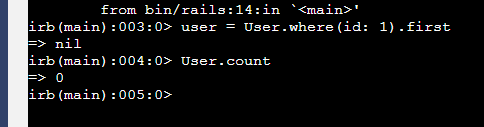
Is there a problem with my installation?
 pasake
on 11 Sep 2018
pasake
on 11 Sep 2018
perhaps you're doing this before you have completed the gitlab install? Like when you first visit it they would create the admin user i think? what error is missing in the above (truncated at top of screenshot)?
 hcientist
on 11 Sep 2018
hcientist
on 11 Sep 2018
@mhciael Thanks a lot ,it works!!and you can check all the ID with:user = Use.all,because you may not the No.1.
 mrsniperz
on 28 Dec 2018
mrsniperz
on 28 Dec 2018
I was able that way:
search for your Docker CONTAINER_ID
docker ps -all
eg

docker exec -it d0bbe0e1e3db bash <-- with your CONTAINER_ID
$ gitlab-rails console production
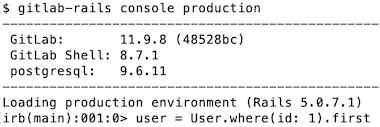
user = User.where(id: 1).first
user.password = 'your secret'
user.password_confirmation = 'your secret'
user.save
exit
exit
 hannesa2
on 18 Apr 2019
hannesa2
on 18 Apr 2019
Related issues
 martinspaeth
·
3Comments
martinspaeth
·
3Comments
 Daxten
·
4Comments
Daxten
·
4Comments
 globalcitizen
·
4Comments
globalcitizen
·
4Comments
 lenovouser
·
3Comments
lenovouser
·
3Comments
 cyklodev
·
3Comments
cyklodev
·
3Comments
Most helpful comment
IF anyone else lands here (like I did) looking to reset their password, try ( https://github.com/sameersbn/docker-gitlab/issues/916#issuecomment-395078678 ):
docker exec -it GITLAB_CONTAINER_ID /bin/bashsu - gitcd gitlabbundle exec rails c productionuser = User.where(id: 1).firstuser.password = 'NEW_PASS'user.password_confirmation = 'NEW_PASS'user.saveexit