Docker.github.io: docs: Could not find a version that satisfies the requirement cloud-init==20.4
Hi Docker team,
In this training language/python/build-images.md, I have an issue with:
pip3 install -r requirements.txt

I've tried to investigate the root cause but I can't resolve this error now. I guess the ERROR caused by the parent image of this course: python:3.8-slim-buster
I'm trying to figure out what the root cause is. Maybe this ERROR is not caused by Docker but I think we should add some notes for watchers.
Thanks & Best regards,
Anh Tran
 longqua69
All 10 comments
I believe that you ran that on the system python install (and that MS has added some specific python packages in wsl)
Python uses virtual environnements (virtualenv) to isolate packages install, and permit to create independant packages
I suggest you to run a virtualenv using Pipenv and then continue the tutorial
 Stig124
on 14 Mar 2021
Stig124
on 14 Mar 2021
Hello @Stig124,
Thanks for your contact. I tried the way in your shared link Pipenv. But this way doesn't work.

The fact that, I don't really know your suggestion due to I don't have enough knowledge currently (I've not understood about virtual environment, dependencies manager... and how they work).
If I didn't understand and follow correctly your intention. Please let me know ^^!
Thanks,
Anh Tran
longqua69
on 15 Mar 2021
I'll give you a requirements.txt when I'll be home
Stig124
on 16 Mar 2021
Hi @Stig124,
Thanks for your dedicated support
longqua69
on 17 Mar 2021
@longqua69
Paste that into the requirements.txt file
click==7.1.2
Flask==1.1.2
itsdangerous==1.1.0
Jinja2==2.11.3
MarkupSafe==1.1.1
Werkzeug==1.0.1
Hi @Stig124,
I followed your guide. But it didn't work.
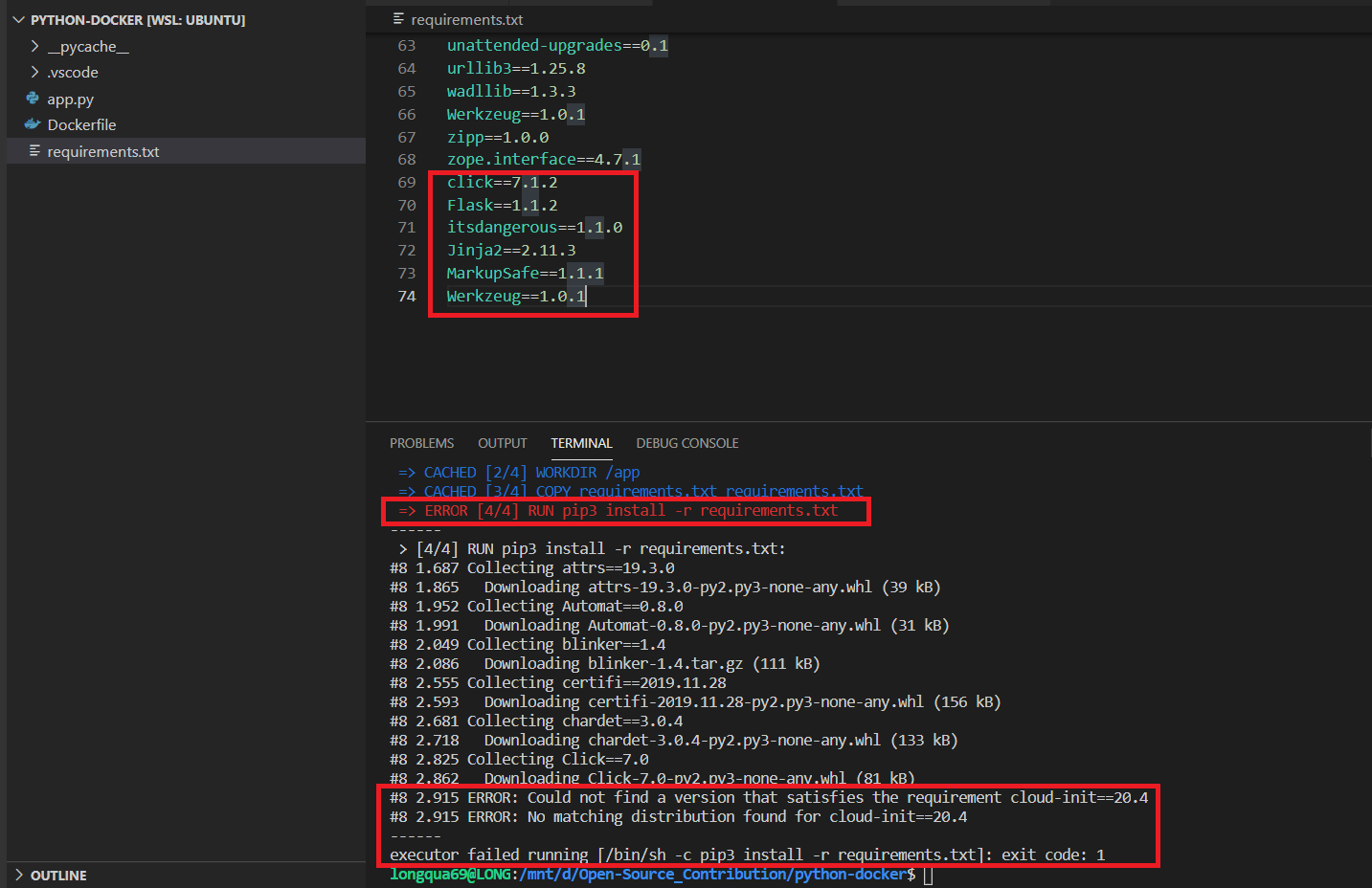
Do you have any idea?
longqua69
on 17 Mar 2021
No, replacing the contents, not appending
Your whole file must contain only what I sent you
Stig124
on 17 Mar 2021
Hi,
I got it. It works.
Thank you so much for your support.
Could you please share me what is the root cause? Do we need to add more notes in the document for helping other people?
Best regards,
Anh Tran
longqua69
on 17 Mar 2021
When you're doing pip freeze > requirements.txt you are reporting every packages installed (so you can have offline modules that can't be ported outside of the local machine (I think that cloud-init is one of those)...), not the one that you just installed
The usage of a virtual environnement is to shield packages from a project to interfere with one another (some projects require specific versions of packages).
Take it like a Docker container, you have :
- the
systempip (the host) where almost every piece of software (you still require root privileges to install packages on system pip) can look into to see what's installed,
- the
userpip (rootless install of docker) which require a specific user to run it and is shielded from the system pip (packages are installed on home directory in opposition with the system-wide pip)
And then a
virtualenvpip (a container), which is project-based, only that projects knows what is installed. The advantage ofpipenvover other pieces ofvenv-wrapper(the venv is a built-in python component and critical for any developper that does python) are it's ease of use, you runpipenv install <package>and then the venv is created, with only one command. And it's got a requirements.txt-like file that even auto-updates
And yes, I really believe that a mention of using a virtualenv is a thing to add
Stig124
on 17 Mar 2021
Hello @Stig124 ,
Thanks for your dedicated support. Now I can keep moving forward.
About your explanation, I haven't had enough knowledge to understand clearly what you've shared now. There are many terms that I've just known. But I can imagine the way it works because of your professional explanation.
For a clean, easy to self-study version of this document, could you please make a PR for closing this issue 😃? I think your explanation will be better than mine.
I'm waiting for your answer so I don't close this issue.
Best regards,
Anh Tran
longqua69
on 18 Mar 2021
Related issues
 etoews
·
3Comments
etoews
·
3Comments
 DanJ210
·
3Comments
DanJ210
·
3Comments
 AlexOQ
·
4Comments
AlexOQ
·
4Comments
 johnthagen
·
3Comments
johnthagen
·
3Comments
 skashmeri
·
3Comments
skashmeri
·
3Comments
Most helpful comment
No, replacing the contents, not appending
Your whole file must contain only what I sent you