Docker.github.io: localhost:8000 not working as expected from Part 2:Build And Run Your Image, from Get Started
Hi!
I am unable to exactly get the required results that the guide says I should be able to get at localhost:8000 for the tutorial discussed here: https://docs.docker.com/get-started/part2/ .
BACKGROUND DETAILS:
Some context first,
OS Details
Linux archlinux 5.5.3-arch1-1 #1 SMP PREEMPT Tue, 11 Feb 2020 15:35:41 +0000 x86_64 GNU/Linux
Docker Version
Docker version 19.03.5-ce, build 633a0ea838
Output of systemctl status docker:
● docker.service - Docker Application Container Engine
     Loaded: loaded (/usr/lib/systemd/system/docker.service; enabled; vendor preset: disabled)
     Active: active (running) since Tue 2020-03-17 15:28:52 PKT; 3 days ago
TriggeredBy: ● docker.socket
       Docs: https://docs.docker.com
   Main PID: 1252 (dockerd)
      Tasks: 58 (limit: 9151)
     Memory: 424.9M
     CGroup: /system.slice/docker.service
             ├─  1252 /usr/bin/dockerd -H fd://
             ├─  1271 containerd --config /var/run/docker/containerd/containerd.toml --log-level info
             ├─313473 /usr/bin/docker-proxy -proto tcp -host-ip 0.0.0.0 -host-port 8000 -container-ip 172.17.0.2 -container-port 8000
             ├─313481 containerd-shim -namespace moby -workdir /var/lib/docker/containerd/daemon/io.containerd.runtime.v1.linux/moby/db64d3df04196e93cc7efe6d3fa13a9b3ecc>
             ├─313499 npm
             ├─313573 sh -c node server.js
             └─313574 node server.js

Mar 21 00:05:54 archlinux dockerd[1252]: time="2020-03-21T00:05:54.620806486+05:00" level=info msg="Layer sha256:befdb4d8cfbe83dfb39ae7d2804772fd36958b789aa62a773dacee66>
Mar 21 00:06:51 archlinux dockerd[1271]: time="2020-03-21T00:06:51.781552108+05:00" level=info msg="shim containerd-shim started" address=/containerd-shim/c365c73f969423>
Mar 21 00:09:03 archlinux dockerd[1271]: time="2020-03-21T00:09:03.570647175+05:00" level=info msg="shim reaped" id=b9ed1f654f30ba1897db9ce66476f2dad3eb0ca7a8965220c0e83>
Mar 21 00:09:03 archlinux dockerd[1252]: time="2020-03-21T00:09:03.580594648+05:00" level=info msg="ignoring event" module=libcontainerd namespace=moby topic=/tasks/dele>
Mar 21 00:09:03 archlinux dockerd[1252]: time="2020-03-21T00:09:03.664830150+05:00" level=warning msg="b9ed1f654f30ba1897db9ce66476f2dad3eb0ca7a8965220c0e837f151e5ccb0 c>
Mar 21 00:09:05 archlinux dockerd[1271]: time="2020-03-21T00:09:05.843664935+05:00" level=info msg="shim containerd-shim started" address=/containerd-shim/6aff53868689de>
Mar 21 00:09:42 archlinux dockerd[1271]: time="2020-03-21T00:09:42.726869133+05:00" level=info msg="shim reaped" id=d24c643711ec78380e2e30e279ecc4f0c6a7b589b243a49e3232a>
Mar 21 00:09:42 archlinux dockerd[1252]: time="2020-03-21T00:09:42.737115153+05:00" level=info msg="ignoring event" module=libcontainerd namespace=moby topic=/tasks/dele>
Mar 21 00:09:42 archlinux dockerd[1252]: time="2020-03-21T00:09:42.826694112+05:00" level=warning msg="d24c643711ec78380e2e30e279ecc4f0c6a7b589b243a49e3232a079ed4d35bb c>
Mar 21 00:09:53 archlinux dockerd[1271]: time="2020-03-21T00:09:53.133884095+05:00" level=info msg="shim containerd-shim started" address=/containerd-shim/3cd12c240ae78f>
Output of docker info:
Client:
 Debug Mode: false

Server:
 Containers: 11
  Running: 1
  Paused: 0
  Stopped: 10
 Images: 54
 Server Version: 19.03.5-ce
 Storage Driver: overlay2
  Backing Filesystem: extfs
  Supports d_type: true
  Native Overlay Diff: false
 Logging Driver: json-file
 Cgroup Driver: cgroupfs
 Plugins:
  Volume: local
  Network: bridge host ipvlan macvlan null overlay
  Log: awslogs fluentd gcplogs gelf journald json-file local logentries splunk syslog
 Swarm: inactive
 Runtimes: runc
 Default Runtime: runc
 Init Binary: docker-init
 containerd version: d76c121f76a5fc8a462dc64594aea72fe18e1178.m
 runc version: dc9208a3303feef5b3839f4323d9beb36df0a9dd
 init version: fec3683
 Security Options:
  seccomp
   Profile: default
 Kernel Version: 5.5.3-arch1-1
 Operating System: Arch Linux
 OSType: linux
 Architecture: x86_64
 CPUs: 4
 Total Memory: 7.463GiB
 Name: archlinux
 ID: X3PV:5XFG:YX63:N7RY:BLAY:EUDN:CSKN:FDEX:73AS:OVLA:CF37:J5UH
 Docker Root Dir: /var/lib/docker
 Debug Mode: false
 Registry: https://index.docker.io/v1/
 Labels:
 Experimental: false
 Insecure Registries:
  127.0.0.0/8
 Live Restore Enabled: false
The browser used is Chromium
Chromium 80.0.3987.106 Arch Linux
STEPS TO REPRODUCE
The following commands were run by me to reach the issue
git clone https://github.com/dockersamples/node-bulletin-board
cd node-bulletin-board/bulletin-board-app
docker image build -t bulletinboard:1.0 .
docker container run --publish 8000:8080 --detach --name bb bulletinboard:1.0
Output of the last command is
bulletinboard:1.0
some_encryped_code_I_don't_think_should_show
The next instruction says:
"Visit your application in a browser at localhost:8000. You should see your bulletin board application up and running. At this step, you would normally do everything you could to ensure your container works the way you expected; now would be the time to run unit tests, for example."
Heading over to 'localhost:8000', I see three different pages by refreshing the page. These are:
1): This site can’t be reached. The webpage at http://localhost:8000/ might be temporarily down or it may have moved permanently to a new web address.
ERR_SOCKET_NOT_CONNECTED
2): This page isn’t working. localhost didn’t send any data.
ERR_EMPTY_RESPONSE
3): This site can’t be reached
The connection was reset.
Try:
Checking the connection
Checking the proxy and the firewall
ERR_CONNECTION_RESET
EXPECTED RESULT
Something like a hello world? Not sure what to expect, but pretty sure it's not a 404 page.
File: get-started/part2.md
 Rubix982
All 13 comments
I wasn't able to reproduce the issue. After running the same commands as you provided (from docker's get started page), I was able to browse localhost:8000 on my local machine.
You can try running docker ps -a to check if docker-machine is up and netstat -tunlp | grep 8000 to check if it is listening on port 8000.
 saadismail
on 22 Mar 2020
saadismail
on 22 Mar 2020
Output for netstat -tunlp | grep 8000,
tcp6 0 0 :::8000 :::* LISTEN 128346/docker-proxy
I can however see the process listed as 0.0.0.0:8000 by using docker ps -a,
854b7821690d bulletinboard:1.0 "docker-entrypoint.s…" 4 minutes ago Up 4 minutes 0.0.0.0:8000->8000/tcp, 8080/tcp bb
Heading over to http://0.0.0.0:8000/, I get the same errors.
Can you list down what version you are using and what OS you are operating with the kernel version? I remember I had 5.3.0 before, and using sudo systemctl status docker with that version gave me a warning from Docker that it will be unable to utilize those features because of the kernel version.
I updated my kernel since then to 5.5.3-arch1.1 now, and those warnings have been removed.
For context, I again ran the two commands just now - no use,
docker image build -t bulletinboard:1.0 .
docker container run --publish 8000:8080 --detach --name bb bulletinboard:1.0
I am also getting the same issue. For me the command netstat -tunlp | grep 8000 does not return any result but the param documentation.
The $ docker ps -a returns the contained id and the bulletinboard:1.0 under image and 0.0.0.0:8000->8080/tcp under ports
When I go to localhost:8000 on my browser, I am getting localhost refused to connect.
I am not seeing the docker icon on the system stray either as mentioned in the exercise to check for switch to linux containers.
Any suggestions to get over this ?
Thanks
Bajrang
 BXK20
on 26 Apr 2020
BXK20
on 26 Apr 2020
@BXK20
Can you show the output for sudo systemctl status docker, or if you have a different OS than me - I have Arch Linux - try systemd instead. It should be green for you, which would mean Docker is running fine in the background.
For localhost refused to connect, try the below suggestions, from here

Rubix982
on 26 Apr 2020
Hi, I am on Windows 10 home edition, and running the commands using the docker provided interactive shell. Both the mentioned commands are not recognized in there.
The command systemctl status docker OR systemd on the VM with linux is not recognized.
I ran command docker ps and it lists the container and its name and it shows under ports 0.0.0.0.8000->8080/tcp.
Thanks
Bajrang
BXK20
on 27 Apr 2020
I was unable to run this example as well, though I found another and it worked for me, perhaps you can try that?
https://hub.docker.com/r/misaogura/whalesay/
Other than that, I think docker is working fine, and it could be something up with the image itself. I've used docker, docker-compose elsewhere, and have not run into any issues similar to this, so perhaps the examples need to be updated.
If you're worried about docker being properly setup, you can run which docker in Linux.
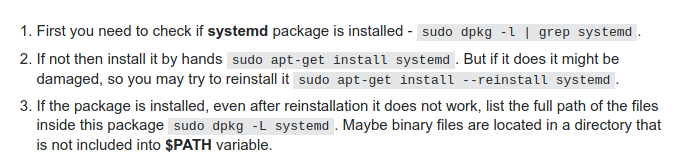
The command systemctl status docker OR systemd on the VM with linux is not recognized.
Which distro are you using? I'm supposing it's Ubuntu. The instructions for getting systemd to work are attached below in the screenshot, from here,
Rubix982
on 28 Apr 2020
Hi the same issue is on my PC.
I cannot connect to bulletin-board-app(ERR_CONNECTION_REFUSED) if it runs under docker.
I can connect to bulletin-board-app and work with it if it runs under Windows.
Environment
1 I use Windows 10 64 Home Edition
- See an attachment docker-version.png for docker verion

- See an attachment build-process.png for docker status

- "netstat -a" doesnot show that 8000 is LISTENING by any process.
 iusaspb
on 4 May 2020
iusaspb
on 4 May 2020
I found out what 's wrong on Windows.
You must set port forwarding in Virtualbox manually.
For instance if you set 8000->8000 forwarding in VirtualBox,
you can complete https://docs.docker.com/get-started/part2/
Sergey
iusaspb
on 4 May 2020
I have another possible explanation. As my tired head tried to type the code and didn't notice it's 8000 to 8080, not to 8000. It may, of course, be some configuration issue, but may also be a typo.
 panjakub
on 21 Jun 2020
panjakub
on 21 Jun 2020
I found out what 's wrong on Windows.
You must set port forwarding in Virtualbox manually.
For instance if you set 8000->8000 forwarding in VirtualBox,
you can complete https://docs.docker.com/get-started/part2/
Sergey
Hello everybody
Thanks iusaspb for your help
I changed ports in VirtualBox following this post: https://www.howtogeek.com/122641/how-to-forward-ports-to-a-virtual-machine-and-use-it-as-a-server/#:~:text=To%20forward%20ports%20in%20VirtualBox%2C%20first%20open%20a%20virtual%20machine's,click%20the%20Port%20Forwarding%20button.
changing host and guest port to 8000 then docker run --publish 8000:8080 --detach -name bb bulletinboard:1.0 and worked
I not need to disable windows firewall

 Sebastian30
on 6 Jul 2020
Sebastian30
on 6 Jul 2020
I have another possible explanation. As my tired head tried to type the code and didn't notice it's 8000 to 8080, not to 8000. It may, of course, be some configuration issue, but may also be a typo.
Thank you, this was exactly my problem as well!
 cyanoptic
on 17 Aug 2020
cyanoptic
on 17 Aug 2020
I think we can all agree to use fonts that don't confuse 8 with 0. Glad it helped, @cyanoptic !
Rubix982
on 17 Aug 2020
I have another possible explanation. As my tired head tried to type the code and didn't notice it's 8000 to 8080, not to 8000. It may, of course, be some configuration issue, but may also be a typo.
Thank you panjakub, you fixed it for me!
 deniskleincj27
on 9 Oct 2020
deniskleincj27
on 9 Oct 2020
Related issues
 londoncalling
·
5Comments
londoncalling
·
5Comments
 joaofnfernandes
·
3Comments
joaofnfernandes
·
3Comments
 johnthagen
·
3Comments
johnthagen
·
3Comments
 AlexOQ
·
4Comments
AlexOQ
·
4Comments
 skashmeri
·
3Comments
skashmeri
·
3Comments
Most helpful comment
I found out what 's wrong on Windows.
You must set port forwarding in Virtualbox manually.
For instance if you set 8000->8000 forwarding in VirtualBox,
you can complete https://docs.docker.com/get-started/part2/
Sergey