Docker.github.io: "docker-machine create" using Hyper-V driver generates IPv6 address
File: machine/drivers/hyper-v.md, CC @londoncalling
I am not able to get the same result as advertised on this page. Instead, I get the following output.
PS C:WINDOWSsystem32> docker-machine create -d hyperv --hyperv-virtual-switch ### _"virtualSwitchAndBridge" worker2
Running pre-create checks...
Creating machine...
(worker2) Copying C:Userssshrestha.GOLO.dockermachinecacheboot2docker.iso to C:Userssshrestha.GOLO.dockermachinemachinesworker2boot2docker.iso...
(worker2) Creating SSH key...
(worker2) Creating VM...
(worker2) Using switch "virtualSwitchAndBridge"
(worker2) Creating VHD
(worker2) Starting VM...
(worker2) Waiting for host to start...
Waiting for machine to be running, this may take a few minutes...
Detecting operating system of created instance...
Waiting for SSH to be available...
Detecting the provisioner...
Provisioning with boot2docker...
Copying certs to the local machine directory...
Copying certs to the remote machine...
Setting Docker configuration on the remote daemon...
This machine has been allocated an IP address, but Docker Machine could not
reach it successfully.
SSH for the machine should still work, but connecting to exposed ports, such as
the Docker daemon port (usually
You may need to add the route manually, or use another related workaround.
This could be due to a VPN, proxy, or host file configuration issue.
You also might want to clear any VirtualBox host only interfaces you are not using.
Checking connection to Docker...
Docker is up and running!
To see how to connect your Docker Client to the Docker Engine running on this virtual machine, run: C:Program FilesDockerDockerResourcesbindocker-machine.exe
env worker2_
Running "docker-machine ip worker2" gives me IPv6 address ad follows.
fe80::215:5dff:fe01:2213
I bounced the VM, got the same IPv6 address.
Running "docker-machine ls" gives me this error.
NAME ACTIVE DRIVER STATE URL SWARM DOCKER ERRORS
worker2 - hyperv Running tcp://192.168.1.37:2376 Unknown Unable to query docker version: Get https://192.168.1.37:2376/v1.15/version: x50
9: certificate is valid for fe80::215:5dff:fe01:2213, not 192.168.1.37
 samdevx1029
All 22 comments
You may have better luck if you set up a new external network switch, as shown here: https://docs.docker.com/machine/drivers/hyper-v/#example .
 JimGalasyn
on 3 Apr 2017
JimGalasyn
on 3 Apr 2017
@JimGalasyn thanks, exactly.
@samdevx1029 please let me know if the external network switch solves your problem. (It definitely won't work without it.)
 londoncalling
on 4 Apr 2017
londoncalling
on 4 Apr 2017
Claimed,
I tried to reproduce what occurred using a fresh install with the same switch name "virtualSwitchAndBridge".
I did not reboot as the example suggested to see if maybe this is what caused the issue reported. This did not get me hung up on "waiting for vm to start" as the example alluded to. Everything in the example worked without any issues and I was able to create all three machines.
After removing all three machines I started over.
I set the virtual switch to "internal" and received the same error reported in this issue
"This machine has been allocated an IP address, but Docker Machine could not
reach it successfully."
It also received an IPv6 address as reported in "docker-machine ip", but I did not see an IPv4 address when running "docker-machine ls" like this issue, so that was the only difference.
I then tried the virtual switch to "private" and it got hung up on
"Waiting for SSH to be available…"
Even though in Hyper-V manager I can see worker1 was created and it has an address, I gave up waiting after several minutes and cancelled command. "docker-machine ls" also produced a "timeout" state for this machine. The machine was removed without an issue.
I then set the virtual switch back to "external" and was able to create all three machines again without any issues.
So I would say this can be closed.
 stevenhanna6
on 21 Apr 2017
stevenhanna6
on 21 Apr 2017
@stevenhanna6 Thank you for the thorough test to try to reproduce. Sounds exactly right to me, and validates our Hyper-V instructions to create the external network switch. How about this .. Can you create a PR to add a couple of things to possibly help avoid this problem in future? (Either way, we'll credit you the full points for this issue.)
Below are my ideas for making this clearer without _too_ much heaviness, but if you have others, please suggest.
Bold the phrase
external network switchin the sentence under the first screen snap, as follows: "Set up a new external network switch to use instead of DockerNAT network switch (for Moby), which is set up by default when you install Docker for Windows. (Or if you already have another network switch set up, you can use that one.)"Extend the parenthetical remark at the end of that sentence as follows: (Or if you already have another network switch set up, you can use that one, but it must be an _external_ switch.)
londoncalling
on 21 Apr 2017
I put bold on the last external word as well, should be clear as day now.
stevenhanna6
on 21 Apr 2017
@stevenhanna6 Beautiful! 🙂 👍
londoncalling
on 21 Apr 2017
Points to @stevenhanna6 for the work to thoroughly test this, and improve the note.
londoncalling
on 24 Apr 2017
I've got the exact same issue. Running on Windows 10 - Hyper V.
docker-machine creates machines with IPv6 - this is whilst the host uses IPv4 and they don't find each other. The context is - I've been trying to setup a swarm with one manager (IPv4) and three workers (IPv6 - expectedly..).
 goudarzi
on 10 Apr 2018
goudarzi
on 10 Apr 2018
I have a similar problem. I followed the tutorial at https://docs.docker.com/get-started/part4/#understanding-swarm-clusters and created an external virtual switch and then created a VM with docker-machine create -d hyperv -hyperv-virtual-switch "myswitch" myvm1
Works fine. However, the IP address of myvm1 is IPv6 and when I try to set the VM as a manager with docker-machine ssh myvm1 "docker swarm init --advertise-addr [fe80::215:5dff:fe0c:3725]" I get the error message: "Error response from daemon: advertise address must be a non-zero IP address or network interface (with optional port number)"
 mafritsch
on 28 Aug 2018
mafritsch
on 28 Aug 2018
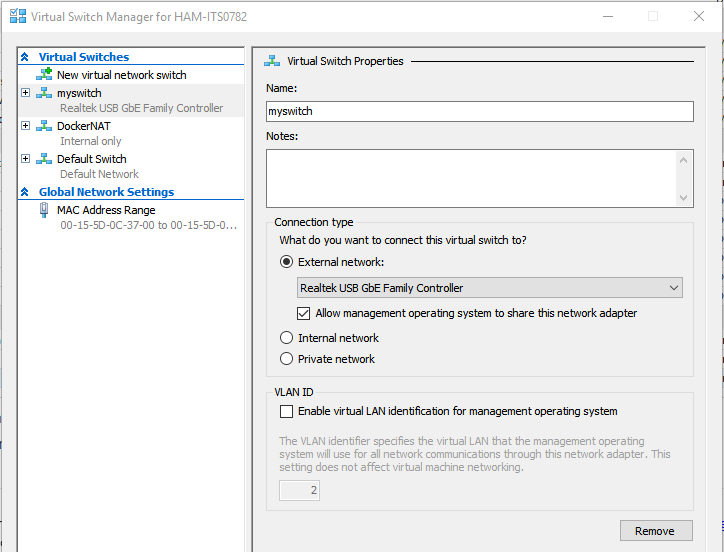
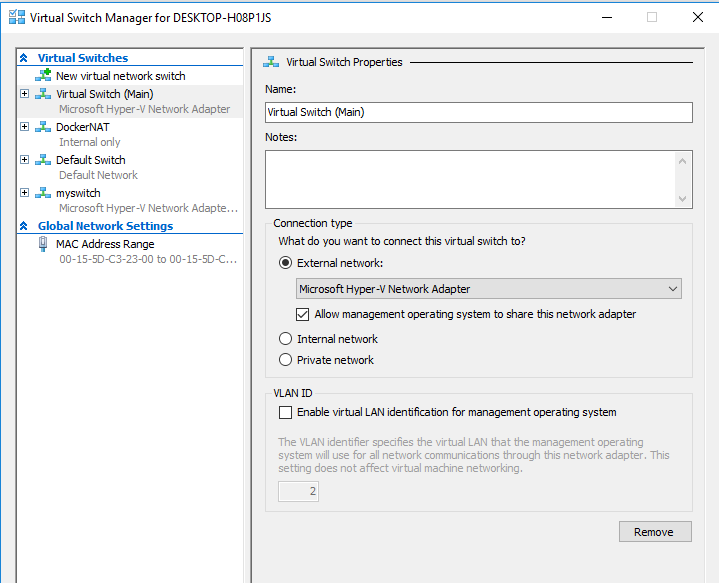
@mafritsch can you do me a favor and take a screen snap of your Virtual Switch Manager to verify that the switch you created was on an external network as shown on the screen snap in this example? We've tested this several times, and never been able to reproduce the problem except when the switch is created on an internal network (per previous comments on this thread).
I'll work through the example again later tonight, as well, to see if it's still working for me.
londoncalling
on 29 Aug 2018
Sure thing:
mafritsch
on 29 Aug 2018
@mafritsch thanks for the screen snap, I got swamped with work (not at Docker anymore) and I had to install Windows 10 on VirtualBox, but I'll walk through the procedures again tonight and see if I can reproduce your problem.
londoncalling
on 30 Aug 2018
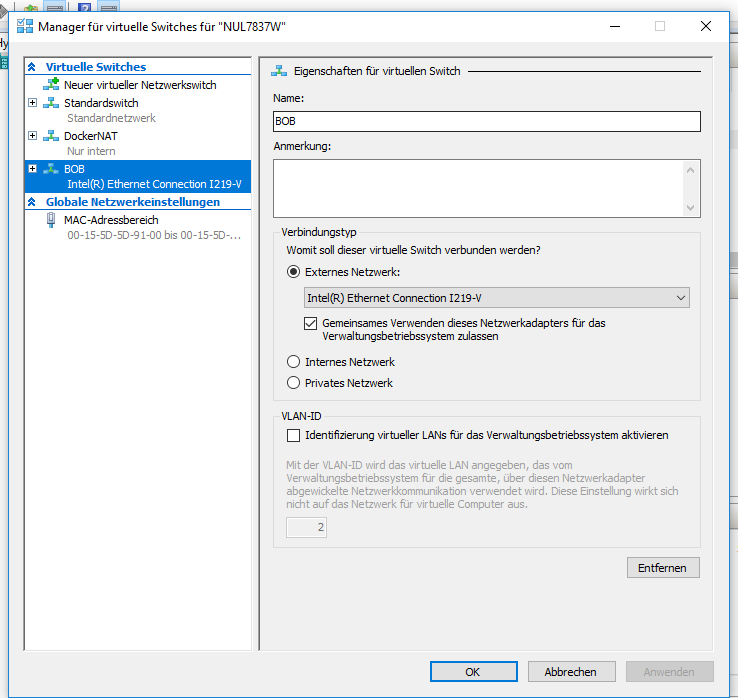
hi @londoncalling @mafritsch did you get the Topic solved? I'm running on the same Situation here. I'm trying to carry out the swarm sample/tutorial for docker. I've created the virtual Switch (external type) and 2 virtual machines running boot2docker. However when I issue a docker-machine ls I get such ips tcp://[fe80::215:5dff:fe5d:9126]:2376 and both vms Display an error
Unable to query docker version: Get https://[fe80::215:5dff:fe5d:9126]:2376/v1.15/version: dial tcp [fe80::215:5dff:fe5d:9126]:2376: connectex: A socket operation was attempted to an unreachable network
Here's how my virtual Switch Looks like:
 munozm01
on 15 Jan 2019
munozm01
on 15 Jan 2019
Hi @munozm01, I've never got the topic solved, sorry.
mafritsch
on 15 Jan 2019
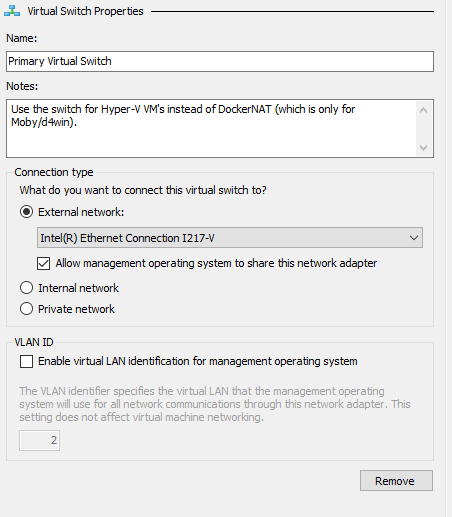
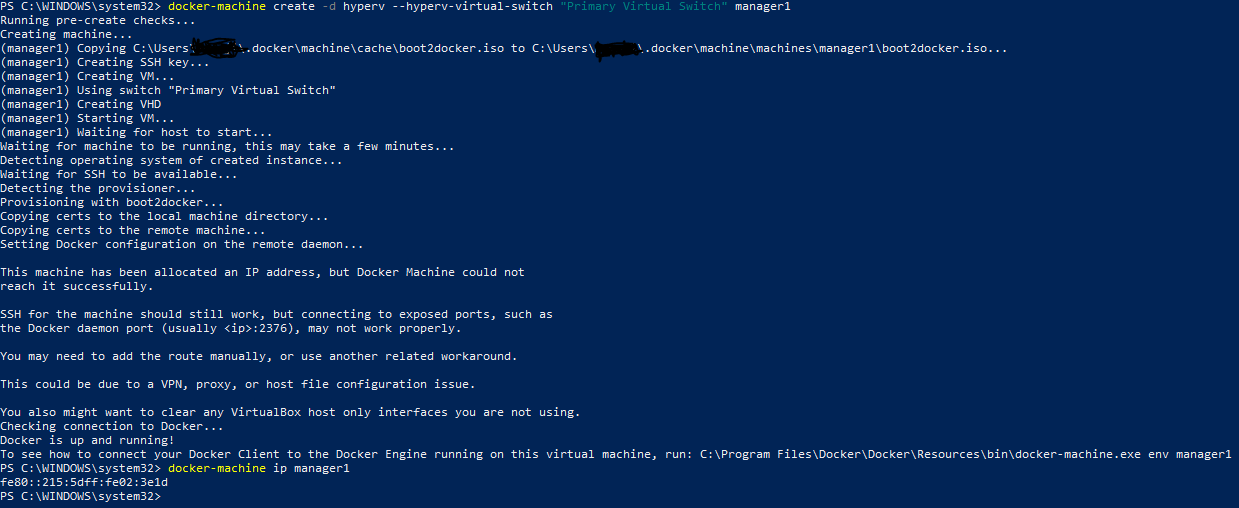
I am facing similar issue even after creating external virtual switch. I am wondering if anyone was able to solve this issue.
 manusebastiank
on 15 Jan 2019
manusebastiank
on 15 Jan 2019
Anyone able to resolve this? I'm seeing the same issue with the Intel(R) Ethernet Connection I218-V. It's a little suspicious that everyone who's reporting this issue is using an Ethernet external network, so I'm guessing that's where the issue lies. But I'm not exactly sure what's going on.
 yashpatel5400
on 20 Mar 2019
yashpatel5400
on 20 Mar 2019
@yashpatel5400 are you using OpenSSH? (see https://github.com/PowerShell/Win32-OpenSSH/issues/1155)
The external network switch is necessary (internal switch won't work). I was never able to reproduce the error. The example here is based on my walkthrough.
londoncalling
on 21 Mar 2019
Having the same issues also.
Not sure if this would make a difference; I am running a windows 10 VM within Hyper-V (also Windows 10) where I run docker.
So far the only difference I found is the ipv6 addresses being generated.
I had to switch on the nested virtualization on my host:
Set-VMProcessor -VMName "
On my guest:
Or do I potentially need to make changes the way I've setup my network adapter on my host?
 pimbogels
on 2 May 2019
pimbogels
on 2 May 2019
Stuck on the same issue. Followed the docker documentation for external switch. Any resolution?
 devanshujoshi
on 19 May 2019
devanshujoshi
on 19 May 2019
Since many are still stuck, as I was after following the above, your issue might = mine. I did the following and was able to get vm on Win10 to instantiate with IPv4 after I ran into same issue from part 4 where IPv6 addresses were populated when already running an EXTERNAL switch.
The solution was to switch networks and then rebuild vms! Easy and peasy! I would get IPv6 @ Starbucks but IPv4 at home.
Now with IPv4 adds, docker allows me to assign workers to swarm. Hope helps!
 sleethma
on 24 Jun 2019
sleethma
on 24 Jun 2019
Hi All,
I have noticed a lot (like me) are/were facing issues with Worker Nodes not able to join Swarm Cluster (IPv6 address assigned to VMs and not IPv4) even after creating a new External Network Switch. As it stands, besides an External Network Switch, it is also important which Network Card/Adapter the External Switch is using, i.e. whether the same is enabled and has Internet Connectivity. Unless the Adapter has strong & stable Internet connection, the External Switch won't have any !
At least for me, the Network Adapter was the issue and I believe it was something similar for @sleethma , who has mentioned switching networks worked for him. Please find below a detailed description of the issue and the steps for resolution.
****** ISSUE DESCRIPTION - START ******
I have tried setting up a 3-node Swarm Cluster. The approach taken was via the docker-machine create command to generate the VMs, only difference is I used the Hyper-V driver instead of Virtual Box. The Manager Node - myvm1 is created fine but has some warnings as marked in the screenshot below.

Same goes for the Worker Node - myvm2.

The Virtual Switch created - Primary External Virtual Switch is as follows.

And the Ethernet Adapter it connects to.

Now, I create a Swarm in the Manager Node - myvm1 successfully.

Next, when I try to join the Worker Node - myvm2 to this Swarm Cluster, get the following error.

I researched a lot but couldn't figure out the exact cause, but believe it has to do something with the warnings issued at the time of VM creation as highlighted in my initial screenshots for the same.
My Host System Docker Configuration:-

****** ISSUE DESCRIPTION - END ******
****** SOLUTION - AT A LATER DATE******
I was more or less sure the Network Adapter (VirtualBox Host-Only Network) selected for my Virtual Switch (i.e. Primary External Virtual Switch) is causing the issue. I was in two minds about the choice of Network Card/Adapter for the External Switch. Whatever instructions/demos/blog posts are available over the Internet, all seemed to use the Wireless Adapter on the Host Machine.
Note:- It is highly imperative the Network Card/Adapter you choose for connection with the External Switch is Enabled & has an Internet Connection.

Hence, I had to choose between the following two options. I don't have a physical LAN and hence Wi-Fi was the only option for me.

Step 1 - Tried to use the Network Adapter for my Wi-Fi with the Virtual Switch.

Step 2 - But then strangely the Host machine could no longer connect to the Internet via Wifi. Resolved it by clicking on the Diagnose option for the External Virtual Switch and taking Windows Corrective actions (apparently DHCP was not enabled).
As seen below, my "Primary External Virtual Switch" has now Internet Access !! Also, note a new Network Bridge has been created. Couldn't figure out much about it, but this came into existence when I updated the Network Adapter for the External Virtual Switch in Step 1 above.

Soon after, the Control panel view was updated and the Wi-Fi status showed Enabled & Bridged. Whereas, the External Switch status of Disabled also got updated.

Step 3 - Moved to my Powershell (Open as Administrator otherwise Hyper-V commands don't execute). Tried creating a new VM - myvm1. Was successful without any warnings and the IP address assigned for my VM was an IPv4 address.

Step 4 - Next, tried creating a second VM - myvm2. Was successful without any warnings and the IP address assigned for my VM was an IPv4 address.

Step 5 - Till now, all good. Moved on to create a Swarm in myvm1. Swarm created successfully, without me needing to pass the myvm1 ip address as --advertise-addr with the "docker swarm init" command. It recognises and picks up the same automatically (see marked text below).

Step 6 - Attempted to join the other VM - myvm2 to the Swarm. Was Successful !!

Below steps are not for troubleshooting, just executed some activities in addition to Swarm creation & joining
Step 7 - Now, tried updating myvm2 status from Worker to Manager.

Step 8 -Tried accessing the Swarm status from myvm2 as it is now a Manager. Success!! (red -> before status was Manager / blue - after got promoted to Manager).

Step 9 -Tried creating a new Service within the Swarm from Leader node - myvm1. Success!! (red -> myvm2 task / pink - myvm1 task).

1) It is very important that an External Virtual Switch is created for use as the Hyper-V Virtual Switch (while creating VMs using docker-machine create command).
2) Likewise, it is equally important the Network Adapter/Card chosen for use with the External Virtual Switch is enabled and has Internet Connectivity.
Hope this helps. Also, as others have been facing similar issues, would love to know if and how they got it resolved ( @goudarzi , @mafritsch , @manusebastiank , @yashpatel5400 , @pimbogels , @devanshujoshi ).
Thanks,
Arnab
 Suvro15
on 7 Jul 2019
Suvro15
on 7 Jul 2019
For me, it has been resolved by using the default switch that has been pre-configured in my machine, I am using Windows 10 Pro/Hyper-V.
 argalx
on 25 Sep 2019
argalx
on 25 Sep 2019
Related issues
 skashmeri
·
3Comments
skashmeri
·
3Comments
 rvernica
·
3Comments
rvernica
·
3Comments
 MicheleMannino
·
4Comments
MicheleMannino
·
4Comments
 sslavic
·
3Comments
sslavic
·
3Comments
 DanJ210
·
3Comments
DanJ210
·
3Comments
Most helpful comment
Claimed,
I tried to reproduce what occurred using a fresh install with the same switch name "virtualSwitchAndBridge".
I did not reboot as the example suggested to see if maybe this is what caused the issue reported. This did not get me hung up on "waiting for vm to start" as the example alluded to. Everything in the example worked without any issues and I was able to create all three machines.
After removing all three machines I started over.
I set the virtual switch to "internal" and received the same error reported in this issue
"This machine has been allocated an IP address, but Docker Machine could not
reach it successfully."
It also received an IPv6 address as reported in "docker-machine ip", but I did not see an IPv4 address when running "docker-machine ls" like this issue, so that was the only difference.
I then tried the virtual switch to "private" and it got hung up on
"Waiting for SSH to be available…"
Even though in Hyper-V manager I can see worker1 was created and it has an address, I gave up waiting after several minutes and cancelled command. "docker-machine ls" also produced a "timeout" state for this machine. The machine was removed without an issue.
I then set the virtual switch back to "external" and was able to create all three machines again without any issues.
So I would say this can be closed.