Docfx: Main nav bar does not collapse when items are added to the dropdown
DocFX Version Used: 2.32.2
Template used: (default or statictoc or contain custom template) default + custom
Steps to Reproduce:
- Add dropdown items to the main nav bar
- name: Guides
  href: articles/
- name: API
  items:
  - name: REST API
    href: restapi/
  - name: Plugins
    href: obj/api/
Expected Behavior: In this example, the nav bar would expand when you hover over "API"
Actual Behavior: The "dropdown" items are permanently stacked in an open position

Thank you.
 cedar-ave
All 14 comments
Yes, currently only 1 level navbar is supported....... Need css/js/html update to support deeper levels.
 vicancy
on 23 Mar 2018
vicancy
on 23 Mar 2018
Thank you @vicancy
cedar-ave
on 23 Mar 2018
Is there an eta for fixing it please? :-)
 cblackuk
on 5 Jun 2018
cblackuk
on 5 Jun 2018
I've written a basic fix here. The Readme provides the steps to fix the issue in a blank project, so should be portable to other projects as it only modifies a copy of the default DocFX template.
 ollie-nye
on 1 Aug 2018
ollie-nye
on 1 Aug 2018
@ollie-nye Thanks a lot for that! Outstanding job!
cblackuk
on 1 Aug 2018
@ollie-nye Looks great! Would mind creating a PR to DocFX's main source base? Thank you.
 superyyrrzz
on 1 Aug 2018
superyyrrzz
on 1 Aug 2018
@cedar-ave @ollie-nye Thank you for contribution. The feature is released in v2.38.
superyyrrzz
on 13 Aug 2018
Thank you very much @ollie-nye !
cedar-ave
on 14 Aug 2018
How to modify nav CSS style in 2.38 ?
 WanderWang
on 5 Sep 2018
WanderWang
on 5 Sep 2018
It's possible to add a dropdownlist to the TOC (I want to use it for project versions) like in MSDN?

Thank you,
 mohaOujda
on 16 Apr 2019
mohaOujda
on 16 Apr 2019
@WanderWang See this, and modify docfx.css.
@mohaOujda The theme for docs.microsoft.com is not open source. There is no easy way to achieve this for now.
superyyrrzz
on 16 Apr 2019
DocFX Version Used: .2.42.3
Template used: (default or statictoc or contain custom template) default + custom
Steps to Reproduce:
Add dropdown items to the main nav bar
- name: API Documentation
dropdown: true
href: articles/
items:
- name: "Common"
href: api/api-common - name: "SDK Note"
href: https://www.lesoir.be/
- name: "Common"
- name: Web Services
dropdown: true
href: articles/
items:
- name: "SOAP"
href: api/index.md - name: "Core"
href: api/api-core
- name: "SOAP"
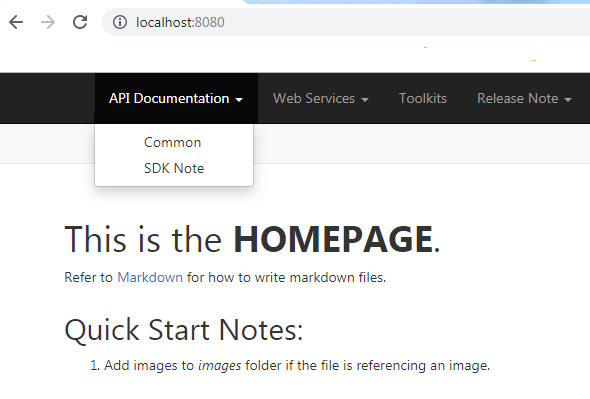
when I click in the menu the page dosn't change i stay in http://localhost:8080/ (href dosn't work)
any idea,
Thanks,
mohaOujda
on 22 May 2019
You have a href key (articles/) under the top level drop down item, that might be causing the problem. Try removing it, see if that helps?
ollie-nye
on 23 May 2019
Thanks ollie-nye, It s work and I added a "/" at the end foreach href
mohaOujda
on 28 May 2019
Related issues
 mjangid
·
3Comments
mjangid
·
3Comments
 FSharpCSharp
·
4Comments
FSharpCSharp
·
4Comments
 SimonSchulte
·
3Comments
SimonSchulte
·
3Comments
 mgregory22
·
3Comments
mgregory22
·
3Comments
 weirdyang
·
4Comments
weirdyang
·
4Comments
Most helpful comment
I've written a basic fix here. The Readme provides the steps to fix the issue in a blank project, so should be portable to other projects as it only modifies a copy of the default DocFX template.