Docfx: Metadata generation is broken after upgrade to VS 2017 15.5
Hi,
I've updated Visual Studio 2017 to the latest update (15.5.0) and started to get new warnings when building metadata. As a result, no API documentation is generated.
d:\Test\Docs>docfx docfx.json --serve
[17-12-05 03:29:18.357]Info:[MetadataCommand.ExtractMetadata]Using msbuild C:\Program Files (x86)\Microsoft Visual Studio\2017\Enterprise\MSBuild15.0\Bin as inner comipiler.
[17-12-05 03:29:19.625]Warning:[MetadataCommand.ExtractMetadata]Workspace failed with: [Failure] Msbuild failed when processing the file 'd:\Test\Test.csproj' with message: Invalid static method invocation syntax: "[MSBuild]::IsRunningFromVisualStudio()". Method '[MSBuild]::IsRunningFromVisualStudio' not found. Static method invocation should be of the form: $([FullTypeName]::Method()), e.g. $([System.IO.Path]::Combine(a,b)). C:\Program Files (x86)\Microsoft Visual Studio\2017\Enterprise\MSBuild15.0\Bin\Microsoft.Common.CurrentVersion.targets
[17-12-05 03:29:19.687]Warning:[MetadataCommand.ExtractMetadata]Project 'd:\Test\Test.csproj' does not contain any documents.
[17-12-05 03:29:19.995]Warning:[MetadataCommand.ExtractMetadata]No metadata is generated for Test.
[17-12-05 03:29:20.005]Info:[MetadataCommand]Completed Scope:MetadataCommand in 1811.9466 milliseconds.
This is obviously not DocFX issue itself, but since DocFx depends on MSBuild...
DocFX Version Used: 2.28.1
Template used: default
 andreycha
All 14 comments
Hi @andreycha any special to test.csproj? would you mind sharing me the test project?
 vicancy
on 6 Dec 2017
vicancy
on 6 Dec 2017
According to https://github.com/Microsoft/msbuild/issues/2775, looks like it's time for docfx to update MSBuild references
vicancy
on 6 Dec 2017
Sorry, this is a proprietary code, I just masked paths and project name. But the very same issue I also have with docfx-seed project.
andreycha
on 6 Dec 2017
@andreycha according to https://github.com/Microsoft/msbuild/issues/2775 just "Upgrade Microsoft.Build to v15.5". I don't know how to upgrade msbuild (do you?)
 mmunchandersen
on 6 Dec 2017
mmunchandersen
on 6 Dec 2017
@mmunchandersen it should be updated in DocFx, see https://github.com/dotnet/docfx/pull/2267. So I'll just wait for the new version. Luckily it doesn't affect my builds, I just noticed this on dev machine.
@vicancy the only thing bothering that it's already the second case in a short period of time when DocFx breaks after VS update...
andreycha
on 6 Dec 2017
I've reproduced this just now. 3 files:
StaticMethod.csproj:
<Project Sdk="Microsoft.NET.Sdk">
  <PropertyGroup>
    <TargetFramework>netstandard2.0</TargetFramework>
  </PropertyGroup>
</Project>
Class1.cs:
namespace StaticMethod
{
    public class Class1
    {
    }
}
docfx.json:
{
  "metadata": [
    {
      "src": [ { "files": [ "StaticMethod.csproj" ] } ],
      "dest": "obj/api"
    }
  ]
}
Run docfx metadata:
[17-12-06 01:27:40.883]Info:Config file docfx.json found, start generating metadata...
[17-12-06 01:27:40.949]Info:[ExtractMetadata]Using msbuild C:\Program Files (x86)\Microsoft Visual Studio\2017\Community\MSBuild\15.0\Bin as inner comipiler.
[17-12-06 01:27:42.703]Warning:[ExtractMetadata]Workspace failed with: [Failure] Msbuild failed when processing the file 'c:\Users\jon\Test\Projects\Issues\docfx\StaticMethod\StaticMethod.csproj' with message: Invalid static method invocation syntax: "[MSBuild]::IsRunningFromVisualStudio()". Method '[MSBuild]::IsRunningFromVisualStudio' not found. Static method invocation should be of the form: $([FullTypeName]::Method()), e.g. $([System.IO.Path]::Combine(`a`, `b`)).   C:\Program Files (x86)\Microsoft Visual Studio\2017\Community\MSBuild\15.0\Bin\Microsoft.Common.CurrentVersion.targets
[17-12-06 01:27:42.807]Warning:[ExtractMetadata]Project 'c:\Users\jon\Test\Projects\Issues\docfx\StaticMethod\StaticMethod.csproj' does not contain any documents.
[17-12-06 01:27:43.339]Warning:[ExtractMetadata]No metadata is generated for StaticMethod.
[17-12-06 01:27:43.351]Info:Completed in 2425.4725 milliseconds


Build succeeded with warning.
[17-12-06 01:27:43.363]Warning:[ExtractMetadata]Workspace failed with: [Failure] Msbuild failed when processing the file 'c:\Users\jon\Test\Projects\Issues\docfx\StaticMethod\StaticMethod.csproj' with message: Invalid static method invocation syntax: "[MSBuild]::IsRunningFromVisualStudio()". Method '[MSBuild]::IsRunningFromVisualStudio' not found. Static method invocation should be of the form: $([FullTypeName]::Method()), e.g. $([System.IO.Path]::Combine(`a`, `b`)).   C:\Program Files (x86)\Microsoft Visual Studio\2017\Community\MSBuild\15.0\Bin\Microsoft.Common.CurrentVersion.targets
[17-12-06 01:27:43.365]Warning:[ExtractMetadata]Project 'c:\Users\jon\Test\Projects\Issues\docfx\StaticMethod\StaticMethod.csproj' does not contain any documents.
[17-12-06 01:27:43.365]Warning:[ExtractMetadata]No metadata is generated for StaticMethod.
        3 Warning(s)
        0 Error(s)
 jskeet
on 6 Dec 2017
jskeet
on 6 Dec 2017
Hi @andreycha Yes I totally understand your concern, I am now setting up CI jobs https://github.com/docascode/docfx.test to test docfx metadata against different projects on different platforms, to catch potential issues beforehand.. Please feel free to let me know your concerns and suggestions.
vicancy
on 7 Dec 2017
2.28.2 should've fixed the issue
vicancy
on 7 Dec 2017
@vicancy having build configuration on Windows with latest VS 2017 sounds good 👍 .
andreycha
on 9 Dec 2017
This issue either wasn't fixed, or has re-occurred with the latest VS 15.8.2.
Leaves me to ask. Why does a documentation generation tool include msbuild binaries such that they keep getting out of sync. This seems like a bad design that just updated the docfx version of the dependency is sweeping under the rug. Isn't it time to re-think the design so this doesn't keep happening?
 smaillet
on 1 Sep 2018
smaillet
on 1 Sep 2018
cc @herohua @superyyrrzz for awareness.
vicancy
on 3 Sep 2018
@smaillet I believe this has been fixed in v2.39.1 that just released.
You know DocFX can generate documents from .cs source code, which relies on MSBulid to open solutions or projects. It's needed in current design, while I agree that it's annoying to keep this in sync manually. We will consider improving it in v3.
 superyyrrzz
on 4 Sep 2018
superyyrrzz
on 4 Sep 2018
@superyyrrzz
That version (2.39.1) has not actually released for the docfx.console NUGET package, The package doesn't seem to get updated regularly (The latest package is at 2.36.2), so while it might be fixed in some internal builds as far as those of us using NUGET with the build integration, it's not there yet.
smaillet
on 4 Sep 2018
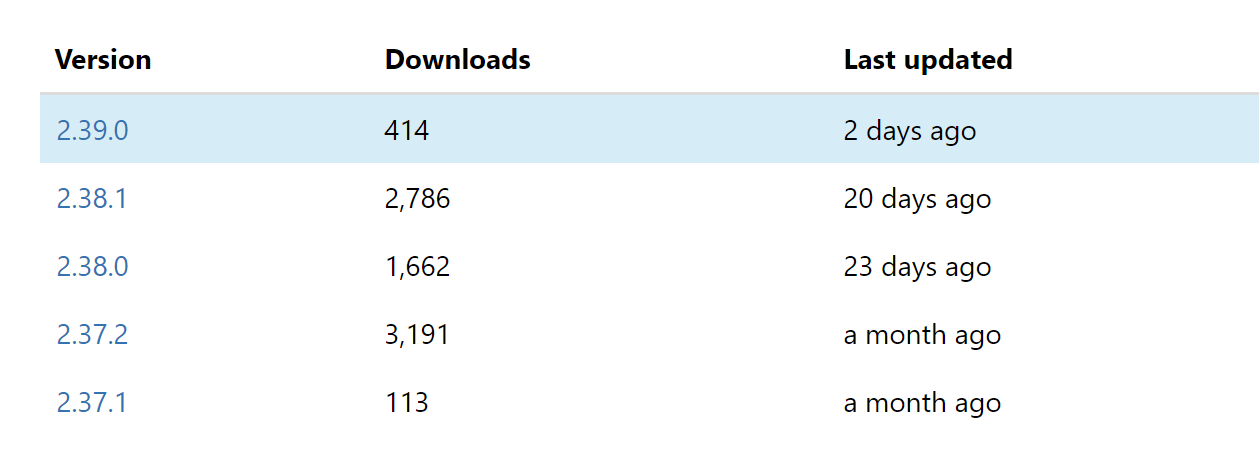
The latest package is at 2.36.2
I can see the latest 2.39 is published 2 days ago, which should also fix this issue. Of course, 2.39.1 is missed on Nuget, and will appear soon. I am not sure why you get 2.36.2 as the latest version.
superyyrrzz
on 4 Sep 2018
Related issues
 xxcuratorxx
·
3Comments
xxcuratorxx
·
3Comments
 pascalberger
·
5Comments
pascalberger
·
5Comments
 Shazwazza
·
5Comments
Shazwazza
·
5Comments
 Rora
·
4Comments
vicancy
·
4Comments
Rora
·
4Comments
vicancy
·
4Comments
Most helpful comment
2.28.2 should've fixed the issue