Docfx: Function request: PDF Link, as on docs.microsoft.com in the standard template
On the docs.microsoft.com page there is the possibility to download one PDF per document. It looks something like this:
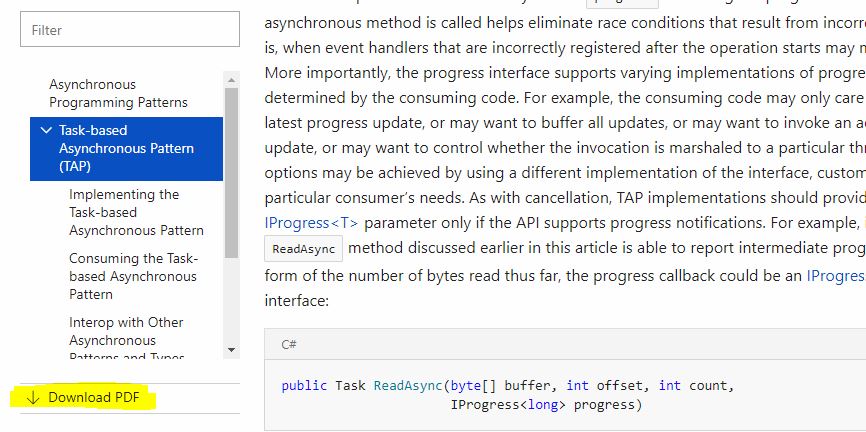
That's very practical. Therefore I have the wish that this should also be included in the standard template of docfx. The PDF function already exists, and since Microsoft uses docfx in the background, this shouldn't be very complicated. It would really be a great feature!
 FSharpCSharp
All 7 comments
@vicancy, @herohua should we open source the build stack of docs site, instead of the core part?
 vwxyzh
on 24 Oct 2017
vwxyzh
on 24 Oct 2017
@vwxyzh an update to the template is enough. This sounds a pretty general feature request.
 vicancy
on 25 Oct 2017
vicancy
on 25 Oct 2017
For reference, if this is fixed, it also resolves the specific example in https://feathub.com/docascode/docfx-feature-proposals/+27
 icnocop
on 15 Dec 2017
icnocop
on 15 Dec 2017
Has there been any news with regards to this topic, or at least an explanation of how the Microsoft pages work behind the scenes?
I'm looking for something very similar. Currently we added a custom template where a preprocessor adds a property "pdfPath" based on the "_tocPath" property. This works reasonably fine, though we have to be very careful in keeping HTML and PDF folder names in sync.
It's mainly now that we want "subsets" of PDFs that it's getting somewhat more complicated: we currently have PDFs like ProductA.pdf, ProductB.pdf; we want ProductA.pdf, ProductA-Api.pdf, ProductB.pdf, ProductB-Api.pdf. The API HTML page should obviously link to just the "subset" PDF.
 albertdev
on 11 Apr 2019
albertdev
on 11 Apr 2019
@albertdev docs.microsoft.com has a whole backend publishing system to support it, so it may not apply to this.
If you don't mind adding pdf path into your TOC, there is an easy way to make it work:
- Make sure sections in
docfx.jsonhave order:metadata,pdf,build. Thus to make surepdfto generate PDF files first, then use them as input ofbuildto be part of the output site. - Add generated pdf files into resoruce section to make them apper in the generated
_site, like:
json { "metadata": ... , "pdf": { ... "dest": "_site_pdf" } "build": { ... "resoruce": [ ... { files": [ "_site_pdf/*.pdf" ] } ] } } - Add pdf to your TOC for a similar experience like docs.microsoft.com, like:
yml
<ul>
<li>name: article1<br />
href: article1.md<br />
...</li>
<li>name: articleN<br />
href: articleN.md</li>
<li>name: Download PDF<br />
href: _site_pdf/generated.pdf<br />
If you have multiple TOCs for your different products, it is easy to make each product document has its own PDF link.
 superyyrrzz
on 12 Apr 2019
superyyrrzz
on 12 Apr 2019
I was able to add a link in the footer as follows:
- Add this to docfx.json:
{
  "build": {
    ...
    "globalMetadata": {
        ...
        "_appFooter": "<a href='Help.pdf' target='_blank'>Download Help Documentation as a PDF.</a>",
        ...
        }
    ...
    },
    ...
}
Copy
Help.pdfto the root of the help documentation URL.
ex. http://www.mydomain.com/Help/Help.pdfThat link will work as-is only from the TOC page, but because the hyperlink is relative, it won't work when viewing a page within a sub-directory for example.
So requests from http://www.mydomain.com/Help/articles/Help.pdf will need to be redirected to http://www.mydomain.com/Help/Help.pdf for example.
That can be achieved depending on the web server you're using, as there are many ways to redirect requests.
icnocop
on 12 Apr 2019
@icnocop There is a way to update pdf path regarding the current file's path. It need some customization to conceptual.html.primary.js, like:
model.pdfPath = templateUtility.resolveSourceRelativePath(model.pdfPath, model._path);
This need to include pdf as resource.
superyyrrzz
on 12 Apr 2019
Related issues
 pascalberger
·
5Comments
pascalberger
·
5Comments
 xxcuratorxx
·
3Comments
xxcuratorxx
·
3Comments
 roji
·
5Comments
roji
·
5Comments
 CodingBeagle
·
5Comments
vicancy
·
4Comments
CodingBeagle
·
5Comments
vicancy
·
4Comments
Most helpful comment
@icnocop There is a way to update pdf path regarding the current file's path. It need some customization to
conceptual.html.primary.js, like:This need to include pdf as resource.