Docfx: Support for .NET Core Tooling Preview3+ projects
Support for .NET Core Tooling Preview3+ projects
When building API documentation for a project that uses .NET Core Preview 3 or higher (csproj), the build fails, because (roslyn?) is unable to parse PackageReference tags
Functional impact
API documentation can not be built for projects that use .NET Core
Minimal repro steps
- Create a docFx project
- Add a metadata reference to a csproj file
Expected result
The build would succeed and API documentation would be built.
Actual result
During the 'generating metadata' phase of the build, a warning is thrown opening the project.
Warning: Error opening project <project>.csproj: The attribute "Version" in element <PackageReference> is unrecognized.. Ignored.
No API documentation is built.
Further technical details
N/A
 foxbot
All 43 comments
Yes, Roslyn should be updated to support it. Currently we are waiting for its official release.
 superyyrrzz
on 14 Feb 2017
superyyrrzz
on 14 Feb 2017
Seems Roslyn 2.0-rc4 can open new csproj, but fail to extract info from it.
superyyrrzz
on 15 Feb 2017
Is there any work being done on this? VS2017 is just around the corner, and for libraries targeting the latest dotnet version, not being able to use DocFx is a bit of a problem.
 cpx86
on 20 Feb 2017
cpx86
on 20 Feb 2017
I encountered this today too. I'm using .NET Core SDK 1.0 rc4 build 004771.
I created a new project:
C:\Code> mkdir MyApp\src\App

C:\Code> cd MyApp

C:\Code\MyApp> dotnet new console -o .\src\App
Content generation time: 42.4024 ms
The template "Console Application" created successfully.

C:\Code\MyApp> dir .\src\App
 Directory of C:\Code\MyApp\src\App

02/24/2017  08:34 PM    <DIR>          .
02/24/2017  08:34 PM    <DIR>          ..
02/24/2017  08:34 PM               170 App.csproj
02/24/2017  08:34 PM               177 Program.cs
Added docfx:
C:\Code\MyApp> docfx init -q
Created folder C:\Code\MyApp\docfx_project\src
Created folder C:\Code\MyApp\docfx_project\api
Created folder C:\Code\MyApp\docfx_project\apidoc
Created folder C:\Code\MyApp\docfx_project\articles
Created folder C:\Code\MyApp\docfx_project\images
Created File C:\Code\MyApp\docfx_project\toc.yml
Created File C:\Code\MyApp\docfx_project\index.md
Created File C:\Code\MyApp\docfx_project\api\toc.yml
Created File C:\Code\MyApp\docfx_project\api\index.md
Created File C:\Code\MyApp\docfx_project\articles\toc.yml
Created File C:\Code\MyApp\docfx_project\articles\intro.md
Created File C:\Code\MyApp\docfx_project\.gitignore
Created File C:\Code\MyApp\docfx_project\api\.gitignore
Created config file C:\Code\MyApp\docfx_project\docfx.json
Successfully generated default docfx project to C:\Code\MyApp\docfx_project
Please run:
        docfx "C:\Code\MyApp\docfx_project\docfx.json" --serve
To generate a default docfx website.
Info: Completed executing in 167.4719 milliseconds.

C:\Code\MyApp> move docfx_project docs
        1 dir(s) moved.

C:\Code\MyApp>dotnet new classlib -o .\docs
Content generation time: 22.0136 ms
The template "Class library" created successfully.
Add nuget reference to docfx.console in docs.csproj.
<Project Sdk="Microsoft.NET.Sdk">

  <PropertyGroup>
    <OutputType>Library</OutputType>
    <TargetFramework>netcoreapp1.0</TargetFramework>
  </PropertyGroup>

  <ItemGroup>
    <PackageReference Include="docfx.console" Version="2.12.1" />
  </ItemGroup>

</Project>
Added src node to the docfx.json.
  "metadata": [
    {
      "src": [
        {
          "files": [
            "src/**.csproj"
          ],
          "exclude": [
            ...
          ],
          "src": "../"
Add a C# class src/App/Foo.cs:
namespace App
{
    /// <summary>
    /// Very useful class
    /// </summary>
    public class Foo { }
}
Build App:
C:\Code\MyApp>dotnet restore .\src\App\App.csproj
  Restoring packages for C:\Code\MyApp\src\App\App.csproj...
  Generating MSBuild file C:\Code\MyApp\src\App\obj\App.csproj.nuget.g.props.
  Generating MSBuild file C:\Code\MyApp\src\App\obj\App.csproj.nuget.g.targets.
  Writing lock file to disk. Path: C:\Code\MyApp\src\App\obj\project.assets.json
  Restore completed in 532.35 ms for C:\Code\MyApp\src\App\App.csproj.

  NuGet Config files used:
      C:\Users\<UserProfile>\AppData\Roaming\NuGet\NuGet.Config

  Feeds used:
      https://api.nuget.org/v3/index.json

C:\Code\MyApp>dotnet build .\src\App\App.csproj
Microsoft (R) Build Engine version 15.1.545.13942
Copyright (C) Microsoft Corporation. All rights reserved.

  App -> C:\Code\MyApp\src\App\bin\Debug\netcoreapp1.0\App.dll

Build succeeded.
    0 Warning(s)
    0 Error(s)

Time Elapsed 00:00:01.35
Build docfx:
C:\Code\MyApp>dotnet restore .\docs\docs.csproj
  Restoring packages for C:\Code\MyApp\docs\docs.csproj...
  Generating MSBuild file C:\Code\MyApp\docs\obj\docs.csproj.nuget.g.props.
  Generating MSBuild file C:\Code\MyApp\docs\obj\docs.csproj.nuget.g.targets.
  Writing lock file to disk. Path: C:\Code\MyApp\docs\obj\project.assets.json
  Restore completed in 538.22 ms for C:\Code\MyApp\docs\docs.csproj.

  NuGet Config files used:
      C:\Users\<UserProfile>\AppData\Roaming\NuGet\NuGet.Config

  Feeds used:
      https://api.nuget.org/v3/index.json

C:\Code\MyApp>dotnet build .\docs\docs.csproj
...
Build succeeded.

EXEC : warning : Error opening project C:/Code/MyApp/src/App/App.csproj: The default XML namespace of the project must be the MSBuild XML namespace. If the project is authored in the MSBuild 2003 format, please add xmlns="http://schemas.microsoft.com/developer/msbuild/2003" to the <Project> element. If the project has been authored in the old 1.0 or 1.2 format, please convert it to MSBuild 2003 format.. Ignored. [C:\Code\MyApp\docs\docs.csproj]
EXEC : warning : No metadata is generated for . [C:\Code\MyApp\docs\docs.csproj]
EXEC : warning : Error opening project C:/Code/MyApp/src/App/App.csproj: The default XML namespace of the project must be the MSBuild XML namespace. If the project is authored in the MSBuild 2003 format, please add xmlns="http://schemas.microsoft.com/developer/msbuild/2003" to the <Project> element. If the project has been authored in the old 1.0 or 1.2 format, please convert it to MSBuild 2003 format.. Ignored. [C:\Code\MyApp\docs\docs.csproj]
EXEC : warning : No metadata is generated for . [C:\Code\MyApp\docs\docs.csproj]
    4 Warning(s)
    0 Error(s)
Add xmlns to App.csproj
<Project Sdk="Microsoft.NET.Sdk" xmlns="http://schemas.microsoft.com/developer/msbuild/2003">

  <PropertyGroup>
    <OutputType>Exe</OutputType>
    <TargetFramework>netcoreapp1.0</TargetFramework>
  </PropertyGroup>

</Project>
Rebuild App
C:\Code\MyApp>dotnet clean .\src\App\App.csproj
Microsoft (R) Build Engine version 15.1.545.13942
Copyright (C) Microsoft Corporation. All rights reserved.


C:\Code\MyApp>dotnet build .\src\App\App.csproj
Microsoft (R) Build Engine version 15.1.545.13942
Copyright (C) Microsoft Corporation. All rights reserved.

  App -> C:\Code\MyApp\src\App\bin\Debug\netcoreapp1.0\App.dll

Build succeeded.
    0 Warning(s)
    0 Error(s)

Time Elapsed 00:00:01.33
Rebuild docs
C:\Code\MyApp>dotnet clean .\docs\docs.csproj
Microsoft (R) Build Engine version 15.1.545.13942
Copyright (C) Microsoft Corporation. All rights reserved.


C:\Code\MyApp>dotnet build .\docs\docs.csproj
...
Build succeeded.

EXEC : warning : Cache for C:/Code/MyApp/src/App/App.csproj in C:\Code\MyApp\src\App\obj\xdoc\cache\final\1753801265 is corrupted [C:\Code\MyApp\docs\docs.csproj]
EXEC : warning : No metadata is generated for App. [C:\Code\MyApp\docs\docs.csproj]
EXEC : warning : Cache for C:/Code/MyApp/src/App/App.csproj in C:\Code\MyApp\src\App\obj\xdoc\cache\final\1753801265 is corrupted [C:\Code\MyApp\docs\docs.csproj]
EXEC : warning : No metadata is generated for App. [C:\Code\MyApp\docs\docs.csproj]
    4 Warning(s)
    0 Error(s)
That's as far as I've gotten.
 DustinKingen
on 25 Feb 2017
DustinKingen
on 25 Feb 2017
Looks like Roslyn 2.0-rc4 has made it's way on to the official NuGet feed, any progress on this?
foxbot
on 5 Mar 2017
Any word on a fix for this?
 sethjuarez
on 8 Mar 2017
sethjuarez
on 8 Mar 2017
As a workaround I'm including *.cs files directly now, that seems to work at least to some extent. Would love to see real support for the new .csproj files. The stable tooling has been released yesterday.
 rschili
on 8 Mar 2017
rschili
on 8 Mar 2017
I have still no success in parsing csproj using Roslyn 4.0-rc4. As @rschili mentioned above, including *.cs is a workaround for now. We are waiting for the stable version of Roslyn.
superyyrrzz
on 9 Mar 2017
Why would anyone still use RC4 when RTM is available? BTW: RC4 is nearly a month old now (even the version on nuget.org).
EDIT: According to dotnet/roslyn#17439, the new multi-TFM MSBuild workspaces still aren't supported yet. So I guess that we have to wait for the next version.
 fubar-coder
on 10 Mar 2017
fubar-coder
on 10 Mar 2017
@fubar-coder The issue is that DocFx has been broken for MSBuild 2017 projects ever since they were introduced in RC3 and replaced project.json, and is still broken despite 2017 now being available as RTM.
cpx86
on 10 Mar 2017
The *.cs workaround does not seem to be working properly for me. It builds most of the docs, but misses some of the cross references that worked with the old setup. This is the last showstopper to being able to update all my repos to the new project format. Any ETA on when this will happen, especially now that 2017 is RTM and released?
 ThadHouse
on 14 Mar 2017
ThadHouse
on 14 Mar 2017
@ThadHouse: Can you give a specific example of the kind of cross-reference that doesn't work? I'd really like to move Noda Time onto VS2017 and csproj projects, and docfx is my last blocker (just like you). I'm tempted to try the *.cs workaround, but I'm nervous after what you've said - particularly if there could be problems that I'd miss. Any specific examples I could try to hunt for in Noda Time would be welcome.
 jskeet
on 18 Mar 2017
jskeet
on 18 Mar 2017
@jskeet https://github.com/robotdotnet/CameraServer/blob/master/src/FRC.CameraServer/CvSource.cs#L42 This was one of the links specifically that didn't work. And there were some others like this that had issues as well. But some of these worked, so I don't know exactly the root cause.
Depending on your docfx build setup, you can even setup the *.cs workaround before going to csproj. Since its just manually globbing the files, you can setup the glob even it the project builds with project.json. I think my issue is I have 8 different folders to glob from, and docfx might be getting confused. I have a few projects that have really weird build setups (Basically workarounds to have shared project files in project.json).
The warnings showed up when building the code with docfx, so it's very easy to tell if a link isn't working.
ThadHouse
on 19 Mar 2017
@ThadHouse: I found that with *.cs all cross-file references failed :(
I've ended up keeping separate project.json files that I can use in my build process just for docfx temporarily. It's really ugly, but it unblocks me...
jskeet
on 19 Mar 2017
Hmm. With mine all didn't fail, but enough did to make me not want to switch. I think I'm going to end up keeping the project.json file around too. Agreed it is an ugly workaround, but there really just isn't much we can do until this supports csproj projects. I wonder if docfx would support not having the file named project.json so it doesn't confuse other build systems. Or maybe I can generate the project.json from the .csproj at docfx build time.
ThadHouse
on 19 Mar 2017
We tried upgrading to net46 and Roslyn 2.0, but still have problem to open csproj. We are working to resolve it. A prerelease version will be published when it's ready.
superyyrrzz
on 22 Mar 2017
Any updates on this @superyyrrzz ?
Much like @jskeet and @ThadHouse, this is blocking me on all my newer projects, and at this rate I may need to change documentation system, which I'd really rather not.
The new tooling is all now RTM and released and has been for a little while now..
 agc93
on 4 Apr 2017
agc93
on 4 Apr 2017
@superyyrrzz @agc93 I was also waiting for this to get fixed and decided to debug it myself. Turns out that even if you use the latest Roslyn packages for Microsoft.CodeAnalysis, the MSBuildWorkspace doesn't work with the new .NET Core csproj file format.
It can open the project or solution, but any source file collections and stuff will be empty.
Looks like the roslyn guys are still working on it (see answer in this https://github.com/dotnet/roslyn/issues/17439)
 MichaCo
on 4 Apr 2017
MichaCo
on 4 Apr 2017
Damn so looks like we're going to have to wait for DocFX to do the work for a custom workspace (a la Omnisharp) since Roslyn don't have the best track record of fixing bugs like that quickly :(
agc93
on 4 Apr 2017
Yup ~~.
For now, "just" throw project.json files in each project you want to have docs for.
That still works just fine for me right now.
@vicancy regarding that workaround with project.json. I found that you removed support for that in https://github.com/dotnet/docfx/commit/158f883df18be9404df03f4844dd705251b280a2#diff-adb6899f8fe77eb74e99a5f4ac3223ccL31. Could you leave that in until the csproj issues are sorted? ;)
MichaCo
on 4 Apr 2017
@MichaCo the latest csproj will be supported in the upcoming release of docfx, together with the removal of support for project.json
 vicancy
on 5 Apr 2017
vicancy
on 5 Apr 2017
@MichaCo What's the csproj format not working? https://github.com/dotnet/docfx/blob/dev/test/docfx.Tests/Assets/net46-test.csproj.sample.1 such format works. And when I use netstandard framework, it works after dotnet restore .
vicancy
on 5 Apr 2017
@vicancy
the latest csproj will be supported in the upcoming release of docfx
Cool, even better ;)
What's the csproj format not working? https://github.com/dotnet/docfx/blob/dev/test/docfx.Tests/Assets/net46-test.csproj.sample.1 such format works
What do you mean, it works? Opening a project works, but does it actually find any source files etc. to generate documentation?
MichaCo
on 5 Apr 2017
Hi @MichaCo the test case https://github.com/dotnet/docfx/blob/dev/test/docfx.Tests/MetadataCommandTest.cs#L100 consumes https://github.com/dotnet/docfx/blob/dev/test/docfx.Tests/Assets/net46-test.csproj.sample.1 and looks fine.
vicancy
on 5 Apr 2017
@vicancy Indeed, that one is working. I checked the test with the latest code and played with my own project files.
Turns out it is the "new" <TargetFrameworks> property element, the one you have to use for multi targeting instead of <TargetFramework>.
If I change your example project file to
   <Project Sdk="Microsoft.NET.Sdk">
    <PropertyGroup>
      <TargetFrameworks>net46</TargetFrameworks>
    </PropertyGroup>
    <ItemGroup>
      <Reference Include="System" />
      <Reference Include="Microsoft.CSharp" />
    </ItemGroup>
   </Project>
the line 927 in ExtractMetadataWorker await _workspace.Value.OpenProjectAsync(path); still is able to open the project, but the collection of documents is now empty
ExtractMetadataWorker line 329:

That's why it is not working for any of my ported projects, which look more like:
<Project Sdk="Microsoft.NET.Sdk">
  <Import Project="..\..\tools\common.props" />
  <PropertyGroup>
    <TargetFrameworks>net40;net45;netstandard1.2</TargetFrameworks>
  </PropertyGroup>
  <PropertyGroup Condition=" '$(TargetFramework)' == 'netstandard1.2' ">
    <DefineConstants>$(DefineConstants);NETSTANDARD</DefineConstants>
  </PropertyGroup>
</Project>
Like @MichaCo the majority of my projects are targeting multiple frameworks (and therefore using TargetFrameworks). Will the upcoming release support this as well or only single-target projects @vicancy ?
Just want to check before I go ahead with upgrading critical path projects.
agc93
on 6 Apr 2017
Does the project.json support have to be removed at the same time as adding csproj support? We build doc sets which include docs from multiple sources - we can't feasibly convert all of them to csproj at one point in time.
I'm fine with scheduling deprecation a few months later, but it'll be painful to have to use two versions and hope that they play nicely together...
jskeet
on 7 Apr 2017
@jskeet sounds reasonable, will still support project.json
vicancy
on 12 Apr 2017
@MichaCo thanks for the investigation, I will take a look
vicancy
on 12 Apr 2017
@vicancy: You're a complete star :) I had expected it to be too hard to support both.
jskeet
on 12 Apr 2017
Hi @agc93 & @MichaCo , for TargetFrameworks, I do a quick fix so that you are able to parse in MSBuild property TargetFramework to docfx metadata.
If the generated metadata files are the same across different frameworks, adding TargetFramework property is enough to work around the issue.
"metadata": [
{
            "src": "...",
            "dest": "...",
            "properties": {
                "TargetFramework": <one_of_your_framework>
            }
        },
]
If you have different classes/methods with different frameworks, it is a little bit complex.
- When the output metadata files differentiate, as similar to
dotnet build, docfx should generate different set of YAML files with different frameworks:
{
"metadata": [
        {
            "src": "*.csproj",
            "dest": "temp/api/netstandard1.4",
            "properties": {
                "TargetFramework": "netstandard1.4"
            }
        },
        {
            "src": "*.csproj",
            "dest": "temp/api/net46",
            "properties": {
                "TargetFramework": "net46"
            }
        }
    ]
....
}
- "merge" command can be used to merge YAML files with same UID into one file..
    "merge": {
        "content": [
            {
                "files": "*.yml",
                "src": "temp/api/netstandard1.4",
            },
            {
                "files": "*.yml",
                "src": "temp/api/net46",
            }
        ],
        "fileMetadata": {
            "platform": {
                "temp/api/netstandard1.4/*.yml": [
                    "netstandard1.4"
                ],
                "temp/api/net46/*.yml": [
                    "net46"
                ]
            }
        },
        "dest": "api"
    },
A sample docfx.json for such case is: https://github.com/dotnet/docfx/pull/1549/files#diff-7e05ae9b74959cf7a2bfe05633158109R12
vicancy
on 14 Apr 2017
@vicancy wow that looks really promising, thanks for the explanation of how to use multiple targets. Didn't played with multiple outputs yet. I guess I have to build some custom templates to do something with platform meta data right?
Thanks a lot! Will give it a try when you publish it ;)
MichaCo
on 14 Apr 2017
@MichaCo yes, multi-platform is not yet supported by default template..... We will be very happy to incorporate your custom template for platform.. 😄
vicancy
on 18 Apr 2017
the latest version 2.16 supports the new csproj format, please have a try.
vicancy
on 18 Apr 2017
Hi
works for me with the new csproj file format. As @vicancy (thx) mentioned it`s important to include the target for multi target projects.
"metadata": [
{
            "src": "...",
            "dest": "...",
            "properties": {
                "TargetFramework": <one_of_your_framework>
            }
        },
]
Maybe this should be included in the official documentation.
Best Regards
 vankooch
on 22 Apr 2017
vankooch
on 22 Apr 2017
@vicancy 关于不同框架内使用properties标识框架:
"dest":"api",
"properties":{
   "TargetFramework":"netcore2.0",
}
我的项目由.Net Framework4.6.1以及.Net Core2.0组成,我解析元数据的时候是解析Core的程序集。我设置为 netcore2.0 时控制台输出警告 无法识别netcore2.0 这个问题是写法的原因还是解析不了core?我看你们有framewok46和netstandardXX,但是没有core的说明?
 XzMitsui
on 30 Jul 2018
XzMitsui
on 30 Jul 2018
@XzMitsui 应该是netcoreapp2.0吧。这个TargetFramework就是csproj里PropertyGroup里可以找到的值。具体的值列表可参见https://docs.microsoft.com/en-us/dotnet/standard/frameworks#supported-target-framework-versions
vicancy
on 30 Jul 2018
@vicancy 好的谢谢,我找到它了。这里还有两个疑问想请教下,一个是关于语言,为了增强国际性,docfx文档中有没有实现切换语言的功能,从项目中生成的都是英文版本,但面临多国用户的话需要不同语言版本,不知道此工具有没有已实现的集成?第二个是我之前开了问题,关于过滤文件的,我给出了我这里的配置想要过滤掉一些不想展示的抽象类等,但是它始终没起到作用。
XzMitsui
on 30 Jul 2018
@XzMitsui
- 多语言切换这个在现有的版本需要自己修改下模板。v3版本是会天生支持的。cc @herohua
- 过滤文件你是按照http://dotnet.github.io/docfx/tutorial/howto_filter_out_unwanted_apis_attributes.html 一步步来的吗?方便的话可以上传一份简单的但是可以重现问题的工程给我们看一下。cc @superyyrrzz
vicancy
on 30 Jul 2018
Am I the only one not seeing latin here?
 dbogatov
on 30 Jul 2018
dbogatov
on 30 Jul 2018
@dbogatov DocFX Team is based in China, so what you are seeing above is another Chinese dev talking to the DocFX dev team about TargetFramework value.
 Still34
on 30 Jul 2018
Still34
on 30 Jul 2018
@vicancy
1.就是说目前版本还没有,v3中会实现这个功能?能否告知一下发布v3版本的大概日期?修改模板的话我之前看文档的时候发现有 default(zh-cn)这个默认的中文模板,是使用这样的模板吗?我会先去尝试一下。
2.过滤的话我是按照上述文档中进行配置的,只有最后属性过滤那些没有尝试。我在我开的问题中写了我这里的过滤文件和配置信息,因为公司内外网的关系我没办法上传相关文件工程,我可以回家后试着上传图片给你们。
XzMitsui
on 30 Jul 2018
@vicancy

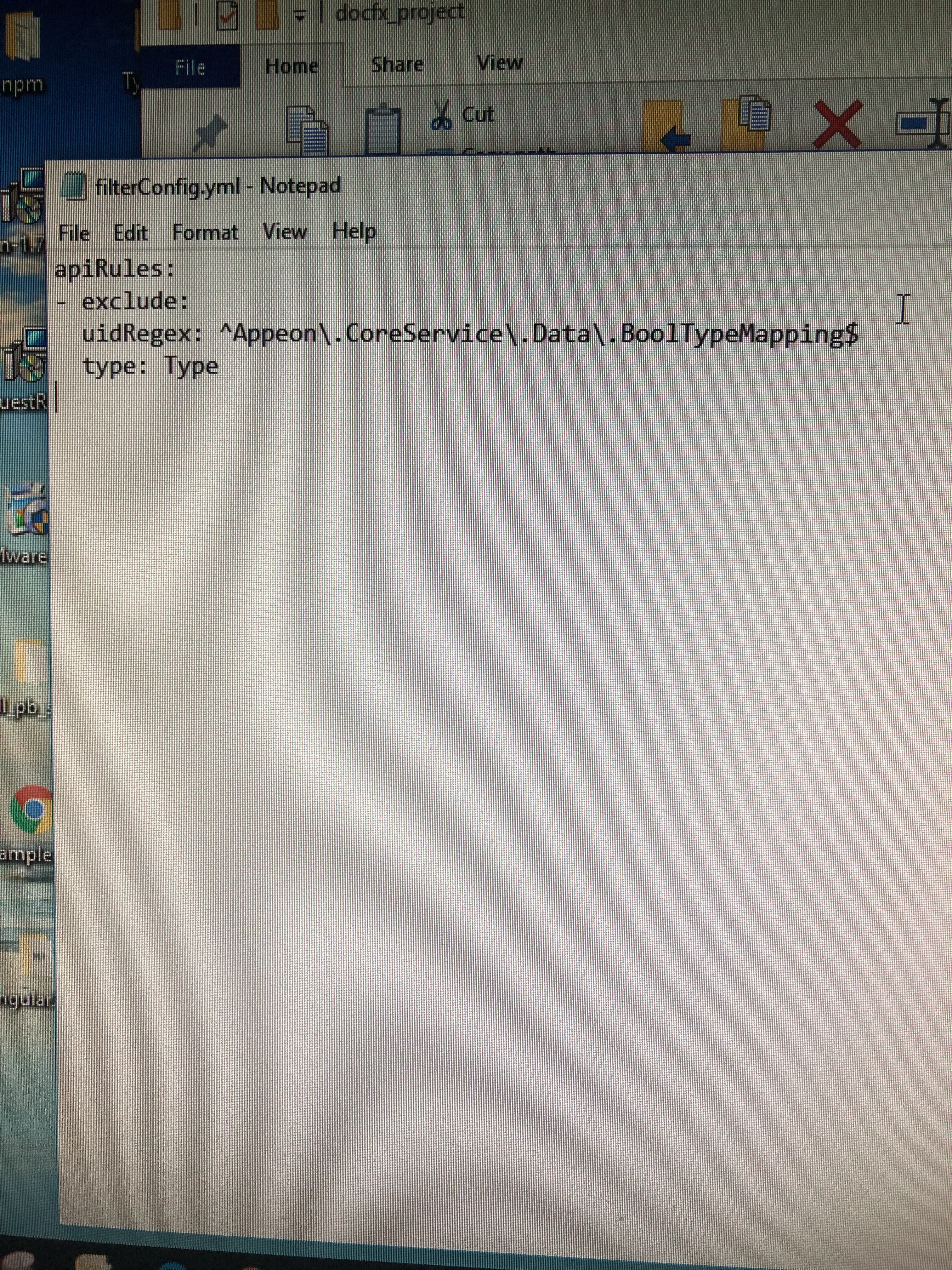
这是我的配置文件,请过目。
XzMitsui
on 30 Jul 2018
Related issues
 SimonSchulte
·
3Comments
SimonSchulte
·
3Comments
 jobubo
·
4Comments
jobubo
·
4Comments
 CodingBeagle
·
5Comments
CodingBeagle
·
5Comments
 Rora
·
4Comments
Rora
·
4Comments
 guardrex
·
5Comments
guardrex
·
5Comments
Most helpful comment
The *.cs workaround does not seem to be working properly for me. It builds most of the docs, but misses some of the cross references that worked with the old setup. This is the last showstopper to being able to update all my repos to the new project format. Any ETA on when this will happen, especially now that 2017 is RTM and released?