Hello, how to generate separate documentation for the projects? In src I have 3 projects:
|-src
- Project1
- Project2
- Project3
I want 3 tabs with documentation. Thanks for help.
  "metadata": [
    {
      "src": [
        {
          "files": [
            "src/**.csproj"
            "src/**.json"
          ],
          "exclude": [
            "**/obj/**",
            "**/bin/**",
            "_site/**"
          ]
        }
      ],
      "dest": "api"
    }
  ],
  "build": {
    "content": [
      {
        "files": [
          "api/**.yml",
          "api/index.md"
        ]
      },
      {
        "files": [
          "articles/**.md",
          "articles/**/toc.yml",
          "toc.yml",
          "*.md"
        ],
        "exclude": [
          "obj/**",
          "_site/**"
        ]
      }
    ],
}
 mbielecki
All 11 comments
docfx.json is like this:
  "metadata": [
    {
      "src": [
        {
          "files": [
            "**/project.json",
            "**/*.csproj"
          ],
          "src": "src/project1"
        }
      ],
      "dest": "obj/project1"
    },
    {
      "src": [
        {
          "files": [
            "**/project.json",
            "**/*.csproj"
          ],
          "src": "src/project2"
        }
      ],
      "dest": "obj/project2"
    },
    {
      "src": [
        {
          "files": [
            "**/project.json",
            "**/*.csproj"
          ],
          "src": "src/project3"
        }
      ],
      "dest": "obj/project3"
    }
  ],
  "build": {
    "content": [
      {
        "files": [
          "**/*.yml"
        ],
        "src": "obj",
        "dest": "api"
      },
      {
        "files": [
          "**/*.md"
        ]
      }
    ]
  }
And you need a toc.md/yml to organize them, e.g.:
# [project1](obj/project1/)
# [project2](obj/project2/)
# [project3](obj/project3/)
 superyyrrzz
on 4 Nov 2016
superyyrrzz
on 4 Nov 2016
Now generates documentation for individual projects, but I don't have a index.html.
{
  "metadata": [
    {
      "src": [
        {
          "files": [
           "**/project.json",
           "**/*.csproj"
          ],
         "src": "src/Project1"
        }
      ],
      "dest": "api/Project1"
    }
  ],
  "build": {
    "content": [
      {
        "files": [
          "api/**.yml",
          "api/index.md"
        ]
      },
      {
        "files": [
          "articles/**.md",
          "articles/**/toc.yml",
          "toc.yml",
          "*.md"
        ],
        "exclude": [
          "obj/**",
          "_site/**"
        ]
      }
    ],
    "resource": [
      {
        "files": [
          "images/**"
        ],
        "exclude": [
          "obj/**",
          "_site/**"
        ]
      }
    ],
    "overwrite": [
      {
        "files": [
          "apidoc/**.md"
        ],
        "exclude": [
          "obj/**",
          "_site/**"
        ]
      }
    ],
    "dest": "_site",
    "globalMetadataFiles": [],
    "fileMetadataFiles": [],
    "template": [
      "default"
    ],
    "postProcessors": [],
    "noLangKeyword": false
  }
}
Do you have index.md in your input?
superyyrrzz
on 4 Nov 2016
No, I only have solution projects in src. Your json doesn't generate '_site' folder.
Deafult json generates '_site' with 1 folder which contains documentation. This folder contains index.html. If I use your json, i dont have index.html in folders with documentation.
In src i have 3 projects. Output should look like this:
|-_site
    |_api
      |_Project1
        - index.html
      |_Project2
        - index.html
      |_Project3
        - index.html
toc.yml
- name: Project1
  href: api/Project1/index.html
- name: Project2
  href: api/Project2/index.html
- name: Project3
  href: api/Project3/index.html
Im wrong?
mbielecki
on 4 Nov 2016
_site folder will be generated with "dest": "_site".
I found your docfx.json incudes api/index.md. From your file structure, I think it should be like api/Project1/index.md?
superyyrrzz
on 5 Nov 2016
I generates the default project (docfx init -q) with the default docfx.json file.

My default json:
{
  "metadata": [
    {
      "src": [
        {
          "files": [
            "src/**.csproj"
          ],
          "exclude": [
            "**/obj/**",
            "**/bin/**",
            "_site/**"
          ]
        }
      ],
      "dest": "api"
    }
  ],
  "build": {
    "content": [
      {
        "files": [
          "api/**.yml",
          "api/index.md"
        ]
      },
      {
        "files": [
          "articles/**.md",
          "articles/**/toc.yml",
          "toc.yml",
          "*.md"
        ],
        "exclude": [
          "obj/**",
          "_site/**"
        ]
      }
    ],
    "resource": [
      {
        "files": [
          "images/**"
        ],
        "exclude": [
          "obj/**",
          "_site/**"
        ]
      }
    ],
    "overwrite": [
      {
        "files": [
          "apidoc/**.md"
        ],
        "exclude": [
          "obj/**",
          "_site/**"
        ]
      }
    ],
    "dest": "_site",
    "globalMetadataFiles": [],
    "fileMetadataFiles": [],
    "template": [
      "default"
    ],
    "postProcessors": [],
    "noLangKeyword": false
  }
}
In the src folder I have 2 folders with projects. This json generates 1 tab with documentation (2 folders, so i want 2 tabs). I trying edit it on your example, but it does not work:
{
  "metadata": [
{
      "src": [
        {
          "files": [
            "**/project.json",
            "**/*.csproj"
          ],
          "exclude": [
            "**/obj/**",
            "**/bin/**",
            "_site/**"
          ],
           "src": "src/project1"
        }
      ],
       "dest": "obj/project1"
    },
       {
      "src": [
        {
          "files": [
            "**/project.json",
            "**/*.csproj"
          ],
          "exclude": [
            "**/obj/**",
            "**/bin/**",
            "_site/**"
          ],
           "src": "src/project2"
        }
      ],
       "dest": "obj/project2"
    }
  ],
  "build": {
    "content": [
      {
        "files": [
          "**/*.yml"
        ],
        "src": "obj",
        "dest": "api"
      },
      {
        "files": [
          "**/*.md"
        ]
      }
    ],
    "resource": [
      {
        "files": [
          "images/**"
        ],
        "exclude": [
          "obj/**",
          "_site/**"
        ]
      }
    ],
    "overwrite": [
      {
        "files": [
          "apidoc/**.md"
        ],
        "exclude": [
          "obj/**",
          "_site/**"
        ]
      }
    ],
    "dest": "_site",
    "globalMetadataFiles": [],
    "fileMetadataFiles": [],
    "template": [
      "default"
    ],
    "postProcessors": [],
    "noLangKeyword": false
  }
}
I don't have index.md file in documentation folder (project1, project2). Default json generates index.md in api folder. How do i add a tabs if i don't have index.md.
mbielecki
on 7 Nov 2016
EDIT
How to add documentation to menu list?

toc.yml
- name: Project1
  href: api/Project1/
This solution does not work.
mbielecki
on 9 Nov 2016
You can modify toc.yml to add more items. See: http://dotnet.github.io/docfx/tutorial/intro_toc.html
superyyrrzz
on 10 Nov 2016
Hello,
I want to add a submenu to the menu release note
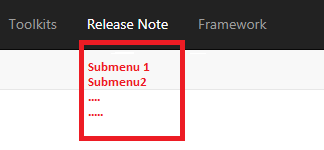
For this, I update toc.yml but The submenu does not dispalyed in the expected place
...
name: Release Note
href: articles/
items:
- name: "Submenu1"
href: https://dotnet.github.io/docfx/tutorial/intro_toc.html
- name: "Submenu2"
href: https://github.com/dotnet/docfx/issues/861
...
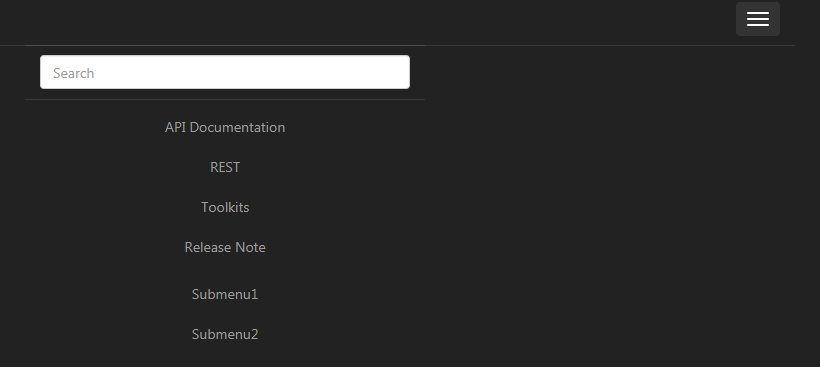
Any idea?
Thanks in advance
 mohaOujda
on 16 Apr 2019
mohaOujda
on 16 Apr 2019
@mohaOujda See: #3168
superyyrrzz
on 16 Apr 2019
Thank you so much
I added dropdown: true, it's working :)
mohaOujda
on 16 Apr 2019
Related issues
 guardrex
·
5Comments
superyyrrzz
·
3Comments
guardrex
·
5Comments
superyyrrzz
·
3Comments
 SimonSchulte
·
3Comments
SimonSchulte
·
3Comments
 Rora
·
4Comments
Rora
·
4Comments
 bitbonk
·
5Comments
bitbonk
·
5Comments