Docfx: Add syntax for "unchecked" relative URL
I'm currently assembling several docfx "mini-sites" together (for a project where the multi-versioning support wouldn't help). Occasionally, I need to cross-reference from one mini-site to another. I can do so via a regular href to the generated HTML, but I get a warning ("Invalid file link").
I definitely appreciate the warnings for other links (e.g. yml and md), but it would be nice to be able to tell docfx not to check a specific link, as I _know_ it won't be present at build time. (I have a later validation stage for that.)
Is there any existing syntax (ideally for both toc.yml and md files) that allows the target of a link to be unchecked?
 jskeet
All 16 comments
@jskeet We're going add a nocheck syntax to skip link check, like this:
[file_does_not_need_to_be_checked](nocheck:path_to_file)
 chenkennt
on 9 Sep 2016
chenkennt
on 9 Sep 2016
@chenkennt: Great! Will that work in toc.yml as well?
jskeet
on 9 Sep 2016
Yes.
chenkennt
on 9 Sep 2016
Wonderful - thanks so much, and I look forward to trying it out :)
jskeet
on 9 Sep 2016
It's really helpful feature. Specially useful when we want to consider pretty url (extensionless).
 AshrafAlam
on 18 Oct 2018
AshrafAlam
on 18 Oct 2018
@chenkennt Is it possible to support this feature in central config (instead to adding repeatedly in every link)?
AshrafAlam
on 18 Oct 2018
I created a link like "../a/b.html" I got a warning.
After that I change the link to "nocheck:../a/b.html"
The warning disappeared, but the generated link becomes "nocheck:../a/b.html". The browser told me it needs special application to run the link. It seems that the browser considers the prefix of "nocheck:" as a protocol indicator.
 Li-Tian
on 12 Feb 2019
Li-Tian
on 12 Feb 2019
@Li-Tian , this feature isn't implemented yet. Adding nocheck:../a/b.html turns the link into an absolute URL like http://docs.com and docfx does not warn absolute URLs.
 yufeih
on 13 Feb 2019
yufeih
on 13 Feb 2019
Would just like to add a 👍 for this feature. We have a whole folder of overwrite files with content that is being appended to our generated API docs. Most of the content contains links, and since the overwrite files are not in the same place in the hierarchy as the files they're being appended to, the docFX build throws tons of Invalid file link warnings. Absolute URLs aren't really an option for us, so this feature would really clean up our build. Hope it can get bumped up on the priority list.
 andrew-frueh
on 30 Apr 2019
andrew-frueh
on 30 Apr 2019
@chenkennt Is it possible to support this feature in central config (instead to adding repeatedly in every link)?
I also think a centralized config is easier to manage then adding a nocheck: tag to every link. In @andrew-frueh's case, bulk excluding a set of URLs using glob patterns might also help.
Since the links in this context are mostly relative URLs, simply adding all relative URLs to config might creates a lot of duplicated entries:
{
    // if 'a.md' has a link 'link' and '/folder/a.md' has a link '../link',
    // it requires 2 different entries and is not friendly for wildcard match
    "suppressLinkWarnings": [
        "link", // for /a.md
        "../link",  // for /folder/a.md
    ]
}
Instead, the config could accept absolute URLs, and we turn relative URLs into absolute URLs before checking for warning suppression:
{
    "suppressLinkWarnings": [
        "link", // works for both 'link' and '../link' in the above case
        "basepath/**", // can also support URL glob match to bulk exclude a set of URLs
    ]
}
@yufeih - you're absolutely right, what you proposed would be the optimal solution - to be able to suppressLinkWarnings to a directory via the config (rather than adding nocheck to every URL).
andrew-frueh
on 1 May 2019
Most of the content contains links, and since the overwrite files are not in the same place in the hierarchy as the files they're being appended to, the docFX build throws tons of Invalid file link warnings.
@andrew-frueh I am curious what is your folder structure? If you are not using the version config, relative path in source folder should work fine without warnings. E.g. if you have a content article/a.md, you can link to it from overwrite/b.md by [LINK](../article/a.md). This can also work if you'd like to link to an API page, like [LINK](../obj/SomeApi.yml).
 superyyrrzz
on 1 May 2019
superyyrrzz
on 1 May 2019
@superyyrrzz - thanks for the followup. Here's some additional context:
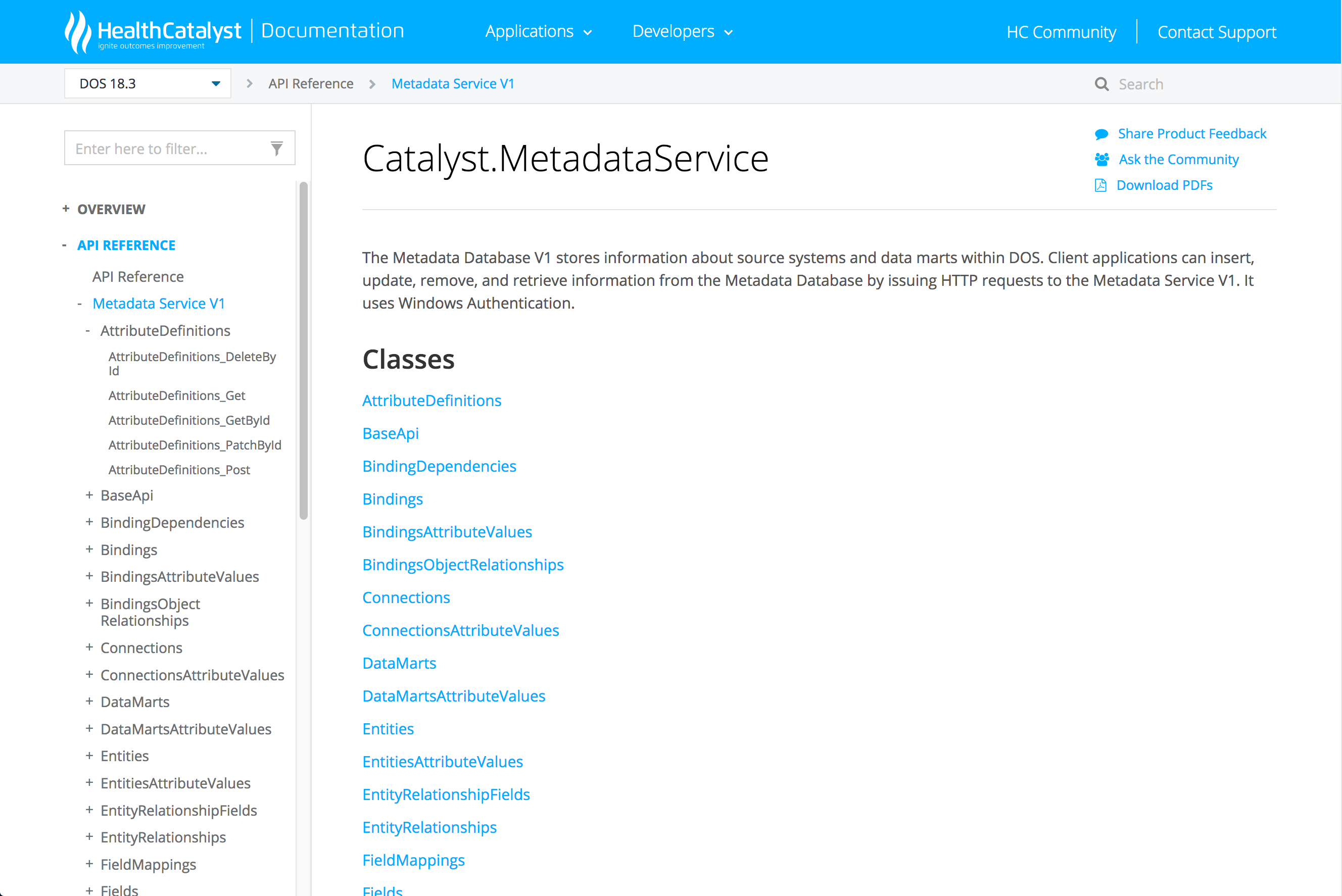
We're using the rest.tagpage and rest.operationpage plugins to organize our API table of contents from our swagger json docs (see attached screenshot). The trouble we were running into is that the generated landing page for group or operation is blank, just a title. We were concerned that makes the site look broken. So as you can see in the attached screenshot, I wrote a Python script to scrape the json file and generate an overwrite file that includes description and links to the associated classes.
All the overwrite files live in a "specs" folder at the root - but the files they are linking to are API docs that are being generated. So we have a "restapi" folder at the root also, that contains the json files. But for example, in the screenshot attached the first link is to [AttributeDefinitions_DeleteById](AttributeDefinitions/AttributeDefinitions_DeleteById.html), and that file doesn't exist outside of what is generated and dropped into wwwroot. So I suspect that's a big part of why the build is throwing warnings.
Definitely open to suggestions if there's a more clever way to accomplish the above. Thanks!
andrew-frueh
on 1 May 2019
@andrew-frueh Thank you for the information. My former solution cannot work as you are using rest.tagpage and rest.operationpage. You can try use uid to reference to your page: [AttributeDefinitions_DeleteById](xref:your-uid-here). You can also search data-uid in the generated page to find out the uid for your API.
superyyrrzz
on 3 May 2019
Ah that's very helpful @superyyrrzz - I didn't realize that linking via uid was an option. I just checked and the uid naming pattern is very logical, so I could easily anticipate what the generated uid will be from my Python script. Great suggestion, thank you!
andrew-frueh
on 6 May 2019
Just want to add another use case: I'm currently putting together a site where the web docs and a PDF version are built in separate steps, but the CI script pulls them together and deploys them both to a GitHub Pages branch. I'm linking to the PDF in the location where I know it will be after deploying but DocFX of course warns during build as it has no way of knowing that the PDF will show up later.
 alexrp
on 7 Sep 2020
alexrp
on 7 Sep 2020
Related issues
 Rora
·
4Comments
Rora
·
4Comments
 wiwei
·
4Comments
wiwei
·
4Comments
 pascalberger
·
5Comments
pascalberger
·
5Comments
 bitbonk
·
5Comments
bitbonk
·
5Comments
 vicancy
·
4Comments
vicancy
·
4Comments
Most helpful comment
Would just like to add a 👍 for this feature. We have a whole folder of overwrite files with content that is being appended to our generated API docs. Most of the content contains links, and since the overwrite files are not in the same place in the hierarchy as the files they're being appended to, the docFX build throws tons of
Invalid file linkwarnings. Absolute URLs aren't really an option for us, so this feature would really clean up our build. Hope it can get bumped up on the priority list.