Dnscrypt-proxy: systemd UDP socket missing in version 2.0.15
I upgraded from 2.0.14 to 2.0.15 on my Raspberry Pi. According to syslog, everything is running OK, but DNS requests do not get forwarded anymore: if I do a nslookup, the request gets a timeout. Reverting back to 2.0.14 makes everything work normally again.
I do not know which debug info you need, please let me know how to support.
 klara31
All 52 comments
try compile with last commit 9135efc
 poentodewo
on 7 Jun 2018
poentodewo
on 7 Jun 2018
I am currently using the pre-build ARM package. Building gives me a load of errors on missing GitHub packages, probably as I am not familiar with building GO packages...
Op 7 jun. 2018, om 13:20 heeft poentodewo notifications@github.com het volgende geschreven:
try compile with last commit 9135efc https://github.com/jedisct1/dnscrypt-proxy/commit/9135efcaeceeb149b56c04a518351f7ce6a1b646
—
You are receiving this because you authored the thread.
Reply to this email directly, view it on GitHub https://github.com/jedisct1/dnscrypt-proxy/issues/480#issuecomment-395385509, or mute the thread https://github.com/notifications/unsubscribe-auth/ABP50J6ZgHkRXC18dSPwD8L6wjLVkok9ks5t6QyXgaJpZM4UeGOG.
klara31
on 7 Jun 2018
if u want you can try my build https://transfer.sh/iOyeL/9135efc.zip just replace binary with my build dont frget to uninstall old binary
poentodewo
on 7 Jun 2018
Tried your build, same result: not working. Reverted back to 2.0.14
Op 7 jun. 2018, om 13:48 heeft poentodewo notifications@github.com het volgende geschreven:
if u want you can try my build https://transfer.sh/iOyeL/9135efc.zip https://transfer.sh/iOyeL/9135efc.zip just replace binary with my build dont frget to uninstall old binary
—
You are receiving this because you authored the thread.
Reply to this email directly, view it on GitHub https://github.com/jedisct1/dnscrypt-proxy/issues/480#issuecomment-395392183, or mute the thread https://github.com/notifications/unsubscribe-auth/ABP50HxL1X0zaFqCmBqWSCavO-sqAiTDks5t6RMFgaJpZM4UeGOG.
klara31
on 7 Jun 2018
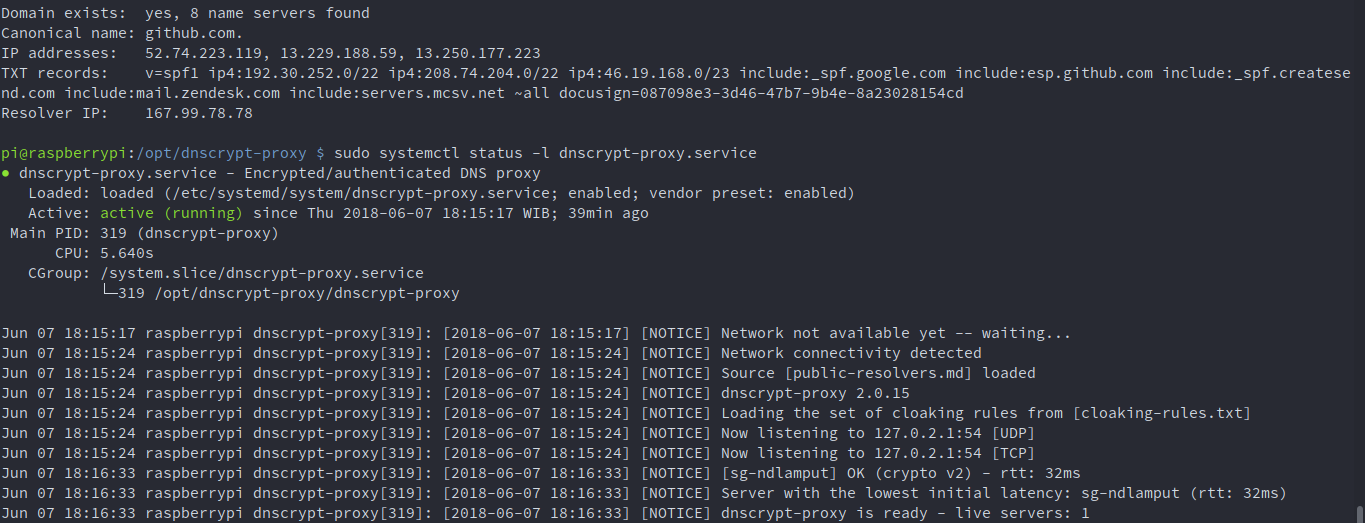
@klara31 that strange ._.
poentodewo
on 7 Jun 2018
This is what my system looks like with your executable:
root@meter:/usr/src/dnscrypt-proxy # systemctl status -l dnscrypt-proxy.service
● dnscrypt-proxy.service - DNSCrypt client proxy
   Loaded: loaded (/etc/systemd/system/dnscrypt-proxy.service; enabled; vendor preset: enabled)
   Active: active (running) since Thu 2018-06-07 14:03:12 CEST; 20s ago
     Docs: https://github.com/jedisct1/dnscrypt-proxy/wiki
 Main PID: 24868 (dnscrypt-proxy)
   CGroup: /system.slice/dnscrypt-proxy.service
           └─24868 /usr/bin/dnscrypt-proxy --config /etc/dnscrypt-proxy/dnscrypt-proxy.toml

Jun 07 14:03:12 meter systemd[1]: Started DNSCrypt client proxy.
Jun 07 14:03:12 meter dnscrypt-proxy[24868]: [2018-06-07 14:03:12] [NOTICE] Source [/var/cache/dnscrypt-proxy/public-resolvers.md] loaded
Jun 07 14:03:12 meter dnscrypt-proxy[24868]: [2018-06-07 14:03:12] [NOTICE] dnscrypt-proxy 2.0.15
Jun 07 14:03:12 meter dnscrypt-proxy[24868]: [2018-06-07 14:03:12] [NOTICE] Wiring systemd TCP socket #0
Jun 07 14:03:12 meter dnscrypt-proxy[24868]: [2018-06-07 14:03:12] [NOTICE] [dnscrypt.nl-ns0] OK (crypto v1) - rtt: 16ms
Jun 07 14:03:13 meter dnscrypt-proxy[24868]: [2018-06-07 14:03:13] [NOTICE] [soltysiak] OK (crypto v1) - rtt: 29ms
Jun 07 14:03:13 meter dnscrypt-proxy[24868]: [2018-06-07 14:03:13] [NOTICE] Server with the lowest initial latency: dnscrypt.nl-ns0 (rtt: 16ms)
Jun 07 14:03:13 meter dnscrypt-proxy[24868]: [2018-06-07 14:03:13] [NOTICE] dnscrypt-proxy is ready - live servers: 2
root@meter:/usr/src/dnscrypt-proxy # nslookup nos.nl
;; connection timed out; no servers could be reached
Reverting back to 2.0.14 gives:
systemctl status -l dnscrypt-proxy.service
● dnscrypt-proxy.service - DNSCrypt client proxy
   Loaded: loaded (/etc/systemd/system/dnscrypt-proxy.service; enabled; vendor preset: enabled)
   Active: active (running) since Thu 2018-06-07 14:06:34 CEST; 4s ago
     Docs: https://github.com/jedisct1/dnscrypt-proxy/wiki
 Main PID: 25263 (dnscrypt-proxy)
   CGroup: /system.slice/dnscrypt-proxy.service
           └─25263 /usr/bin/dnscrypt-proxy --config /etc/dnscrypt-proxy/dnscrypt-proxy.toml

Jun 07 14:06:34 meter systemd[1]: Started DNSCrypt client proxy.
Jun 07 14:06:34 meter dnscrypt-proxy[25263]: [2018-06-07 14:06:34] [NOTICE] Source [/var/cache/dnscrypt-proxy/public-resolvers.md] loaded
Jun 07 14:06:34 meter dnscrypt-proxy[25263]: [2018-06-07 14:06:34] [NOTICE] dnscrypt-proxy 2.0.14
Jun 07 14:06:34 meter dnscrypt-proxy[25263]: [2018-06-07 14:06:34] [NOTICE] Wiring systemd TCP socket #0
Jun 07 14:06:34 meter dnscrypt-proxy[25263]: [2018-06-07 14:06:34] [NOTICE] Wiring systemd UDP socket #1
Jun 07 14:06:34 meter dnscrypt-proxy[25263]: [2018-06-07 14:06:34] [NOTICE] [dnscrypt.nl-ns0] OK (crypto v1) - rtt: 15ms
Jun 07 14:06:34 meter dnscrypt-proxy[25263]: [2018-06-07 14:06:34] [NOTICE] [soltysiak] OK (crypto v1) - rtt: 33ms
Jun 07 14:06:34 meter dnscrypt-proxy[25263]: [2018-06-07 14:06:34] [NOTICE] Server with the lowest initial latency: dnscrypt.nl-ns0 (rtt: 15ms)
Jun 07 14:06:34 meter dnscrypt-proxy[25263]: [2018-06-07 14:06:34] [NOTICE] dnscrypt-proxy is ready - live servers: 2
root@meter:/usr/src/dnscrypt-proxy # nslookup nos.nl
Server:     127.0.0.1
Address:    127.0.0.1#53

Non-authoritative answer:
Name:   nos.nl
Address: 145.58.29.114
Name:   nos.nl
Address: 145.58.28.175
The difference I see, is that 2.0.14 is using an UDP socket, next to the TCP socket
klara31
on 7 Jun 2018
@klara31 i dont have any issue with nslookup maybe @jedisct1 can explain

poentodewo
on 7 Jun 2018
Jun 07 14:03:12 meter systemd[1]: Started DNSCrypt client proxy.
Jun 07 14:03:12 meter dnscrypt-proxy[24868]: [2018-06-07 14:03:12] [NOTICE] Source [/var/cache/dnscrypt-proxy/public-resolvers.md] loaded
Jun 07 14:03:12 meter dnscrypt-proxy[24868]: [2018-06-07 14:03:12] [NOTICE] dnscrypt-proxy 2.0.15
Jun 07 14:03:12 meter dnscrypt-proxy[24868]: [2018-06-07 14:03:12] [NOTICE] Wiring systemd TCP socket #0
Looks like the systemd UDP socket is missing.
 jedisct1
on 7 Jun 2018
jedisct1
on 7 Jun 2018
That's my conclusion as well, but what's causing that?! The only thing I update, is the executable...
klara31
on 7 Jun 2018
Same problem on Fedora 28. Like @klara31 I only updated the executable. After reverting to v. 2.0.14 all is well again.
 curiosity-seeker
on 7 Jun 2018
curiosity-seeker
on 7 Jun 2018
This is probably due to this change to the systemd socket activation module: https://github.com/coreos/go-systemd/commit/65cc0ad826177f0ec9f0ee87c1bc5718b0d8ec97
Any systemd person know how to make this work again?
jedisct1
on 7 Jun 2018
@klara31 can you try to extract and innstall dnscrypt in /opt ?
poentodewo
on 7 Jun 2018
I'm having this issue as well after upgrading to v2.0.15. Gave me quite some headaches.
Basically it's not working any more.
 k4yt3x
on 8 Jun 2018
k4yt3x
on 8 Jun 2018
The workaround is simple: disable systemd sockets, and put the IP addresses in listen_addresses instead.
jedisct1
on 8 Jun 2018
I meet the same problem. Although starting socket causes UDP port listening on 127.0.2.1:53. The service seems cannot connect to that port.
So I did the workaround given by @jedisct1 :
systemctl disable dnscrypt-proxy.socket.systemctl stop dnscrypt-proxy.socket.- Add
"127.0.2.1:53"tolisten_addresses. - Comment
Requires=dnscrypt-proxy.socketin/lib/systemd/system/dnscrypt-proxy.service. systemctl restart dnscrypt-proxy
 Sraw
on 8 Jun 2018
Sraw
on 8 Jun 2018
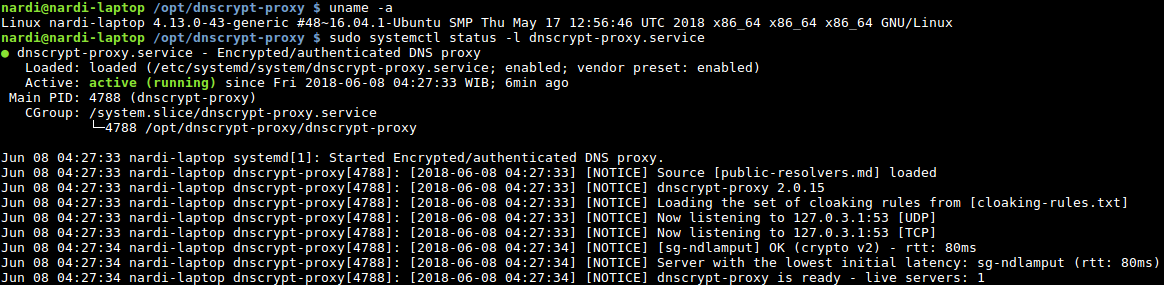
btw in my raspbian dnscrypt is in /opt then only run
as i know
- sudo ./dnscrypt-proxy -service install -> this will create service in /etc/systemd and auto start if system off until you uninstall dnscrypt
- sudo ./dnscrypt-proxy -service start/stop > to trigger
- sudo ./dnscrypt-proxy -service restart > to restart you dont need systemctl restart dnscrypt proxy
i dont make any changes in dnscrypt-proxy.service or dnscrypt-proxy.socket because service will auto create i have test on 16.04
poentodewo
on 8 Jun 2018
systemctl disable dnscrypt-proxy.socket.
systemctl stop dnscrypt-proxy.socket.
Add "127.0.2.1:53" to listen_addresses.
Comment Requires=dnscrypt-proxy.socket in /lib/systemd/system/dnscrypt-proxy.service.
systemctl restart dnscrypt-proxy
That's what I did, too (with the exception that my listen_address is 127.0.0.1:53). Also executed systemctl daemon-reload before restarting dnscrypt-proxy. Result:
● dnscrypt-proxy.service - DNSCrypt-proxy client
   Loaded: loaded (/etc/systemd/system/dnscrypt-proxy.service; enabled; vendor preset: disabled)
   Active: failed (Result: exit-code) since Fri 2018-06-08 13:13:01 CEST; 2s ago
     Docs: https://github.com/jedisct1/dnscrypt-proxy/wiki
  Process: 7872 ExecStart=/usr/bin/dnscrypt-proxy --config /etc/dnscrypt-proxy/dnscrypt-proxy.toml (code=exited, status=255)
 Main PID: 7872 (code=exited, status=255)

Jun 08 13:13:00 HANK systemd[1]: Started DNSCrypt-proxy client.
Jun 08 13:13:00 HANK dnscrypt-proxy[7872]: /etc/dnscrypt-proxy/public-resolvers.md: open sf-cridhz43syuf5wmm.tmp: permission denied
Jun 08 13:13:00 HANK dnscrypt-proxy[7872]: /etc/dnscrypt-proxy/public-resolvers.md.minisig: open sf-ho5zvrjpagmisexh.tmp: permission denied
Jun 08 13:13:00 HANK dnscrypt-proxy[7872]: Source [public-resolvers.md] loaded
Jun 08 13:13:00 HANK dnscrypt-proxy[7872]: dnscrypt-proxy 2.0.15
Jun 08 13:13:00 HANK dnscrypt-proxy[7872]: Loading the set of whitelisting rules from [/etc/dnscrypt-proxy/whitelist.txt]
Jun 08 13:13:00 HANK dnscrypt-proxy[7872]: Loading the set of blocking rules from [/etc/dnscrypt-proxy/blacklist.txt]
Jun 08 13:13:01 HANK dnscrypt-proxy[7872]: listen udp 127.0.0.1:53: bind: permission denied
Jun 08 13:13:01 HANK systemd[1]: dnscrypt-proxy.service: Main process exited, code=exited, status=255/n/a
Jun 08 13:13:01 HANK systemd[1]: dnscrypt-proxy.service: Failed with result 'exit-code'.
Again back to 2.0.14.
curiosity-seeker
on 8 Jun 2018
I added the following to my dnscrypt-proxy.service...
CapabilityBoundingSet=CAP_NET_BIND_SERVICE
AmbientCapabilities=CAP_NET_BIND_SERVICE
and place a comment on Requires=dnscrypt-proxy.socket
don't forget to add the listen address.
It is now working fine...
systemd[1]: Started DNSCrypt-proxy client.
dnscrypt-proxy[17782]: [2018-06-08 21:32:57] [NOTICE] dnscrypt-proxy 2.0.15
dnscrypt-proxy[17782]: [2018-06-08 21:32:57] [NOTICE] Loading the set of cloaking rules from [cloaking-rules.txt]
dnscrypt-proxy[17782]: [2018-06-08 21:32:57] [NOTICE] Now listening to 127.0.0.1:53 [UDP]
dnscrypt-proxy[17782]: [2018-06-08 21:32:57] [NOTICE] Now listening to 127.0.0.1:53 [TCP]
dnscrypt-proxy[17782]: [2018-06-08 21:32:57] [NOTICE] * OK (crypto v2) - rtt: 17ms
dnscrypt-proxy[17782]: [2018-06-08 21:32:57] [NOTICE] Server with the lowest initial latency:
dnscrypt-proxy[17782]: [2018-06-08 21:32:57] [NOTICE] dnscrypt-proxy is ready - live servers: *
 omegaprimedirective
on 8 Jun 2018
omegaprimedirective
on 8 Jun 2018
This is probably due to this change to the systemd socket activation module: coreos/go-systemd@65cc0ad
Any systemd person know how to make this work again?
If that's the cause for breakage then I think it should be reported to go-systemd devs.
 ghost
on 8 Jun 2018
ghost
on 8 Jun 2018
So what would a complete (preferrably working) dnscrypt-proxy.service file look like?
klara31
on 8 Jun 2018
I added the following to my dnscrypt-proxy.service...
CapabilityBoundingSet=CAP_NET_BIND_SERVICE
AmbientCapabilities=CAP_NET_BIND_SERVICE
Thanks - that worked! Great!
curiosity-seeker
on 8 Jun 2018
So what would a complete (preferrably working) dnscrypt-proxy.service file look like?
This is how mine looks like on Fedora 28:
[Unit]
Description=DNSCrypt-proxy client
Documentation=https://github.com/jedisct1/dnscrypt-proxy/wiki

## Use systemd sockets. Disable on TCP_NODELAY fail. Then define ip address in dnscrypt-proxy.toml.
# Requires=dnscrypt-proxy.socket

## Start service after the network is online.
## Requires a wait service such as NetworkManager or systemd-networkd.
## Verify using:
## systemctl is-enabled NetworkManager-wait-online.service systemd-networkd-wait-online.service
## Then enable:
## systemctl enable NetworkManager-wait-online.service
## Or alternatively:
## systemctl enable systemd-networkd-wait-online.service
After=network-online.target
Wants=network-online.target

## DNSCrypt-proxy provides and requires name resolution.
Before=nss-lookup.target
Wants=nss-lookup.target

[Service]
## Set O_NONBLOCK flag for socket unit.
NonBlocking=true

## Execute dnscrypt-proxy with configuration file.
#ExecStart=/usr/bin/firejail /usr/bin/dnscrypt-proxy --config /etc/dnscrypt-proxy/dnscrypt-proxy.toml
ExecStart=/usr/bin/dnscrypt-proxy --config /etc/dnscrypt-proxy/dnscrypt-proxy.toml

## Make /home, /root and /run/user read only.
ProtectHome=yes

## Make Linux control groups read only.
ProtectControlGroups=yes

## Deny explicit module loading.
ProtectKernelModules=yes

## Run dnscrypt-proxy as unprivileged user with
## temporary assigned UID/GID. See man:systemd.exec
## for more info. Requires systemd 232+.
DynamicUser=yes
#CacheDirectory=dnscrypt-proxy
LogsDirectory=dnscrypt-proxy
RuntimeDirectory=dnscrypt-proxy

#CapabilityBoundingSet=~CAP_SYS_ADM
#CapabilityBoundingSet=ipc_lock net_bind_service setgid setuid sys_chroot
#CapabilityBoundingSet=
CapabilityBoundingSet=CAP_NET_BIND_SERVICE
AmbientCapabilities=CAP_NET_BIND_SERVICE

NoNewPrivileges=true

# Entire file system hierarchy is mounted read-only
ProtectSystem=strict

# Kernel variables accessible through /proc, /sys will be made read-only
ProtectKernelTunables=true

MemoryDenyWriteExecute=true


SystemCallFilter=~@aio @chown @clock @cpu-emulation @ipc @keyring @memlock @module @mount @obsolete @privileged @raw-io @reboot @setuid @swap @resources @sync @timer
SystemCallFilter=fchownat
SystemCallArchitectures=native

# Sets up new file system namespace and mounts private /tmp and /var/tmp directories inside it
PrivateTmp=true
PrivateDevices=true
RestrictRealtime=true
RemoveIPC=true
KeyringMode=private

ReadWritePaths=/etc/dnscrypt-proxy /var/log/dnscrypt-proxy
#/var/cache/dnscrypt-proxy
#ReadOnlyPaths=/usr/bin/dnscrypt-proxy

#LogsDirectoryMode=0644

[Install]
## Install socket unit.
Also=dnscrypt-proxy.socket

## Create symlink for systemd to pull in the unit when starting multi-user.target
## Can be found in /etc/systemd/system/multi-user.target.wants/
WantedBy=multi-user.target
Suggestions how to improve it are welcome :-)
EDIT: Please note that the SystemCallFilter might differ from distro to distro.
curiosity-seeker
on 8 Jun 2018
This is how mine looks like:
I have entered the listen_address in dnscrypt-proxy.toml and used your dnscrypt-proxy.service. It
fails..
systemctl status -l dnscrypt-proxy.service
● dnscrypt-proxy.service - DNSCrypt-proxy client
   Loaded: loaded (/etc/systemd/system/dnscrypt-proxy.service; enabled; vendor preset: enabled)
   Active: failed (Result: exit-code) since Fri 2018-06-08 14:25:34 CEST; 4s ago
     Docs: https://github.com/jedisct1/dnscrypt-proxy/wiki
  Process: 8802 ExecStart=/usr/bin/dnscrypt-proxy --config /etc/dnscrypt-proxy/dnscrypt-proxy.toml (code=exited, status=226/NAMESPACE)
 Main PID: 8802 (code=exited, status=226/NAMESPACE)

Jun 08 14:25:34 meter systemd[1]: Started DNSCrypt-proxy client.
Jun 08 14:25:34 meter systemd[1]: dnscrypt-proxy.service: Main process exited, code=exited, status=226/NAMESPACE
Jun 08 14:25:34 meter systemd[1]: dnscrypt-proxy.service: Unit entered failed state.
Jun 08 14:25:34 meter systemd[1]: dnscrypt-proxy.service: Failed with result 'exit-code'.
Syslog gives a bit more information:
Jun  8 14:25:14 meter systemd[1]: [/etc/systemd/system/dnscrypt-proxy.service:45] Unknown lvalue 'LogsDirectory' in section 'Service'
Jun  8 14:25:14 meter systemd[1]: [/etc/systemd/system/dnscrypt-proxy.service:65] Don't know system call group, ignoring: @aio
Jun  8 14:25:14 meter systemd[1]: [/etc/systemd/system/dnscrypt-proxy.service:65] Don't know system call group, ignoring: @chown
Jun  8 14:25:14 meter systemd[1]: [/etc/systemd/system/dnscrypt-proxy.service:65] Don't know system call group, ignoring: @memlock
Jun  8 14:25:14 meter systemd[1]: [/etc/systemd/system/dnscrypt-proxy.service:65] Don't know system call group, ignoring: @reboot
Jun  8 14:25:14 meter systemd[1]: [/etc/systemd/system/dnscrypt-proxy.service:65] Don't know system call group, ignoring: @setuid
Jun  8 14:25:14 meter systemd[1]: [/etc/systemd/system/dnscrypt-proxy.service:65] Don't know system call group, ignoring: @swap
Jun  8 14:25:14 meter systemd[1]: [/etc/systemd/system/dnscrypt-proxy.service:65] Don't know system call group, ignoring: @sync
Jun  8 14:25:14 meter systemd[1]: [/etc/systemd/system/dnscrypt-proxy.service:65] Don't know system call group, ignoring: @timer
Jun  8 14:25:14 meter systemd[1]: [/etc/systemd/system/dnscrypt-proxy.service:73] Unknown lvalue 'RemoveIPC' in section 'Service'
Jun  8 14:25:14 meter systemd[1]: [/etc/systemd/system/dnscrypt-proxy.service:74] Unknown lvalue 'KeyringMode' in section 'Service'
@Rosanna4 They intentionally removed the parameter because it was unsafe. So the actual issue is probably in the way dnscrypt-proxy uses it.
jedisct1
on 8 Jun 2018
@klara31 : What version of systemd are you running? Sandboxing in systemd is only available in newer versions. That your system doesn't know the syscall groups suggests that your version is older.
curiosity-seeker
on 8 Jun 2018
I am running Raspbian Stretch with standard provided systemd, version 232
Op 8 jun. 2018, om 16:09 heeft curiosity-seeker notifications@github.com het volgende geschreven:
@klara31 https://github.com/klara31 : What version of systemd are you running? Sandboxing https://www.freedesktop.org/software/systemd/man/systemd.exec.html in systemd is only available in newer versions. That your system doesn't know the syscall groups suggests that your version is older.
—
You are receiving this because you were mentioned.
Reply to this email directly, view it on GitHub https://github.com/jedisct1/dnscrypt-proxy/issues/480#issuecomment-395772422, or mute the thread https://github.com/notifications/unsubscribe-auth/ABP50K3IMmoif5KmwzX64nPf4zW3UIvtks5t6oWFgaJpZM4UeGOG.
klara31
on 8 Jun 2018
Sorry, I was not very precise. Systemd has been supporting sandboxing for some years but new features have been added in newer versions. I'm not sure when the system call sets were introduced. I'm on v. 238 here.
I don't know if executing systemd-analyze syscall-filter which lists all system calls in those groups works in your version. You could add them one by one. If you're interested I can present that list to you.
curiosity-seeker
on 8 Jun 2018
I really appreciate your help, but for now I have no intention of upgrading systemd as I'd like to stick to the common Raspbian stretch repo.
In my opinion, there are 2 simple solutions possible:
- make the command
dnscrypt-proxy -service installinstall a working set - provide a working systemd script as part of this git repo
I'd prefer the latter...
klara31
on 9 Jun 2018
Using systemd can be tricky but also revealing weaknesses. For instance in the service file from curiosity-seeker. If PrivateDevices=yes or PrivateUsers=yes is enabled, you will get the generic error: ¨ listen udp 127.0.0.1:53: bind: permission denied¨ etc. Even then when _CapabilityBoundingSet=CAP_NET_BIND_SERVICE_ and _AmbientCapabilities=CAP_NET_BIND_SERVICE_ are set.
This is probably because of dnscrypt-proxy is trying to set up executable memory by using mmap of /dev/zero instead of using MAP_ANON.
EDIT: thanks curiosity-seeker (in the comment below), you are right - it is only PrivateUsers=yes which is causing the problem in my case. I think therefore the problem is related to https://github.com/systemd/systemd/issues/5900
 hanvinke
on 10 Jun 2018
hanvinke
on 10 Jun 2018
If PrivateDevices=yes or PrivateUsers=yes is enabled, you will get the generic error: ¨ listen udp 127.0.0.1:53: bind: permission denied¨ etc. Even then when CapabilityBoundingSet=CAP_NET_BIND_SERVICE and AmbientCapabilities=CAP_NET_BIND_SERVICE are set.
Not confirmed for Fedora 28. It's running completely error-free.
EDIT: Correction: confirmed with PrivateUsers=yes which was NOT in above file. No problem with PrivateDevices=yes, though.
curiosity-seeker
on 11 Jun 2018
I have no problems with 2.0.15 on the Raspberry Pi.
pi@pihole:~ $ sudo systemctl status -l dnscrypt-proxy.service
● dnscrypt-proxy.service - Encrypted/authenticated DNS proxy
Loaded: loaded (/etc/systemd/system/dnscrypt-proxy.service; enabled; vendor preset: enabled)
Active: active (running) since Mon 2018-06-11 13:45:37 CEST; 1min 9s ago
Main PID: 5207 (dnscrypt-proxy)
CGroup: /system.slice/dnscrypt-proxy.service
└─5207 /opt/dnsproxy/dnscrypt-proxy/dnscrypt-proxy
[2018-06-11 13:45:37] [NOTICE] Source [public-resolvers.md] loaded
[2018-06-11 13:45:37] [NOTICE] dnscrypt-proxy 2.0.15
[2018-06-11 13:45:37] [NOTICE] Now listening to 127.10.10.2:54 [UDP]
[2018-06-11 13:45:37] [NOTICE] Now listening to 127.10.10.2:54 [TCP]
[2018-06-11 13:45:38] [NOTICE] [cloudflare] OK (DoH) - rtt: 22ms
[2018-06-11 13:45:38] [NOTICE] Server with the lowest initial latency: cloudflare (rtt: 22ms)
[2018-06-11 13:45:38] [NOTICE] dnscrypt-proxy is ready - live servers: 1
[Unit]
Description=Encrypted/authenticated DNS proxy
ConditionFileIsExecutable=/opt/dnsproxy/dnscrypt-proxy/dnscrypt-proxy[Service]
StartLimitInterval=5
StartLimitBurst=10
ExecStart=/opt/dnsproxy/dnscrypt-proxy/dnscrypt-proxyWorkingDirectory=/opt/dnsproxy/dnscrypt-proxy
Restart=always
RestartSec=120
EnvironmentFile=-/etc/sysconfig/dnscrypt-proxy[Install]
WantedBy=multi-user.target
 Yinchie
on 11 Jun 2018
Yinchie
on 11 Jun 2018
I just can't get it to work without dnscrypt-proxy.socket. I have entered the address from dnscrypt-proxy.socket into the listen_address in dnscrypt-proxy.toml. When starting the service, it fails.
What am I forgetting or doing wrong?
klara31
on 12 Jun 2018
@klara31 What error message do you get when you are starting it from the command line?
jedisct1
on 12 Jun 2018
@jedisct1 what exactly do you want me to test? If I am starting from the command line dnscrypt-proxy -config /etc/dnscrypt-proxy/dnscrypt-proxy.toml, there is no output whatsoever...
klara31
on 12 Jun 2018
If there is no output whatsoever, it means that you changed the configuration file to not display any log, and redirect them to some file instead.
jedisct1
on 12 Jun 2018
OK, my dnscrypt-proxy.toml had the # before log_file removed, causing all log information to be written to the log file. When I put the # back, the log is dumped to screen. Is this behaviour intentionally?
Anyway: starting from the command line generates the following:
[2018-06-13 07:58:59] [NOTICE] Source [/var/cache/dnscrypt-proxy/public-resolvers.md] loaded
[2018-06-13 07:59:00] [NOTICE] dnscrypt-proxy 2.0.15
[2018-06-13 07:59:00] [NOTICE] Now listening to 127.10.10.1:41 [UDP]
[2018-06-13 07:59:00] [NOTICE] Now listening to 127.10.10.1:41 [TCP]
[2018-06-13 07:59:00] [NOTICE] [dnscrypt.nl-ns0] OK (crypto v1) - rtt: 15ms
[2018-06-13 07:59:00] [NOTICE] [soltysiak] OK (crypto v1) - rtt: 33ms
[2018-06-13 07:59:00] [NOTICE] Server with the lowest initial latency: dnscrypt.nl-ns0 (rtt: 15ms)
[2018-06-13 07:59:00] [NOTICE] dnscrypt-proxy is ready - live servers: 2
which is the same for 2.0.14. When started by hand, it's working correctly. When started by systemd, it's not (see dump above in the 7th post, where only a TCP socket is opened).
edit: typo corrected
klara31
on 13 Jun 2018
@klara31 So the problem is your systemd file.
If you remove all the custom systemd files related to dnscrypt-proxy and just install it with dnscrypt-proxy -service install, it will probably work.
jedisct1
on 13 Jun 2018
Since the actual issue has been lost in noise, here it is again:
The way dnscrypt-proxy tries to use systemd sockets is apparently not correct/reliable, and is not supported any more in the current version of the systemd module.
Does anybody know how to fix this?
If not, support for systemd sockets will be deleted instead of keeping broken and unmaintained code around.
jedisct1
on 13 Jun 2018
If you remove all the custom systemd files related to dnscrypt-proxy and just install it with dnscrypt-proxy -service install, it will probably work.
I have updated my dnscrypt-proxy.toml file to the latest version and updated it with the settings I had. I noticed that the new file had a lot more options. Deleted systemd files and reinstalled the service. It is working now with 2.0.15
klara31
on 13 Jun 2018
I've opened help request in upstream. Maybe someone will offer help there.
ghost
on 13 Jun 2018
I think I have found a solution for the socket activation problem:
First of all remove _NonBlocking=true_ from dnscrypt-proxy.socket. It belongs in the service file, not in the socket! [Edit: might not be the culprit, work in progress]
cat /lib/systemd/system/dnscrypt-proxy.socket
_[Unit]
Description=DNSCrypt-proxy socket
Documentation=https://github.com/jedisct1/dnscrypt-proxy/wiki
Before=nss-lookup.target
Wants=nss-lookup.target_
_[Socket]
ListenStream=127.0.0.1:5353
ListenDatagram=127.0.0.1:5353
ListenStream=[::1]:5353
ListenDatagram=[::1]:5353_
_[Install]
WantedBy=sockets.target_
In the dnscrypt-proxy.toml file I have:
_listen_addresses = ['127.0.0.1:53', '[::1]:53']_
For the advanced users - here is my
dnscrypt-proxy.service.txt
[Edit: if Requires=dnscrypt-proxy.socket is added to the service then the corresponding socket will be enabled automatically. So the only thing needed is to enable the service]
Maybe needless to say - but that one is for security freaks, using DynamicUser=yes already is very safe!
//Sorry, had to edit this many times, as was not quite clear to me what the culprit was and why it worked! I will keeping this post updated.
hanvinke
on 16 Jun 2018
First of all remove NonBlocking=true from dnscrypt-proxy.socket. It belongs in the service file, not in the socket!
Well, I'm not seeing anybody has it wrong here.
Your solution doesn't make sense. There are two potential reasons for using socket activation:
- running dnscrypt-proxy without _CAP_NET_BIND_
- starting dnscrypt-proxy only when actual traffic comes to it
Listening on different ports is redundant. You will be better off updating to current git master which has fix for this issue or disabling socket activation completely.
ghost
on 17 Jun 2018
Thanks Rosanna4 for reacting!
You are right Rosanna4 about using CAP_NET_BIND in the service file of course. I forgot to uncomment it, it is indeed not necessary when using the socket activation. AmbientCapabilities=CAP_NET_BIND_SERVICE is still necessary. BTW I am not pretending to be an expert, I am only posting working solutions here. If you have another solution I am glad to here it.
So in my service file I set: #CapabilityBoundingSet=CAP_NET_BIND_SERVICE or remove it.
And my solution still works of course.
Today I will be very busy and I will leave it to others to find alternative working solutions involving socket activation. I will have a look at git later on, thanks.
hanvinke
on 17 Jun 2018
I have again updated my example files.
@Rosanna4
I have used git and I have no problems with IPv4, congratulations! Great work, thanks.
Unfortunately with this solution I cannot get IPv6 to work with listen_addresses = [] in dnscrypt-proxy.toml. When I revert back to my own solution, I get a 100% on internet.nl. Hmm, I am probably overseeing something. My listening port in the socket has been changed to 53, following your advice that listening on different ports is redundant. But then I get the error: dnscrypt-proxy.socket: Unit configured for accepting sockets, but sockets are non-accepting. Refusing. When changing back to another port like 5353 and restart everything is OK again.
Does someone has IPv6 with latest solution from git?
hanvinke
on 18 Jun 2018
@hanvinke
You need to do below as described by @jedisct1:
systemctl daemon-reload
systemctl disable dnscrypt-proxy.socket
systemctl stop dnscrypt-proxy.socket
systemctl restart dnscrypt-proxy
omegaprimedirective
on 19 Jun 2018
@omegaprimedirective
Thanks, probably forgot that. But I also had to remove the networkconnection and add it agian in NM. Now internet connection is up again now, but still IPv6 fails. With an empty listen-address in toml and
Listen: [::1]:53 (Stream)
[::1]:53 (Datagram)
127.0.2.1:53 (Stream)
127.0.2.1:53 (Datagram)
When visiting internet.nl and starting the test I get always the message: Modern addresses not reachable (IPv6) . With listen_addresses =['127.0.0.1:53'] in the toml (see above) I have a 100%.
Maybe you have more luck, I hope so. What is your score with listen_addresses = [] in toml?
hanvinke
on 19 Jun 2018
@hanvinke Your setup is confusing me a bit. In the systemd section you have:
[Socket]
ListenStream=127.0.0.1:5353
ListenDatagram=127.0.0.1:5353
but your dnscrypt-proxy.toml has listen_addresses = ['127.0.0.1:53', '[::1]:53']
Shouldn't these point to the same address:port?
klara31
on 23 Jun 2018
Sorry, for my late comment.
In my dnscrypt-proxy.toml I indeed have listen_addresses = ['127.0.0.1:53', '[::1]:53']
And in my socket file I have
[Socket]
ListenStream=[::1]:5353
ListenDatagram=[::1]:5353
ListenStream=127.0.0.1:5353
ListenDatagram=127.0.0.1:5353
This works a 100% for me under Ubuntu 18.04 LTS
hanvinke
on 24 Jun 2018
I think the reason why some configurations are unreliable (at least for me) is because of port 53 is probably hardcoded for listening to the internal cache. As long as I put listen_addresses =['127.0.0.1:53'] in the toml and another listeningaddress in the socket it is fine.
It is like the old days with version 1 with external cache. So basically the listening ports in the socket can be anything but 53. For example with listen_addresses =['127.0.0.1:53'] in the tom and in dnscrypt-proxy.socket:
[Socket]
Freebind=yes
...without any configured ports also works for me.
hanvinke
on 24 Jun 2018
@hanvinke I guess you are running your configuration without dnsmasq? I am running dnscrypt-proxy next to pi-hole. On my system, dnsmasq is listening on 127.0.0.1:53 and requests are forwarded to 127.0.0.1:41
Hope I have summarised it correctly ;)
klara31
on 25 Jun 2018
Unfortunately I only tested with the build-in cache with cache = true in the toml. I do not have tested it with external cache solutions, like dnsmasq.
Also unfortunately - I must apologize to everyone- my socket solution with freebind=yes was not working as it should. The reason is that the socket service still used the old settings, even after a reboot! But sudo systemctl show dnscrypt-proxy.service and sudo systemctl show dnscrypt-proxy.socket told me the service wasn´t using the the new settings for the socket at all.
hanvinke
on 25 Jun 2018
@klara31
I don´t know why I did not test this earlier:
_[Socket]
ListenStream=[::1]:53
ListenDatagram=[::1]:53_
And in the toml: completely comment-out all listen_addresses, so no listen addresses at all:
_#listen_addresses =[]_
To be sure, after commenting I did:
_systemctl stop dnscrypt-proxy.socket
systemctl disable dnscrypt-proxy.socket
systemctl disable dnscrypt-proxy.service
systemctl enable dnscrypt-proxy.service
reboot_
hanvinke
on 25 Jun 2018
Related issues
 EstherMoellman
·
5Comments
EstherMoellman
·
5Comments
 Sak94664
·
5Comments
Sak94664
·
5Comments
 jos1264
·
4Comments
jos1264
·
4Comments
 dduransseau
·
5Comments
dduransseau
·
5Comments
 JayBrown
·
6Comments
JayBrown
·
6Comments
Most helpful comment
I added the following to my dnscrypt-proxy.service...
CapabilityBoundingSet=CAP_NET_BIND_SERVICE
AmbientCapabilities=CAP_NET_BIND_SERVICE
and place a comment on Requires=dnscrypt-proxy.socket
don't forget to add the listen address.
It is now working fine...
systemd[1]: Started DNSCrypt-proxy client.
dnscrypt-proxy[17782]: [2018-06-08 21:32:57] [NOTICE] dnscrypt-proxy 2.0.15
dnscrypt-proxy[17782]: [2018-06-08 21:32:57] [NOTICE] Loading the set of cloaking rules from [cloaking-rules.txt]
dnscrypt-proxy[17782]: [2018-06-08 21:32:57] [NOTICE] Now listening to 127.0.0.1:53 [UDP]
dnscrypt-proxy[17782]: [2018-06-08 21:32:57] [NOTICE] Now listening to 127.0.0.1:53 [TCP]
dnscrypt-proxy[17782]: [2018-06-08 21:32:57] [NOTICE] * OK (crypto v2) - rtt: 17ms
dnscrypt-proxy[17782]: [2018-06-08 21:32:57] [NOTICE] Server with the lowest initial latency:
dnscrypt-proxy[17782]: [2018-06-08 21:32:57] [NOTICE] dnscrypt-proxy is ready - live servers: *