Dnscrypt-proxy: Causes disconnections sometimes
Installed last night and it seemed to work okay in its default configuration - I didn’t touch the config file.
But today it’s been causing disconnects all day.
I’ll go to load a page and suddenly nothing will load.
Sometimes Network Diagnostics says everything is fine (all green), but it’s really not.
And sometimes it says there’s a problem with the DNS settings and I should allow the ones provided by the DHCP server.
Doing that restores my Internet immediately.
If I change the server back to 127.0.0.1 like I did a moment ago, it’ll begin working for a while - it’s working right now.
 GitTheHellOutaHere
All 13 comments
I have the same issue, sometimes become unresponsive and the resolutions fail. After a few seconds (30~) the service usually works again, but sometimes i need to restart the service manually.
 Ainatar
on 22 Feb 2018
Ainatar
on 22 Feb 2018
A few times my service was restored after a short time as well. The other times it wasn’t.
Either way it’s inconvenient and frustrating.
At least with dnscrypt-osxclient there was a menu item so I could easily disable/re-enable or choose a different server when this happened.
With this, I guess my options are to quit the service in Activity Monitor, track down and copy the command to re-start the service, open Terminal or switch to Path Finder, paste the command into Terminal or Path Finder’s terminal pane, press the enter key, type my password, press the enter key, quit Terminal if it was opened, and voilà!
Simple, right?
GitTheHellOutaHere
on 22 Feb 2018
@GitTheHellOutaHere you wrote,
Installed last night and it seemed to work okay in its default configuration - I didn’t touch the config file.
Have you tried limiting the number of servers, i.e. default servers but uncommented (no hashtag):
server_names = ['scaleway-fr', 'google', 'yandex']
Maybe only an issue with too many servers?
 ghost
on 22 Feb 2018
ghost
on 22 Feb 2018
Try to find if specific servers don't work as expected. Some can have a very high variance in latency.
In particular, I suspect some to be very fast at serving cached queries, but having bad upstream connection, so they can be slow for uncached queries.
Find these, try to use only other ones, and report your findings. Thanks!
 jedisct1
on 22 Feb 2018
jedisct1
on 22 Feb 2018
As I mentioned in another post, if I have to mess around with a config file I’m unlikely to use it.
I don’t have the time, skills or patience to be testing countless DNS servers.
GitTheHellOutaHere
on 22 Feb 2018
I don’t have the time, skills or patience to be testing countless DNS servers.
When we really want something we discover a surprising amount of time, skills and patience.
I was born lazy but when I face something I know I'll like and want it badly I switch the gear and discover I'm able of far more than I thought. It will require a minimum (or maximum) of work and efforts but it's always almost feasible.
Chin up! There's plenty of documentation concerning DNSCrypt and DNSCrypt-proxy. I had gone through information myself (at the time of previous version 1.9.x) then came back here to ask what I hadn't understood (after having worked myself) and jedisct1 and others filled the gaps of my ignorance. But it's not possible to have teachers do your homework, right?
Good luck, and stay tuned to DNSCrypt-proxy, it's really worth it.
ghost
on 22 Feb 2018
DNS security isn’t a priority or hobby of mine. Having a functional Internet connection _is_.
It’s easy enough to enter DNS servers in the Network prefs.
I think the odds of a DNS redirect are minuscule at best, and I’m not too concerned about my ISP seeing which addresses I’ve connected to - they probably do DPI anyway.
If I was that worried I’d pay for a VPN service. And I can always use Tor or OpenVPN when I need to.
GitTheHellOutaHere
on 22 Feb 2018
@jedisct1 Can you tell me what the easiest way to find out if a DNS server is regularly slow is? If so, I'll happily find out which ones are slow and which ones aren't for you.
 Dyras
on 24 Feb 2018
Dyras
on 24 Feb 2018
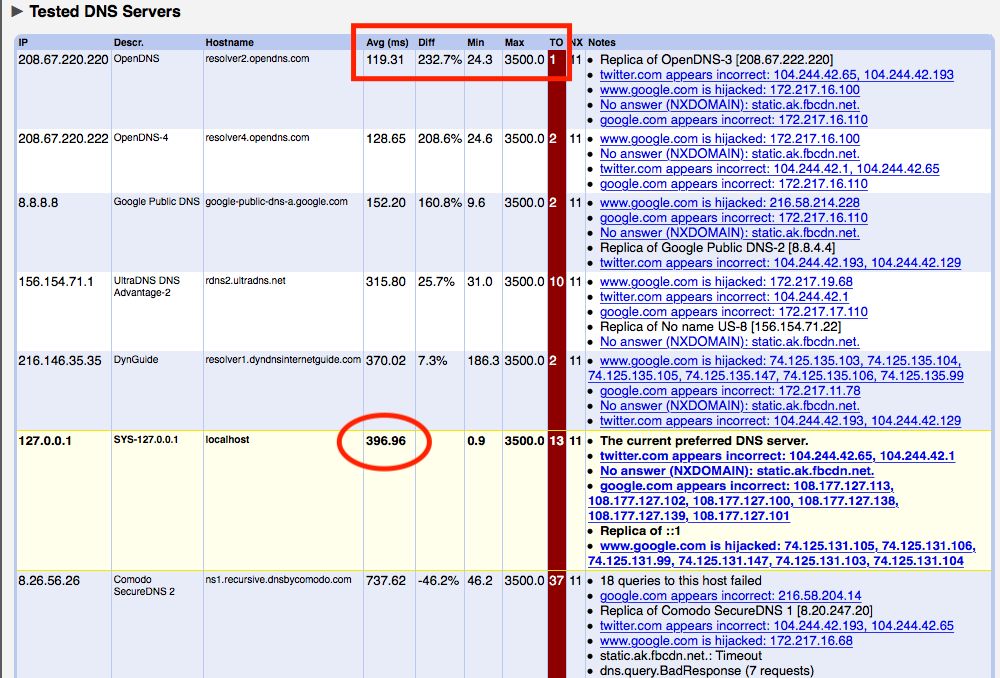
Namebench?
 idanka
on 24 Feb 2018
idanka
on 24 Feb 2018
terrible result with the fastest server
idanka
on 24 Feb 2018
How many times did you run it?
Namebench is very unreliable IMO.
Or _it_ may be reliable but the results differ greatly each time.
Run it 10 times and you’ll be lucky to get the same 3 servers at the top four of those times.
GitTheHellOutaHere
on 24 Feb 2018
ohhh :)
I understand.
idanka
on 24 Feb 2018
Namebench is a bit old and not very accurate. It doesn't reflect the actual speed you will get when browsing websites. 1/3 of modern websites use DNS servers that return different IPs according to the resolver IP in order to redirect you to the fastest web server. Namebench doesn't care at all about that, and just measures DNS latency which is not really relevant any more in practice.
It also checks only popular, mostly American websites, that are likely to be cached by upstream resolvers. It doesn't resolve specific names you get from CDNs. It doesn't check names used by APIs and other names that are not the main domain of a website. It doesn't match your actual browsing experience.
Some resolvers can appear to be super fast in Namebench's output because they are super fast at delivering IP addresses of ad servers and trackers, but these can be very slow at delivering actual website content.
You can get similar results faster by just starting dnscrypt-proxy from the command-line, as it will perform a benchmark of all configured servers at startup time.
But really, it's better to just... try. Try servers close to your location first, and see which ones feel faster.
jedisct1
on 24 Feb 2018
Related issues
 rugabunda
·
5Comments
rugabunda
·
5Comments
 Hasshu
·
4Comments
Hasshu
·
4Comments
 dongjuanyong
·
3Comments
dongjuanyong
·
3Comments
 jos1264
·
4Comments
jos1264
·
4Comments
 dduransseau
·
5Comments
dduransseau
·
5Comments
Most helpful comment
When we really want something we discover a surprising amount of time, skills and patience.
I was born lazy but when I face something I know I'll like and want it badly I switch the gear and discover I'm able of far more than I thought. It will require a minimum (or maximum) of work and efforts but it's always almost feasible.
Chin up! There's plenty of documentation concerning DNSCrypt and DNSCrypt-proxy. I had gone through information myself (at the time of previous version 1.9.x) then came back here to ask what I hadn't understood (after having worked myself) and jedisct1 and others filled the gaps of my ignorance. But it's not possible to have teachers do your homework, right?
Good luck, and stay tuned to DNSCrypt-proxy, it's really worth it.