Dnn.platform: ERROR:Could not find stored procedure dbo.AuthCookies_Update
Maybe its not a bug but Im trying to run DNN 9.4.1 from Visual Studio.
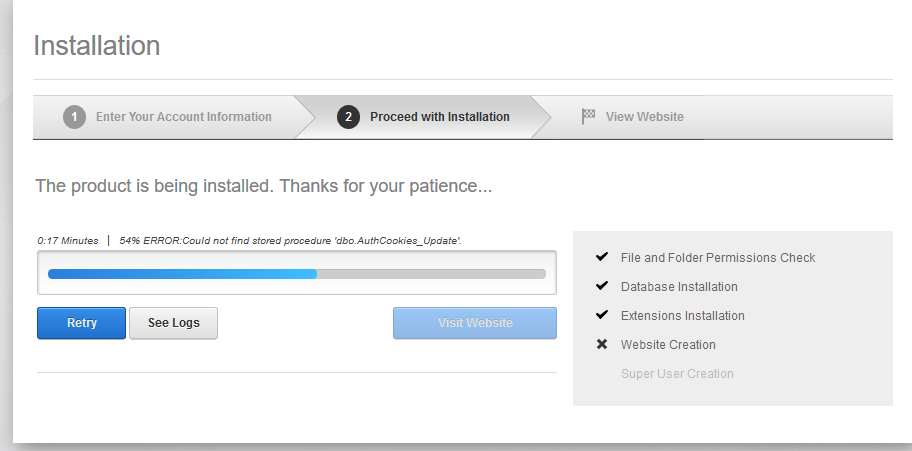
And Im gettin the following error;
"progress":54,"details":"ERROR:Could not find stored procedure dbo.AuthCookies_Update"
Firstly Ive created dnndev.me database and Ive checked and completed the permissions.
Ive created an app pool on iis named dnndev.me and Ive set the path like ...\Dnn.Platform-9.4.1\Website
Ive checked the folder permissions.
After that Ive run the project from Visual Studio.
In the first step Ive filled Account Informations properly.
In the second step when creating stored procedures, dbo.AuthCookies_Update couldnt be created
The way Ive tried to solve the error but I couldnt success is;
Ive created a new database with the same name (dnndev.me) and the same permissions
Ive created an app pool with the same name and the same path with controling folder permissions
And I've commented the lines following on the Visual Studio
( ...\Dnn.Platform-9.4.1\Website\Providers\DataProviders\SqlDataProvider --> 09.02.00.SqlProvider file)

Before running project on Visual Studio I've create that procedure on SSMS and it has been created successfully

Then when I run the project Ive got the same error and when I checked the database I couldnt see dbo.AuthCookies_Update on the Stored Procedure files
Ive checked out about this error, its a common error I guess.
 kbratuysuz
All 3 comments
Please review the Build documentation, which details the steps to run the site locally from source. The first step is running build.ps1 from a PowerShell terminal. This will ensure all of the pieces for the installation are in the right place.
Hope it helps!
 bdukes
on 10 Sep 2020
bdukes
on 10 Sep 2020
Exactly, website folder in the source code is not meant for running the site, but rather a staging area for the build process. You should run ./build.ps1 on the root of the souce code to first generate a first build, then follow the link above to find the workflow that suits you depending on what workflow suits your need. I am closing this issue because it is not an actionable item from a development perspective, but rest assured you can keep commenting on the issue and we will still get notified and able to help if you encounter and issues with the documented build process.
 valadas
on 10 Sep 2020
valadas
on 10 Sep 2020
Please note:
To run DNN or even to develop extensions like modules or skins, you do not need to build DNN yourself. Instead you should use the install package and follow setup instructions.
 sleupold
on 10 Sep 2020
sleupold
on 10 Sep 2020
Related issues
 ohine
·
3Comments
ohine
·
3Comments
 shanewalker1595
·
4Comments
shanewalker1595
·
4Comments
 zyhfish
·
5Comments
zyhfish
·
5Comments
 david-poindexter
·
4Comments
david-poindexter
·
4Comments
 moorecreative
·
4Comments
moorecreative
·
4Comments
Most helpful comment
Exactly, website folder in the source code is not meant for running the site, but rather a staging area for the build process. You should run
./build.ps1on the root of the souce code to first generate a first build, then follow the link above to find the workflow that suits you depending on what workflow suits your need. I am closing this issue because it is not an actionable item from a development perspective, but rest assured you can keep commenting on the issue and we will still get notified and able to help if you encounter and issues with the documented build process.