Dnn.platform: Unable To Upload Files Using Page Settings with A File Type for Page
Description of bug
Using file page type presents issues after you upload the initial file upload. If you have a file already selected you cannot upload a new one using the page settings file uploader. You drag a file onto the area and it says file uploaded but it never shows up to be selected. It also never shows up in the site assets either.
Steps to reproduce
List the precise steps to reproduce the bug:
- Go to page settings
- Click on File for page type
- Upload initial file and save
- Go back and try to upload a new file
Current behavior
Files are not uploading after you already have a selection. Workaround is to just use the site assets uploader and then pick the file from the page settings ui.
Expected behavior
Files should upload using the page settings file uploader.
Screenshots

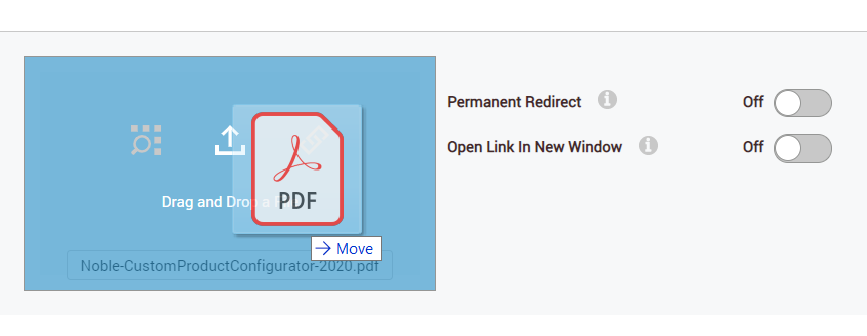
Error information
No console and no admin logs.
Additional context
3865 - referenced here
Affected version
- [X] 09.06.02
- [X] 09.06.01
Affected browser
- [X] Chrome 84.0.4147.125
- [X] Firefox 79.0
- [X] Microsoft Edge Chromium 84.0.522.52
 cklenk
All 6 comments
I went ahead and tested this on DNN 9.07.00 RC2 and am getting the same results. It is not working. I tried upload vs. drag and drop, no matter how I tried, the file was not ending up saved on the server.
I did find this error in my /Portals/_default/Logs/2020.08.11.log.resources
2020-08-11 21:52:25.444-05:00 [DS2035][D:2][T:95][ERROR] DotNetNuke.Web.InternalServices.FileUploadController - System.InvalidOperationException: Bad Request
   at DotNetNuke.Web.InternalServices.FileUploadController.UploadFile(Stream stream, Int32 portalId, UserInfo userInfo, String folder, String filter, String fileName, Boolean overwrite, Boolean isHostPortal, Boolean extract, String validationCode)
 jeremy-farrance
on 12 Aug 2020
jeremy-farrance
on 12 Aug 2020
yes, it is a known issue, there are references in #3865 like stated above, this should be a quick fix, we just need to add the validation code in 2 places and there are code samples for reference on how it got also fixed in the page icons section, this was just missed. If anyone has time soon to submit a PR for that, we may get it into 9.7.0
 valadas
on 12 Aug 2020
valadas
on 12 Aug 2020
Looks like this still isn't fixed correct? I see 9.7.1 is coming out soon and no PR. Just wondering if anyone had a timeline on this.
Thanks
-Cameron
cklenk
on 14 Sep 2020
yeah, looks like nobody picked this one up yet, the fix should be similar to
https://github.com/dnnsoftware/Dnn.Platform/pull/3865/commits/454b7657484f5b035bdd3abe247257310dac483b
and/or
https://github.com/dnnsoftware/Dnn.Platform/pull/3865/commits/6ef0c5b722d2f00bbbc54143c809db163e14b2e2
But in another area that was missed, posting the info here if someone has time to tackle that...
valadas
on 14 Sep 2020
We have detected this issue has not had any activity during the last 90 days. That could mean this issue is no longer relevant and/or nobody has found the necessary time to address the issue. We are trying to keep the list of open issues limited to those issues that are relevant to the majority and to close the ones that have become 'stale' (inactive). If no further activity is detected within the next 14 days, the issue will be closed automatically.
If new comments are are posted and/or a solution (pull request) is submitted for review that references this issue, the issue will not be closed. Closed issues can be reopened at any time in the future. Please remember those participating in this open source project are volunteers trying to help others and creating a better DNN Platform for all. Thank you for your continued involvement and contributions!
![stale[bot] picture](https://avatars.githubusercontent.com/in/1724?v=4&s=40) stale[bot]
on 13 Dec 2020
stale[bot]
on 13 Dec 2020
Just tested again on an upgraded 9.08.00 site and this is still a problem. Only workaround I found was to switch to the Site Assets, upload the file there, then come back to the page settings and use Browse. Tried many other combinations and usually nothing worked and other times the PersonaBar just went blank-white after a few steps.
Tried it with
- a new page
- an existing converting Type from Standard to File
- existing page with PDF already set/working and then uploading a new one (different file name)
However, I could not come up with a repeatable pattern to show the blank-white page thought that happened twice during 5+ variations on testing.
jeremy-farrance
on 13 Dec 2020
Related issues
 mnouraei
·
5Comments
mnouraei
·
5Comments
 shanewalker1595
·
4Comments
shanewalker1595
·
4Comments
 trouble2
·
5Comments
trouble2
·
5Comments
 iJungleboy
·
3Comments
iJungleboy
·
3Comments
 zyhfish
·
5Comments
zyhfish
·
5Comments
Most helpful comment
yes, it is a known issue, there are references in #3865 like stated above, this should be a quick fix, we just need to add the validation code in 2 places and there are code samples for reference on how it got also fixed in the page icons section, this was just missed. If anyone has time soon to submit a PR for that, we may get it into 9.7.0