Dnn.platform: SEO display hidden pages default not working on Sitemap.aspx
Description of bug
The SEO page has a default option to not include hidden pages in the SiteMap.aspx file. The default option of off is still including these hidden pages in the sitemap.aspx
Steps to reproduce
List the precise steps to reproduce the bug:
- Fresh install of DNN
- Go to SEO Site Map settings page to confirm that hidden pages should not be included
- View the Sitemap.aspx page and review the XML file returned. Hidden pages like http://localhost/Activity-Feed are included in the sitemap.
Expected behavior
If the default option to exclude hidden pages is checked, then these pages should not be shown in the Sitemap.aspx file.
Screenshots
SEO page setting default
https://bfb30d4aa283201c8ae6-fa4f287ec88b082f34d8962c0b5f36f7.ssl.cf2.rackcdn.com/assets/SEO.png
Example Sitemap.aspx return
https://bfb30d4aa283201c8ae6-fa4f287ec88b082f34d8962c0b5f36f7.ssl.cf2.rackcdn.com/assets/sitemap.png
Error information
Provide any error information (console errors, error logs, etc.) related to this bug.
Additional context
Provide any additional context that may be helpful in understanding and/or resolving the bug.
Affected version
- [x ] 09.07 RC
- [x ] 09.06.02
Affected browser
 euclid-mark
All 8 comments
I have additional details on this that should help in debugging as well as provide a workaround. Since the workaround is easy, it is my very-humble opinion that this is minor and should not hold up the release of 9.07.00 (currently at RC2). These details/steps should make it fairly easy to devise a fix for this. I believe this problem has existed for a while.
In brief:
After an install, PortalSettings does not have the 5 records for SiteMap* settings. The image below shows the settings after they have been written/created.
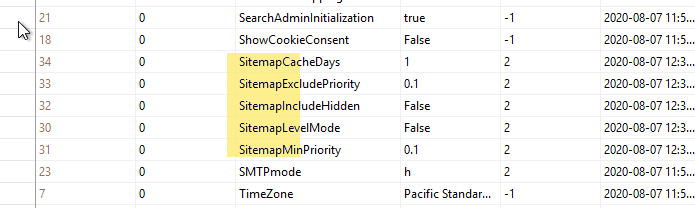
In this state, Sitemap Clear Cache and the SiteMap generator do not do their job properly, you just get a default spew of the 6 or so initial pages including the Activity-Feed pages which should not be showing.
The workaround is to go to Settings, SEO, Sitemap Settings tab, change any setting under GENERAL SITEMAP SETTINGS and Save (then change it back and hit Save again). This writes the 5 settings to the PortalSettings table and after that, you must go to Settings, Servers and Restart Application (and wait a few seconds). Then everything works as expected. e.g. change a setting on a page (set Display in Menu to false), go to SiteMap Settings and Clear Cache, then reload SiteMap.aspx and you should see changes and all page (and SiteMap) settings respected in the output.
Proper Steps to Demonstrate the problem
- New install of 9.07.00 RC2; after install, the PortalSettings table does not yet have the entries for SiteMap (5 rows highlighted above)
- Go look at your current /SiteMap.aspx output. It includes Activity-Feed page and subpages even though those are false for Display in Menu. You can go to Settings, SEO, Sitemap Settings tab and click Clear Cache (do not yet change any setting under the General section), make changes to settings ON PAGES, Clear Cache again, reload SiteMap.aspx, nothing will change.
- Now go to Settings, SEO, Sitemap Settings tab and change a setting and Save. As an aside, at this point, you can look in SQL and see that the 5 entries for SiteMap in PortalSettings get written when you save.
- IMPORTANT STEP - Settings, Servers, Restart Application
- Now have a look at the /SiteMap.aspx. It will have changed and the output will now start respecting the page settings. The Activity-Feed and sub-pages should no longer be in the output.
- Add a new page, add All Users View permission.
- Reload SiteMap.aspx; the page should not appear yet
- Go to Sitemap Settings, click the Clear Cache button
- Reload SiteMap.aspx; your new page should appear
- Go to your new pages settings, change Display in Menu to false
- Go to Sitemap Settings, click the Clear Cache button
- Reload SiteMap.aspx; and your new page should be missing
To drive the point home,
- go to SQL and delete the 5 Sitemap* entries in PortalSettings
- Settings, Servers, Restart Application
- Reload SiteMap.aspx and enjoy the mess; page settings are ignored, Activity-Feed pages are back, etc.
 jeremy-farrance
on 7 Aug 2020
jeremy-farrance
on 7 Aug 2020
I have confirmed the work around solves the issue on my production and test installs.
euclid-mark
on 7 Aug 2020
We have detected this issue has not had any activity during the last 90 days. That could mean this issue is no longer relevant and/or nobody has found the necessary time to address the issue. We are trying to keep the list of open issues limited to those issues that are relevant to the majority and to close the ones that have become 'stale' (inactive). If no further activity is detected within the next 14 days, the issue will be closed automatically.
If new comments are are posted and/or a solution (pull request) is submitted for review that references this issue, the issue will not be closed. Closed issues can be reopened at any time in the future. Please remember those participating in this open source project are volunteers trying to help others and creating a better DNN Platform for all. Thank you for your continued involvement and contributions!
![stale[bot] picture](https://avatars.githubusercontent.com/in/1724?v=4&s=40) stale[bot]
on 6 Nov 2020
stale[bot]
on 6 Nov 2020
This issue has been closed automatically due to inactivity (as mentioned 14 days ago). Feel free to re-open the issue if you believe it is still relevant.
stale[bot]
on 20 Nov 2020
This is still an issue. Exists in 9.8.
 sjsports
on 21 Nov 2020
sjsports
on 21 Nov 2020
This really should not be closed.
jeremy-farrance
on 26 Nov 2020
I can confirm it's still an issue in 9.8.0
 valadas
on 26 Nov 2020
valadas
on 26 Nov 2020
I'll take this one, just wanting to confirm @jeremy-farrance that after doing the above of saving settings all is good, it is simply the missing values that are the issue?
 mitchelsellers
on 27 Nov 2020
mitchelsellers
on 27 Nov 2020
Related issues
 sleupold
·
4Comments
sleupold
·
4Comments
 mnouraei
·
5Comments
mnouraei
·
5Comments
 hismightiness
·
5Comments
hismightiness
·
5Comments
 iJungleboy
·
3Comments
iJungleboy
·
3Comments
 david-poindexter
·
3Comments
david-poindexter
·
3Comments