Dnn.platform: Imagehandler generating huge images
Description of bug
We have an image of 186kb.
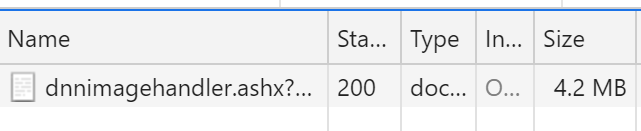
After calling: http://OUR_URL/dnnimagehandler.ashx?mode=file&file=/Portals/2/Images/Sample3.png
We get an image of over 4mb.
How can this be possible?
Current behavior
Huge files are generated when using image handler.
Expected behavior
Image resizers should optimize the images and not other way round.
Screenshots
Affected version
- [x] 9.3.2
Affected browser
- [x] Chrome
- [ ] Firefox
- [ ] Safari
- [ ] Internet Explorer 11
- [ ] Microsoft Edge (Classic)
- [ ] Microsoft Edge Chromium
 dgroh
dgroh
All 25 comments
It doesn't look like DnnImageHandler does any optimization, so if your image is already sized correctly and optimized, serving it through DnnImageHandler will de-optimize it.
Here's where the image is saved to the output stream:
https://github.com/dnnsoftware/Dnn.Platform/blob/39299ca2bf868d625f79ac80177c0f65c78835b3/DNN%20Platform/Library/Services/GeneratedImage/ImageHandlerInternal.cs#L297-L319
Here's where it's rendered:
https://github.com/dnnsoftware/Dnn.Platform/blob/39299ca2bf868d625f79ac80177c0f65c78835b3/DNN%20Platform/Library/Services/GeneratedImage/ImageHandlerInternal.cs#L455-L471
In your scenario, the only image "transform" is loading the image from disk, which happens here:
https://github.com/dnnsoftware/Dnn.Platform/blob/develop/DNN%20Platform/Library/Services/GeneratedImage/ImageTransform.cs#L58-L71
The only control that's build into it is changing the ImageCompression value that's passed as the Quality parameter into the image encoder, but I don't think that even has an effect for a PNG. You would change that value via web.config:
https://github.com/dnnsoftware/Dnn.Platform/blob/39299ca2bf868d625f79ac80177c0f65c78835b3/DNN%20Platform/Library/Services/GeneratedImage/DnnImageHandler.cs#L546-L596
@dgroh in this case where you have the path and aren't doing any transforms, what's your goal in using DnnImageHandler.ashx? Is it just that you expected it to optimize the image for you (or, at least, that it wouldn't be de-optimized)?
 bdukes
on 14 Jul 2020
bdukes
on 14 Jul 2020
@bdukes I don't fully agree with the behavior. If I pass an image of 186kb why should it renders it as a 4.2mb image? Does this make sense? We used imageresizing which gave us the image of the same size and not almost 40 times bigger. We were so excited about the DNN Imagehandler because of the caching strategy, but if we get so big images, it doesn't really help.
About the point with the path was just an example, but if we use:
http://OUR_URL/dnnimagehandler.ashx?mode=file&file=/Portals/2/Images/Sample3.png&resizemode=fit&w=1024.
This will generate a file size of almost 40 times bigger (4.2mb) than the original one (186kb).
dgroh
on 14 Jul 2020
@dgroh to be clear, I'm not saying it _should_ de-optimize the image, but just tracking down the current behavior so that we can understand what it is doing and what it's not currently trying to do.
Thanks for the example. My first thought was that we could add a special case to handle when an image doesn't have any transforms and just pass it straight through from disk. But if you're resizing, then we need to process the image. So, I think ultimately it's a question of whether there's a well-supported open source library we can use to optimize the image at the end of the pipeline (and if someone will volunteer to implement it).
bdukes
on 14 Jul 2020
I will go back to the question from @bdukes, what is the desired behavior?
For an already optimized image, I wouldn't want to leverage any external API to cache it internally to the application. Proper static file cache settings etc will optimize better than anything.
The dnnimagehandler itself is limited in what it can do, because of the fact that it doesn't use a third-party library etc. I also consider its long-term benefit as a question.
But ideally, I'm curious as to why you want to use it for an already optimized image
 mitchelsellers
on 14 Jul 2020
mitchelsellers
on 14 Jul 2020
We have a two portals with a lot of images. We were using imageresizing. We have a big performance issue mostly because not all images are cached and because some images are bigger than our viewports.
The imageresizing in the free version has TinyCache which we are currently using, but is a size-limited disk cache (30MB, max 1024 cache items).
We then wanted to try the DNN Imagehandler. For us would be a big benefit because then we won't have to rely on a third party API plus DNN has its own caching engine.
But as you can see, it has IMO a very weird bahavior.
You can see in the screenshot below the original image and the image generated from DNN imagehandler.

You guys pointed out that I'm not resizing the image which actually is not the point. We will resize the image based on the ViewPort as I mentioned above, but even if I resize the image to the half, the file size is still too big in relation to the original one, for example:
The original image in the example below has a width of 650px and a file size of 228KB
If I resize it to the half:
http://localhost:8102/dnnimagehandler.ashx?file=%2fPortals%2f2%2fImages%2fSample1.png&w=325&mode=file&resizemode=fit
The file size is still 5 times bigger than the original one:

dgroh
on 14 Jul 2020
We can look at the compression settings, but the API's available for us are going to limit some of the ability to get the really small file sizes
mitchelsellers
on 14 Jul 2020
Alternative would be to give the image a format, for example saving the image as jpg. That could be done here?
var ici = GetEncoderInfo(GetImageMimeType(this.ContentType));
For example:
http://localhost:8102/dnnimagehandler.ashx?file=%2fPortals%2f2%2fImages%2fSample1.png&w=325&mode=file&resizemode=fit&format=jpeg
This would drop the size drastically.
dgroh
on 14 Jul 2020
Are you saying that adding format fixes this issue for you? Or that you think it would help if it worked?
bdukes
on 14 Jul 2020
Both actually. Not only for me, but for everyone who uses PNG. I see PNG more for images with transparency.
You can imagine that content managers upload images without knowing what they are really doing and we cannot control that in the PersonaBar / Assets management. So they might upload a 2000px / 2000px image to display on some page. Our job would be to resize it to fit it to our ViewPort and also to make sure that the extension is appropriate for the current module.
I don't know. This would be an option. You could check this here:
They also have option to output in different formats.
dgroh
on 14 Jul 2020
I think the real key that we have to understand here is a bit multifaceted.
- Is the platform in the business of providing this level of service?
- Can we provide a proper service, without third-party licensing to leverage this
- Is type adjustment acceptable? or do we not want to risk quality loss etc.
- Should this actually be used/integrated in the larger platform to be used. (It isn't currently)
Paging @david-poindexter
mitchelsellers
on 14 Jul 2020
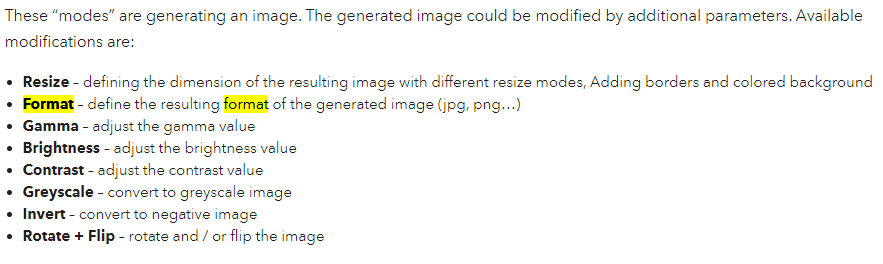
By the way, it's already possible to pass a format, I just tested:
http://localhost:8102/dnnimagehandler.ashx?file=%2fPortals%2f2%2fImages%2fSample4.png&w=1366&format=jpeg&mode=file&resizemode=fit
It works like a charm:

For me this issue is closed as long as I don't have to render PNGs, what I think should not be the case.
And I missed this parameter in the docs:
dgroh
on 14 Jul 2020
Just checked and unfortunately the PNG images are way too big.
JPEG is not a problem.
This has definitely to be investigated. We can't restrict the content managers to upload only JPEGs.
We could look at Imageflow and see how they achieve the PNGs to be so performant. It's open source.
dgroh
on 15 Jul 2020
Imageflow is licensed under AGPL, so we can't include it in DNN (their .NET client is Apache licensed, so we could add support in DNN, but to actually use it, someone would need a valid license of the underlying Imageflow components).
ImageResizing has a core that's Apache licensed, but performance plugins are AGPL. It's possible that we could replace some of the existing image transformation logic with ImageResizing, but we'd need to test to determine how much of a difference that might make.
When we originally looked at adding the image handler, ImageResizing was considered, but there were concerns about the effect it had on performance of the site when it wasn't in use.
And, ultimately, as @mitchelsellers said, we need a clear understanding of the goals of this component of DNN Platform.
bdukes
on 15 Jul 2020
@dgroh have you looked into Cloudinary? Right tool for the job?
@mitchelsellers I do believe we have multiple things to consider here. Perhaps this is worth a conversation within the Technology group.
Fwiw, we have never seen this feature as a solution for the OPs use case. I don't believe it was intended for all that.
 david-poindexter
on 15 Jul 2020
david-poindexter
on 15 Jul 2020
One more thing...if we really want to tackle some improvements for the image handler with some of these goals in mind, we should probably turn our attention to WebP optimization.
david-poindexter
on 15 Jul 2020
Ok, I'll add this to the discussion for the next Technology group meeting.
The initial add of this "feature" was really lost back in the 5.x days and it has just been carried along thus far.
mitchelsellers
on 15 Jul 2020
I did not look into the licensing details so I am just posting here that I have used http://imagemagick.net/ on a very complex image handling software, it is awesome and I have good knowledge and code samples available if we do go that route.
 valadas
on 15 Jul 2020
valadas
on 15 Jul 2020
I did not look into the licensing details so I am just posting here that I have used http://imagemagick.net/ on a very complex image handling software, it is awesome and I have good knowledge and code samples available if we do go that route.
ImageMagick is free software delivered as a ready-to-run binary distribution or as source code that you may use, copy, modify, and distribute in both open and proprietary applications. It is distributed under a derived Apache 2.0 license.
david-poindexter
on 15 Jul 2020
There are multiple vulnerabilities in ImageMagick, a package commonly used by web services to process images. One of the vulnerabilities can lead to remote code execution (RCE) if you process user submitted images. The exploit for this vulnerability is being used in the wild.
I would lean towards using (ImageResizer)[https://www.nuget.org/packages/ImageResizer] as the engine underlying DnnImageHandler.ashx. AFAIK it's the most battle-tested platform for .NET (from a performance and security perspective). The main limitation without AGPL plugins is caching, which we're already handling. So long as don't turn on the IHttpModule part of it by default, I don't think we'd see general performance issues.
bdukes
on 15 Jul 2020
FYI:
DnnImageHandler had been added to DNN 8 based on BBimageHandler from Torsten Weggen (https://github.com/weggetor/BBImageHandler). It was just based on Microsoft.Web.GeneratedImage
 sleupold
on 15 Jul 2020
sleupold
on 15 Jul 2020
I've been doing some research to find out how it is possible that two visually identical PNG images of the same resolution have such dramatic differences regarding their file size. I thought I'd share what I found out in case some of you guys are interested in this.
Disclaimer: I am a collegue of @dgroh and interested in finding a solution to this as well. By no means I am some kind of expert in image compression. I just read some online resources like Finally understanding PNG.
So basically there are different types of PNG files that differ primarily in their bit depth.
PNG-32 and PNG-24 use 8 bit for each color value (red, green, blue) which makes 3 byte per pixel (or 4 byte for PNG-32 which uses another byte for transparency). There are clever ways to reduce the file size by not saving recurring patterns for example, but those might not be relevant here.
PNG-8 instead is super clever by creating a color palette of 1 byte for the whole image and for each pixel only the index in this palette is saved. This allows each pixel to be saved in 1 byte instead of 3 (plus one byte for the whole image). The disadvantage here is that the palette can only hold a maximum of 256 different colors. For many images this is sufficient though.
Now, my guess is that @dgroh's test image is either a PNG-8 or PNG-24 file but DNN Image Handler ignores that and rerenders the image as PNG-32 which makes it much larger.
Maybe the algorithm can be fixed so that it does not unnecessarily increase the bit depth of the original image.
This is just a first attempt at explaining where the large file size might come from. It still does not explain why it becomes 40 (!) times bigger, so there have to be more differences between the two files.
 benruehl
on 16 Jul 2020
benruehl
on 16 Jul 2020
Just to add one more note to the discussion, it might also be worth looking at https://sixlabors.com/blog/announcing-imagesharp-100/, which is a .NET Standard library (rather than migrating to ImageResizing and being more coupled to .NET Framework). I don't know anything aboiut ImageSharp's performance or image size optimizations, so just adding it as another option to investigate.
bdukes
on 5 Aug 2020
We have detected this issue has not had any activity during the last 90 days. That could mean this issue is no longer relevant and/or nobody has found the necessary time to address the issue. We are trying to keep the list of open issues limited to those issues that are relevant to the majority and to close the ones that have become 'stale' (inactive). If no further activity is detected within the next 14 days, the issue will be closed automatically.
If new comments are are posted and/or a solution (pull request) is submitted for review that references this issue, the issue will not be closed. Closed issues can be reopened at any time in the future. Please remember those participating in this open source project are volunteers trying to help others and creating a better DNN Platform for all. Thank you for your continued involvement and contributions!
![stale[bot] picture](https://avatars.githubusercontent.com/in/1724?v=4&s=40) stale[bot]
on 5 Nov 2020
stale[bot]
on 5 Nov 2020
This issue has been closed automatically due to inactivity (as mentioned 14 days ago). Feel free to re-open the issue if you believe it is still relevant.
stale[bot]
on 19 Nov 2020
Some results from Google PageSpeed:
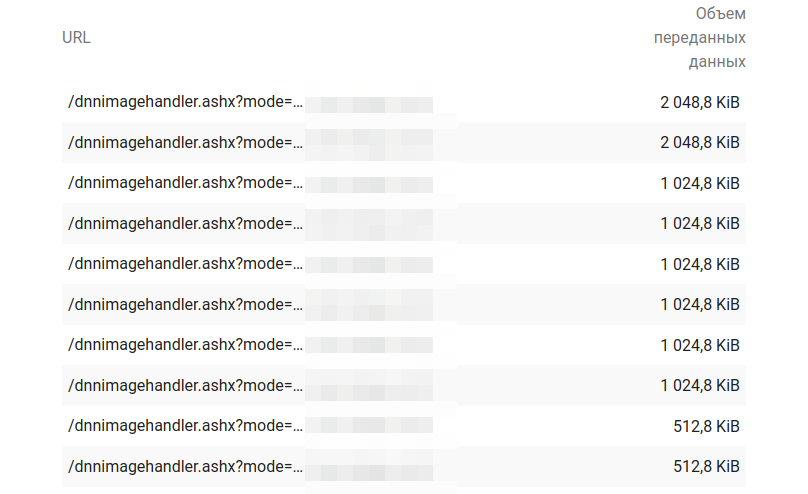
URL format: /dnnimagehandler.ashx?mode=securefile&fileid=xxx&filter=resize&w=727
All base images in JPEG. All generated images - in PNG.
Changing URL format to /dnnimagehandler.ashx?mode=securefile&fileid=xxx&filter=resize&w=727&format=jpeg still produces PNGs (at least in DNN 8.0.4)
 roman-yagodin
on 25 Nov 2020
roman-yagodin
on 25 Nov 2020
Related issues
 DanielNelsonCantarus
·
5Comments
DanielNelsonCantarus
·
5Comments
 cklenk
·
5Comments
cklenk
·
5Comments
 shanewalker1595
·
4Comments
shanewalker1595
·
4Comments
 iJungleboy
·
3Comments
iJungleboy
·
3Comments
 moorecreative
·
4Comments
moorecreative
·
4Comments