Dnn.platform: Translation Roles in PersonaBar
Description of bug
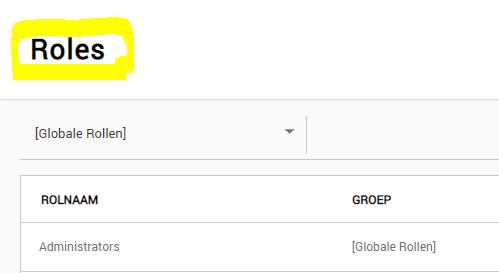
When translating the PersonaBar Roles page in a Multilanguage platform (or just any other language then English), the Title is not included.
So all files are translated but the title is not affected.
See issue on forum here: https://dnncommunity.org/forums/aft/509#1956
Steps to reproduce
List the steps to reproduce the behavior:
- Go to 'Roles'
- Look at the Title, this is not in the translated language.
Current result
The current result is that no matter what translation file you translate, the Roles title will not be affected by it.
Expected result
That it will change the Title according to the translated files.
Screenshots
Affected version
DNN 9.3.2
I have not tested the lower DNN 9 versions.
Affected browser
Every browser as the issue is not related to the browser you use.
 Sorencys
All 6 comments
I tested this and to me this seems like a bug.
For the Users part of the PB the localization is here:
DesktopModules\Admin\Dnn.PersonaBar\Modules\Dnn.Users\App_LocalResources\Users.resx
If I change the text to:
< data name="nav_Users.Text" xml:space="preserve">
< value>Users-x< /value>
< /data>
The PB shows Users-X (after an app pool restart)in the "PB menu" and the header of the "Page" itself.
When I do the same for Roles:
< data name="nav_Roles.Text" xml:space="preserve">
< value>Roles-x< /value>
< /data>
In DesktopModules\Admin\Dnn.PersonaBar\Modules\Dnn.Roles\App_LocalResources\Roles.resx
Only the text in the PB menu changes and not the header in the actual edit screen.
So IMO this is a bug.
 Timo-Breumelhof
on 7 Nov 2019
Timo-Breumelhof
on 7 Nov 2019
You can check if "static text is localizable by the setting in web.config
<add key="ShowMissingKeys" value="true" />
I am not sure if this setting works for the PB _(ooohhh, how I do not like the PB_ :-( )
 EPTamminga
on 7 Nov 2019
EPTamminga
on 7 Nov 2019
(you are not allowed to say you don't like the PB :p) ;-)
Timo-Breumelhof
on 7 Nov 2019
@Timo-Breumelhof I am not saying it, I am writing it :-)
EPTamminga
on 7 Nov 2019
@EPTamminga even worse.. ;-)
Timo-Breumelhof
on 7 Nov 2019
I have not tested the lower DNN 9 versions
Well, what's important is to test the higher versions :)
Also, you you spoke french then it would simply be the same word in english and french and you would have no problem :P
But all kidding aside, yeah, there is a bug, the code here looks for Roles instead of nav_Roles.Text and the resource file does not have a Roles key, so it just displays the key.
 valadas
on 8 Nov 2019
valadas
on 8 Nov 2019
Related issues
 mnouraei
·
5Comments
mnouraei
·
5Comments
 soheilkheiri
·
5Comments
soheilkheiri
·
5Comments
 coretoco
·
4Comments
coretoco
·
4Comments
 hismightiness
·
5Comments
hismightiness
·
5Comments
 cklenk
·
5Comments
cklenk
·
5Comments