Dnn.platform: Resolve Build Warnings on DNN.Platform Solution
When building the DNN Solution in Visual Studio a number of build warnings appear for code-quality related elements. This clustters the build logs and makes the identification of actual issues complicated.
Description of bug
Building DNN Platform results in 676 Build Warnings, making it impossible to identify if there are any "actual" issues.
Steps to reproduce
- Open the solution
- Build
- View Output Window and notice 676 Warnings
Expected result
Zero build warnings
 mitchelsellers
All 14 comments
This issue has been automatically marked as stale because it has not had recent activity. It will be closed if no further activity occurs. Thank you for your contributions.
![stale[bot] picture](https://avatars.githubusercontent.com/in/1724?v=4&s=40) stale[bot]
on 4 Oct 2019
stale[bot]
on 4 Oct 2019
Please keep it Stalebot :)
 valadas
on 5 Oct 2019
valadas
on 5 Oct 2019
Hello,
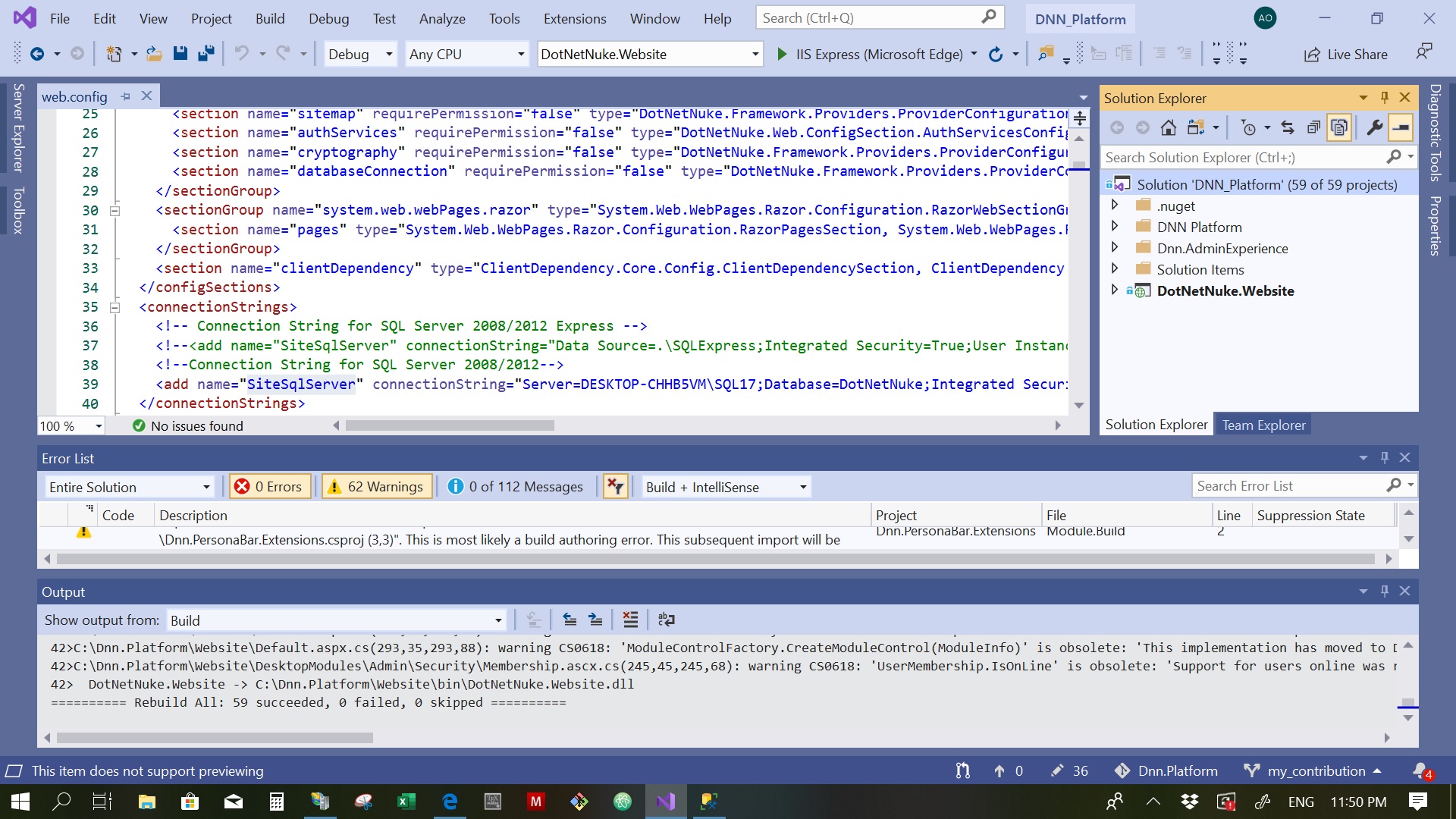
Regarding this issue, I have set up and built the dnn.platform successfully, but only 62 warnings appear.
please note that I am using Visual studio 2019 community
 eng-aomar
on 9 Oct 2019
eng-aomar
on 9 Oct 2019
@eng-aomar That is about right. I'm going to go through this again and fix everything soon.
mitchelsellers
on 9 Oct 2019
I want to contribute to this issue if it is assigned to nobody.
eng-aomar
on 9 Oct 2019
@eng-aomar We would welcome contributions for this.
Please do include detail comments for any changes made to help with review
mitchelsellers
on 9 Oct 2019
Just a note @eng-aomar if you do this soon and without breaking changes you could target the release/9.4.x branch for a faster merge. If they are not all solved in one go, any partial fixes are also a welcome step in the right direction :)
valadas
on 9 Oct 2019
@valadas, @mitchelsellers I will do my best.
@valadas, Thank you very much, your video titled [Setting up the Tools for DNN Development] on youtube was of great help (https://www.youtube.com/watch?v=zLB6uzdqGF8)
eng-aomar
on 9 Oct 2019
Yeah, some things on this playlist are now outdated, but the good news is that it is now easier, we merged the AdminExperience repository into this one, so that part is now easier to test/build. Also you can now just run in powershell ./builds.ps1 to generate all assets into the Artifacts directory. Just ping us here if you run into any issue building.
valadas
on 9 Oct 2019
@valadas
According to the warnings with the code CS0618 such as for example this one "Upgrade.AddPortal(XmlNode, bool, int)' is obsolete: 'Deprecated in DNN 9.3.0, will be removed in 11.0.0. Use the overloaded method with the 'superUser' "
when tracing doing the warning in the install.aspx.cs file
I replaced it with the overloaded method with superUser passed = null
Upgrade.Upgrade.AddPortal(node, true, 0,null); and the warning is gone
Or should it be passed to some value?
and in general for those warnings with codes CS0618 C# is obsolete, CS0809 C# Obsolete member overrides non-obsolete member, How could I know what is the needed as a solution for such cases, is there any documentation for possible fixes.
What should I do in order to deliver the right solution?
My second question is related to the messages in beside the warnings, do they lie within the scope of this issue? Is it ok to slove those code quality messages?
eng-aomar
on 22 Oct 2019
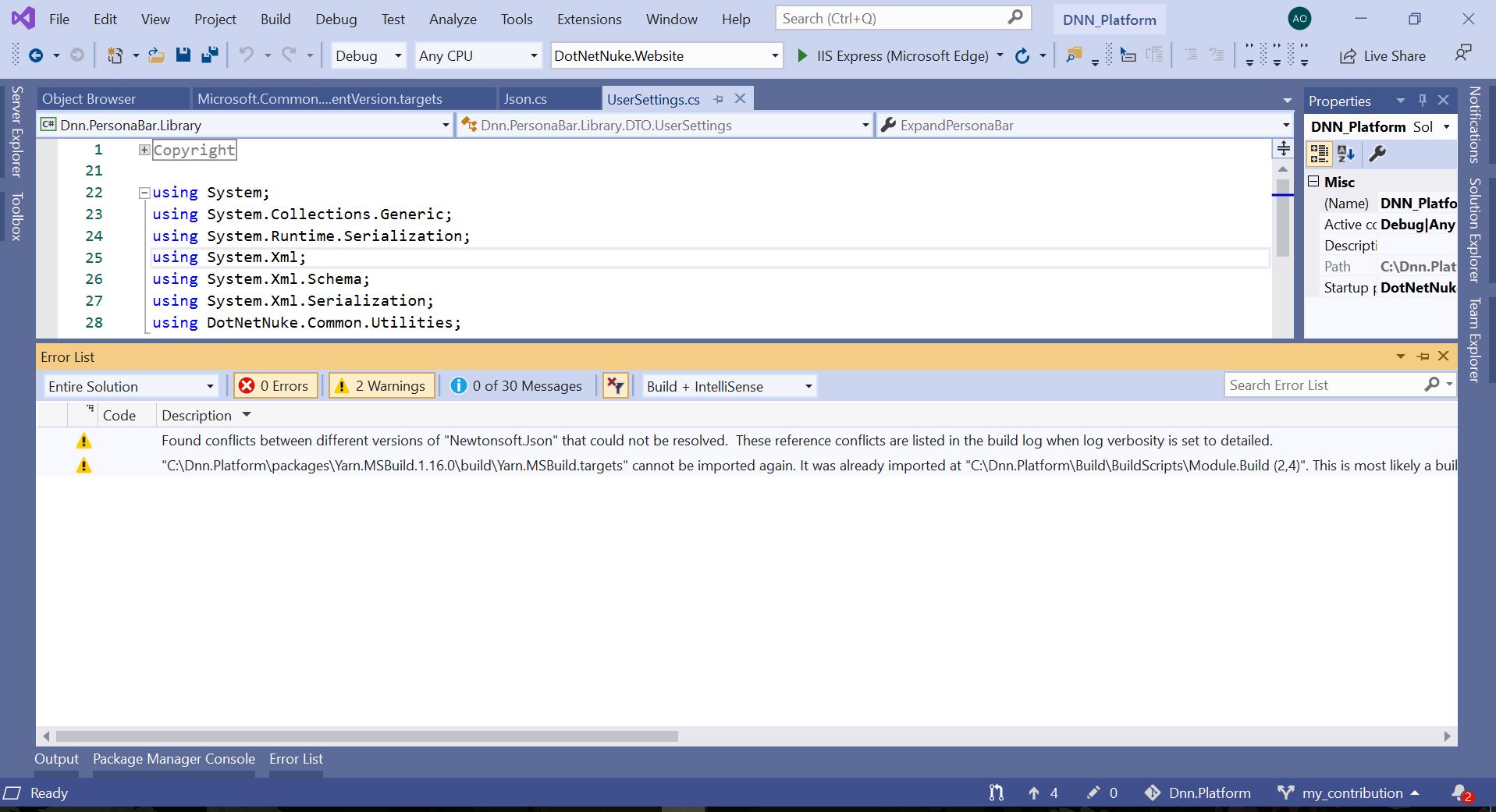
I have worked on solving the warning and I succeeded to decrease the number of warnings to 2, as illustrated in the attached picture.
The first warning is concerned with newtonsoft.jason library, Dnn.AuthServices.Jwt\bin\Newtonsoft.Json.dll Version=10.0.0.0while the HintPath=....\packages\Newtonsoft.Json.10.0.3lib\net45\Newtonsoft.Json.dll, I tried to update the newtonsoft.jason using NuGet package manager, but the warning did not disappear. Besides, DNN.EditBar.Library uses newtonsoft.json v =6.0.0.0.
The second is yarn.MSBuild.1.160.0
@valadas, @mitchelsellers
I want to ask if there is a test mechanism used in the case of those warnings or it is just enough to have a free-error solution? and if there is any suggestion about those two warnings to be solved.
Thank you
eng-aomar
on 26 Oct 2019
Oh, there are way more warnings than those 2. Many of the projects throw 10-20 warnings each for multiple mixed reasons.
As for the two you see here, the first issue is that two projects depend on different versions of that same assembly, we need to find which and reference the same as the higher version.
For the yarn.MSBuild one, it must be imported twice in the build scripts on different files, on this second one, make sure you get the latest updates, this may have been fixed already in the last couple of days...
valadas
on 28 Oct 2019
@valadas Thanks for responding. Actually, There were more than 2 warnings, but I have fixed them all, as the solution was showing 62 when first I build it.
I will work on the remaining and try to fix them soon, but I have to know if there is a test mechanism used to verify the functionality rather than having an error-free solution?
eng-aomar
on 28 Oct 2019
Oh awesome. There are _some_ automated tests that will run with the Pull Request automatically but they do not cover everything. We will also review the pull request and if we see any risks from there we will both let you know and test the affected areas. If you want reviews early before it is all final, you can also submit a "work in progress" pull request
valadas
on 30 Oct 2019
Related issues
 soheilkheiri
·
5Comments
soheilkheiri
·
5Comments
 sleupold
·
4Comments
sleupold
·
4Comments
 cklenk
·
5Comments
cklenk
·
5Comments
 DanielNelsonCantarus
·
5Comments
DanielNelsonCantarus
·
5Comments
 trouble2
·
5Comments
trouble2
·
5Comments
Most helpful comment
I want to contribute to this issue if it is assigned to nobody.