Dlib: Training mmod detector crashes when using bounding box regression
I am training a normal mmod detector like the ones in the examples, but I enable bounding box regression with:
net.subnet().layer_details().set_num_filters(5 * options.detector_windows.size());
Current Behavior
I get the following error really often:
Error detected at line 1591.
Error detected in file ../../external/dlib/dlib/../dlib/dnn/loss.h.
which refers to: https://github.com/davisking/dlib/blob/b401185aa5a59bfff8eb5f4675a7e4802c37b070/dlib/dnn/loss.h#L1591-L1592
I was not getting this error with the same code a while ago, but many things have changed since (especially CUDA versions).
Most of the time, this error happens at the beginning of the training, when everything is very chaotic. However, sometimes I get the error after the loss has stabilized, as well.
I tried updating the gradient for h and w only when they are positive and let the gradient be 0 otherwise.
This avoids the crashing, but messes up the training (loss goes to inf).
I've also noticed this didn't happen when I changed the lambda value to much lower values, such as 1, instead of the default 100. Maybe it's just that the lambda is too big?
EDIT: it also happens.
How would you proceed?
- Version: dlib master (19.21.99)
- Where did you get dlib: github
- Platform: Linux 64 bit, CUDA 11.0.2, CUDNN 8.0.2.39
- Compiler: GCC-9.3.0 for C (in order to enable CUDA) and GCC-10.2 for C++
 arrufat
All 19 comments
I think I have figured a way to make it work:
- train detector without bounding box regression (bbr)
- retrain the previous detector with bbr (I set
lambda_bbr = 10) and initialize all but finalconlayer with previous detector, as number of filters don't match (basically:net_bbr10.subnet().subnet() = net_nobbr.subnet().subnet(); - finetune the previous detector with
lambda_bbr = 100. This time we start from the whole network and a smaller learning rate (basically:net_bbr100.subnet() = net.bbr10.subnet();)
I've tried this so far and it does not crash because of that assertion. It would be nice though to have it working without these intermediate steps.
I am open to suggestions on how we could tackle this :)
arrufat
on 27 Aug 2020
Na, you shouldn't have to do any of that hacky stuff.
I just looked at the code and oops, it's totally wrong. It should be like this:
diff --git a/dlib/dnn/loss.h b/dlib/dnn/loss.h
index e4b913a3..a2fb0790 100644
--- a/dlib/dnn/loss.h
+++ b/dlib/dnn/loss.h
@@ -1582,9 +1582,9 @@ namespace dlib
                                     double dw = out_data[dets[i].tensor_offset_dw];
                                     double dh = out_data[dets[i].tensor_offset_dh];

-                                    dpoint p = dcenter(dets[i].rect_bbr);
-                                    double w = dets[i].rect_bbr.width()-1;
-                                    double h = dets[i].rect_bbr.height()-1;
+                                    dpoint p = dcenter(dets[i].rect);
+                                    double w = dets[i].rect.width()-1;
+                                    double h = dets[i].rect.height()-1;
                                     drectangle truth_box = (*truth)[hittruth.second].rect;
                                     dpoint p_truth = dcenter(truth_box);
Either that or it's too late and I'm tired and should go to sleep. But unless I'm just missing or forgetting something that's happening elsewhere in the code that somehow makes what's there right, it should be using rect not rect_bbr there. I'm launching a training session now to see if this works right/better. I'll look more tomorrow. But try the above and see if it works better.
 davisking
on 29 Aug 2020
davisking
on 29 Aug 2020
I've tried that change locally and it does not crash any more. Moreover, the resulting detector's bounding box regression works way better than before! Thank you!
EDIT: this might also explain why I was having some trouble in #1824.
arrufat
on 29 Aug 2020
No problem. Yeah, that is likely :|
The way non-max suppression is handled is also possibly less than ideal since to_label uses rect_bbr but overlaps_any_box_nms only looks at the rect (the rectangle without bounding box regression applied). It might be better to use rect_bbr, but it also might destabilize training.
davisking
on 29 Aug 2020
Hmm, but in this comment you say that we're using rect_bbr instead.
https://github.com/davisking/dlib/blob/0e721e5cae66214a57fa91fd671854d8f479852e/dlib/dnn/loss.h#L1310
I will check if I can run a training with nms on rect_bbr soon, then.
Thanks for looking into this.
arrufat
on 29 Aug 2020
Yeah, we are using it in the output you get as the user, but the loss computation isn't looking at it. You would need to make this change to have the loss use rect_bbr too.
diff --git a/dlib/dnn/loss.h b/dlib/dnn/loss.h
index a2fb0790..7ac40a7b 100644
--- a/dlib/dnn/loss.h
+++ b/dlib/dnn/loss.h
@@ -1487,7 +1487,7 @@ namespace dlib
                 // The point of this loop is to fill out the truth_score_hits array.
                 for (size_t i = 0; i < dets.size() && final_dets.size() < max_num_dets; ++i)
                 {
-                    if (overlaps_any_box_nms(final_dets, dets[i].rect))
+                    if (overlaps_any_box_nms(final_dets, dets[i].rect_bbr))
                         continue;

                     const auto& det_label = options.detector_windows[dets[i].tensor_channel].label;
@@ -1556,7 +1556,7 @@ namespace dlib
                 // detections.
                 for (unsigned long i = 0; i < dets.size() && final_dets.size() < max_num_dets; ++i)
                 {
-                    if (overlaps_any_box_nms(final_dets, dets[i].rect))
+                    if (overlaps_any_box_nms(final_dets, dets[i].rect_bbr))
                         continue;

                     const auto& det_label = options.detector_windows[dets[i].tensor_channel].label;
Training now with the exact same settings as before. The only change is the NMS on the rect_bbr. I'll let you know how it goes :)
arrufat
on 29 Aug 2020
So, I have finished a new training on a small dataset of 14 images and 2 classes. Each class has 25 annotated bounding boxes.
- NMS with
rect
- minimum training loss: 0.17
- performance:
  set |     prec.   recall      mAP
------+----------------------------
train |        1 0.93617 0.93617
- NMS with
rect_bbr
- minimum training loss: 0.10
- performance:
  set |     prec.   recall      mAP
------+----------------------------
train |         1 0.978723 0.978723
I noticed that the training with rect_bbr decreased the learning rate a bit earlier than the one with rect. Probably because the bounding boxes were a bit more chaotic at the beginning of the training, due to the bbr. You can see both training losses here:
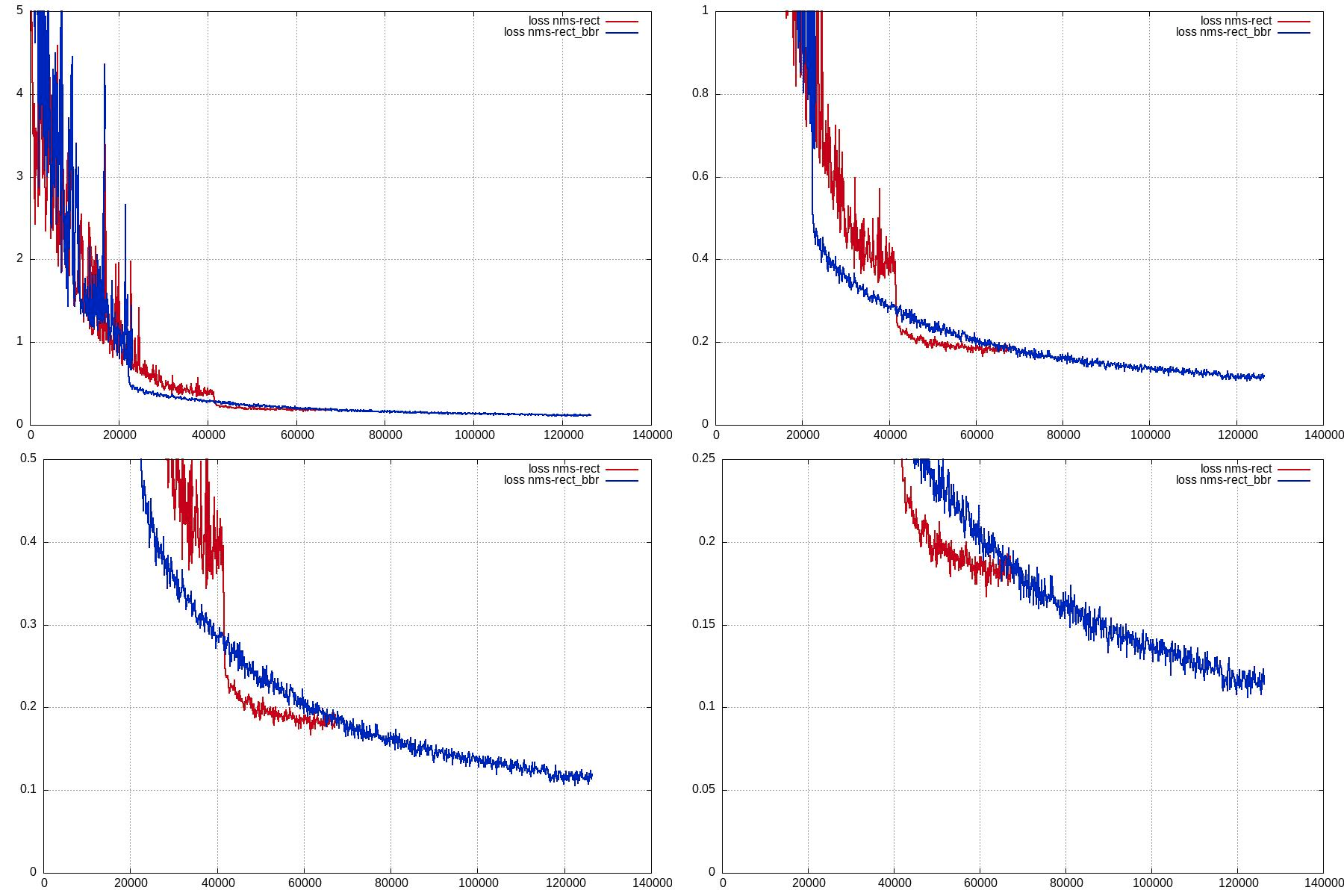
As you can see, the training took almost as twice as long, but got lower loss.
Visually, the results of both detectors almost indistinguishable.
I know it's just a very simple test, so I'm not sure about what conclusions to draw from it.
Edit: both trainings use bbr_lambda = 100.
arrufat
on 30 Aug 2020
Yeah, I'm playing with this myself as well and fairly strongly leaning towards switching to rect_bbr. Using rect_bbr is mathematically right while rect is wrong. So I expect it to be better as you noticed. I'm going to let a few more things run though to make sure it's not unstable when using rect_bbr though.
davisking
on 30 Aug 2020
Yes, I am also running a training on a more complicated dataset, and so far it seems to work well :)
arrufat
on 30 Aug 2020
Cool.
I had intended for the code to do this all along too. It’s just a silly typo :/
On Aug 30, 2020, at 7:44 AM, Adrià Arrufat notifications@github.com wrote:
Yes, I am also running a training on a more complicated dataset, and so far it seems to work well :)—
You are receiving this because you commented.
Reply to this email directly, view it on GitHub, or unsubscribe.
davisking
on 30 Aug 2020
You are the proof that these things happen to the best of us ;)
arrufat
on 30 Aug 2020
Ha, definitely happens to everyone :)
davisking
on 30 Aug 2020
Hmm, one of my training experiments was working well until this happened:
step#: 47897  learning rate: 0.1   train loss: 0.769779     test loss: 1.03388      steps without apparent progress: train=280, test=181
step#: 47921  learning rate: 0.1   train loss: 0.799993     test loss: 1.03411      steps without apparent progress: train=280, test=189
step#: 47945  learning rate: 0.1   train loss: 0.782686     test loss: 1.03451      steps without apparent progress: train=280, test=191
step#: 47969  learning rate: 0.1   train loss: 0.781647     test loss: 1.03451      steps without apparent progress: train=280, test=191
step#: 47993  learning rate: 0.1   train loss: 0.790689     test loss: 1.03499      steps without apparent progress: train=280, test=196
step#: 48017  learning rate: 0.1   train loss: 0.804648     test loss: 1.03466      steps without apparent progress: train=280, test=193
step#: 48041  learning rate: 0.1   train loss: 0.808493     test loss: 1.03471      steps without apparent progress: train=280, test=197
Saved state to resnet_sync_
step#: 48052  learning rate: 0.1   train loss: 6.48865      test loss: 1.03471      steps without apparent progress: train=759, test=197
step#: 48076  learning rate: 0.1   train loss: 2.23024e+13  test loss: 2982.08      steps without apparent progress: train=759, test=232
step#: 48097  learning rate: 0.1   train loss: 2.51129e+14  test loss: 2971.93      steps without apparent progress: train=759, test=233
step#: 48118  learning rate: 0.1   train loss: 58.1264      test loss: 2961.81      steps without apparent progress: train=759, test=232
step#: 48140  learning rate: 0.1   train loss: 58.7457      test loss: 2961.81      steps without apparent progress: train=759, test=232
step#: 48161  learning rate: 0.1   train loss: 58.0006      test loss: 2951.73      steps without apparent progress: train=759, test=233
step#: 48182  learning rate: 0.1   train loss: 58.4349      test loss: 2941.69      steps without apparent progress: train=759, test=234
step#: 48203  learning rate: 0.1   train loss: 59.3353      test loss: 2941.69      steps without apparent progress: train=759, test=234
step#: 48225  learning rate: 0.1   train loss: 60.3899      test loss: 2931.68      steps without apparent progress: train=759, test=246
step#: 48246  learning rate: 0.1   train loss: 60.7579      test loss: 2921.71      steps without apparent progress: train=759, test=238
step#: 48267  learning rate: 0.1   train loss: 60.5504      test loss: 2911.78      steps without apparent progress: train=759, test=239
step#: 48288  learning rate: 0.1   train loss: 61.9052      test loss: 2911.78      steps without apparent progress: train=759, test=239
step#: 48309  learning rate: 0.1   train loss: 60.8502      test loss: 2901.87      steps without apparent progress: train=48299, test=240
step#: 48330  learning rate: 0.1   train loss: 60.5087      test loss: 2892.01      steps without apparent progress: train=48299, test=241
step#: 48351  learning rate: 0.1   train loss: 61.5448      test loss: 2882.16      steps without apparent progress: train=48299, test=242
step#: 48373  learning rate: 0.1   train loss: 61.1537      test loss: 2882.16      steps without apparent progress: train=48299, test=242
step#: 48394  learning rate: 0.1   train loss: 62.8898      test loss: 2872.38      steps without apparent progress: train=48299, test=243
step#: 48415  learning rate: 0.1   train loss: 61.9871      test loss: 2862.62      steps without apparent progress: train=48299, test=244
step#: 48435  learning rate: 0.1   train loss: 62.8654      test loss: 2852.88      steps without apparent progress: train=48299, test=245
step#: 48457  learning rate: 0.1   train loss: 63.0394      test loss: 2852.88      steps without apparent progress: train=48299, test=245
step#: 48478  learning rate: 0.1   train loss: 64.2344      test loss: 2843.19      steps without apparent progress: train=48299, test=246
step#: 48499  learning rate: 0.1   train loss: 63.7557      test loss: 2833.53      steps without apparent progress: train=48299, test=244
step#: 48521  learning rate: 0.1   train loss: 64.0486      test loss: 2833.53      steps without apparent progress: train=48299, test=244
step#: 48542  learning rate: 0.1   train loss: 64.8464      test loss: 2823.89      steps without apparent progress: train=48299, test=245
step#: 48563  learning rate: 0.1   train loss: 67.6641      test loss: 2814.3       steps without apparent progress: train=48550, test=246
step#: 48584  learning rate: 0.1   train loss: 63.9508      test loss: 2804.75      steps without apparent progress: train=48550, test=247
step#: 48606  learning rate: 0.1   train loss: 65.0192      test loss: 2804.75      steps without apparent progress: train=48550, test=247
step#: 48627  learning rate: 0.1   train loss: 65.7023      test loss: 2795.22      steps without apparent progress: train=48550, test=248
step#: 48648  learning rate: 0.1   train loss: 64.9975      test loss: 2785.73      steps without apparent progress: train=48550, test=249
Saved state to resnet_sync
step#: 48660  learning rate: 0.1   train loss: 67.7556      test loss: 2785.73      steps without apparent progress: train=48550, test=249
step#: 48682  learning rate: 0.1   train loss: 64.6271      test loss: 2776.26      steps without apparent progress: train=48550, test=250
step#: 48703  learning rate: 0.1   train loss: 68.4396      test loss: 2766.85      steps without apparent progress: train=48550, test=251
step#: 48725  learning rate: 0.1   train loss: 66.7297      test loss: 2766.85      steps without apparent progress: train=48550, test=251
step#: 48747  learning rate: 0.1   train loss: 65.5185      test loss: 2757.43      steps without apparent progress: train=48550, test=252
step#: 48768  learning rate: 0.1   train loss: 65.9232      test loss: 2748.05      steps without apparent progress: train=48550, test=253
step#: 48789  learning rate: 0.1   train loss: 64.2989      test loss: 2738.68      steps without apparent progress: train=48550, test=254
To my understanding, it shouldn't have saved the sync_state_file (but maybe because that accounted for less than 10% of the steps, since I am using early stopping on test set with 1000 steps, the steps without decrease on train is set to 50000).
Fortunately, I saw before it was too late and could resume the training from the previous sync file, which now seems to be working well again.
arrufat
on 31 Aug 2020
That kind of loss spike can and does happen normally, so I wouldn't worry about that with regard to this thread. However, the dnn_trainer should have automatically reloaded from the previous state when it happened. However, it appears that that initial insanely large spike threw off the loss slope confidence interval check. I'll post a change that will make the test robust to such things in a bit.
davisking
on 31 Aug 2020
I just pushed the change to use rect_bbr in NMS like we were talking. It appears to be just better in general.
davisking
on 1 Sep 2020
Great, thank you! Closing the issue then :)
EDIT:
For reference, this issue has been addressed with these two commits:
arrufat
on 1 Sep 2020
I just pushed a change to dlib to use a robust statistic for loss explosion detection. So the next training run that sees the kind of loss spike you posted should automatically backtrack and not require any user intervention.
davisking
on 3 Sep 2020
Thank you!! I will try it right away!
arrufat
on 3 Sep 2020
Related issues
 rsadiq
·
4Comments
rsadiq
·
4Comments
 great-thoughts
·
5Comments
great-thoughts
·
5Comments
 charul09
·
4Comments
charul09
·
4Comments
 yourmailhacked
·
3Comments
yourmailhacked
·
3Comments
 alison-carrera-pegasus
·
3Comments
alison-carrera-pegasus
·
3Comments