Hi,
its been some time but once again its me with some questions/issues.
This might be a longer post very sorry for it. Thanks a lot in advance + for the great work you did with this project.
Its about the multiclass detector based on cnn.
I tried to create my own detection tool, with my own objects. Therefore i labeled 8000 images by hand in 3 categories.
I am running the trainer for a very long time now yet the loss is still over 1:
step#: 37114 learning rate: 0.1 train loss: 1.09005 test loss: 1.34749 steps without apparent progress: train=6512, test=70
Edit:
Also if it stop and test it detects 0 boxes. (yes i had a look at the faq. all the images are labeled correctly and contain 1-4 boxes per image)
I also had a look at your faq and so on. All the images are labeled corretly. However there a some thinks which i find rather wierd.
loss: loss_mmod (detector_windows:(56x70,70x46,86x30,30x82,70x33,30x121,65x70,70x43,37x70,90x30,30x81,30x160,70x58,47x70,70x33,30x79,114x30,155x30,30x108,30x145,70x46,60x70,83x30,34x70,148x30,30x111,30x190,70x34,259x30,111x30,368x30,497x30), loss per FA:1, loss per miss:1, truth match IOU thresh:0.5, overlaps_nms:(0.528188,0.952017), overlaps_ignore:(0.5,0.95))
1.
it found 32 options based on my iamges. my images are allowed to be rotated by pretty much 360 degree. I thought it would be better to set the max roation degree to something low since it differs so much. Is it ok to set it to a very high number? Will this decease the amount of options?
- i sometimes get messages like this:
Warning, ignoring object. We encountered a truth rectangle with a width and height of 199 and 30. The image pyramid and sliding windows can't output a rectangle of this shape. This is either because (1) the final layer's features have too large of a stride across the image, limiting the possible locations the sliding window can search or (2) because the rectangle's aspect ratio is too different from the best matching detection window, which has a width and height of 86 and 30.
I understand the basic message but i cant really figure out what to do to fix the problem.
- If i look at the crops the random cropüer produces, naturally sometimes some boxes are partly outside of the crop (it crops out a part of the image ;)) is this normal or something wrong?
And last if after nearly 40.000 steps the loss is still above one, does it make sense to wait and hope it will work out?
thanks and regards
 VisionEp1
All 47 comments
So long as those warnings don't happen a lot it's fine. Like if they were
scrolling off the screen that would be bad. But every once in a while
doesn't matter. The main issue is you don't want it to be ignoring some
large fraction, or even all, of your data, which doesn't sound like the
case here.
As for rotation, you can rotate as much or as little as you want. That
doesn't really matter.
The bigger issue is picking a network architecture capable of learning
whatever you are working with and making a good training dataset that is
consistently labeled. You also might have to wait a long time for the
trainer to finish. Make sure you use a good GPU and be patient. If it's
underfitting then either lower the weight decay, make the model bigger, or
inspect your data for inconsistencies. I'm a little suspicious about the
huge range of bounding box shapes for something that has only 3 classes.
You need to draw boxes in a consistent manner and most objects don't have
such high variability in their shape.
 davisking
on 11 Mar 2018
davisking
on 11 Mar 2018
Thanks for your awnser. I use 4x nvidia 1080ti so that shouldnt be the problem.
I did try and change the rotation but as you said that didnt really changed much.
Right now i am even in step:
step#: 76443 learning rate: 0.1 train loss: 1.09031 test loss: 1.15095 steps without apparent progress: train=44135, test=1428
The objects are labeled consitently. Since those i real 3d objects they differ depending on the point of view.
To make the model bigger would you increase the amount of layers or the exisitng layers themself?
thanks a lot ( i changed set_test_iterations_without_progress_threshold to 1500 just to be sure)
VisionEp1
on 11 Mar 2018
It's probably underfitting. You just have to run a bunch of experiments
and see what works. Try making the model deeper and/or adding wider
layers, or reducing the weight decay.
davisking
on 11 Mar 2018
thanks for the help.
Weight decay is already very low:
weight decay = 0.0001 like in your example
does it make sence to lower the value even more?
thanks a lot again.
VisionEp1
on 11 Mar 2018
That's low, you could try but it might not help.
The test data doesn't do anything other than produce those log messages or
trigger the learning rate to drop. It's not going to affect the
underfitting.
You probably need a more powerful network.
davisking
on 11 Mar 2018
Thanks.
One last thing before i try and test all the things you suggested.
Is adding more layers with batch normalization a good idea:
template
or is it usually better to just chain conv layers.
or if there are any other "powerfull" layers which are generally a good idea to use(for example those from your imagenet example:
template
)
VisionEp1
on 11 Mar 2018
Using batch normalization is probably a good idea. But other than that I
don't know. Try things and see what works.
davisking
on 11 Mar 2018
Thanks a lot. Will go ahead and try a lot of stuff.
Maybe remove pyramid_down<6> to a fixed size (is that a ok idea?)
or reduce the general downsampling + add more layers-
Shall i let this open + write my reports the next 2 days or close it for now?
VisionEp1
on 11 Mar 2018
If your object's are all at the same scale then you don't need the pyramid.
Otherwise you probably need it.
Maybe reducing downsampling is good. Like if your objects are all really
small you want less downsampling. I don't get the impression that is your
situation though.
Sure, if you want to write up something that others might find useful then
keep the issue open and fill it out with whatever tricks were useful when
you figure out why it's not working :)
davisking
on 11 Mar 2018
@VisionEp1
Have you tried to decrease adjust_threshold?
If you do, I guess eventually you should get at least some detections (try -5 for example?). If so, do these detections now make any sense, or are they just random?
 reunanen
on 12 Mar 2018
reunanen
on 12 Mar 2018
On a related note, at some point I wrote some code to find a suitable threshold automatically. It may turn out to be helpful sometimes – especially in cases like this one, where you don't get anything (or you get lots) and you don't really know what to do.
@davisking , I would be happy to make a PR if you wanted to have that thing be part of dlib. (I even added some tests and fixes after the initial commit.)
Or maybe there's already something similar in the library?
reunanen
on 12 Mar 2018
Thanks i try to adjust the threshhold.
In the meantime i did so much stuff.
1) reduce the train data to images where i am 100% sure they are labeled corretly
-> same result
2) use the net from imagenet
-> same result
3) ONLY use 3 images (1 for each label with exactly 1 box) on the original network(from car example)
-> even those get a train result of training results: 1 0 0
any additional ideas?
VisionEp1
on 13 Mar 2018
@reunanen, the code seems good. But I don't want to advocate any particular strategy for picking the threshold (other than using the default one) since there are many legitimate ways to adjust it. Someone who needs or wants to adjust it should be forced to understand what it does and why they are doing it.
@VisionEp1 No idea. It should certainly work with just 3 images. Something must be really wrong. At a minimum it should be able to just memorize those images.
davisking
on 13 Mar 2018
@davisking thats what i was thinking aswell. (thats why i reduced it to 3). Any ideas what might help here?
Where can i set the adjust_threshold ? i dont see a function for that.
(i dont want to overwrite the to_label function if not needed).
VisionEp1
on 13 Mar 2018
Without seeing your data I have no idea.
Adjust_threshold is something you can use after training is finished. It
just changes the detection threshold, which can be useful. However, you
have a much deeper problem that needs to be fixed before you worry about
that kind of thing.
davisking
on 13 Mar 2018
i attached the 3 images:
here is the xml Code.
<?xml version='1.0' encoding='ISO-8859-1'?>
<?xml-stylesheet type='text/xsl' href='image_metadata_stylesheet.xsl'?>
<dataset>
<name>imglab dataset</name>
<comment>Created by imglab tool.</comment>
<images>
  <image file='_images_0_01_AA_911.jpg'>
    <box top='122' left='748' width='244' height='269'>
     <label>h</label>
    </box>
  </image>
  <image file='_images_0_01_AK-74MEndWar.jpg'>
    <box top='183' left='12' width='327' height='300'>
     <label>l</label>
    </box>
  </image>
  <image file='_images_0_02_AmericanSniperANM8.jpg'>
    <box top='345' left='411' width='362' height='662'>
     <label>g</label>
    </box>
  </image>
</images>
</dataset>
SOURCE: http://www.imfdb.org/wiki/Main_Page
edit removed images so the site loads faster again
VisionEp1
on 13 Mar 2018
And i have no clue why it wount just memorize those 3 images.
(my final set are way more of those images)
thanks a ton in advance.
Is there anyway to donate for all the support u gave me over such a long time?(+ the good lib)
just to make sure. I set up a new project with the original car_train example and add my mini test file to it.
VisionEp1
on 13 Mar 2018
Huh, that all seems fine. Try it with just one image. My guess is that you have edited the code in some way and aren't really loading the labels or are somehow destroying the training data before it gets to the code. Or maybe you aren't loading the data you think you are. It wouldn't be the first time I've done something silly like that.
Sure, you can donate via Zelle or PayPal to [email protected]. Any amount is appreciated :)
davisking
on 13 Mar 2018
Thanks for the info + help.
I will try it from scratch again. and keep you updated. (my guess would be that 3 images will work but the big set wont. but lets see).
I wrote all kind of debugg stuff to check the labels are loaded correctly + the images are cropped out correctly and so on. All seemed correct ..
VisionEp1
on 13 Mar 2018
Oh one more note. With the big data set the loss comes incredibly close to 1 (1,06) after 24h on 4 1080ti.
(for that reason my guess was it always outputs 0 or somethink like this, but i re checked that every image is labeled correctly + i marked difficult parts as ignore boxes (bad angle etc) )
VisionEp1
on 13 Mar 2018
Yeah, it converges to one because it's making 1 mistake on average per image, which is to not detect the object. :/
davisking
on 13 Mar 2018
Ok thanks, thats sort of what i was thinking.
Do you think increase the loss per missed (from 1 to 5 or somtething) would help?
So far my resume is:
- its not(only) the net size since a smaller net should at least detect some cases not 0.
- it really should (only) be the xml file + images since i checked them all again manually and tried out diffrent amount of images (10k 2k ) with the same result-
ps: 3 images sample los is atm 0.63 after 1k steps so it seems to learn those ,
i hope the small donation went through :)
VisionEp1
on 13 Mar 2018
I wouldn't mess with the loss parameters. That's not the problem.
Try training with just one type of object. It might be that the network is
incapable of modeling all these things together and you need a larger
network. It should certainly work with just one type of object.
Yeah, thanks for the donation :)
davisking
on 13 Mar 2018
you are very welcome.
ok that will be my next step.
I will go ahead and try to only use one type and mark the others as ignore.
What is so confusing to me it that it detects 0.0 (i even had a look at the visual display you wrote in a demo programm to see the values its eighter all blue or all some sort of yellow).
If it would detect like 50% or anything it would make much more sense to me (more train data network size or what ever .. ).
Anyway i will finish my test with 3 images only + post the update here and then do the same with only 1 type of objects.
Btw i use dlib 19.8, but according to the patch notes that has no impact on the parts i use. (just in case i missed something)
VisionEp1
on 13 Mar 2018
Make sure you train with just one image for the test. If you trained with
one image with an object and 1000 others with nothing (or with only ignore
boxes) there is a good chance it will learn that the best thing to do is to
never detect anything since most of the time there is no object.
davisking
on 13 Mar 2018
thanks. Thats what i do right now ( well 3 images 1 for each class with 1 box each nothing else).
by what category do you set ur cropper dimension, i would guess object size? (i just noticed how huge the last sample image box is, this might also be a problem since it should get set to ignore if i understood the random cropper source code correctly)
VisionEp1
on 13 Mar 2018
I'm not sure what you mean.
davisking
on 13 Mar 2018
The random cropper:
cropper.set_chip_dims(350, 350);
cuts out a 350 times 350 part of the image.
But my example box is box top='345' left='411' width='362' height='662'
therefore bigger then the 350pixels.
So from what i saw in the random cropper source it should set that box to ignore (its always partially outside of the cropper or isnt it?) Did i overlook something
VisionEp1
on 13 Mar 2018
No, that's not what it does. Look at the output of the random cropper. It
resizes the image and crops in an appropriate way. Or it's supposed to
anyway. Maybe it's generating garbage data for you (I doubt it), but you
should look at it with your eyes and check that it's not wack.
davisking
on 13 Mar 2018
You were right once again :)
Ok the images look fine and as expected.
will keep you updated once the first test is done.
VisionEp1
on 13 Mar 2018
Update the test with 3 does not work as expected.
Only the first image seems to be recognized (and 2 images when upsampled).
Hint i used train and test data the same 3 images for demonstration-
I stopped to test at this step:
step#: 20817 learning rate: 0.1 train loss: 0.0160834 test loss: 0.0676553 steps without apparent progress: train=432, test=48
I know it is not completely done yet but with 0,01 loss i dont understand how it only can read 33%.
What do you thing?
*training results: 1 0.333333 0.333333
training upsampled results: 1 0.666667 0.666667
num testing images: 3
testing results: 1 0.333333 0.333333
testing upsampled results: 1 0.666667 0.666667 *
VisionEp1
on 13 Mar 2018
Objects smaller than the nominal detection window are impossible for it to
detect. I think I wrote a lot about how this all works in the find cars
training example.
The training is finding them because the random cropper is appropriately
upsampling the objects.
davisking
on 13 Mar 2018
Thanks for the answer,
But if i look at the boxes they should be all ok sized.
And only the smallest box gets recognized, so that shouldn't be the problem here i think.
box top='122' left='748' width='244' height='269'>
box top='183' left='12' width='327' height='300'>

box top='345' left='411' width='362' height='662'>
Did you tell me you turned off the image pyramid?
davisking
on 13 Mar 2018
no i used the /dnn_mmod_train_find_cars_ex.cpp as it is.
(i started from scratch yesterday to prevent any silly error i might have done in the past).
So its 100% the source code of the dnn_mmod_train_find_cars_ex.cpp i just changed the xml files to mine.
From dlib 19.8
(Seems all working: num objects, learning process, images which gets cropped etc. Only the result is wierd)
VisionEp1
on 13 Mar 2018
Huh. Send me a tar file containing your xml and images you used in this
test.
davisking
on 13 Mar 2018
done via email.
edit: oh wait tar file gona send the tar file via email too. I hope that is ok
VisionEp1
on 13 Mar 2018
Ok:
so more images of only one type again go towards loss = 1 with no detections.
I think the network is more focused on "2d" objects (faces front, plates, traffic signs, cars etc) always from the same angle.
Do you have an idea of how a network should look like to be way more powerful for this detector.
I considered just chaining up more rcon5 layers in between?
I used the imgnet net once (just changed loss layer ofc) but that just didn't feel right.
Maybe you have an idea what might be a good approach for a genral bigger strucured network for this kind of application
VisionEp1
on 13 Mar 2018
So I ran your data and looked at what happens. The issue where the
training loss goes to 0 but the detector doesn't find the object is due to
border effects. Which are somewhat extreme with the default settings I
have. Basically what happens is that objects that are too close to the edge
of the image are impossible to detect. This is because each possible
object location is centered on a pixel in the output feature map (see
http://blog.dlib.net/2017/08/vehicle-detection-with-dlib-195_27.html for a
discussion). But what happens is the edge of the image gets whittled away
a little bit each time you go down the image pyramid, so that really large
objects can't be detected if they are near the edge of the image.
If you simply pad the image with 0s the detector will find your objects. I
could make this padding automatic but it makes the detector run slower. So
I leave this up to users to do if they need it. I guess this could be more
clear.
Anyway, none of what I just said is relevant for training. The issue there
is that the network isn't powerful enough (or your data isn't well
labeled). Add more layers to the output network.
davisking
on 13 Mar 2018
Hi thanks for your answer. That solves the problem with the 3 images.
However if i train the network with around 300images of the same class it still converges to 1 (detects nothing).
I increased the layers by a lot (example but i tried more variations):
using net_type = loss_mmod<con<1,9,9,1,1,rcon5<rcon5<res<80,rcon5<rcon5<rcon5<rcon5<rcon5<rcon5<rcon5<downsampler<input_rgb_image_pyramid<pyramid_down<6>>>>>>>>>>>>>>>;
Shall i send you the data once again? To my knowledge they are all labeled very clear and correctly.
((detector_windows:(38x30,30x41,63x30,91x30)).
i just dont quite understand why i detects nothing even with a big net + correctly labeled data.
Any ideas are very welcome :)
VisionEp1
on 14 Mar 2018
It's probably somehow your data. I don't have time to solve everyone's
data creation or training problems for them though. So you are on your own
for this part.
davisking
on 15 Mar 2018
@VisionEp1 You didn't play with the adjust_threshold, did you? Bringing it down to the point where you get at least some detections may give you some ideas (depending on what exactly those detections look like).
reunanen
on 15 Mar 2018
Thanks for the answers.
Where can i set the adjust threshold while reading?
I did not find a function to set it, and dont wanna overwrite any dlib sourcecode.
onst dlib::mmod_rect d : net(img) thats how i call the net right now
VisionEp1
on 15 Mar 2018
You use .process() on the loss layer.
davisking
on 15 Mar 2018
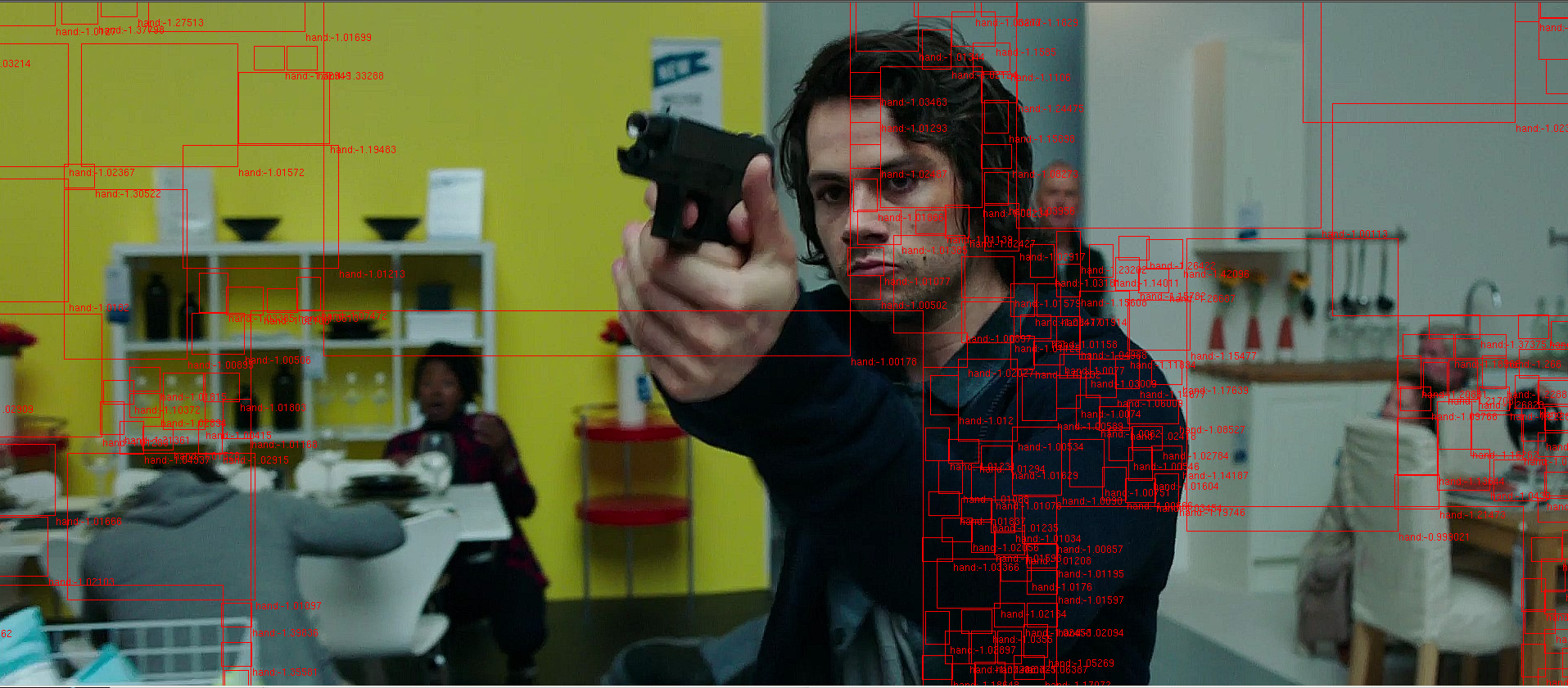
Sadly the resulting boxes look very random (nearly all boxes are at between -1.1 and -1.0).
What is sort of wierd is that i have ton of small boxes but where the actuall object is i have one huge box which is far to large.
I really start to run out of ideas.
(changes network, checked labels, used smaller dataset, used only 1 type of labels and more).
example:
VisionEp1
on 15 Mar 2018
Warning: this issue has been inactive for 173 days and will be automatically closed on 2018-09-07 if there is no further activity.
If you are waiting for a response but haven't received one it's likely your question is somehow inappropriate. E.g. you didn't follow the issue submission instructions, or your question is easily answerable by reading the FAQ, dlib's documentation, or a Google search.
 dlib-issue-bot
on 4 Sep 2018
dlib-issue-bot
on 4 Sep 2018
Notice: this issue has been closed because it has been inactive for 177 days. You may reopen this issue if it has been closed in error.
dlib-issue-bot
on 9 Sep 2018
Related issues
 srikanthreddybethi
·
4Comments
srikanthreddybethi
·
4Comments
 lvella
·
4Comments
lvella
·
4Comments
 charul09
·
4Comments
charul09
·
4Comments
 jackweiwang
·
4Comments
jackweiwang
·
4Comments
 joeking11829
·
5Comments
joeking11829
·
5Comments