Django-jet: forms.MultipleChoiceField doesn't work as it does in default admin site
When a use django default admin site, I get the desired MultiChoiceField

but when i switch to django-jet admin site I get something like below, none of the option are selectable

 DevAbhinav2073
All 12 comments
Same problem here
 ilubnon
on 14 May 2018
ilubnon
on 14 May 2018
Can you send us trace back?
 SalahAdDin
on 14 May 2018
SalahAdDin
on 14 May 2018
same here
 AmrAnwar
on 4 Jun 2018
AmrAnwar
on 4 Jun 2018
@DevAbhinav2073 did you get it ?
AmrAnwar
on 5 Jun 2018
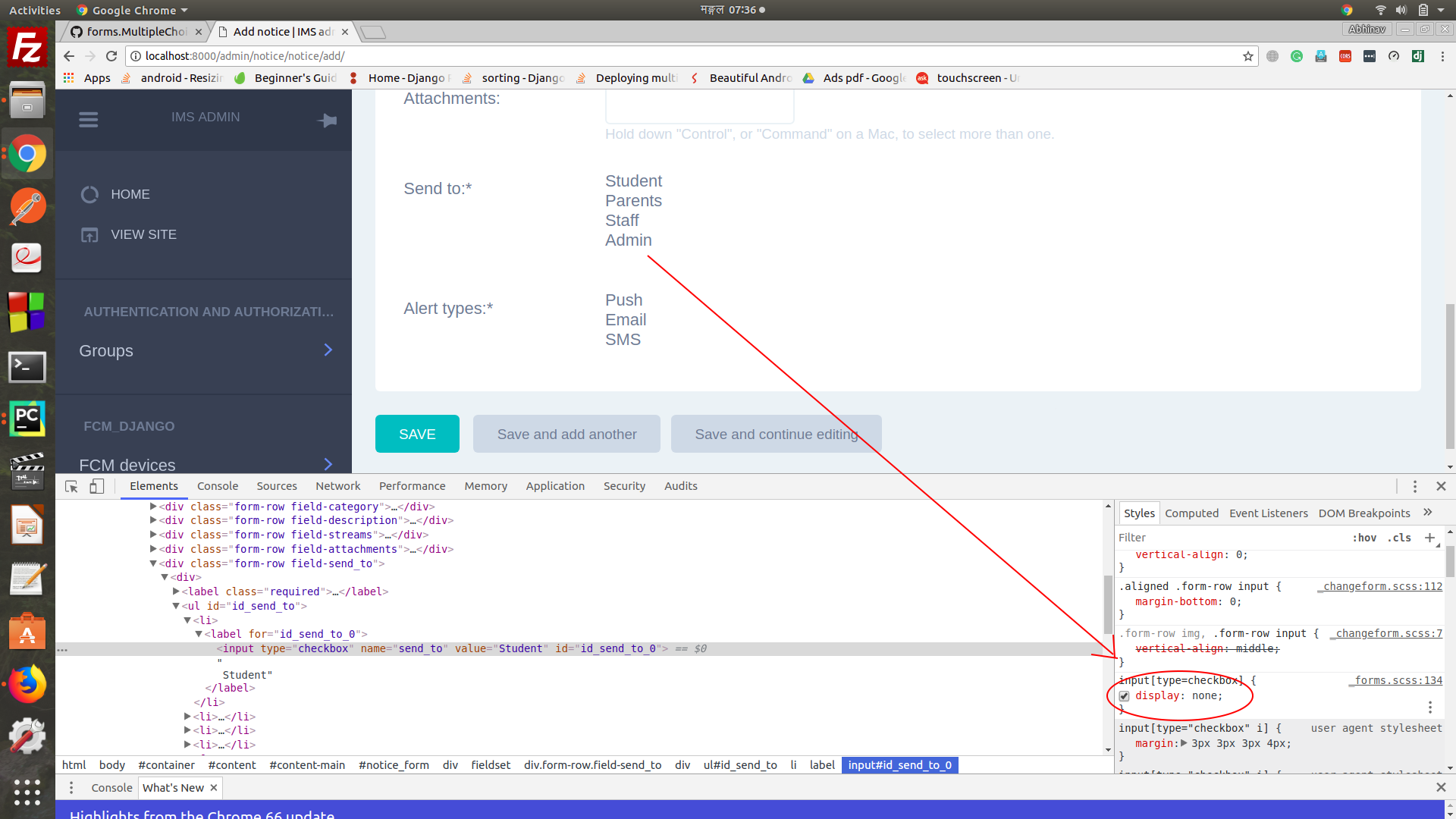
Well, I figured out that the problem was with the css file. The display property of checkbox input types was set to 'none' which created the problem. When I removed the display: none property the checkbox appeared.
The image before removing 'display: none':
The image after removing 'display: none':
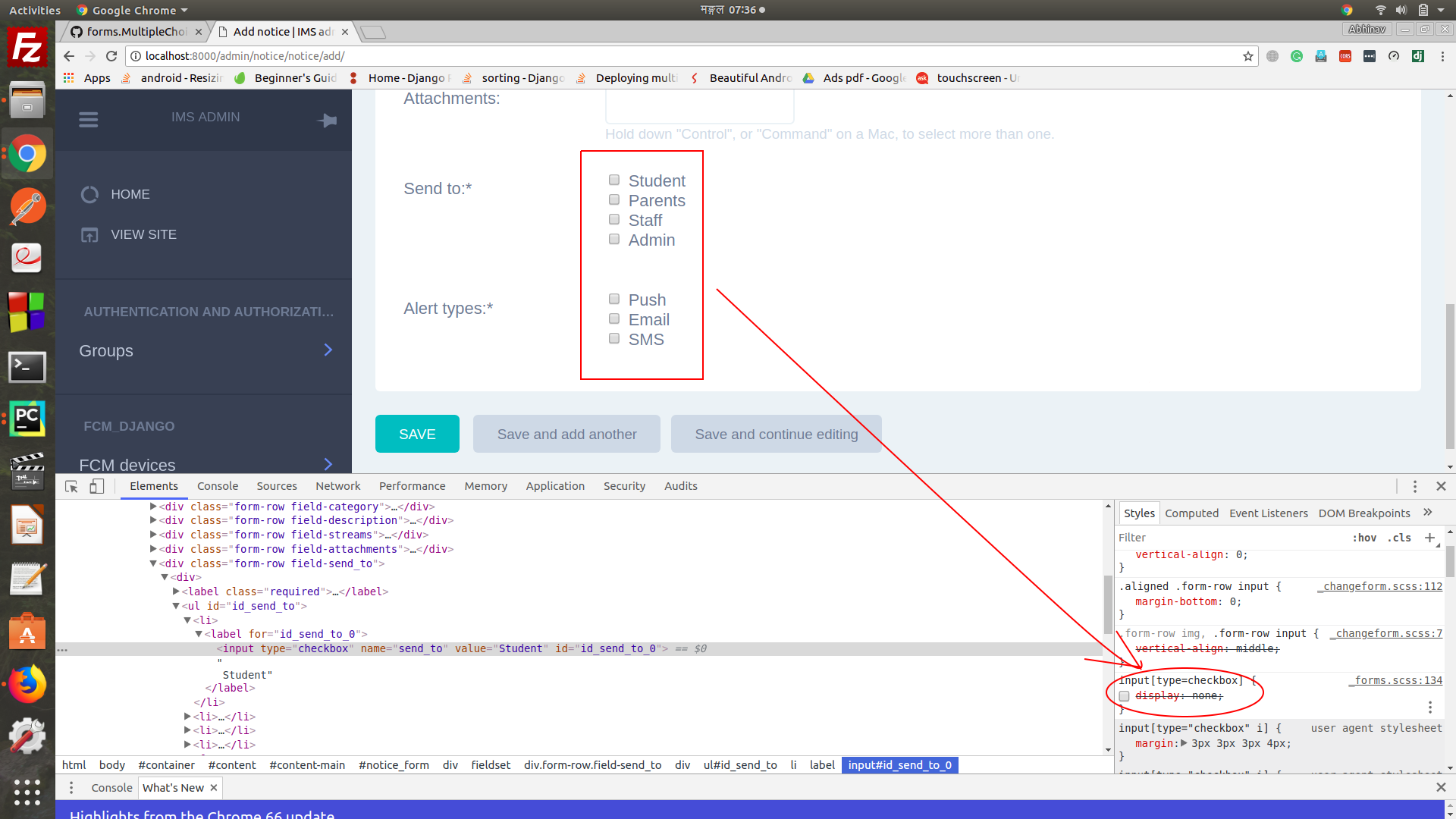
So all we need to do is remove the property from css. Firstly I tried to edit the _forms.scss file (line number 138) of the django-jet static file (located at your-static-folder/jet/css/_forms.scss). But then I thought not to change the library codes and just made another css file and overrided the display property there.
DevAbhinav2073
on 5 Jun 2018
@DevAbhinav2073 thanks for your replay, but please can you tell me how to add this new CSS file to my code? I know that I can add specific template file only to the field
for me I've added a simple Jquery line at the end of the specific template file to the checkbox id after you mentioned this solution
<script>
jQuery("#id__checkbox_field_0").css("display", "inline");
</script>
PR welcome.
@f1nality
SalahAdDin
on 5 Jun 2018
@AmrAnwar
Here is the step by step procedure,
step 1
run python manage.py collectstatic
This will import all the static files of the admin dashboard to you STATIC_ROOT folder.
If you've already done just goto next step.
step 2
make a forms.css file in your-static-folder/admin/css/ and add the following code in it and save it
```input[type=checkbox] {
display: table-row;
&#action-toggle {
display: none !important;
}
- label:before {
@include font-icon;
color: $input-icon-color;
font-size: 12px;
content: $icon-checkbox-outline;
letter-spacing: 5px;
.action-checkbox-column & {
color: $content-contrast2-text-color;
}
}
&:checked + label:before {
content: $icon-checkbox;
}
}
**step 3**
Next, make a folder named "admin" in the project's template directory and inside that directory
make a "base.html" file and paste the following code in the file.

```{% extends "admin/base.html" %}
{% load static %}
{% block extrastyle %}
<link rel="stylesheet" type="text/css" href="{% static "admin/css/forms.css" %}" />
{% endblock %}
Now you overrided the default base admin template and added the newly created css file to the base admin template. This will make the new css available to all the templates extending base template.
Hope this works for you.
DevAbhinav2073
on 5 Jun 2018
@DevAbhinav2073 you can add that change in the static files and make a PR :dancer:
SalahAdDin
on 5 Jun 2018
Hi there, great look with Jet. Has this change been committed? I just installed and have the same issue. I tried following @DevAbhinav2073 change and it doesn't load with error "Selector expected. Ruleset ignored due to bad selector."
 mykljohn
on 25 Jul 2018
mykljohn
on 25 Jul 2018
I got @DevAbhinav2073 fix to work, but the css as this:
input[type=checkbox] {
  display: inline;

  #action-toggle {
    display: none !important;
  }
  + label:before {
    @include font-icon;
    color: $input-icon-color;
    font-size: 12px;
    content: $icon-checkbox-outline;
    letter-spacing: 5px;
    .action-checkbox-column & {
      color: $content-contrast2-text-color;
    }
  }
  :checked + label:before {
    content: $icon-checkbox;
  }
}
But this screws up the changelist page putting 2 checkboxes.
If I take out the line display: none; it uses the display from _forms.css
mykljohn
on 25 Jul 2018
Hello again! I have come up with another and easier solution that doesn't require any changes to the library CSS or code.
Just add an extra CSS class to the form widget and you are good to go.
# admin.py
class XyzAdmin(admin.ModelAdmin):
    form = XyzForm

admin.site.register(Xyz, XyzAdmin)

# forms.py

class XyzForm(forms.ModelForm):
    abc_field = forms.MultipleChoiceField(widget=forms.CheckboxSelectMultiple, choices=ABC_FIELD_CHOICES)

    xyz_field.widget.attrs.update({'class': 'vCheckboxLabel'})

    class Meta:
        model = Xyz
        exclude = ()

#models.py

class Xyz(models.Model):
        abc_field = MultiSelectField(choices=ABC_FIELD_CHOICES, max_length=100, null=True)
This does the magic but it shifts the whole choices set to right to some extent but that is not such a big problem
DevAbhinav2073
on 20 Apr 2019
Related issues
 leogout
·
8Comments
leogout
·
8Comments
 uroybd
·
5Comments
uroybd
·
5Comments
 VincentVW
·
5Comments
VincentVW
·
5Comments
 kevin-miles
·
5Comments
kevin-miles
·
5Comments
 jangeador
·
5Comments
jangeador
·
5Comments
Most helpful comment
@AmrAnwar
Here is the step by step procedure,
step 1
run
python manage.py collectstaticThis will import all the static files of the admin dashboard to you
STATIC_ROOTfolder.If you've already done just goto next step.
step 2
make a forms.css file in your-static-folder/admin/css/ and add the following code in it and save it
```input[type=checkbox] {
display: table-row;
&#action-toggle {
display: none !important;
}
@include font-icon;
color: $input-icon-color;
font-size: 12px;
content: $icon-checkbox-outline;
letter-spacing: 5px;
.action-checkbox-column & {
color: $content-contrast2-text-color;
}
}
&:checked + label:before {
content: $icon-checkbox;
}
}
Now you overrided the default base admin template and added the newly created css file to the base admin template. This will make the new css available to all the templates extending base template.
Hope this works for you.