Django-jet: Empty menu item if user has not permissions on model
With configuration like this:
JET_SIDE_MENU_COMPACT = True
JET_SIDE_MENU_ITEMS = [
    {
        'label': 'Test',
        'items': [
            {
                'name': 'catalog.categoria',
            },
        ]
    },
]
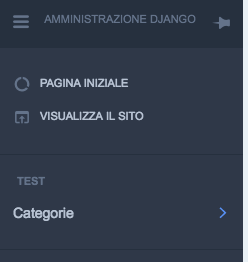
For staff user, with permission on catalog.categoria model, the menu appear as
For staff user, WITHOUT permission on catalog.categoria model, the menu appear as:
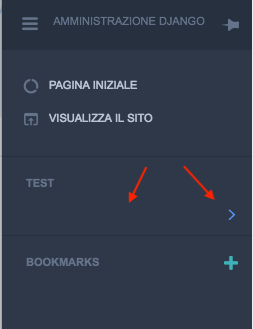
The problem is not present for JET_SIDE_MENU_COMPACT = False
I'm using django-jet 1.0.7
Regards,
Roberto
 srTinto80
All 9 comments
hey there, I am experiencing the same behavior did you @srTinto80 ever found a solution?
 orlax
on 6 Dec 2019
orlax
on 6 Dec 2019
Hi @orlax , i finded a kind of workaround but i not use jet anymore and i dont remember with precision.
I finded workaround debugging the code. The problem was in utils.py file, get_menu_items method.
Try using custom JET_SIDE_MENU_ITEMS configuration, setting "permissions": [] or similar for the app.
Sorry.
srTinto80
on 6 Dec 2019
no worries, I will look in to it and document it if possible, thank you for pointing me on the direction.
orlax
on 6 Dec 2019
Hello there. Have you found a workaround?
 Eirenne
on 16 Dec 2019
Eirenne
on 16 Dec 2019
hello, @Eirenne for time constraints I resolved to just do a CSS override to hide those lines. I am using sass and this is what worked for me:
````
.sidebar-section{
border: none;
&> a:first-child{
display: none;
}
&> a:nth-child(2){
display: none;
}
}
````
but this will vary wildly depending on the project. but well, hopefully, I get some time to do this properly during this week.
orlax
on 16 Dec 2019
Hello again.
Forked the repo and tried to debug the problem. Found out that if you have app defined in custom menu and django doesn't give user permission for that app, jet makes a default object with default permissions and data from JET_SIDE_MENU_ITEMS list.
Fixed it here by setting default objects permissions to false and thus not showing it in the menu.
However this change makes side menu items only work if they all come from django. If you have custom labels and urls, you'll need to add a bit more changes there.
Eirenne
on 17 Dec 2019
Unfortunately, this repository is no longer maintained anymore.
 SalahAdDin
on 22 Jan 2020
SalahAdDin
on 22 Jan 2020
I have exactly the same issue, the only option that I could come up with, using jQuery to just hide the empty lines, not ideal, but solve my problem.
I override the template "admin/base.html" (not only for this purpose), and added the script:
<script>
            function fix_menu_items() {
                let $ = jQuery;
                let $sidebar_links_labels = $('.sidebar-link-label');
                let $sidebar_link = $('.sidebar-link');

                $sidebar_links_labels.each(function (i) {
                    if (!$sidebar_link.eq(i).text().trim()) {
                        $sidebar_link.eq(i).closest('.sidebar-link').hide();
                        console.debug('empty menu item removed');
                    }
                });
            }
 </script>
then, call it from body onload.
<body class="...." onload="fix_menu_items()">
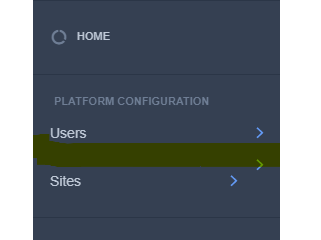
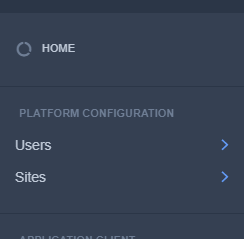
Update
woke up in the morning and figured out how to get around this in a more elegant way, with just one line change in template and without jQuery:
in the same template "admin/base.html" find the block that itarate over the app.items ({% for model in app.items %}), and add condition and model.label to if model.has_perms if statement.
Here's what the updated code looks like:
 {% for model in app.items %}
        {% if model.has_perms and model.label %} {% comment %}<- here is the added condition (and model.label){% endcomment %}
           <div>
                <a{% if model.url %} href="{{ model.url }}"{% endif %}
                  class="sidebar-link"{% if model.url_blank %}
                                      target="_blank"{% endif %}>
                   <span class="sidebar-right">
                         <span class="sidebar-right-arrow icon-arrow-right"></span>
                   </span>
                           <span class="sidebar-link-label">{{ model.label }}</span>
                     </a>
                 </div>
          {% endif %}
 {% endfor %}
without a doubt, it’s much more correct to find the problem itself and solve it, but I don’t have the time do it, hope this will help someone also to save time .
 xdma
on 7 Feb 2020
xdma
on 7 Feb 2020
Right now you just need to use
JET_SIDE_MENU_ITEMS = [
"items": [
    {
        "label": _("Access Control"),
        "items": [{"name": "auth.user", "permissions": ['auth.view_user']}, {"name": "auth.group", "permissions": ['auth.view_group']},],
    }
]
]
Replace the items and permissions appropriately.
 esirK
on 31 Aug 2020
esirK
on 31 Aug 2020
Related issues
 leogout
·
8Comments
leogout
·
8Comments
 erayerdin
·
5Comments
erayerdin
·
5Comments
 imdario
·
5Comments
imdario
·
5Comments
 kevin-miles
·
5Comments
kevin-miles
·
5Comments
 RamizSami
·
4Comments
RamizSami
·
4Comments
Most helpful comment
I have exactly the same issue, the only option that I could come up with, using jQuery to just hide the empty lines, not ideal, but solve my problem.
I override the template "admin/base.html" (not only for this purpose), and added the script:
then, call it from body onload.
Update
woke up in the morning and figured out how to get around this in a more elegant way, with just one line change in template and without jQuery:
in the same template "admin/base.html" find the block that itarate over the app.items (
{% for model in app.items %}), and add conditionand model.labeltoif model.has_permsif statement.Here's what the updated code looks like: