Django-autocomplete-light: How to capture on change event on Django Autocomplete Light
I am using Django Autocomplete Light (DAL) in my application.
In order to do some post-processing in the background on selection of a choice by user, I am trying to capture the .on('change') event (when DAL select field choice is changed) using jQuery (like we do on objects like an input field or a Django select field etc.). However I am not able to capture the event.
For example the following code:
$(document).on('change', '#x_select_item', function() {
    console.log('Selection on x_select_item changed');
});
is not generating any message.
Whereas, the following code for capturing .on('focus) is working:
$(document).on("focus", '#x_select_item', function() {
    console.log('THIS IS FIELD x_select_item for on Focus Event');
});
Looking for DAL events also did not help much excepting that it took me to the "select2" events page. There are events listed including "change" and "change.select2", but using both of these (as in example above) are not generating any reaction in the console.
What is the right approach to capture selection change event on DAL?
Environment:
Django 2.0.6
Python 3.6
django-autocomplete-light 3.4.1
 nameisnot
All 7 comments
Possibly fixed by #1131?
I hit the same issue with similar code and Django 3.0.2 + DAL 3.5.0, but it's now working by either following _install the dev version with git_ or the document.querySelector(...).onchange = ... workaround from #1053.
 ashovlin
on 7 Jan 2020
ashovlin
on 7 Jan 2020
@ashovlin Thanks for your reply (and sorry for responding late).
I am trying to use the following to pick up .on('change') event for a select box which works quite well:
$(document).on("change", "#"+varResultHash, function() {
    matl_sel = $(this).find("option:selected").text();
"varResultHash" is the dynamically created selector and "matl_sel" is a variable to which the user selection is being passed.
However, as I have already mentioned, if I change the select box to DAL I don't get any response.
Could you kindly guide me as to how do I translate my code (above) on the line suggested (in #1053 ) i.e.
document.querySelector('select[name="myselect2name"]').onchange=function() {
  console.log("myselect2name changed");
};
Instead of jQuery's change handler, try using JavaScript to modify the element's onchange attribute. Something like:
```javascript
document.querySelector("#"+varResultHash).onchange=function() {
matl_sel = $(this).find("option:selected").text();
}
````
ashovlin
on 13 Jan 2020
Thanks for your reply. I am using inline formset with a number of elements, each having some play at creating the final document. I am picking up the selected values from the respective select fields (using jQuery as shown below). I have housed the code segment within a function (being called by an event). My trouble is, how (/where) do I include the javascript (as in your code) in the present scenario.
...
...
else if (parseInt(focusColIndex) === 1) {
    $(document).on("focusout", "#"+varResultHash, function() {
            matl_cat = $(this).find("option:selected").text();
    });
} else if (parseInt(focusColIndex) === 2) {
    $(document).on("focusout", "#"+varResultHash, function() {
            matl_ty = $(this).find("option:selected").text();
    });
} else if (parseInt(focusColIndex) === 3) {
    $(document).on("change", "#"+varResultHash, function() {
            matl_sel = $(this).find("option:selected").text();
    });
...
...
}
As you can see, for the first two elements, I am using .on('focusout') and for the third i.e. "matl_sel" field, I was hoping to use .on('change') as I am forcing an ajax callback to fill another field based on the value selected (for "matl_sel"). With .on('focusout'), I am able to fill the said fourth field even with DAL, but I can see a NaN error in the console, which I suspect, might lead to some future glitch.
As I was hoping for minimal changes (to avoid my logic undergoing a major overhaul), is there a way I may include the javascript in my present scheme of things?
nameisnot
on 14 Jan 2020
I think the change event should work, but I don't think the same selector should not work for change and focus, I think the underlying field (hidden select, as used in POST) triggers a change, but I think the visible input should propagate a focus event:
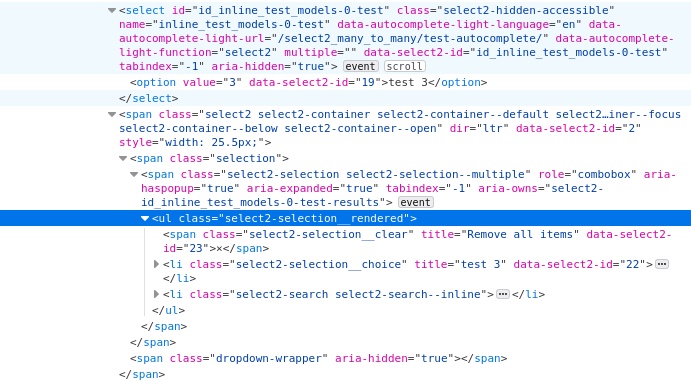
For instance, this works for for me even with dynamic forms:
$(document).on('change', '.select2-hidden-accessible', function() { console.log($(this).val()) })
 jpic
on 18 Mar 2020
jpic
on 18 Mar 2020
I'm trying any way to make the events work on forward field change, but without success.
The script suggested in the documentation does not work.
In my case, the continental and country are select2 fields within the django administration form.
I want to clear the selected country if the continental is changed.
My code called in the form...
    class Media:
        js = (
            '/static/js/code.js',
        )
code.js
$(document).ready(function() {

    // is not generating any message
    $('select#id_continental').on("select2:open", function(e) {
        console.log('Test 1');
    });

    // is not generating any message
    $('select#id_continental').on('change', function() {
        console.log('Test 2');
    });

    // is not generating any message
    $(document).on("change", "select#id_continental", function() {
        console.log('Test 3');
    });

    // is generating a message, but even when loading the home page, without any change to the field
    document.querySelector('select#id_continental').onchange=function() {
        console.log('Test 4');
    };
});
Is there any impediment to using the select2 functions for this?
How can I make use of select2 resources?
Environment:
Django 2.1.15
Django-autocomplete-light 3.5.1
[EDIT]
After some research, I found this answer by @tewald that works in my environment.
 gustavo-sdo
on 28 Jul 2020
gustavo-sdo
on 28 Jul 2020
hi , please someone can help me , in my case , i have to use onKeyup attribute to my form fields , whenever i enter quantity and price field i have made some calculate in js using onKeyup whenever those two fields filled out , it should write the multiplication between quantity and price , the form works fine without backend , but i dont know how to make it work to my form as well , i use django inlineformset
this is my models.py
` class Main(models.Model):
admin = models.ForeignKey(User,on_delete=models.CASCADE)
company = models.ForeignKey(Companies,on_delete=models.CASCADE)
items = models.ManyToManyField(Item,through='Child')
invoice_number = models.IntegerField()
class Child(models.Model):
     main = models.ForeignKey(Main,on_delete=models.CASCADE)
     item = models.ForeignKey(Item,on_delete=models.CASCADE)
     quantity = models.IntegerField()
     price = models.IntegerField()
//my template
{% extends 'base.html' %}
{% load widget_tweaks %}
{% block content %}

<form method="POST">{% csrf_token %}
    {{items.management_form}}
            <div class="flex w-8/12 lg:w-9/12">

                <div class="">
                      invoice number  :
                  </div>

                <div class="w-10/12 ml-8 border-b border-gray-600 border-dotted">
                    {{form.invoice_number | add_class:'bg-transparent w-full text-center focus:outline-none' }}
                </div>
            </div>
      <div class="w-full  md:w-11/12 mx-auto realative p-2 bg-gray-200 invoice">

        <!-- table -->
        <div class="mt-1 border border-black">
            <!-- header -->
            <div class="flex flex-wrap grayBG text-sm text-white">
                <div class="w-2/12  border-r text-center">
                    item
                </div>
                <div class="w-2/12  border-r text-center">
                    price
                </div>
                <div class="w-2/12  border-r text-center">
                    quantity
                </div>
                <div class="w-2/12  border-r text-center">
                    total price
                </div>
            </div>
            <!-- inputs -->
            <div id="allInp" class="text-right">
                {% for item in items.forms %}

                {{item.id}}
            <div class="flex flex-wrap grayBG text-sm text-black inp">
              <div class="w-20 md:w-2/12 p-2 border-r text-center">
          {{item.item | add_class:'w-full item rounded-lg focus:outline-none py-1'}}

                    </div>
                    <div class="w-20 md:w-2/12 p-2 border-r text-center">
          {{item.price | add_class:'price w-full item rounded-lg focus:outline-none py-1'}}
                    </div>
                    <div class="w-20 md:w-2/12 p-2 border-r text-center">
          {{item.quantity | add_class:'quantity w-full item rounded-lg focus:outline-none py-1'}}
                    </div>
             <div class="w-20 md:w-2/12 p-2 border-r text-center">
               <input type="number" class="totalSumField rounded-lg focus:outline-none py-1 w-full">
               </div>
             </div>
                {% endfor %}

            </div>
                <div class="w-6/12 flex">
                    <div class="w-6/12 p-2 border-r text-center">
                        <p class="mb-2 text-white">total price</p>
                        <input type="number" id="total" class="rounded-lg focus:outline-none py-1 w-full text-center" placeholder="total price">
                    </div>
                </div>
            </div>
        </div>

    </div>

    <div class="w-6/12 text-center mt-1 mx-auto mb-6">
        <button type="submit" class="w-full bg-white text-gray-900">print</button>
    </div>
</form>

{% endblock %}
// and this is my js code
  function counting(result) {
      document.getElementById("total").value= result;

   }

  counting(0);

  function totalSumField () {
  let inp = document.querySelectorAll("#allInp > .inp");
  let result=0;
    for(let i=0;i<inp.length;i++){
      let price=inp[i].getElementsByClassName("price")[0].value;
      let quantity=inp[i].getElementsByClassName("quantity")[0].value;
      inp[i].getElementsByClassName("totalSumField")[0].value=(price*quantity);
      }


function totalSum () {
 let inp = document.querySelectorAll("#allInp > .inp");
 let result=0;
  for(let i=0;i<inp.length;i++){
   let price=inp[i].getElementsByClassName("price")[0].value;
   let quantity=inp[i].getElementsByClassName("quantity")[0].value;
[0].value;
     result+=(quantity*price);
      }
      counting(result)
      totalSumField()
  }
`
now i dont know how to use onKeyup to quantity and price input fields in order to calculate and set the result into total price , i have used class based in the views.py . thank you
 hunar-art
on 23 Mar 2021
hunar-art
on 23 Mar 2021
Related issues
 ulziiburend
·
7Comments
ulziiburend
·
7Comments
 mrname
·
9Comments
mrname
·
9Comments
 JMIdeaMaker
·
3Comments
JMIdeaMaker
·
3Comments
 brandenhall
·
9Comments
brandenhall
·
9Comments
 raratiru
·
4Comments
raratiru
·
4Comments