Django-autocomplete-light: The language file for "./i18n/en-us" could not be automatically loaded. A fallback will be used instead
On a clean install, Django 1.10, I get the following message:
The language file for "./i18n/en-us" could not be automatically loaded. A fallback will be used instead
I see that in the src and dist folders the translation files don´t have the sublanguage suffixes.
What´s the best practice here?
 busla
busla
All 30 comments
This is a warning, triggered by Select2, and it can be safely ignored.
 kevin-brown
on 19 Dec 2016
kevin-brown
on 19 Dec 2016
I would like to resolve the issue since its affecting the load speed of the admin site. The static files seem to wait for this to load and with multiple inlines its really having an impact.
busla
on 19 Dec 2016
This definitely affects "time to interactive," especially when you have multiple fields on the page. Sometimes we have upwards of 50 and its very noticeable. I don't think "it can be safely ignored" is a good assessment of the issue.
I understand its more likely an issue with select2 itself, but it would be nice to have a resolution in the context of a django app :)
 jforaker
on 25 May 2017
jforaker
on 25 May 2017
Pull requests will be reviewed.
Perhaps something can be done with #746
 jpic
on 25 May 2017
jpic
on 25 May 2017
Just to note when you change the value to <html lang="en"> versus <html lang="en-US"> the warning goes away (and gain a slight performance increase in the case of many select2 fields on the page).
jforaker
on 25 May 2017
@jforaker That unfortunately no longer seems to be the case :/
 wgordon17
on 1 Mar 2019
wgordon17
on 1 Mar 2019
Any update on this situation? Unfortunately @jforaker solution don't solve the problem for now :(
 pedrofaria09
on 27 Mar 2019
pedrofaria09
on 27 Mar 2019
I have a similar problem with using a localization of Select2. Is it possible to set the language in JavaScript after the page has loaded?
 pascalvogel1992
on 20 Apr 2019
pascalvogel1992
on 20 Apr 2019
I managed to find a pretty easy way around this, you can specify the language using data- attributes to specify Select2 configuration. The implementation is very is easy and looks like:
autocomplete.ModelSelect2Multiple(
    url='example.com',
    attrs={'data-language': 'en'}
)
I managed to find a pretty easy way around this, you can specify the language using
data-attributes to specify Select2 configuration. The implementation is very is easy and looks like:autocomplete.ModelSelect2Multiple( url='example.com', attrs={'data-language': 'en'} )
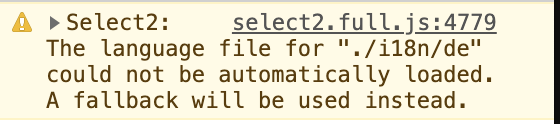
This does seem to work for English but I am trying to set the language to German using the way you are describing. This gets me the following error:
pascalvogel1992
on 21 Apr 2019
It looks like dal will only load the specific Javascript that you have enabled for your project (https://github.com/yourlabs/django-autocomplete-light/blob/master/src/dal_select2/widgets.py#L45).
You may have to manually load the static file from admin/js/vendor/select2/i18n/%s.js
These are the languages supported by the Django Admin select2 module (which is what this project uses): https://github.com/django/django/tree/master/django/contrib/admin/static/admin/js/vendor/select2/i18n
wgordon17
on 22 Apr 2019
It looks like
dalwill only load the specific Javascript that you have enabled for your project (https://github.com/yourlabs/django-autocomplete-light/blob/master/src/dal_select2/widgets.py#L45).You may have to manually load the static file from
admin/js/vendor/select2/i18n/%s.jsThese are the languages supported by the Django Admin
select2module (which is what this project uses): https://github.com/django/django/tree/master/django/contrib/admin/static/admin/js/vendor/select2/i18n
Thanks for the answer. Could you kindly give me a pointer as to how to load the file and where?
pascalvogel1992
on 27 Apr 2019
Maybe "backport" (copy) them from upstream django version into your project ?
jpic
on 27 Apr 2019
Try adding the Media class within your Form class...something like
class MyForm(forms.ModelForm):
    my_field = autocomplete.ModelSelect2(
        url='/example/',
        attrs={'data-language': 'de'}
    )

    class Media:
        js = ('static/admin/js/vendor/select2/i18n/de.js',)
This assumes STATIC_URL = '/static/'. I haven't tested, but the Media should enforce the JS you need to load.
wgordon17
on 28 Apr 2019
Try adding the
Mediaclass within your Form class...something likeclass MyForm(forms.ModelForm): my_field = autocomplete.ModelSelect2( url='/example/', attrs={'data-language': 'de'} ) class Media: js = ('static/admin/js/vendor/select2/i18n/de.js',)This assumes
STATIC_URL = '/static/'. I haven't tested, but the Media should enforce the JS you need to load.
I think the language file is found now but I get another error message:
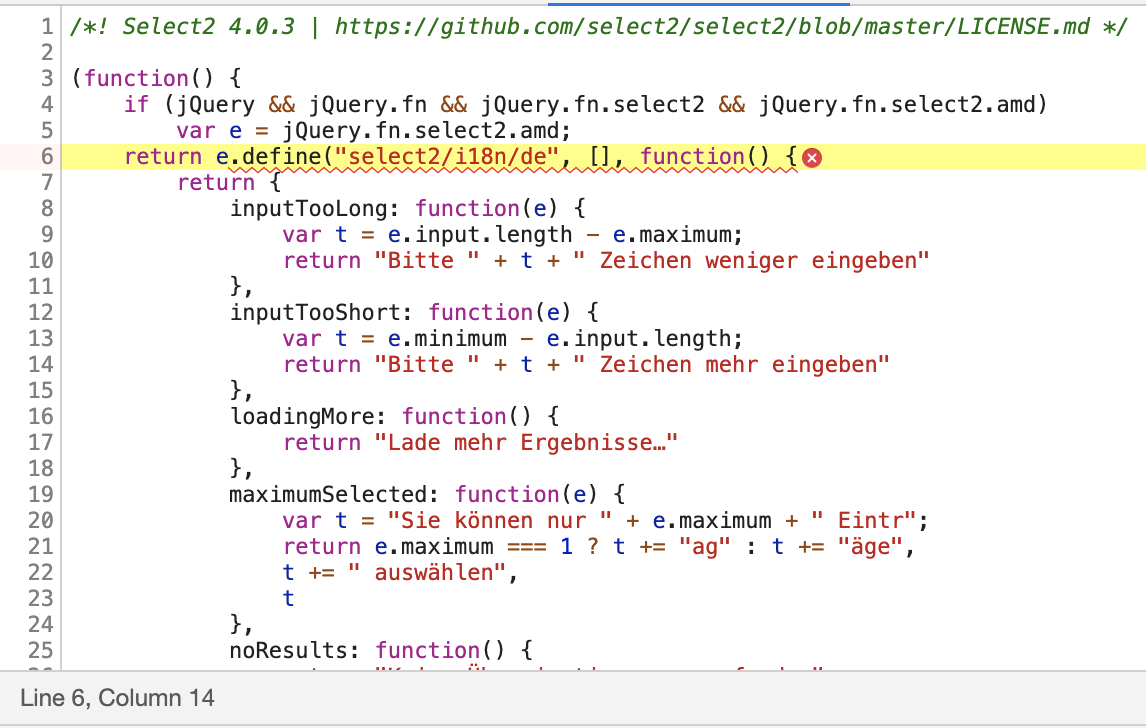

Is it possible jQuery is not being found (being loaded at the wrong spot possibly)?
pascalvogel1992
on 28 Apr 2019
So, I tested this locally, and as you can see

jQuery is still being loaded first.
Where I think the problem is comes from the way django-autocomplete loads the select2 library. Basically they don't use the global jQuery object, they use they're own version, so then when you load the language file, it doesn't have the select2 object attached to jQuery.fn.
I'm honestly not familiar enough with django-autocomplete to know if there's a way around this. Perhaps someone more familiar with the codebase can help out?
wgordon17
on 29 Apr 2019
Do you get better result with the fix_782 branch ?
Note that it requires you to checkout select2 submodule of the repo.
Thanks in advance for your feedback
jpic
on 29 Apr 2019
@jpic That doesn't seem to address @pascalvogel1992's specific problem.
I know this issue was originally opened because django-autocomplete-light is looking for a en-us.js file, which doesn't exist. I actually think the _specific_ fix for this issue would be to use something like finders in widgets.py to see if the file exists, and then try stripping out the -us part and trying again. I wish I could say you could _always_ strip out -<thing>, but apparently some of them do exist.
Anyway, it looks like @pascalvogel1992's issue is they're trying to use the de language for Select2, but it's not the project default set in settings.LANGUAGE_CODE. Because both master and fix_782 work for me if I have settings.LANGUAGE_CODE set to "de". But with settings.LANGUAGE_CODE = "en-us", and using my attrs hack to override the language to de, it does not seem to work as expected.
wgordon17
on 29 Apr 2019
Anyway, it looks like @pascalvogel1992's issue is they're trying to use the de language for Select2, but it's not the project default set in settings.LANGUAGE_CODE. Because both master and fix_782 work for me if I have settings.LANGUAGE_CODE set to "de". But with settings.LANGUAGE_CODE = "en-us", and using my attrs hack to override the language to de, it does not seem to work as expected.
Reading this comment I just realized that I am using the language code 'de-DE' instead of 'de' in my settings.py. After changing the language code to 'de' everything works now... I'm not sure where I got this de-DE language code. It did work and set the admin language etc. to German that's why I never considered it might be the wrong choice in this case.
pascalvogel1992
on 29 Apr 2019
Is this maybe the method you want to hack: https://github.com/yourlabs/django-autocomplete-light/blob/master/src/dal_select2/widgets.py#L40-L66
We could probably have a baby algorithm that could find the best locale to load ?
jpic
on 29 Apr 2019
Yeah, that was where I was thinking. It doesn't have to be to smart, just a very basic
does this exist?
    strip -<thing>
    does this exist now?
        eh screw it
I think that would at least be enough to close this issue and prevent this specific error message
wgordon17
on 29 Apr 2019
Question: are you all on django < 2.0 ?
jpic
on 29 Apr 2019
I'm on 2.1
wgordon17
on 29 Apr 2019
So, do you think this should call finders.find every time a select2 widget
is displayed ?
jpic
on 29 Apr 2019
Ewww, that's ugly. Somehow that wasn't hitting me that it was called on every display. What about doing something even more naive? Just include both the hypenated and non-hyphenated versions? Something like
def media(self):
    """Return JS/CSS resources for the widget."""
    extra = '' if settings.DEBUG else '.min'
    i18n_name = SELECT2_TRANSLATIONS.get(translation.get_language())
    i18n_file = (
        'admin/js/vendor/select2/i18n/%s.js' % i18n_name,
    ) if i18n_name else ()
    if '-' in i18n_name:
        i18n_file = i18n_file + (
            'admin/js/vendor/select2/i18n/%s.js' % i18n_name.split('-')[0],
        )
This way the browser will just 404 on the incorrect one, and still end up loading the correct one.
wgordon17
on 29 Apr 2019
I‘m on 2.2 if it helps.
pascalvogel1992
on 29 Apr 2019
In this case, how do you suggest we modify select2 initialization to load 2
languages ?
https://github.com/yourlabs/django-autocomplete-light/blob/master/src/dal_select2/static/autocomplete_light/select2.js#L77
jpic
on 29 Apr 2019
Otherwise would it work to call the finder and set a class level dict
attribute for caching ?
jpic
on 29 Apr 2019
Hmm, Select2 isn't making this easy for us 😆
I think you have the right idea with caching. I'm even thinking a module-level function with lru_cache should prevent the biggest performance hit
wgordon17
on 1 May 2019
Sure, do you want to make a pull request now that you're well aware of the
situation ?
jpic
on 2 May 2019
Related issues
 rg3l3dr
·
6Comments
rg3l3dr
·
6Comments
 dotmobo
·
7Comments
dotmobo
·
7Comments
 Schnouki
·
7Comments
Schnouki
·
7Comments
 Guilouf
·
3Comments
Guilouf
·
3Comments
 darahsten
·
7Comments
darahsten
·
7Comments
Most helpful comment
Just to note when you change the value to
<html lang="en">versus<html lang="en-US">the warning goes away (and gain a slight performance increase in the case of many select2 fields on the page).