Discordchatexporter: Linux usage instructions
How do I use this on Linux?
 naturallymitchell
All 17 comments
Hi,
I don't believe you can.
EDIT: read comments below.
 Tyrrrz
on 30 Jul 2018
Tyrrrz
on 30 Jul 2018
If you install Mono you can run the CLI version just fine. I have yet to see if the GUI version works.
 Atagait
on 3 Aug 2018
Atagait
on 3 Aug 2018
You can with CLI and Mono. It isn't that user friendly, but it works.
Installing Mono
To get mono on Ubuntu (other distros and more info here):
Open Terminal and type
sudo apt-key adv --keyserver hkp://keyserver.ubuntu.com:80 --recv-keys 3FA7E0328081BFF6A14DA29AA6A19B38D3D831EFecho "deb https://download.mono-project.com/repo/ubuntu stable-bionic main" | sudo tee /etc/apt/sources.list.d/mono-official-stable.listsudo apt updatesudo apt install mono-devel
(Edited at 09/12/2018 with correct installation instructions)
You can check if mono was installed successfully using mono -V, it should output its version. If it didn't work, try the link above for more info.
Downloading and using DiscordChatExporter
Download the latest DiscordChatExporter CLI release here and extract its contents on your Desktop to a folder called
DiscordChatExporter.Open terminal and type to change Terminal directory:
cd ~/Desktop/DiscordChatExporterReplace
TOKENandCHANNEL, and execute the command to run DiscordChatExporter.Cli.exe:mono DiscordChatExporter.Cli.exe -t TOKEN -c CHANNEL
It's also possible to run the CLI on macOS, but installing mono is a little bit different, since you'd be using brew or macports instead of apt. I have a simple terminal script for the CLI on macOS here if @Tyrrrz wants to take a look.
The GUI might work with Wine or Wineskin, but I'm not sure, since I haven't tried it.
 Yudi
on 3 Aug 2018
Yudi
on 3 Aug 2018
Oh lol, sorry. I just finished writing this, didn't see your reply, Atagait.
Yudi
on 3 Aug 2018
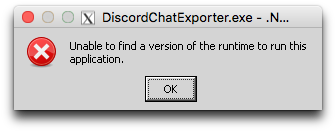
I wasn't able to run the GUI with Mono, nor with a fresh installation of Wine on both Ubuntu and macOS.
Mono outputs:
The entry point method could not be loaded due to Could not load file or assembly 'PresentationFramework, Version=4.0.0.0, Culture=neutral, PublicKeyToken=31bf3856ad364e35' or one of its dependencies. assembly:PresentationFramework, Version=4.0.0.0, Culture=neutral, PublicKeyToken=31bf3856ad364e35 type:
member:(null) signature:
Wine on Ubuntu gives me this
And a more or less configured Wineskin on macOS still gives me this even after applying some fixes I've found on the internet:
Yudi
on 3 Aug 2018
Yeah... No way I could make the GUI work.
Should we include these instructions on somewhere more visible, @Tyrrrz? I had the same question when I first saw this tool on Reddit.
The instructions would be too large for the Readme, so maybe a Wiki page? Then we could include Mac and Linux instructions, and also the "workaround" way to get the token.
Yudi
on 6 Aug 2018
I'm on vacation currently but I'll look into it later
Tyrrrz
on 6 Aug 2018
Until the documentation is up you'll also probably want to define a different output format using the -f, --format parameter. Ex:
mono DiscordChatExporter.Cli.exe -t <token> -c <channel> -f PlainText
Is there any hope for the CLI to be .NET Core compatible?
 strafe
on 13 Aug 2018
strafe
on 13 Aug 2018
There is currently only one dependency, I believe, that forces CLI to be on .NET fx. I will look into moving it to .NET core when I have time.
Tyrrrz
on 13 Aug 2018
I've created a wiki page meanwhile, thanks @RenanYudi!
https://github.com/Tyrrrz/DiscordChatExporter/wiki/Linux-usage-instructions
Tyrrrz
on 13 Aug 2018
I tried running this on Ubuntu 18.04 and got the following error:
Unhandled Exception:
System.MissingMethodException: Method 'System.Net.Logging.get_Http' not found.
  at System.Net.Http.HttpMessageInvoker.SendAsync (System.Net.Http.HttpRequestMessage request, System.Threading.CancellationToken cancellationToken) [0x00027] in <27bbdd4ceaf04a95b172ee502d76a725>:0
  at System.Net.Http.HttpClient.SendAsync (System.Net.Http.HttpRequestMessage request, System.Net.Http.HttpCompletionOption completionOption, System.Threading.CancellationToken cancellationToken) [0x0007a] in <27bbdd4ceaf04a95b172ee502d76a725>:0
  at System.Net.Http.HttpClient.SendAsync (System.Net.Http.HttpRequestMessage request) [0x00008] in <27bbdd4ceaf04a95b172ee502d76a725>:0
... (lots of other content)
Does anybody have a fix for this?
 Kentoseth
on 18 Aug 2018
Kentoseth
on 18 Aug 2018
Solution found.
If you don't follow the instructions here: https://www.mono-project.com/download/stable/#download-lin-ubuntu
It won't run properly. This is because the distro version (even 18.04) is very outdated. I think it is 4.6.2 while the version above is 5.14.0 (at time of writing this).
If you are on 18.04, run these commands first:
sudo apt-key adv --keyserver hkp://keyserver.ubuntu.com:80 --recv-keys 3FA7E0328081BFF6A14DA29AA6A19B38D3D831EF
echo "deb https://download.mono-project.com/repo/ubuntu stable-bionic main" | sudo tee /etc/apt/sources.list.d/mono-official-stable.list
sudo apt update
Then run: sudo apt-get install mono-devel
Tested and worked for me.
Kentoseth
on 18 Aug 2018
Well that’s weird… It worked fine for me on a fresh 18.04 install without needing to edit anything.
I’m also working on a more detailed wiki page, I’ll include the full instructions there and open an “Issue” once it’s done so Tyrrrz can replace the current wiki.
Yudi
on 18 Aug 2018
Hey, I've got the GUI version running fine with Wine (give or take some cosmetic issues), mind if I add the instructions to the wiki page?
In the meantime, here's the lowdown: First, install wine-staging via the instructions here (for Ubuntu). Then, install winetricks using these instructions. Now run these commands:
sudo apt-get install binutils cabextract p7zip zenity unrar unzip wget p11-kit-modules:i386 libp11-kit-gnome-keyring:i386

env WINEPREFIX="$HOME/wine" WINEARCH=win32 wine wineboot

env WINEPREFIX="$HOME/wine" WINEARCH=win32 ./winetricks dotnet46
You'll need to go through a few prompts for each installer, don't stop the terminal until it's finished. When you want to run the exporter, use this command:
env WINEPREFIX="$HOME/wine" WINEARCH=win32 wine DiscordChatExporter.exe
(or just set the default wineprefix/winearch and run it through wine as you would normally).
Hope this helps someone
 jman005
on 11 Aug 2019
jman005
on 11 Aug 2019
It works and it's great :-)! You can add a GUI section here after Tyrrrz's approval.
The winehq-staging and development branches aren't working on 18.04, though. They have libfaudio0 as a dependency, but apt is not installing it. Stable is working.
And I think you forgot wine in the last command.
Yudi
on 12 Aug 2019
Add it to wiki :)
Tyrrrz
on 12 Aug 2019
Added, thanks.
jman005
on 12 Aug 2019
Related issues
 quyleanh
·
6Comments
quyleanh
·
6Comments
 Unknow0059
·
6Comments
Unknow0059
·
6Comments
 chibiusagi
·
4Comments
chibiusagi
·
4Comments
 tyzoid
·
3Comments
tyzoid
·
3Comments
 mdiller
·
3Comments
mdiller
·
3Comments
Most helpful comment
You can with CLI and Mono. It isn't that user friendly, but it works.
Installing Mono
To get mono on Ubuntu (other distros and more info here):
Open Terminal and type
sudo apt-key adv --keyserver hkp://keyserver.ubuntu.com:80 --recv-keys 3FA7E0328081BFF6A14DA29AA6A19B38D3D831EFecho "deb https://download.mono-project.com/repo/ubuntu stable-bionic main" | sudo tee /etc/apt/sources.list.d/mono-official-stable.listsudo apt updatesudo apt install mono-devel(Edited at 09/12/2018 with correct installation instructions)
You can check if mono was installed successfully using
mono -V, it should output its version. If it didn't work, try the link above for more info.Downloading and using DiscordChatExporter
Download the latest DiscordChatExporter CLI release here and extract its contents on your Desktop to a folder called
DiscordChatExporter.Open terminal and type to change Terminal directory:
cd ~/Desktop/DiscordChatExporterReplace
TOKENandCHANNEL, and execute the command to run DiscordChatExporter.Cli.exe:mono DiscordChatExporter.Cli.exe -t TOKEN -c CHANNELIt's also possible to run the CLI on macOS, but installing mono is a little bit different, since you'd be using brew or macports instead of apt. I have a simple terminal script for the CLI on macOS here if @Tyrrrz wants to take a look.
The GUI might work with Wine or Wineskin, but I'm not sure, since I haven't tried it.