Discordchatexporter: Usage for command line
There is a tutorial? I can't find it?
 tomillo
All 22 comments
Just run the CLI without parameters and it should show the usage manual
 Tyrrrz
on 23 Apr 2018
Tyrrrz
on 23 Apr 2018
Excuse my ignorance, what would be the command?
Does it work on macos?
tomillo
on 23 Apr 2018
I don't think it does, unless you somehow run the exe file.
Tyrrrz
on 23 Apr 2018
Ok. How is it used with command line?
tomillo
on 23 Apr 2018
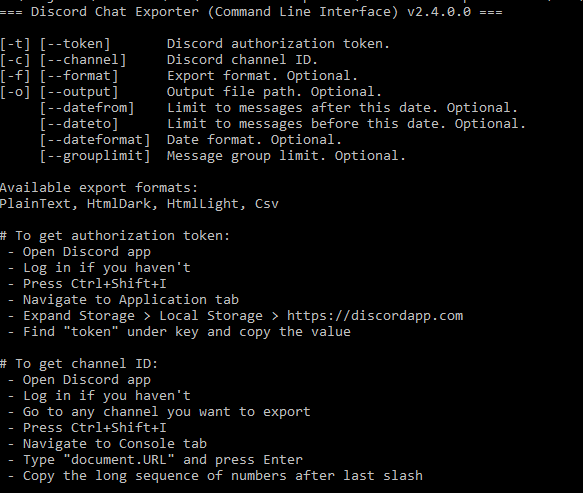
Tyrrrz
on 23 Apr 2018
Thankyou Tyrrrz! Last question. What is it the code for start with terminal?
tomillo
on 23 Apr 2018
I'm not sure, I don't have a Mac 😜
Tyrrrz
on 23 Apr 2018
Sorry, I have not mentioned that I want to try it on windows...
tomillo
on 23 Apr 2018
In that case, you can just start cmd(Win+R, "cmd", Enter), then just copy the full path to DiscordChatExporter.Cli.exe. To append commands simply list them using dashes, e.g. c:\path\to\DiscordChatExporter.Cli.exe -t YOUR_TOKEN -c CHANNEL_ID -f HtmlDark.
Tyrrrz
on 23 Apr 2018
Thank you!
tomillo
on 24 Apr 2018
Tyrrrz. It works well! What is the command to export to plain text?
tomillo
on 25 Apr 2018
Replace the last part with -f PlainText
Tyrrrz
on 25 Apr 2018
What is the error here?

tomillo
on 30 Apr 2018
You sure the token is valid?
Tyrrrz
on 30 Apr 2018
Or that you can access that channel
Tyrrrz
on 30 Apr 2018
Was the channel, sorry!
There's an option to export automatically every seconds / minutes?
tomillo
on 30 Apr 2018
No there's not, but you can automate it yourself
Tyrrrz
on 30 Apr 2018
I'm programming one in python, but in several times the exporter get stuck and can't force quit and start again automatically...
tomillo
on 30 Apr 2018
Good luck :smile:
Tyrrrz
on 30 Apr 2018
It's possible to download entire server in one command?
tomillo
on 1 May 2018
Nope, not right now
Tyrrrz
on 1 May 2018
I'm closing this since the question has been answered
Tyrrrz
on 1 May 2018
Related issues
 NerveCoordinator
·
3Comments
NerveCoordinator
·
3Comments
 Latias4Ever
·
4Comments
Latias4Ever
·
4Comments
 fynnay
·
6Comments
fynnay
·
6Comments
 mdiller
·
3Comments
mdiller
·
3Comments
 billyon
·
3Comments
billyon
·
3Comments