Discord.js: You cannot reproduce the original image of users when executing the command!
Please describe the problem you are having in as much detail as possible:
In this version, when I updated the files, Bot was unable to reproduce the user's avatar correctly, if the user had a gif, he could not reproduce the gif or the original resolution of the user's avatar ... I assumed it was a bug in API ... it didn't just happen on my bot, on other bots too, I have a friend who had a similar problem when updating files ... the command I used to update files is => npm upgrade --save
@SergioGlorias
Include a reproducible code sample here, if possible:
const Discord = require("discord.js")
const fs = require("fs");
module.exports = {
  name: "avatar",

  run : async (bot, message, args) => {
              await bot.users.fetch(args[0]).then(async ()=>{
              let user1 = await bot.users.fetch(args[0])
              let user= message.author;
              let avatar5 = user1.displayAvatarURL({ size: 1024 })
              if (avatar5.endsWith(".webp?size=1024")) {avatar5 = user1.displayAvatarURL({ format: 'png', size: 1024 })}
                var embed1 =  new Discord.MessageEmbed()
                  .setImage(avatar5)
                  .setColor(0xff0000)
                  .setTitle(`Avatar do ${user1.tag} `)
                  .setDescription(`<@!${user.id}>`+" Clique aqui =>"+"[Download]("+avatar5+")")
                  .setFooter(`Comando executado por: ${message.author.tag}`,(message.author.displayAvatarURL()))
                  message.channel.send(embed1);
  })  }}
Further details:
- discord.js version: "discord.js": "github:discordjs/discord.js" ( Discord.js => 12.0.0-dev)
- Node.js version: v12.13.1
- Operating system: win10, linux
- Priority this issue should have – please be realistic and elaborate if possible:
- [ ] I have also tested the issue on latest master, commit hash:
 StarlineBR
All 4 comments
This is the expected behavior as of #3530
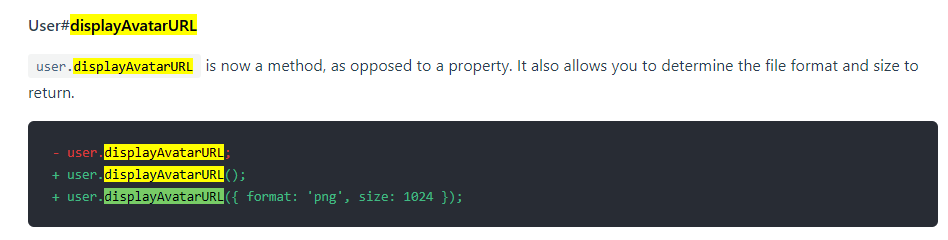
Accessing the avatar via .displayAvatarURL({ dynamic: true, format: 'png', size: 1024 }); will result in what you are trying to handle with the conditional modification of the URL natively now: provide the image as .png if it is not a gif, else .gif
relevant documentation:
If true, the format will dynamically change to gif for animated avatars; the default is false.
https://discord.js.org/#/docs/main/master/typedef/ImageURLOptions
For future reference:
- When using a development version please tick the "I have also tested the issue on latest master" and provide the commit hash. As development versions move on quite quickly it is important for us to know which exact code you are running.
- Further please provide __minimal__ code samples that work without having to guess your command handler or other structure and remove all other code or information that is not needed to reproduce the issue.
Edit:
[...] he could not reproduce the gif or the original resolution of the user's avatar
I can not reproduce this problem vector, even with the exact code you provide the size is correctly set to 1024.
 almostSouji
on 18 Jan 2020
almostSouji
on 18 Jan 2020
additional notes:
- Older updates were working
You are only doing webp image instead of gif for those with animated avatar
 SergioGlorias
on 18 Jan 2020
SergioGlorias
on 18 Jan 2020
really the error is the (dynamic) that I didn't introduce in the code, because I already checked the Discord.js Guide and didn't see any changes ...
Thanks for everything, sorry for the inconvenience
StarlineBR
on 18 Jan 2020
This is a rather recent change not yet covered on the guide, thanks for the heads up, we should definitely add a notice about that!
almostSouji
on 18 Jan 2020
Related issues
 Acaretia
·
3Comments
Acaretia
·
3Comments
 Dmitry221060
·
3Comments
Dmitry221060
·
3Comments
 tom-barnes
·
3Comments
tom-barnes
·
3Comments
 Blumlaut
·
3Comments
Blumlaut
·
3Comments
 shukriadams
·
3Comments
shukriadams
·
3Comments