Discord.js: Heartbeats stop sending to websocket and does not reconnect
Please describe the problem you are having in as much detail as possible:
First of all, I'm on stable and I don't fancy updating to master... yet.
I don't know what the issue is or how to move forward and I have asked in the Discord support channels to no avail, so I'm politely posting here...
My bot seems to be randomly disconnecting from the websocket, yet the server I'm hosting it on tells me that it is online.
I've added the debug, disconnect, error, rateLimit, reconnecting, resume and warn events to my bot and looked at the logs when this happened next but there was literally nothing other than the last heartbeat being sent: [ws] [connection] Heartbeat acknowledged, latency of 105ms. Shortly after, the bot went offline on Discord. My server tells me that all is up and running and it stays that way until I manually restart the bot.
I am at a loss as to what to do or what this means - so does anyone have any ideas on how to debug this further or how to solve this problem?
Further details:
- discord.js version: 11.5.1
- Node.js version: 10.15.2
- Operating system: Linux
- Priority this issue should have – please be realistic and elaborate if possible: Regular priority
- [ ] I have also tested the issue on latest master, commit hash:
 Jiralite
All 8 comments
I've been having a similar issue in which the message event would stop working out of the blue for no reason, and as you, no logs being outputted.
I am running discord.js locally through PowerShell and using npm, nothing fancy at all. It's simply outputting messages. Though as I said, it would just stop randomly. I noticed that whenever I tried terminating the application via CTRL+C, what seems to be _old_ messages suddenly started being outputted. Although, I'm not sure if my program paused any other operations as a result.
Additionally, I noticed that I could also _unfreeze_ the bot by pressing enter, again, it would shoot out all old messages. I think it has to do with heartbeat because after some time when I do press enter, whether or not the bot is frozen, sometimes 'sending heartbeat' would get logged.
For what it's worth, I am not sharding, and my bot is barely at 100 guilds.
I think I'm going to destroy and remake the client every 5 minutes so I don't have to manually do this everytime this bug occurs.
 Infinitay
on 4 Feb 2020
Infinitay
on 4 Feb 2020
UPDATE: It happened again and this time I have some more information, see the photo below.
NOTE: This didn't get logged UNTIL I pressed the enter key, which as described above, seemed as if it unfroze the bot.
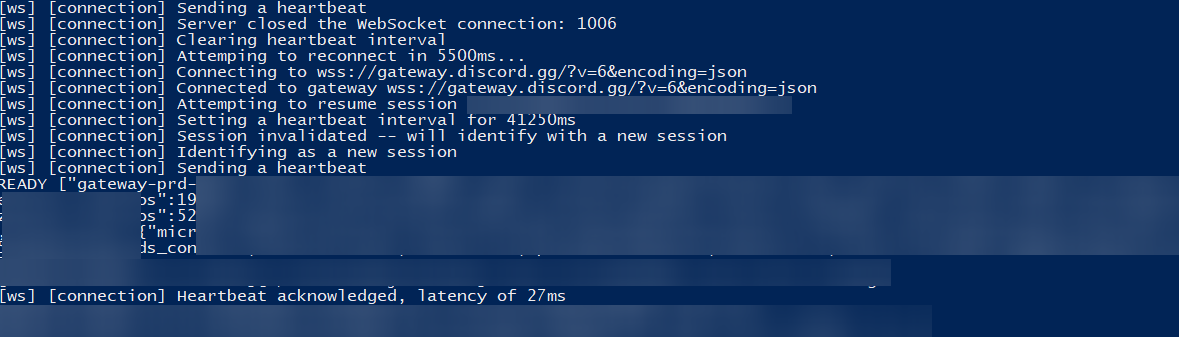
I hope they help.
Infinitay
on 4 Feb 2020
Disable quick edit mode in powershell settings, it causes pausing the process if you will try to mark any text with your mouse so app will not produce any logs while you're marking. That's my best guess on that
EDIT
https://sucks-to-b.eu/loQNpE.mp4
This video should show what i mean with quick edit setting. To exit it i pressed enter and it processed whole, i suppose "queue".
 tipakA
on 4 Feb 2020
tipakA
on 4 Feb 2020
Disable quick edit mode in powershell settings, it causes pausing the process if you will try to mark any text with your mouse so app will not produce any logs while you're marking. That's my best guess on that
I am 70% sure that is not the case, but I will go ahead and do so anyways. I will also run the application via CMD and see if it's the same case to confirm.
EDIT: 40 minutes in while using CMD, no problems yet. Looks like I rolled the 30% and was wrong. Since I'm running locally, I'm going to stop the bot, but I will run it for a while tomorrow and will post/edit an update if anything else happens either through CMD or PowerShell. Thanks again!
Infinitay
on 4 Feb 2020
Additionally, I noticed that I could also _unfreeze_ the bot by pressing enter, again, it would shoot out all old messages. I think it has to do with heartbeat because after some time when I do press enter, whether or not the bot is frozen, sometimes 'sending heartbeat' would get logged.
I think I'm going to destroy and remake the client every 5 minutes so I don't have to manually do this everytime this bug occurs.
Your issue is simply a case of accidentally (or intentionally) clicking on the console, causing it to pause due to what @tipakA said. That is not a discord.js bug.
As for the issue @Jiralite reported... I'd need far more details than that... Can you create a reproduction script that works and repros your issue? Was this a one-timer? Does it work on master?
 vladfrangu
on 4 Feb 2020
vladfrangu
on 4 Feb 2020
I runned the latest stable version on MSYS 2.7 in Win7. Sometimes with a poor connection on server the client to crash [ERR_UNHANDLED_ERROR] -> WebSocket { _closeCode: 1006 }.
I read #2523 about catching errors client.on('error', (err) => { ... }); but couldn't catch an error in log.
First check that the sending method is async client.on('message', async (msg) => { ... });
Secondly, the error was displayed when reconnecting.
 bopoh13
on 5 Feb 2020
bopoh13
on 5 Feb 2020
As for the issue @Jiralite reported... I'd need far more details than that... Can you create a reproduction script that works and repros your issue? Was this a one-timer? Does it work on master?
Hey. I'm deciding to upgrade over to master. It'll take a while, however.
I don't think my issue, upon further investigation, is related to discord.js. I'm 99% sure it isn't, I think I pushed a commit in that is causing this issue. What I find strange is that reverting to older commits don't seem to solve the problem, so I'm really at a loss.
It's definitely not a one-time issue, it's been pretty much happening every day or two since since a bit before posting this issue. I don't think I can create a reproduction script as I am not sure how (I wish I did), I've tried mitigating the problem on my end since this post by checking for possible infinite loops and disabling new features around/since the problem but nothing. Probably something else broke, yet it's only a problem with this one particular application rather than all/more than one of my applications. As such, I'm going to close this issue as it doesn't seem discord.js related. Really considering to just recode right from the bottom to top again and if I encounter the same issue, I'll come back here.
Thank you for your time in reading this!
Jiralite
on 11 Feb 2020
@Jiralite I also had a problem randomly.
It looks like Discord API changed. Let's see if the problem recurs. What I saw in client.rest.
  RESTManager {
    client:
      Client {
        _events:
          [Object: null prototype] {
-           reconnecting: [Function],
-           resume: [Function],
          },
-       _eventsCount: 12,
+       _eventsCount: 10,
        ws:
          WebSocketManager {
-           connection: [WebSocketConnection] },
+           connection: [WebSocketConnection],
+           lastHeartbeatAck: true },
      }
  }
Related issues
 Dmitry221060
·
3Comments
Dmitry221060
·
3Comments
 Lombra
·
3Comments
Lombra
·
3Comments
 xCuzImPro
·
3Comments
xCuzImPro
·
3Comments
 ghost
·
3Comments
ghost
·
3Comments
 Brawaru
·
3Comments
Brawaru
·
3Comments