Discord.js: Event 'end' on StreamDispatcher fires too early on Node 10+
Please describe the problem you are having in as much detail as possible:
Event 'end' on StreamDispatcher or StreamDispatcher.stream (tested on both) from VoiceConnection fires well before the end of the stream when running node v10 and v12 [Edit for clarification: This is a writable stream but this event is internally fired by 'finish']. Example debug output from my bot, see the code layout further below:
Start:  1561844184  Nominal length:  199
Ender fired:  1561844312  Elapsed:  128
In node v8, no other changes, the problem does not exist:
Start:  1561845620  Nominal length:  199
Ender fired:  1561845820  Elapsed:  200
The test file is not corrupted and plays properly on media players.
Issue previously discussed here in December: https://discordapp.com/channels/222078108977594368/222081003253006336/524287676267102208
If this behavior is intended I need access to an event emitter that fires end when the stream is actually done playing.
Note: I made a cursory attempt to test this on djs v12 (commit hash below), but I was unable to actually test this issue. In v12, when Client.login resolves, the Guilds in Client.guilds are unavailable (.available == false). From what I can tell this shouldn't be happening. There is no server outage. I'm logging in with a token. This problem does not happen on djs v11.
Include a reproducible code sample here, if possible:
//...

this._debugStart = moment().unix();
console.log("Start: ", this._debugStart, " Nominal length: ", this._play.length);

let ender = () => {
    let debugEnd = moment().unix();
    console.log("Ender fired: ", debugEnd, " Elapsed: ", (debugEnd - this._debugStart));

    //...
};

//Where vc is the VoiceConnection, and seek is 0
vc.playFile(song.path, {volume: volume, seek: seek}).once("end", ender);

//...
Further details:
- discord.js version: 11.5
- Node.js version: 10.6 (Also tested with v12)
- Operating system: Debian Stretch
- Priority this issue should have – please be realistic and elaborate if possible: High. This is a breaking bug that locks users into a version of node for which support will be dropped in the next major version of discord.js .
- [ ] I have also tested the issue on latest master, commit hash: b65a4f05da40a45e33f78fc43c9b8172a170a3df
 Protected
All 26 comments
Does the audio play actually play fully, or does that also end early?
 amishshah
on 1 Jul 2019
amishshah
on 1 Jul 2019
I did.. a bit too much testing with this code.
The code tests how far a song plays with djs stable/master and ytdl-core/ytdl-core-discord. I made sure to have the connection.disconnect() call separate to the end/finish event to test if the audio plays fully.
The results of which are as follows:
When using discord.js stable and ytdl-core to play music, the music sometimes cuts out early.
The bot stays in the channel and continues with a speaking indicator, but stops streaming audio when the end event is emitted. The end reason, regardless of if the song finishes or not, is Stream is not generating quickly enough:
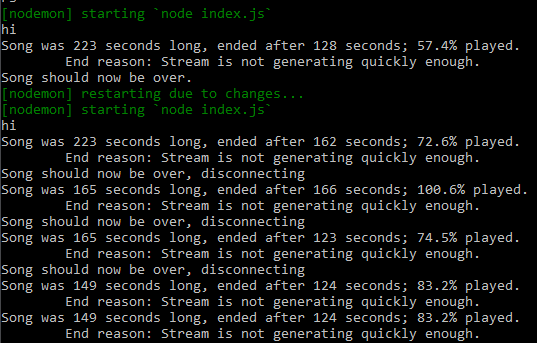
When using discord.js stable and ytdl-core-discord to play music, using the playOpusStream() method, the music plays fine. It completes each song 100%. The end reason is stream. I only tried this three times, though:

When using discord.js master (commit hash b65a4f0) and ytdl-core to play music, the music seemed to play fine in the beginning:

and then after further testing, I realized that master still has the issue, this time with the added quirk that when the song does cut out early, it won't emit the finish event:


Do note that every test was a different song on YouTube (because I didn't really feel like listening to the same song 20 times). If anything, the master testing has made me more confused as to why some songs cut out and others don't. I might do further testing making sure that the audio format is the same, as it could be linked to that. Playing even the same song twice can yield varying results, so it could be partially how ytdl-core chooses audio formats, not sure. (See the 143 second song above.)
I might do some more testing tomorrow with more specific testing parameters (e.g. itag format from YouTube). I also did no testing on node 8, but I don't think that would help much.
Extra info:
discord.js: 11.5.1 and master (commit hash mentioned above)
node: 10.16.0
OS: Debian 9.9 (tested via ssh from a windows laptop, I could also try testing on windows and macOS)
 Gymnophoria
on 2 Jul 2019
Gymnophoria
on 2 Jul 2019
Thanks a lot, Gymnophoria! I only just read the replies.
Protected
on 2 Jul 2019
Yeah totally! I'm doing all the testing because I host a fair sized bot (like 1400 servers) and I'd also like music to work properly. I think I'm going to downgrade to node 8 for now because there doesn't seem to be a good workaround currently.
And then, adding to the issue info: My main bot will occasionally end streams with the reason destroyed due to error - TypeError: cannot read property 'key' of undefined and the following error is logged:
TypeError: Cannot read property 'key' of undefined
at StreamDispatcher.createPacket (/home/nikolas/arthur/bot/node_modules/discord.js/src/client/voice/dispatcher/StreamDispatcher.js:166:106)
at StreamDispatcher.sendBuffer (/home/nikolas/arthur/bot/node_modules/discord.js/src/client/voice/dispatcher/StreamDispatcher.js:134:25)
at StreamDispatcher.process (/home/nikolas/arthur/bot/node_modules/discord.js/src/client/voice/dispatcher/StreamDispatcher.js:243:14)
at Socket.stream.once (/home/nikolas/arthur/bot/node_modules/discord.js/src/client/voice/dispatcher/StreamDispatcher.js:324:12)
at Object.onceWrapper (events.js:286:20)
at Socket.emit (events.js:198:13)
at emitReadable_ (_stream_readable.js:539:12)
at process._tickCallback (internal/process/next_tick.js:63:19)
My bot also has the Song is not generating quickly enough reason at nearly every end of a song, not sure if that helps.
Gymnophoria
on 2 Jul 2019
Ah, mine is meant to be self-hosted and mainly for my own use (that I know of), but it's fully open source if it helps. Relevant module and function: https://github.com/Protected/rowboat/blob/master/ModRajio.js#L1134
Protected
on 3 Jul 2019
After further testing today - not through really testing but just my friend playing music and me trying to fix my bot while he does so - I found some interesting things:
Using playOpusStream and node-ytdl-discord did not fix the issue for me (for some reason?).
Using node v8.16.0 did not fix the issue for me.
(The issue being streams ending early)
This is odd, I realize, as I've had the bot work before on node v8, just on a different machine. My friend inquires if the ffmpeg versions match up and, sure enough, my server had ffmpeg v3.2.12 (the version you get with sudo apt-get install ffmpeg) whereas my iMac (where I previously hosted the bot without issue) was running ffmpeg v3.4.1 (I swear when I checked it was running 4.x.x, but whatever, still a newer version).
I decided to try updating ffmpeg on my server (I used the ffmpeg-static npm module and copied the binaries to ~/bin) and it seems to have fixed the stream ending early issue, interesting enough. It seems that ffmpeg 4.1 doesn't have this issue.
Streams still end with reason "Stream is not generating quickly enough" (and reason "stream" when streaming with ytdl-core-discord), but they're ending at the end now, which is all that really matters.
@Protected, could you try installing ffmpeg v4.1 (or just any 4.x version) and see if that fixes the issue for you too? (Verify version with ffmpeg -version)
Edit: Just to clarify, streaming is working fine (without the bug this issue mentions) on discord.js stable (11.5.1), node v10.16.0, and ffmpeg v4.1
Gymnophoria
on 3 Jul 2019
I just tried it. Replacing ffmpeg 3.3.9 with 4.1, then swapping node 8 with node 10, reinstalling all packages and running the bot, songs are still ending half way through.
The ffmpeg process looked like this during execution:
myshelt+ 19010 0.9 0.0 1132832 13660 pts/1 Sl+ 21:29 0:00 ffmpeg -i file:songs/240505183c53c950517c9a4961402ecd.flac -analyzeduration 0 -loglevel 0 -f s16le -ar 48000 -ac 2 -ss 0 pipe:1
$ ffmpeg -version
ffmpeg version 4.1-static https://johnvansickle.com/ffmpeg/ Copyright (c) 2000-2018 the FFmpeg developers
(But ffmpeg 4.1 works as well as 3.3 on node v8.)
Protected
on 3 Jul 2019
Can you try running your bot in v12? The issue you described above about unavailable guilds can be fixed by listening to the ready event instead of waiting for login to resolve.
amishshah
on 4 Jul 2019
I tried but I'm still having trouble converting my code after making the change you suggested. The bot now initializes properly, but there seem to be changes in event signatures such a voiceStateUpdate or presenceUpdate that are not well documented yet. It's not trivial to upgrade even those two because at first glance (not tested exhaustively) the .member attribute of both old and new state objects contains the same member, rather than a member that reflects the state that provides it?
I can't really commit to v12 until there is a list of all changes so I can convert the entire codebase properly.
Protected
on 4 Jul 2019
Audio ended early for me in v11.5.1 aswell using playArbitraryInput().
I switched to v12 and used play() instead and it got rid of the audio cut-offs!
 bakapear
on 15 Jul 2019
bakapear
on 15 Jul 2019
Audio ended early for me in v11.5.1 aswell using playArbitraryInput().
I switched to v12 and used play() instead and it got rid of the audio cut-offs!
What OS? What node and what ffmpeg are you using? I'm having trouble getting this work for me.
 suroh001
on 16 Jul 2019
suroh001
on 16 Jul 2019
Tried it on Win10 with node v10.16.0 & ffmpeg v4.1.3. I hope this helps!
bakapear
on 16 Jul 2019
So I figured out a somewhat hacky workaround for this issue.
I'm hosting a music bot on an AWS EC2 instance, and was already facing issues with discord.js v11.5.1 wherein audio streams would not play, as explained by this pre-existing issue (https://github.com/discordjs/discord.js/issues/2573). Hence, I resolved to using the master branch of discord.js (v12.0.0dev). I updated the syntax and references in my code, which was a bit of a headache, but eventually got the bot to play the audio stream.
Then, I ran into this issue. The audio stream was cutting off about halfway through whatever I was attempting to play.
In an attempt to fix this, I implemented a hacky patch I had explored earlier. This works perfectly fine on node v10.16.1 and discord.js v12.0.0dev, and my bot is finally able to stream complete audio sources, even when run on the EC2 instance. Here's an overview of the patch. You will need to modify this per your use case, but here goes:
var fs = require('fs');

asnyc function play(/*your arguments*/) {

    // Essentially, I am writing the online audio stream into a local file,
    // which, in this case is called file.webm
    let writeStream = await <request object like youtube-dl or other>.pipe(fs.createWriteStream('file.webm', {flags: 'w'}));

    // Adding a small delay here so that a potentially slow write process above
    // won't hamper the reading process in the next steps
    await new Promise(done => setTimeout(done, 5000));

    // Reading the same file after a delay of 5000ms as. The object is a node stream.
    let readStream = fs.createReadStream('file.webm');

    // Created a StreamDispatcher playing the read stream created above
    const dispatcher = serverQueue.connection.play(readStream)
    .on('end', () => {
        console.log('Stream ended!');
        writeStream.end();
        // do whatever
    })
    .on('error', error =>
        console.error(error);
    });
}
So what's happening is:
- Begin by writing the online stream to a local file
- Add a minimum 5 second delay so that any error caused by a slow read/write speed in _1_ can be avoided.
- Begin reading the local file as a stream.
- Pass the stream in _3_ to the StreamDispatcher.
- Upon the end of the read stream, close the writing stream in _1_.
This workaround appears to be doing its job for me. I ran it on the following systems:
- Laptop: macOS 10.14.6 / nodeJS v10.16.0 / discord.[email protected] PASSED
- EC2: ubuntu 18.04 / nodeJS v10.16.1 / discord.[email protected] PASSED
I'm pretty new to GitHub, so I'm sorry if certain parts of my explanation don't make perfect sense. Additionally, my code may not be optimal so to speak, because I'm not very well versed with the intricacies of JavaScript. Nonetheless, I'd be happy to help anyone with this!
Here's an issue thread I'd opened for myself on a personal project: https://github.com/amalbansode/Discord-Music-Bot/issues/7. You could check out the PRs linked on that thread for further details, though I've tried to cover as much as possible here.
 amalbansode
on 8 Aug 2019
amalbansode
on 8 Aug 2019
Thanks @amalbansode, definitely helps understand the issue. Seems to be a race condition or side effect of how streams end or are written. I've skimmed the Node10/12 changelogs but I don't see a specific line that would point to why this might've started causing issues.
Perhaps we can close #3310, #3311, #3314 as they all seem related and consolidate the information here?
 JMTK
on 8 Aug 2019
JMTK
on 8 Aug 2019
Hi, so as I understand, this issue didn't originally use ytdl so I don't think the fix would be applicable to this particular issue (although the fix is probably the closest thing we'll get to a working ytdl at this moment in time)
amishshah
on 13 Aug 2019
For me the situation is different
discord.js: 12.0.0-dev
node: 12.14.0
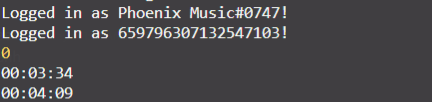
It ended soon at node version v12
But At Node Version v10.16 It don't

 HellCatVN
on 1 Jan 2020
HellCatVN
on 1 Jan 2020
Having the same issue. Node v13.7.0, discord.js 11.5.1, ffmpeg n4.2.2, and on linux. Tried .playArbitraryInput, .playOpusStream, and .playStream with direct link and giving a stream from the request module.
 recette-lemon
on 4 Feb 2020
recette-lemon
on 4 Feb 2020
Node v13.8.0
discord.js 11.5-dev
ffmpeg 4.2.2
Same problem with .playFile. The audio is cutted a bit before the end. It only happen with .playFile. With .playStream, the file is read without any problem, except when it's too short; in this case it's not read at all, and the end will never be fired (maybe related to https://github.com/discordjs/discord.js/issues/3310) except when I play another file. In this case, the dispatcher.stream.bytesRead will be 0 when the end and close events are triggered.
It happen when playing a .wav file with the .playStream function (reading a stream created with fs from the file) or when reading .wav / .opus with .playFile. When playing a .opus file encoded with ffmpeg or node-opus with playStream the file is not cutted.
 jackred
on 11 Feb 2020
jackred
on 11 Feb 2020
For me the situation is different
discord.js: 12.0.0-dev
node: 12.14.0
It ended soon at node version v12
But At Node Version v10.16 It don't
Downgrading the node version to v10.16 solved the problem to me!
 reisdev
on 24 Mar 2020
reisdev
on 24 Mar 2020
@amishshah Here is an audio example (I have the same problems)
"The stream will repeat a part of the stream twice multiple times and then skip to the end prematurely (https://www.youtube.com/watch?v=7ljwjlHSS00 at 1:21). I honestly have no clue why the stream glitches like this after a short time. Sometimes the stream stops completely (https://www.youtube.com/watch?v=iQKQ0-mhEJE at 1:10)"
Closed issue regarding this issue: https://github.com/fent/node-ytdl-core/issues/596
 Helperbot3
on 30 Mar 2020
Helperbot3
on 30 Mar 2020
@Gymnophoria so the best solution right now is to downgrade to node 8?
Helperbot3
on 30 Mar 2020
Use node 8 and discord.js v11, I suppose, yeah. Discord.js v12 also requires node v12 so there's no real solution for using the latest stable. I will say that I get this issue far less often on debian than I used to with d.js v12.
Gymnophoria
on 30 Mar 2020
I would but I only have experience with v12. It would be too much of a burden to change over 1000 lines of code just to fix a single feature
Helperbot3
on 31 Mar 2020
I'm finally converting to v12 stable on node 14 (node 8 was getting so old some upstream modules were no longer running on it). Good news is that the timing of the finish event seems to be correct after the first few tests! At least on windows.
The upgrade to v12 guide should probably mention that the 'finish' event isn't emited on 'destroy()' even though the 'end' event was emited on 'end()' in v11 (they are currently presented as equivalent). The 'close' event would be be closer to equivalent (I imagine, and observation so far confirms, that it behaves as a standard writable stream close event).
Simplified example:
let options = {
    volume: (volume != 1 ? volume : false),
    seek: (seek ? Math.round(seek / 1000.0) : 0),
    highWaterMark: 64,
    fec: false  //Configurable, but set to false in working example
};

if (song.format == 'pcm') {
    options.type = 'converted';
    vc.play(fs.createReadStream(song.path), options).once("close", ender);
} else {
    vc.play(song.path, options).once("close", ender);
}
I'll update if I run into trouble.
Protected
on 9 May 2020
@Protected so how are your tests going so far?
 mk360
on 15 Jul 2020
mk360
on 15 Jul 2020
I think everything has been working perfectly regarding the timing of the close event. The only issue I've been recently having has to do with occasional minor audio pacing issues of the kind I used to experience way back in the day when using opusscript (and which I'd never experienced with node-opus before this cluster of upgrades), but that may simply have to do with server connectivity... Discord does regularly have blips in voice channel connectivity so it's hard to be sure.
Note that if it's off by <1s as in #4358 it will be very difficult for me to know for sure. The problem I used to have cut the playback way earlier, as you can see from the original ticket.
Protected
on 23 Jul 2020
Related issues
 smchase
·
3Comments
smchase
·
3Comments
 kvn1351
·
3Comments
kvn1351
·
3Comments
 tiritto
·
3Comments
tiritto
·
3Comments
 BrandonCookeDev
·
3Comments
BrandonCookeDev
·
3Comments
 tom-barnes
·
3Comments
tom-barnes
·
3Comments
Most helpful comment
So I figured out a somewhat hacky workaround for this issue.
I'm hosting a music bot on an AWS EC2 instance, and was already facing issues with discord.js v11.5.1 wherein audio streams would not play, as explained by this pre-existing issue (https://github.com/discordjs/discord.js/issues/2573). Hence, I resolved to using the master branch of discord.js (v12.0.0dev). I updated the syntax and references in my code, which was a bit of a headache, but eventually got the bot to play the audio stream.
Then, I ran into this issue. The audio stream was cutting off about halfway through whatever I was attempting to play.
In an attempt to fix this, I implemented a hacky patch I had explored earlier. This works perfectly fine on node v10.16.1 and discord.js v12.0.0dev, and my bot is finally able to stream complete audio sources, even when run on the EC2 instance. Here's an overview of the patch. You will need to modify this per your use case, but here goes:
So what's happening is:
This workaround appears to be doing its job for me. I ran it on the following systems:
I'm pretty new to GitHub, so I'm sorry if certain parts of my explanation don't make perfect sense. Additionally, my code may not be optimal so to speak, because I'm not very well versed with the intricacies of JavaScript. Nonetheless, I'd be happy to help anyone with this!
Here's an issue thread I'd opened for myself on a personal project: https://github.com/amalbansode/Discord-Music-Bot/issues/7. You could check out the PRs linked on that thread for further details, though I've tried to cover as much as possible here.