New Issue Checklist
- [x] I have searched for a similar issue in the project and found none
Issue Info
| Info | Value | |
| ------------------------------ | ----------------------------------------------------- | ---- |
| Platform Name | web | |
| Platform Version | | |
| Dio Version | 3.0.8 | |
| Repro rate | 100% | |
| Repro with our demo prj | | |
| Demo project link | | |
Issue Description and Steps
When I dio.get big JSON file (2-5 Mb) - I have freeze UI on the Web about 10-30 seconds. Standard HttpClient work fine.
 Gorniv
All 17 comments
This issue has been automatically marked as stale because it has not had recent activity. It will be closed if no further activity occurs. If this is still an issue, please make sure it is up to date and if so, add a comment that this is still an issue to keep it open. Thank you for your contributions.
![stale[bot] picture](https://avatars3.githubusercontent.com/in/1724?v=4&s=40) stale[bot]
on 4 Mar 2020
stale[bot]
on 4 Mar 2020
mine freezes about 300 ms. which is still laggy since i call api call every 2 seconds.
 softmarshmallow
on 10 Mar 2020
softmarshmallow
on 10 Mar 2020
I've encountered the same issue with 1MB+ json response.
I believe it is because the responseType is always internally set to blob instead to json and a stream is created from it (the actual slow part is transforming and consuming the stream).
 ganigeorgiev
on 14 Mar 2020
ganigeorgiev
on 14 Mar 2020
This issue has been automatically marked as stale because it has not had recent activity. It will be closed if no further activity occurs. If this is still an issue, please make sure it is up to date and if so, add a comment that this is still an issue to keep it open. Thank you for your contributions.
stale[bot]
on 13 Apr 2020
up
Gorniv
on 13 Apr 2020
This issue has been automatically marked as stale because it has not had recent activity. It will be closed if no further activity occurs. If this is still an issue, please make sure it is up to date and if so, add a comment that this is still an issue to keep it open. Thank you for your contributions.
stale[bot]
on 13 May 2020
same behaviro on ios .any solution?
 100cm
on 15 May 2020
100cm
on 15 May 2020
Same for me on web
 Manguelo
on 9 Jun 2020
Manguelo
on 9 Jun 2020
I had a freeze on a 246kb JSON for ~4-6sec. Running the CPU sampler in Chrome shows there is a lot of GC coming from List_List$from inside ResponseBody.fromBytes. This seems to be what Uint8List.fromList is been called in JS and we are invoking it for each byte. https://github.com/flutterchina/dio/blob/632931586b5153fb03f58a75378e59b564276b82/dio/lib/src/adapter.dart#L99-L100
Here is a sample of the CPU sampler from Chrome.
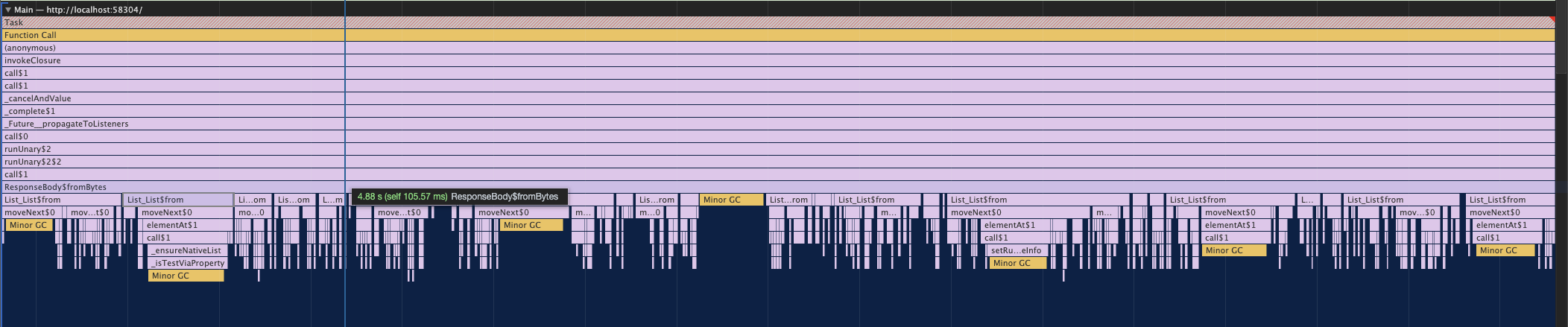
So I swapped it out with Stream.value(Uint8List.fromList(bytes)) to take the whole list all at once, and all GC from before is gone; now only thing CPU Sampler seems to find is the UTF8 decode and JSON parse at ~20ms each in debug mode.
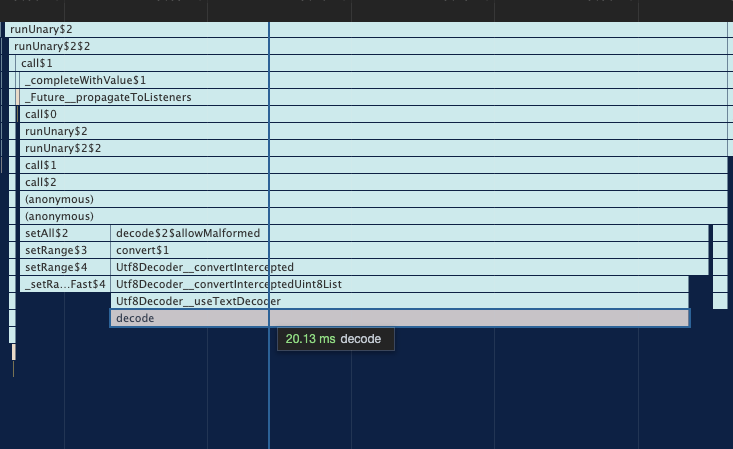
I used Profiler mode in Debug for all the sampling. Running in release mode did not seem to affect the GC much. Also Stream.value requires Dart 2.5, but, we can fall back to Future.value(Uint8List.fromList(bytes)).asStream() for the current min Dio Dart version.
 marukami
on 28 Jun 2020
marukami
on 28 Jun 2020
This issue has been automatically marked as stale because it has not had recent activity. It will be closed if no further activity occurs. If this is still an issue, please make sure it is up to date and if so, add a comment that this is still an issue to keep it open. Thank you for your contributions.
stale[bot]
on 29 Jul 2020
reopen
softmarshmallow
on 6 Aug 2020
reopen pls, problem is not gone
 urusai88
on 18 Oct 2020
urusai88
on 18 Oct 2020
Can anyone help me on this?
 LucaIaconelli
on 4 Nov 2020
LucaIaconelli
on 4 Nov 2020
Can anyone help me on this?
you can try this
https://github.com/urusai88/dio/tree/feature/refactor-progress
urusai88
on 5 Nov 2020
Thanks, I'll
LucaIaconelli
on 5 Nov 2020
Hello Guys,
I think the problem comes from the BrowserHttpClientAdapter from dio.
After hours of manual profiling (the old way) I found out that the operation that take a lot of time is
if (requestStream == null) {
      xhr.send();
    } else {
     //The killer is the reduce method used here.
      requestStream
          .reduce((a, b) => Uint8List.fromList([...a, ...b]))
          .then(xhr.send);
    }
I copied this class and changed the reduce method with regular for loop and it works pretty fast for me.
if (requestStream == null) {
      xhr.send();
    } else {
      List<int> r = [];
      List<List<int>> listOfLists = await requestStream.toList();
      for (int i = 0; i < listOfLists.length; i++) {
        r.addAll(listOfLists[i]);
      }
      xhr.send(Uint8List.fromList(r));
    }
Here is the full WebAdapterclass that I am using (for web only) instread of the default BrowserHttpClientAdapter
`import 'dart:async';
import 'dart:typed_data';
import 'package:dio/dio.dart';
import 'dart:html';
class WebClientAdapter implements HttpClientAdapter {
final _xhrs =
bool withCredentials = false;
@override
Future
var xhr = HttpRequest();
_xhrs.add(xhr);
xhr
  ..open(options.method, options.uri.toString(), async: true)
  ..responseType = 'blob'
  ..withCredentials = options.extra['withCredentials'] ?? withCredentials;
options.headers.remove(Headers.contentLengthHeader);
options.headers.forEach((key, v) => xhr.setRequestHeader(key, '$v'));
var completer = Completer<ResponseBody>();

xhr.onLoad.first.then((_) {
  var blob = xhr.response ?? Blob([]);
  var reader = FileReader();

  reader.onLoad.first.then((_) {
    var body = reader.result as Uint8List;

    completer.complete(
      ResponseBody.fromBytes(
        body,
        xhr.status,
        headers: xhr.responseHeaders.map((k, v) => MapEntry(k, v.split(','))),
        statusMessage: xhr.statusText,
        isRedirect: xhr.status == 302 || xhr.status == 301,
      ),
    );
  });

  reader.onError.first.then((error) {
    completer.completeError(
      DioError(
        type: DioErrorType.RESPONSE,
        error: error,
        request: options,
      ),
      StackTrace.current,
    );
  });

  reader.readAsArrayBuffer(blob);
});

xhr.onError.first.then((_) {
  // Unfortunately, the underlying XMLHttpRequest API doesn't expose any
  // specific information about the error itself.
  completer.completeError(
    DioError(
      type: DioErrorType.RESPONSE,
      error: 'XMLHttpRequest error.',
      request: options,
    ),
    StackTrace.current,
  );
});

cancelFuture?.then((_) {
  if (xhr.readyState < 4 && xhr.readyState > 0) {
    try {
      xhr.abort();
    } catch (e) {
      // ignore
    }
  }
});

if (requestStream == null) {
  xhr.send();
} else {
  List<int> r = [];
  List<List<int>> listOfLists = await requestStream.toList();
  for (int i = 0; i < listOfLists.length; i++) {
    r.addAll(listOfLists[i]);
  }
  xhr.send(Uint8List.fromList(r));
}
return completer.future.whenComplete(() {
  _xhrs.remove(xhr);
});
}
/// Closes the client.
///
/// This terminates all active requests.
@override
void close({bool force = false}) {
if (force) {
for (var xhr in _xhrs) {
xhr.abort();
}
}
_xhrs.clear();
}
}
`
I hope it helps.
Salam.
 Oualitsen
on 26 Nov 2020
Oualitsen
on 26 Nov 2020
No fix yet.. Any updates?
 arthurdlima
on 10 Dec 2020
arthurdlima
on 10 Dec 2020
Related issues
 codeThe0
·
6Comments
codeThe0
·
6Comments
 aleksander351
·
4Comments
aleksander351
·
4Comments
 skybur
·
4Comments
skybur
·
4Comments
 vico-aguado
·
6Comments
vico-aguado
·
6Comments
 lazarvgd
·
4Comments
lazarvgd
·
4Comments
Most helpful comment
reopen pls, problem is not gone