Dio: Can not upload file with FomData
Platform Name flutter / android
Platform Version 1.9
Dio Version 3.04
I try to upload a file from bytes or from file and I get an error from server => "Current request is not a multipart request"
It was working with Dio Version 2.X
Future<UpdatePictureResponse> updateUserPicture(
      {File file, List<int> bytes}) async {
    FormData formData;
    if (file != null) {
      formData = FormData.fromMap({
        "image":
            await MultipartFile.fromFile(file.path, filename: "picture.jpg"),
      });
    } else if (bytes != null) {
      final multiPartBytes =
          await MultipartFile.fromBytes(bytes, filename: "picture.jpg");
      formData = FormData.fromMap({
        "image": multiPartBytes,
      });
    } else {
      throw ApiException('No image set');
    }

    try {
      final response = await _dio.post('/uaa/account/image',
          data: formData,
          options: Options(contentType: Headers.formUrlEncodedContentType),
          onSendProgress: (send, total) {});
      return UpdatePictureResponse(
          imageUrl: response.data['image_url'],
          thumbnailUrl: response.data['thumbnail_url']);
    } on DioError catch (e) {
      throw ApiException(e.message);
    } catch (e) {
      throw ApiException(e);
    }
  }
 fvisticot
All 13 comments
Same issue with 3.0.5
fvisticot
on 19 Nov 2019
Adding logging interceptor I have this request:
- Not sure content Type is correct
- I can not see the detail of FormData with this interceptor
I/flutter (12327): *** Request ***
I/flutter (12327): uri: https://api.xxx/v2/uaa/account/image
I/flutter (12327): method: POST
I/flutter (12327): responseType: ResponseType.json
I/flutter (12327): followRedirects: true
I/flutter (12327): connectTimeout: 5000
I/flutter (12327): receiveTimeout: 5000
I/flutter (12327): extra: {}
I/flutter (12327): headers:
I/flutter (12327):  content-type: application/json; charset=utf-8
I/flutter (12327):  Accept: application/json
I/flutter (12327):  Content-Type: application/json
I/flutter (12327): data:
I/flutter (12327): Instance of 'FormData'
in version 3.0.5 too
 IkhwanSI13
on 20 Nov 2019
IkhwanSI13
on 20 Nov 2019
try {
      final response = await _dio.post('/uaa/account/image',
          data: formData,
          onSendProgress: (send, total) {});
      return UpdatePictureResponse(
          imageUrl: response.data['image_url'],
          thumbnailUrl: response.data['thumbnail_url']);
    } on DioError catch (e) {
      throw ApiException(e.message);
    } catch (e) {
      throw ApiException(e);
    }
try this,remove options: Options(contentType: Headers.formUrlEncodedContentType),
 madboy1987
on 20 Nov 2019
madboy1987
on 20 Nov 2019
I have tried to remove the option as you was suggesting..
But issue is still there.
fvisticot
on 20 Nov 2019
It seems #562 breaks uploading files
 PiN73
on 21 Nov 2019
PiN73
on 21 Nov 2019
@fvisticot Check whether the request body is correct with proxy tool (e.g charles).
 wendux
on 22 Nov 2019
wendux
on 22 Nov 2019
I have checked with 3.0.7 and still the same issue.
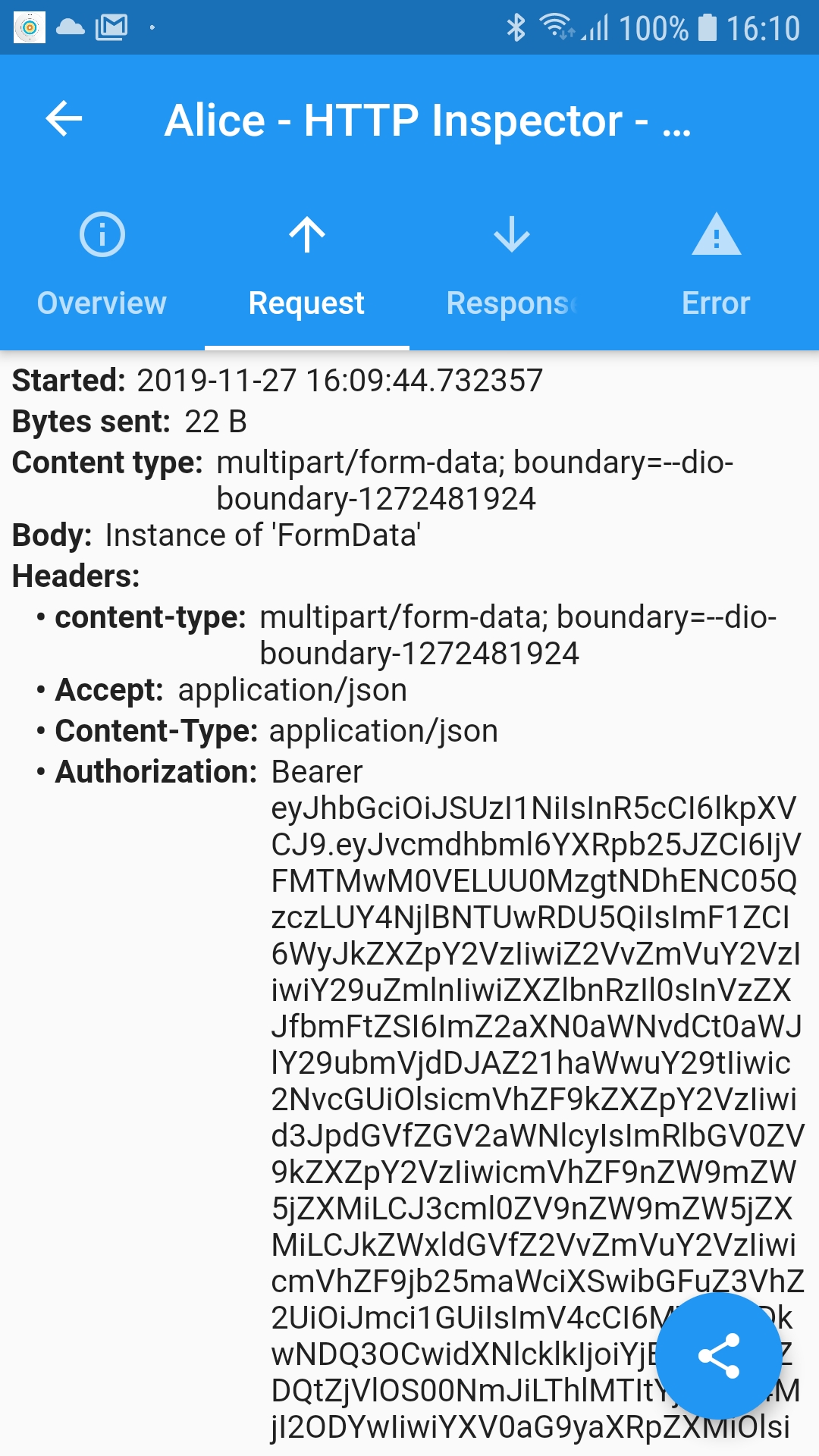
Additional information:
- Can not see FormData in Alice Dio Plugin :(
- In Alice I can see that Content Type is present 2 times in header
content-type (lower case) : multipart ...
Content-Type (upper case): application/json
for information I'm using the same dio client for json and formData
fvisticot
on 27 Nov 2019
If i create a "dedicated" DIO instance to upload the file it is OK,
If i use a "global" DIO instance used for JSON and FormData it does not Work
fvisticot
on 28 Nov 2019
@fvisticot what mean "dedicated", you solved your problem?
 rio45ka
on 17 Dec 2019
rio45ka
on 17 Dec 2019
Yup this is happening to me as well, also I'm not sure whether you guys noticed but content type randomly becomes null for other types of POST requests, @rio45ka I think he means a dynamic instance type when @fvisticot says a dedicated dio instance, I tried it and its not resolving the issue for me though, working with dio 3.x is causing way too many problems, version 2.1.16, doesn't give me any problems at all though, sad such an amazing library has become like this, just because it rushed to add web support.
 droidluv
on 14 Jan 2020
droidluv
on 14 Jan 2020
This issue has been automatically marked as stale because it has not had recent activity. It will be closed if no further activity occurs. If this is still an issue, please make sure it is up to date and if so, add a comment that this is still an issue to keep it open. Thank you for your contributions.
![stale[bot] picture](https://avatars3.githubusercontent.com/in/1724?v=4&s=40) stale[bot]
on 13 Feb 2020
stale[bot]
on 13 Feb 2020
If i create a "dedicated" DIO instance to upload the file it is OK,
If i use a "global" DIO instance used for JSON and FormData it does not Work
how did you create this dedicated instance
 Joezzy
on 24 Aug 2020
Joezzy
on 24 Aug 2020
Related issues
 ghozay19
·
6Comments
ghozay19
·
6Comments
 HelgeSverre
·
6Comments
HelgeSverre
·
6Comments
 codeThe0
·
6Comments
codeThe0
·
6Comments
 vico-aguado
·
6Comments
vico-aguado
·
6Comments
 papakay
·
4Comments
papakay
·
4Comments