Dim: Shadowkeep loadout optimizer crashes browser tab
Been having some issues with the new loadout optimizer. Whenever I try to go to the optimizer the browser/app window will freeze for 10-20seconds. Memory usage spikes to 4.2gb and keeps growing. Eventually it loads up but is completely unresponsive and a few seconds later it crashes the browser tab.
I believe its because it starts computing all this at route load and since theres no filters it quickly snowballs out of control.
Chrome console reports:
found 11326 stat mixes after processing 1722350 stat combinations in 17310.29999999737 ms
If I keep the inspector window open the debugger will actually pause the script execution before crashing reporting the exception "Paused before potential out of memory crash" at line 175 in loadout-builder/process.ts.
It looks like the loadouts are being recomputed on every destiny data refresh, and since it's refreshing at a faster interval than the loadouts can be processed the ram usage stacks up faster than Chrome can garbage collect, eventually leading to a crash.
Maybe a solution could be to prevent the inventory refresh while processing the loadouts, or forcing user input before trying to process the loadouts?
 kraffslol
All 19 comments
We’ll have to reevaluate how it works now that there are 6 stats. The whole thing only takes a couple hundred milliseconds on my machine though - what browser and device are you using?
 bhollis
on 14 Oct 2019
bhollis
on 14 Oct 2019
Chrome 77.0.3865.120. i7-6800K, 32gb ram
kraffslol
on 14 Oct 2019
Hmm. You might simply have more range of armor than I do:
found 3231 stat mixes after processing 59670 stat combinations in 428.28999999619555 ms
I might need to have some time to play the game and get more types of armor before I can reproduce this.
bhollis
on 14 Oct 2019
Yeah, thinking more about it, this will be difficult - the optimization that made the Loadout Optimizer work at all is defeated by the fact that stats can have so many ranges. I'll have to think about how to prevent it from dying. We may have to do some web worker magic to keep the UI responsive, or require that you set filters if the number of possibilities is too large.
bhollis
on 14 Oct 2019
One potential option is to have a "best only" mode where we won't even consider items that have inferior stats.
bhollis
on 14 Oct 2019
Or a more guided mode where you have to choose stat ranges ahead of time...
bhollis
on 14 Oct 2019
A quick work around might be to limit the number of combos allowed (per line 136 in process.ts) to some arbitrary limit. If an error message is shown telling the user to set some filters to get the number lower it might make it usable for some people (or at least not crash their tab if they click on it)
I was able to get the loadout optimizer working locally by capping the combos and then just picking 1 exotic perk to limit the number of permutations (from 1.6M total to a few thousand typically).
I can work up a PR for this if it would be useful generally.
 richmusser
on 16 Oct 2019
richmusser
on 16 Oct 2019
That may technically work, but then you could be missing out on some better permutations. I like @bhollis idea to _"require that you set filters if the number of possibilities is too large."_
 kyleshay
on 17 Oct 2019
kyleshay
on 17 Oct 2019
I also have this issue. I have a nearly full vault in my case nearly ~40 items of armor per section.
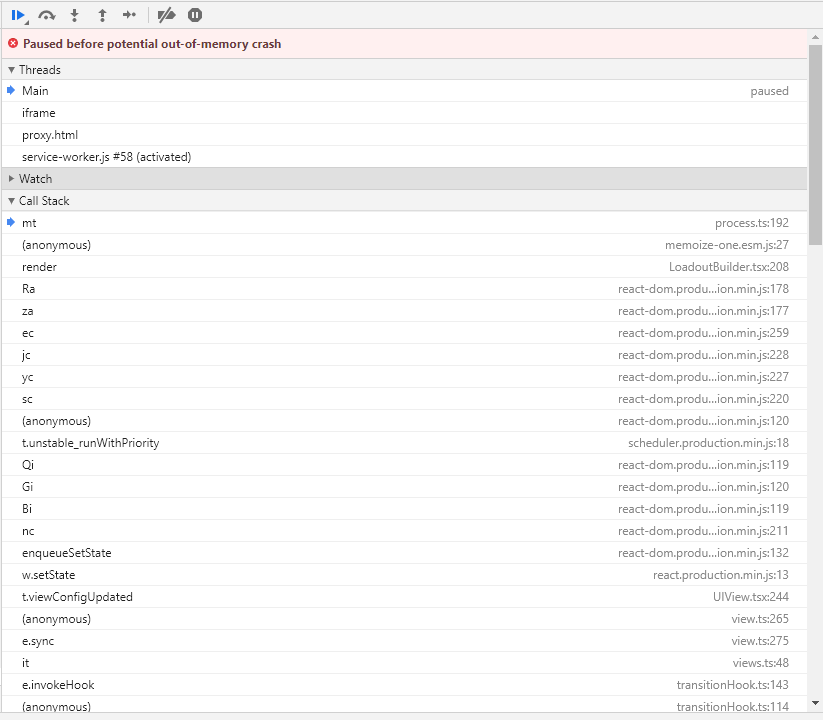
Fails on this line: https://github.com/DestinyItemManager/DIM/blob/master/src/app/loadout-builder/process.ts#L192
 singerbj
on 17 Oct 2019
singerbj
on 17 Oct 2019
Looks like each set being added to this set map:
https://github.com/DestinyItemManager/DIM/blob/master/src/app/loadout-builder/process.ts#L127
Includes all the data for each armor piece for the set, not just the stats. Maybe there's a way to do this without the duplicated data and instead just reference it using the armor ids later?
singerbj
on 17 Oct 2019
@singerbj It may look like that, but it's not really duplicating memory.
@richmusser the issue with the way it currently works is that filters are applied after sets are generated. It's not actually super easy to filter first.
A lot of how this tool currently works is predicated on the fact that stats could only take on a very small range of values, and Shadowkeep changed that.
bhollis
on 19 Oct 2019
Also having this issue, and I have a crap ton of armor stocked up
 tehtrav
on 19 Oct 2019
tehtrav
on 19 Oct 2019
Yup, what we've been talking about here is that the crap ton of armor is what causes the combinatorial explosion that takes up all your memory.
bhollis
on 19 Oct 2019
Can folks check out the latest beta? I've made a bunch of improvements that should help.
bhollis
on 21 Oct 2019
Still crashes for me in the same way as it did before.
kraffslol
on 21 Oct 2019
Working for me now! It was still crashing when I tried earlier this morning but I think the problem was the "update DIM" wasn't working and I was still stuck on the old build.
tehtrav
on 21 Oct 2019
Working for me now aswell! I guess I was also stuck on the old build until now.
kraffslol
on 21 Oct 2019
Works here too. All the changes to the optimizer over the weekend made it a fantastic tool, thanks DIM team.
richmusser
on 21 Oct 2019
A little late, but this works for me now too!
singerbj
on 1 Nov 2019
Related issues
 duckmanBR
·
3Comments
duckmanBR
·
3Comments
 michabbb
·
4Comments
kyleshay
·
7Comments
michabbb
·
4Comments
kyleshay
·
7Comments
 cbcrouse
·
4Comments
cbcrouse
·
4Comments
 delphiactual
·
4Comments
delphiactual
·
4Comments