Using DIM in Microsoft Edge 42.17134.1.0 (Windows 10 Pro 1803) results in rampant memory usage in dwm.exe simply by scrolling up and down.
This memory usage is not freed upon closing Microsoft Edge. You must sign out of the account to release the allocated memory from dwm.exe.
I've created a video demonstrating the problem.
 RyuConnor
All 18 comments
Some additional details.
I have 184 Destiny 2 items with tags or notes, so I backed up that info and fully purged my browser settings. Returning to a stock configuration resolved the problem demonstrated in the video.
My problems immediately returned upon restoring my settings from backup. It would appear that tags and notes are causing Edge to freak out.
I have attached my JSON backup, though from a cursory glance nothing seem out of the ordinary about it.
dim-data.zip
RyuConnor
on 10 Nov 2018
That's great info. Let me dig in and see if I can find an issue.
 bhollis
on 10 Nov 2018
bhollis
on 10 Nov 2018
Hmm, I don't see anything obviously leaking here, though I don't have MS Edge to test with. I pushed an update to Beta though - can you try it there?
bhollis
on 11 Nov 2018
The one thing that I'm thinking is that maybe Edge has a memory leak with either SVGs, or with SVGs that have a CSS filter applied to them. It's the only think I could imagine happening on scroll (we don't do much interesting in DIM on scroll, so it'd have to be Edge's renderer).
Could you scroll around on https://fontawesome.com/icons?from=io and see what happens?
bhollis
on 11 Nov 2018
Once I imported my tag data into Beta, dwm.exe began to leak memory.
The FontAwesome.com site link you provided does not cause the memory leak to occur.
RyuConnor
on 11 Nov 2018
Right - my hunch is that it has something to do with the way we display the icons for tagged items, which is why you don't see it until you load tags.
bhollis
on 11 Nov 2018
Did some testing on this, took the svg and made a separate page with nothing but the svg element for a tag 1000 times. Scrolled it, no memory leak...
So I started doing some comparisons between the DIM SVG and my test page, figured maybe some wrapper or something? It ended up being the css filter property:
filter: drop-shadow(0px 0px 2px rgba(0, 0, 0, 0.7));
removing that via the web inspector on DIM stopped the leak. Adding it to my test page, started the leak there.
In the beta, with the new green tags I don't think the filter will be necessary anymore.. Prod... it needs something for the tags to be visible over exotics. So we'll need to decide how to proceed.
worth mentioning this happens with the css filter property on normal non-svg elements as well when on edge.
 inexorableAce
on 17 Nov 2018
inexorableAce
on 17 Nov 2018
Thanks for figuring it out! The filter was definitely my suspicion. We can maybe switch it off just for Edge.
bhollis
on 17 Nov 2018
woah, awesome work tracking that down!
 kyleshay
on 17 Nov 2018
kyleshay
on 17 Nov 2018
Not entirely sure what to do here - removing the shadow even on the new tiles reduces their visibility. @inexorableAce how few filters do I have to remove to fix the leak. Is just the tags enough?
bhollis
on 18 Nov 2018
That’s all I did to get it to stop, literally just unchecked that css property in the inspector and the leak stopped. But if that filter is anywhere else it could happen again.
Maybe we could just add a stroke to the svg to keep the visibility up?
inexorableAce
on 18 Nov 2018
Beta should be fixed now, can somebody take a look?
bhollis
on 19 Nov 2018
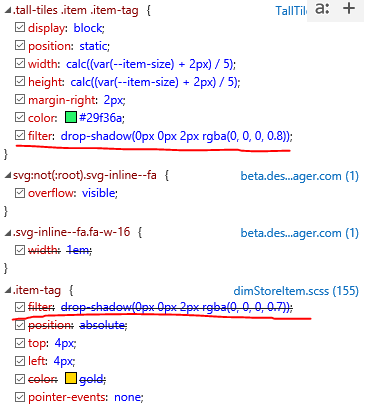
Tags still have the drop-shadows in edge. so the problem persists.
inexorableAce
on 19 Nov 2018
after looking into a bit I think its because the css is being spit out like this
.ms-edge .tall-tiles .item .item-tag {
   filter: none;
}
but it needs to be:
.ms-edge.tall-tiles .item .item-tag {
   filter: none;
}
inexorableAce
on 19 Nov 2018
Yup. Should be updated now, can you take another look?
bhollis
on 19 Nov 2018
Still leaking memory.
Strike that. Had to hit the Update DIM button. It is fixed.
RyuConnor
on 19 Nov 2018
All good now after the latest beta update. Css is being applied as intended on edge. Tested with no leaking.

inexorableAce
on 19 Nov 2018
Huzzah! Awesome work!
kyleshay
on 20 Nov 2018
Related issues
bhollis
·
3Comments
 joshminnie
·
4Comments
joshminnie
·
4Comments
 chuckreynolds
·
6Comments
chuckreynolds
·
6Comments
 michabbb
·
4Comments
michabbb
·
4Comments
 KyoukanGG
·
3Comments
KyoukanGG
·
3Comments