DietPi-Config | Support official RPi case fan with temperature control
Hello,
I have very strange issue. Using latest Raspberry with latest DietPi, original adaptor, heatsinc and fan. I'm using headless mode.
Today I've install heatsync and fan. My system is 35°C, but unfortunately my fan is always spinning/working. How can I set my fan to work when the system is so hot? Details are below:
G_DIETPI_VERSION_CORE=6
G_DIETPI_VERSION_SUB=34
G_DIETPI_VERSION_RC=3
G_GITBRANCH=’master’
Distro=Buster
Kernel=Linux hostname 5.4.79-v7l+ #1373 SMP Mon Nov 23 13:27:40 GMT 2020 armv7l GNU/Linux
SBC Model=RPi 4 Model B (armv7l)
Power supply=Original Type-C adaptor.
SDCard= Sandisk ultra
Software Title=LEMP, PHPMyAdmin, OpenSSH
 cankirca
All 21 comments
Hi,
merry Xmas and many thanks for your message. If this is a normal fan just connected to the board without anything, it's quite normal to have it spinning all the time. Usually you need some additional hardware (transistor) to have it controlled.
https://howchoo.com/g/ote2mjkzzta/control-raspberry-pi-fan-temperature-python
 Joulinar
on 25 Dec 2020
Joulinar
on 25 Dec 2020
Hello,
Thank you for your answer. In Raspberry official webpage, I red
following explanation and steps about fan controling. Is it not
possible with DietPi?
"Once you have connected your fan, by default it will be on whenever
your Raspberry Pi is running. You can configure it to turn on only
when your Raspberry Pi reaches a temperature that you choose."
URL: https://www.raspberrypi.org/products/raspberry-pi-4-case-fan/
Thank you.
2020-12-25 2:45 GMT+03:00, Joulinar notifications@github.com:
Hi,
marry Xmas and many thanks for your message. If this is a normal Fan just
connected to the board without anything, it's quite normal to have it
spinning all the time. Usually you need some additional hardware
(transistor) to have ot controlled.https://howchoo.com/g/ote2mjkzzta/control-raspberry-pi-fan-temperature-python
--
You are receiving this because you authored the thread.
Reply to this email directly or view it on GitHub:
https://github.com/MichaIng/DietPi/issues/4003#issuecomment-751131145
--
Can Kırca
cankirca
on 25 Dec 2020
do you have exactly this fan? Or something else?
Joulinar
on 25 Dec 2020
Yes, i have it.
Joulinar notifications@github.com şunları yazdı (25 Ara 2020 03:43):
do you have exactly this fan? Or something else?—
You are receiving this because you authored the thread.
Reply to this email directly, view it on GitHub, or unsubscribe.
cankirca
on 25 Dec 2020
There is no Fan option in the config/performance as stated on the page.
Joulinar notifications@github.com şunları yazdı (25 Ara 2020 03:43):
do you have exactly this fan? Or something else?—
You are receiving this because you authored the thread.
Reply to this email directly, view it on GitHub, or unsubscribe.
cankirca
on 25 Dec 2020
DietPi does not use the Raspberry Pi configuration tool, and as such does not have the same options. However, it looks like the fan might work with the Python script in the link that @Joulinar posted. You could start on step 5, and use the blue wire as the transistor. If you do so, make sure to install the gpiozero Python library. apt install python3-gpiozero.
 ravenclaw900
on 25 Dec 2020
ravenclaw900
on 25 Dec 2020
Hello again,
Thanks for your answers.
I don't want to use an other device to control the fan, it seem that I have to buy transistor am I right?
Also, if I install raspi original, would it be possible to use config tool via SSH? Because I'll continue to use in headless mode.
If I to be honest, Dietpi is awesome for me and it's software packages are well-configured. If I find an other way to decrease fan working time, I don't want to reinstall an other OS.
@MichaIng do you have any suggestion please?
cankirca
on 25 Dec 2020
Here is the relevant code from raspi-config: https://github.com/RPi-Distro/raspi-config/blob/master/raspi-config#L1205-L1287
So the following seems to be all what is needed:
echo 'dtoverlay=gpio-fan,gpiopin=14,temp=60000' >> /boot/config.txt
With GPIO pin 14 (default, matches the instructions you linked) and starting the fan at 60°C, which is the lowest according to raspi-config. On RPi 4 with DietPi by default throttling starts at ~70°C (full throttling at 75°C), so 70°C would be enough to assure that throttling does never really kick in.
python3-gpiozero does not seem to be required, so apt purge python3-gpiozero to assure. I turned the issue into a feature request. Since it's the official RPi case fan, we should support it with dietpi-config.
 MichaIng
on 25 Dec 2020
MichaIng
on 25 Dec 2020
Hello,
Thank you for the answer.
@MichaIng , I've applied above command, but my fan is still spinning. There is no running app.
Dietpi shows: Temperature | 35’C : 95’F (Cool runnings)
Here the command out of 'cpu'
root@hostname:~# cpu
─────────────────────────────────────────────────────
DietPi CPU Info
─────────────────────────────────────────────────────
Architecture | armv7l
Temperature | 35’C : 95’F (Cool runnings)
Governor | ondemand
Throttle up | 50% CPU usage
Current Freq Min Freq Max Freq
CPU0 | 1500 MHz 600 MHz 1500 MHz
CPU1 | 1500 MHz 600 MHz 1500 MHz
CPU2 | 1500 MHz 600 MHz 1500 MHz
CPU3 | 1500 MHz 600 MHz 1500 MHz
Is it expected behaviar?
BTW: I ran 'shutdown' command to turn-off the unit, but fan is still working :-)
Thank you so much.
cankirca
on 25 Dec 2020
@MichaIng
Does the GPIO needs to be activated?
Joulinar
on 25 Dec 2020
The device tree overlay should enable it. @cankirca you did a reboot, didn't you?
Ah, and assure that you connected it to pin 14 like in the instructions you liked, or adjust the gpiopin value to the matching pin number.
MichaIng
on 25 Dec 2020
I enter the command again and type 'reboot', fan stopped, after few seconds spin again, but after 2 seconds stopped again.
Now it is not spinning, system Temperature | 40’C : 104’F (Optimal temperature) I think this is expected result am I right?
When my system Temperature goes to 60°C , it start to spin again am I right?
Also @MichaIng, I have connected my fan by getting a help from a sided person as a visually impaired user, how can I to be sure that pins are correct?
Let me try to explain section that I've connected.
As you know, there are 3 cables comes with fan. 1 has double plug, other one single.
My double cables are connected from the second and 3rd ping from the right side of the unit, other cable is connected to the number 4. SO cables are plugged 2-3-4 pins from the right side, near the corner of the unit when I start counting from sd card durection.
Not sure told correctly 👍
Where is pin 14?
cankirca
on 25 Dec 2020
@MichaIng
I just ordered one for testing purposes 😄
Joulinar
on 25 Dec 2020
Sounds like you did it as advised here: The upper two are for power, the third is for control and it's GPIO pin 14. To test, you could run dietpi-config > Tools > Stress Test to head it up.
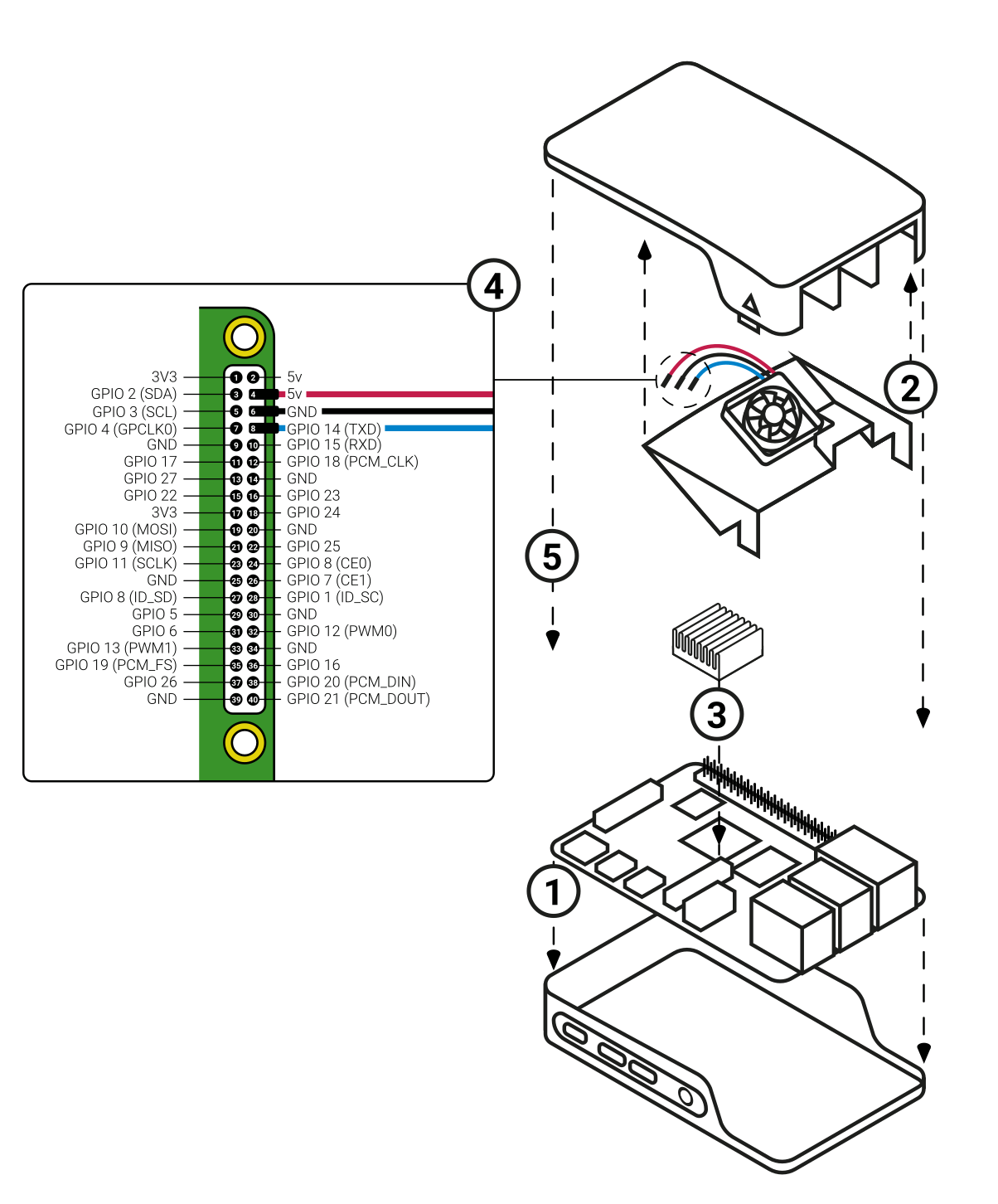
Here the official docs about GPIO pins: https://www.raspberrypi.org/documentation/usage/gpio/README.md
MichaIng
on 25 Dec 2020
Thank you for your awesome support, it seems that it works as expected now!
Hope that show this function in the dietpi-config soon.
cankirca
on 27 Dec 2020
@MichaIng
today I got my thin and noisy RPi Fan. Good that it can be switched off. I did some reengineering to have it fitting into my case 🤣

The value for the fan to kick in can be lowered as you like. It was running with 60, 55, 50 as well as 45 °C. Once fan started, it always will try to lower temp by 10°C before it stop.
- 60°C that's a good value for normal usage
- 55°C is quite ok as long as the system is not in use. Fan is not spinning that often
- 50°C there the fan is kicking in quite often as it's way below idle temp
- 45°C as starting temp is useless as it is quite impossible to reach 35°C and it never stop in this case.
To measure temp I used Influxdb, Grafana and Telegraf (which is still missing on the software repository 😜 ). That's the only thing running on my RPi4B 64bit

That's how Stress_Test looks like
Stress_Test logfile attached. Click to expand!
 Stress_Test
─────────────────────────────────────────────────────
 Mode: Running stress test for 60 seconds

[ INFO ] DietPi-Config | To terminate, type: killall -w stress
stress: info: [1548] dispatching hogs: 8 cpu, 0 io, 0 vm, 0 hdd
Wed Dec 30 15:54:02 CET 2020 | 57'c | 60 seconds remaining
Wed Dec 30 15:54:03 CET 2020 | 61'c | 59 seconds remaining
Wed Dec 30 15:54:04 CET 2020 | 62'c | 58 seconds remaining
Wed Dec 30 15:54:05 CET 2020 | 63'c | 57 seconds remaining
Wed Dec 30 15:54:06 CET 2020 | 63'c | 56 seconds remaining
Wed Dec 30 15:54:08 CET 2020 | 62'c | 54 seconds remaining
Wed Dec 30 15:54:09 CET 2020 | 62'c | 53 seconds remaining
Wed Dec 30 15:54:10 CET 2020 | 63'c | 52 seconds remaining
Wed Dec 30 15:54:11 CET 2020 | 62'c | 51 seconds remaining
Wed Dec 30 15:54:12 CET 2020 | 61'c | 50 seconds remaining
Wed Dec 30 15:54:13 CET 2020 | 62'c | 49 seconds remaining
Wed Dec 30 15:54:15 CET 2020 | 62'c | 48 seconds remaining
Wed Dec 30 15:54:16 CET 2020 | 62'c | 46 seconds remaining
Wed Dec 30 15:54:17 CET 2020 | 61'c | 45 seconds remaining
Wed Dec 30 15:54:18 CET 2020 | 62'c | 44 seconds remaining
Wed Dec 30 15:54:19 CET 2020 | 61'c | 43 seconds remaining
Wed Dec 30 15:54:20 CET 2020 | 60'c | 42 seconds remaining
Wed Dec 30 15:54:22 CET 2020 | 60'c | 40 seconds remaining
Wed Dec 30 15:54:23 CET 2020 | 60'c | 39 seconds remaining
Wed Dec 30 15:54:24 CET 2020 | 61'c | 38 seconds remaining
Wed Dec 30 15:54:25 CET 2020 | 60'c | 37 seconds remaining
Wed Dec 30 15:54:26 CET 2020 | 59'c | 36 seconds remaining
Wed Dec 30 15:54:27 CET 2020 | 59'c | 35 seconds remaining
Wed Dec 30 15:54:28 CET 2020 | 60'c | 34 seconds remaining
Wed Dec 30 15:54:30 CET 2020 | 59'c | 32 seconds remaining
Wed Dec 30 15:54:31 CET 2020 | 60'c | 31 seconds remaining
Wed Dec 30 15:54:32 CET 2020 | 60'c | 30 seconds remaining
Wed Dec 30 15:54:33 CET 2020 | 58'c | 29 seconds remaining
Wed Dec 30 15:54:34 CET 2020 | 59'c | 28 seconds remaining
Wed Dec 30 15:54:35 CET 2020 | 58'c | 27 seconds remaining
Wed Dec 30 15:54:37 CET 2020 | 58'c | 25 seconds remaining
Wed Dec 30 15:54:38 CET 2020 | 58'c | 24 seconds remaining
Wed Dec 30 15:54:39 CET 2020 | 59'c | 23 seconds remaining
Wed Dec 30 15:54:40 CET 2020 | 58'c | 22 seconds remaining
Wed Dec 30 15:54:41 CET 2020 | 57'c | 21 seconds remaining
Wed Dec 30 15:54:42 CET 2020 | 58'c | 20 seconds remaining
Wed Dec 30 15:54:44 CET 2020 | 57'c | 18 seconds remaining
Wed Dec 30 15:54:45 CET 2020 | 57'c | 17 seconds remaining
Wed Dec 30 15:54:46 CET 2020 | 58'c | 16 seconds remaining
Wed Dec 30 15:54:47 CET 2020 | 57'c | 15 seconds remaining
Wed Dec 30 15:54:48 CET 2020 | 57'c | 14 seconds remaining
Wed Dec 30 15:54:49 CET 2020 | 57'c | 13 seconds remaining
Wed Dec 30 15:54:51 CET 2020 | 57'c | 11 seconds remaining
Wed Dec 30 15:54:52 CET 2020 | 57'c | 10 seconds remaining
Wed Dec 30 15:54:53 CET 2020 | 56'c | 9 seconds remaining
Wed Dec 30 15:54:54 CET 2020 | 56'c | 8 seconds remaining
Wed Dec 30 15:54:55 CET 2020 | 57'c | 7 seconds remaining
Wed Dec 30 15:54:56 CET 2020 | 57'c | 6 seconds remaining
Wed Dec 30 15:54:58 CET 2020 | 56'c | 5 seconds remaining
Wed Dec 30 15:54:59 CET 2020 | 57'c | 3 seconds remaining
Wed Dec 30 15:55:00 CET 2020 | 56'c | 2 seconds remaining
Wed Dec 30 15:55:01 CET 2020 | 56'c | 1 seconds remaining
stress: info: [1548] successful run completed in 60s
[  OK  ] DietPi-Config | Stress Test Completed
Awesome test, great work. Also good to know that any temperature works, as raspi-config only allows to set 60 - 120 °C so I was not sure whether this is a hard kernel module limit or only thought a lowest reasonable value from RPi devs few. As we by default ship with a temperature limit of 75 °C (means the CPU is starting to be throttled at 70°C with max throttling at 75°C, 60°C indeed seems to be a reasonable value to start with as long as there are no special needs.
You're right, Telegraf needs to be added to complete the TIG stack (Telegraf-InfluxDB-Grafana) 👍.
MichaIng
on 30 Dec 2020
After 4 hour run time, 60 °C is still a good value on my demo system. The fan is activated 5-6 times a hour for around 30 secounds

Should be fine to follow RPi devs on their settings.
Joulinar
on 30 Dec 2020
@MichaIng
I did a test and fan is working on my RPi3B+ as well.
Joulinar
on 2 Jan 2021
For the records, Fan is working as well on RPi1 but it require different temp settings. It's quite hard to get the RPi1 above 55°C. It require a CPU exhausting application like PaperMC. Idle is around 50°C.
Joulinar
on 6 Jan 2021
Jep, my RPi 2 idles around 32 °C and I never saw it above 50 °C. Not the temps need to be different, but it doesn't make sense to put a fan into anything below RPi 3, as long as you do not want to win an overclocking context 😄.
MichaIng
on 7 Jan 2021
Related issues
 Fourdee
·
3Comments
Fourdee
·
3Comments
 k-plan
·
3Comments
k-plan
·
3Comments
 and09
·
3Comments
k-plan
·
3Comments
and09
·
3Comments
k-plan
·
3Comments
 bhaveshgohel
·
3Comments
bhaveshgohel
·
3Comments