Dietpi: Can't update DietPi build or add any other software to Custom Allo buster build
Creating a bug report/issue
Details:
- Date | Fri Sep 11 20:33:32 CEST 2020
- DietPi version | v6.32.2 (MichaIng/master)
- Image creator | DietPi Core Team
- Pre-image | Raspbian Lite
- Hardware | RPi 4 Model B (armv7l) (ID=4)
- Kernel version | Linux DietPi 5.4.51-v7l+ #1333 SMP Mon Aug 10 16:51:40 BST 2020 armv7l GNU/Linux
- Distro | buster (ID=5,RASPBIAN=1)
- Command | apt-get -q update
- Exit code | 100
- Software title | DietPi-Update
Steps to reproduce:
- ...
- ...
Expected behaviour:
I need to add software with Dietpi-update. So when I execute I hit the aforementioned error codes.
- ...
Actual behaviour:
I can't add software or upgrade
- ...
Extra details:
I want to add optimized software to the build.
- ...
Additional logs:
```
Get:1 http://raspbian.raspberrypi.org/raspbian buster InRelease [15.0 kB]
Get:2 https://archive.raspberrypi.org/debian buster InRelease [32.6 kB]
Reading package lists...
E: Release file for http://raspbian.raspberrypi.org/raspbian/dists/buster/InRelease is not valid yet (invalid for another 40d 16h 17min 50s). Updates for this repository will not be applied.
E: Release file for https://archive.raspberrypi.org/debian/dists/buster/InRelease is not valid yet (invalid for another 34d 20h 54min 35s). Updates for this repository will not be applied.
 Rickyrivits
All 8 comments
Many thanks for your report.
Date | Fri Sep 11 20:33:32 CEST 2020
Your system time is out of sync. Please re-sync and consider to enable daily time sync:
/boot/dietpi/func/run_ntpd 1
To change time sync settings:
dietpi-config > Advanced Options > Time sync mode
 MichaIng
on 22 Oct 2020
MichaIng
on 22 Oct 2020
If I understood all the custom code additions for building Allo's custom GUI image then I could just install a normal 32bit Dietpi build and add the Allo features as if the OEM designed it.
I have tried this so: Can anyone tell me how Allo does it? What are the steps?
Note: I do understand its more complicated than just adding software choices by running the Dietpi-software command
(I understand the obvious choices found in the DL Allo GUI image so I made the same software choices in my new 32bit build)
When same choices found in the GUI build are accomplished with a my new 32bit image and you boot and interrogate the Web GUI you will find more behind the build than just choices made by running the same Dietpi-software choices. I can see I am missing files and scripts used to config the Allo customizations.
Note: When you install and run the LXDE desktop in the 32bit image and run Dietpi-just boom after you made all the software choices aforementioned and try to change the ALSA Output you can't see the ALLO hat called Boss.
Well at this point I decided to ask you for directions as I ran out of hacks.
Rickyrivits
on 22 Oct 2020
Ran the commands and configured time sync mode at boot. Did the upgrade and it works!
Thanks for the support and the cool os, Just learning how to navigate is fun. Knowledge is power.
Rickyrivits
on 22 Oct 2020
@MichaIng
this is the 3rd or 4th report about time sync issues with Allo images now. Would it make sense to have a closer look? Could it be, that time sync is set to manuell and not updating automatically https://github.com/MichaIng/DietPi/issues/3839#issuecomment-712066123
 Joulinar
on 22 Oct 2020
Joulinar
on 22 Oct 2020
Also added LXDE desktop and when I ran ALSA output I found BossDAC is configured too. Now I can use my OS and Allo product as I intended. Thanks for the knowledge
Rickyrivits
on 22 Oct 2020
@Rickyrivits
Our Allo GUI images (for Sparky SBC and RPi) are not much more than a regular DietPi image with Allo GUI installed through dietpi-software:
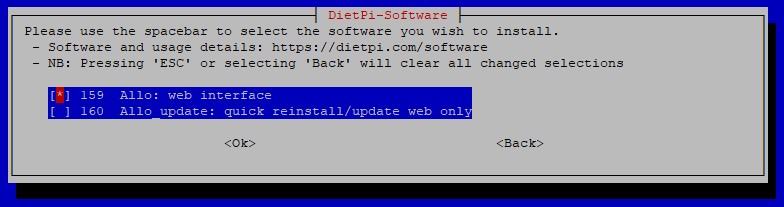
This pulls in all other audiophile software as well. So you can as well to that manually. The pre-installed images are more to save time (long process to install all that additional software) and in case you want to directly run it as local media device without internet access.
@Joulinar
You are right:
# Network time sync: 0=disabled | 1=boot only | 2=boot + daily | 3=boot + hourly | 4=Daemon + Drift
CONFIG_NTP_MODE=0
I just checked how that happened and it is part of my container script since container time is in sync with host time and systemd-timesyncd is doomed to fail there. On regular image creation, this is undone by DietPi-PREP, I now added this as well to my Allo GUI creation script.
I'll redo the images now.
MichaIng
on 22 Oct 2020
Thanks and I hope this helps others like me. Nice process for finding solutions. I am impressed.
Rickyrivits
on 22 Oct 2020
Images updated!
MichaIng
on 22 Oct 2020
Related issues
 Kapot
·
3Comments
Kapot
·
3Comments
 Fourdee
·
3Comments
Fourdee
·
3Comments
 bhaveshgohel
·
3Comments
bhaveshgohel
·
3Comments
 k-plan
·
3Comments
bhaveshgohel
·
3Comments
k-plan
·
3Comments
bhaveshgohel
·
3Comments