Dietpi: Nanopi M4 + Dietpi does not start
Downloading the actual version of dietpi:
https://dietpi.com/downloads/images/DietPi_NanoPCT4-ARMv8-Buster.7z
I write it into a Emmc, and it's get the green led blinking but it's never starts. Nothing shown via hdmi display. I get a black monitor.
I tried via the prebuild Armbian + PREP_SYSTEM_FOR_DIETPI.sh and it looks to woork fine. But I want to try directly with the original version of Dietpi, because in this prebuild system, I have problems with the mdadm and the raid 5 that I have mounted:
_mdadm: Fail create md0 when using /sys/module/md_mod/parameters/new_array_
On the other hand, I also have the rockpro64 and with this one I have not had any issues, neither to start dietpi nor with mdadm and my raid. But I want to connect the raid to the nanopi m4 sata hat.
Some advice? Some help? Thanks!
 M3L0R
M3L0R
All 15 comments
Hi,
many thanks for your message. I guess, using PREP script should be fine. If I'm not mistaken, this is how images are created anyway 😃. But I guess @MichaIng could comment on this part better than I.
 Joulinar
on 11 Oct 2020
Joulinar
on 11 Oct 2020
Possibly eMMC support for NanoPi M4 requires a dedicated image instead of NanoPi T4. I have to look through the image request issues to see what has been tested, but as well it might have changed.
So yes basically when you use the M4 Armbian image (Linux 5.X, Debian Buster, server or minimal image at best) and run PREP_SYSTEM_FOR_DIETPI.sh, you'll get the same result that we'd create. If there are kernel/firmware issues with this, most likely our image will suffer from the same.
But I can create one, just to give it a try, if you want? Anyway good since ours is already a few months old.
 MichaIng
on 11 Oct 2020
MichaIng
on 11 Oct 2020
I also have tried on a microsd and have the same issues. So yes, I would like to try the image if it is not too much trouble.
Also I want check to see if that way the mdadm does not give me issues when mounting the raid.
M3L0R
on 12 Oct 2020
Hi guys! 14 days since my last post and I wanted to ask how the topic was going. I just see some topic updates. Thanks for your time!
M3L0R
on 25 Oct 2020
I created two new images. Would be great if you could test the new T4 image from eMMC: https://dietpi.com/downloads/images/DietPi_NanoPCT4-ARMv8-Buster.7z
If that does not work, I created an M4-only image as well: https://dietpi.com/downloads/images/testing/DietPi_NanoPiM4-ARMv8-Buster.7z
MichaIng
on 26 Oct 2020
I get more than once this kind of erros testing both images with the eMMC:
[ INFO ] DietPi first run setup is currently running on another screen (PID=1173). Please resume setup on the active screen.
[ INFO ] DietPi first run setup is currently running on another screen (PID=743). Please resume setup on the active screen.
So I connect the NanopiM4 to a monitor and I see this:
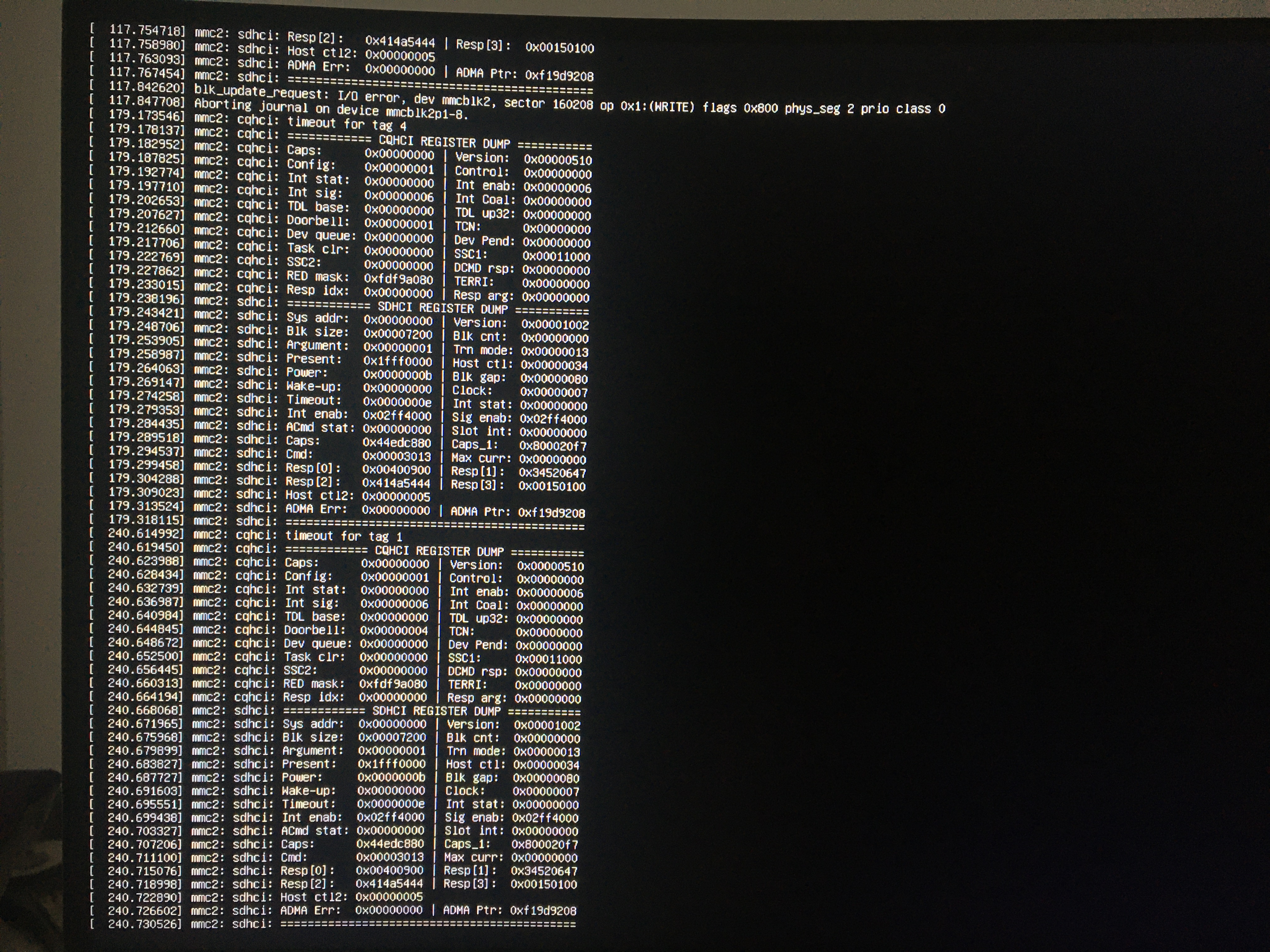
So I thought my eMMC must have a problem.
Then I tried with a micro SD card with the NanoPCT4-ARMv8-Buster and it works fine.
I'm making full erase to the eMMC and lets try it again with both OS and will report the results.
M3L0R
on 26 Oct 2020
I hope that eMMC support is not generally broken with these images. I remember that this worked before, although it was T4 internal 16 GiB eMMC, AFAIK.
MichaIng
on 27 Oct 2020
I think the problem with all of this is my eMMC.
The strange thing is that with the Armbian and the PREP_SYSTEM_FOR_DIETPI.sh it runs with the eMMC so the eMMC service must be Ok.
Also the first IMG, it did not start with the micro SD to me. Now at least I can get everything going
But it is for NAS - Plex server so it will work fine with micro SD.
"Problem solved" for my part. If you need me to test something more just say and I will try. But as I say, I think the problem is on my eMMC.
M3L0R
on 27 Oct 2020
The strange thing is that with the Armbian and the PREP_SYSTEM_FOR_DIETPI.sh it runs with the eMMC so the eMMC service must be Ok.
Which Armbian image did you use? Linux 4.4 or 5.8? I did nothing different than using the Armbian Linux 5.8 image and ran PREP_SYSTEM_FOR_DIETPI.sh on it 🤔.
MichaIng
on 28 Oct 2020
I think there has been a misunderstanding.
To me with Armbian, the eMMC worked right.
It is a reduced version, of version 4.4, that I found "I think in the forum" for the nanopi m4 to use with PREP_SYSTEM_FOR_DIETPI.sh.
M3L0R
on 29 Oct 2020
Okay, so then I guess Linux 4.4 (legacy, probably manufacturer build) vs Linux 5.8 (mainstream) makes the difference here. If you are in mood, would be interesting if it boots from eMMC when you do the procedure yourself, to rule out any issue that is related to doing this in container or the image file creation (file system + partition shrinking), using this image: https://redirect.armbian.com/nanopim4/Buster_current
It is a reduced version, of version 4.4, that I found "I think in the forum"
The image above is already a "server" image, hence quite reduce, although in rare cases they build "minimal" images which are a bid smaller again, but currently not for M4. The alternative Linux 4.4 image would be: https://redirect.armbian.com/nanopim4/Buster_legacy
If you found it in the forum, probably it was one to fix something, or even related to eMMC boot, or just a link to the official image? I had a quick look through the Armbian forum but didn't find a hint about eMMC boot issues with RK3399 or M4 explicitly.
MichaIng
on 29 Oct 2020
The second image that you put, the 4.4 versión, is with the one I had tried. Now I have also tried the first one, the 5.8 versión, and also without problems. Isnt strange that both work fine? I'm confunsed. LoL.
M3L0R
on 9 Nov 2020
Okay, so https://redirect.armbian.com/nanopim4/Buster_current boots from eMMC but https://dietpi.com/downloads/images/testing/DietPi_NanoPiM4-ARMv8-Buster.7z does not?
Then, then I'd need to review the image creation process, probably re-flash u-boot, not sure 🤔.
MichaIng
on 9 Nov 2020
It's weird, I don't understand it either 🤣😅
Luckily for you, now I am working from a micro sd and I have the eMMC free for some other test ... I don't trust my eMMC anymore to work continuously.
M3L0R
on 9 Nov 2020
Lol, and usually I'd have doubts with an SD card (life time) while trusting more an eMMC. But yeah, while SD card boot is supported in every case, eMMC sometimes does, sometimes not, depending on firmware/bootloader/kernel combination 😄.
MichaIng
on 9 Nov 2020
Related issues
 pgferr
·
3Comments
pgferr
·
3Comments
 and09
·
3Comments
and09
·
3Comments
 1021683053
·
3Comments
1021683053
·
3Comments
 Fourdee
·
3Comments
Fourdee
·
3Comments
Fourdee
·
3Comments
Fourdee
·
3Comments