Dietpi: mirrors.netix.net - a certificate in the chain is expired, apt cant update.
Creating a bug report/issue
Hey all, a certificate error (mirrors.netix.net) is preventing apt from updating dietpi!
a certificate in the chain is expired, as you can see here https://www.sslshopper.com/ssl-checker.html#hostname=mirrors.netix.net
 jerryhopper
All 29 comments
Hi,
many thanks for your report. But this seems to be out of DietPi scope as DietPi is not hosting this website.
EDIT:
it's one of the global Raspbian mirrors
https://www.raspbian.org/RaspbianMirrors
EDIT2:
The issue doesn't seems to with mirrors.netix.net. Looks more like the company who issued the root certificate USERTrust has an invalid certificate.
https://www.tbs-certificates.co.uk/FAQ/en/USER-Trust-RSA-Certification-Authority.html
 Joulinar
on 28 Jul 2020
Joulinar
on 28 Jul 2020
Ok. but somehow a clean dietpi hits mirrors.netix.net - and spits out the error - and installation is stuck.
Is there any way to exclude this mirror?
I tried editing /etc/hosts and point that hostname to 0.0.0.0 - but while running update, it doesnt try a different mirror.
jerryhopper
on 28 Jul 2020
I guess you are using a Raspberry Pi. As the DietPi base image for RPi is Raspberry OS, you are going to taget a Raspbian Repository Mirror 😉
not sure if this is working but you can try to edit /etc/apt/sources.list.d/raspi.list and change HTTPS into HTTP
Joulinar
on 28 Jul 2020
I actually have a NanoPiNeo2Black. i have edited /etc/apr/sources.list.d/raspi.list - but now its whining about a public key that is missing.
Maybe forcing apt to use insecure mirror for this mirrors.netix.net is the fastest way.
Acquire::https::mirrors.netix.net::Verify-Peer "false";
Acquire::https::mirrors.netix.net::Verify-Host "false";
ill try inform peepz at raspbian about this faulty mirror.
* UPDATE :
with the above lines added in /etc/apt/apt.conf.d/70debconf , ignoring ssl errors, i managed to install dietpi on the nanopineo2black
However, this problem only occurs when the netix mirrors are selected.... i have no clue why it consistently uses this mirror first - but a beginner would get really stuck with this upgrade & the bad luck of this selected mirror.
jerryhopper
on 28 Jul 2020
Accessing via browser https://mirrors.netix.net/raspbian/ shows that the certificate chain is fully intact. Is it probably only a wrong system time? In case try: /boot/dietpi/func/run_ntpd 1
EDIT: Ah sorry I see you are one step further with USERTrust. Lets check the system trusted CAs.
 MichaIng
on 28 Jul 2020
MichaIng
on 28 Jul 2020
@jerryhopper
this is fully at Raspbian side. They are managing the mirrors.
@MichaIng
issue is with one of the root certificates and not with mirrors.netix.net
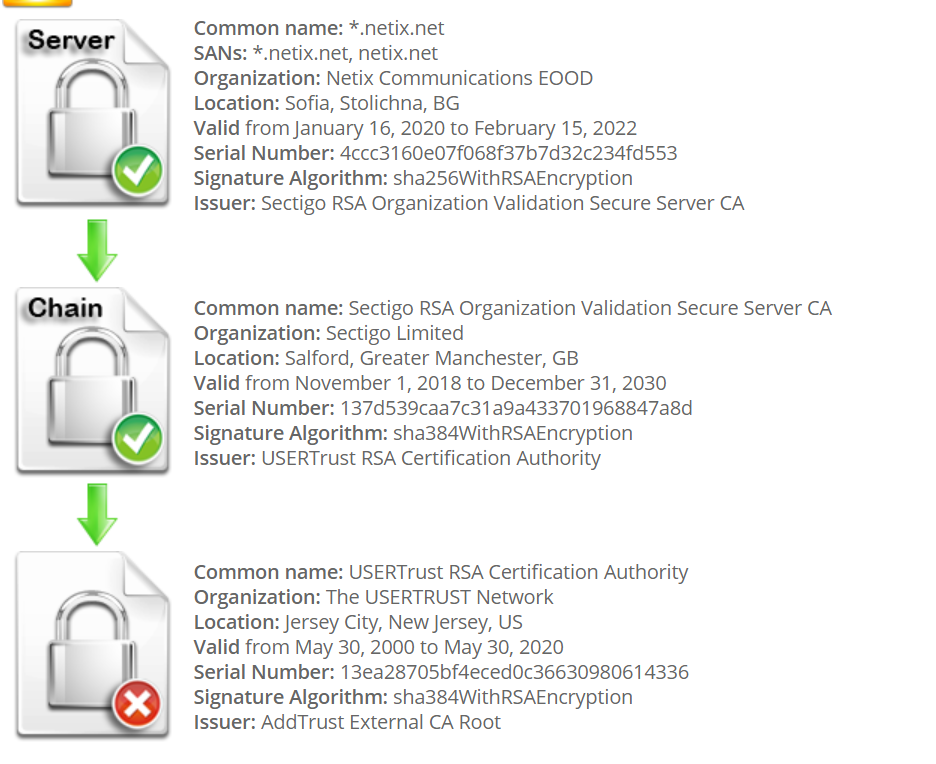
Joulinar
on 28 Jul 2020
Does this show anything? ls -l /etc/ssl/certs/USERTrust*
I get:
lrwxrwxrwx 1 root root 76 Dec 24  2017 /etc/ssl/certs/USERTrust_ECC_Certification_Authority.pem -> /usr/share/ca-certificates/mozilla/USERTrust_ECC_Certification_Authority.crt
lrwxrwxrwx 1 root root 76 Dec 24  2017 /etc/ssl/certs/USERTrust_RSA_Certification_Authority.pem -> /usr/share/ca-certificates/mozilla/USERTrust_RSA_Certification_Authority.crt
And grep 'USERTrust' /etc/ca-certificates.conf should have them enabled (leading to the above symlinks):
mozilla/USERTrust_ECC_Certification_Authority.crt
mozilla/USERTrust_RSA_Certification_Authority.crt
@MichaIng i get exactly what you have. but like @Joulinar says, the problem is on the armbian side.
Best way is to have that mirror removed at the armbian side.... or hardcode the fix in a dietpi image/update. (which is rather nasty and temporary, and doesnt fix the existing dietpi images.)
jerryhopper
on 28 Jul 2020
well It's quite a big mirror for a lot of destro's including Raspbian and Armbian. So it's not isolated to a single Destro.
Joulinar
on 28 Jul 2020
Strange is that I can use this mirror very fine on my RPi and my browser shows that no cert of the chain is expired, but SSLShopper shows the expiry.
2020-07-28 23:11:46 root@micha:/var/log# apt update
Hit:1 https://mirror.netcologne.de/raspbian/raspbian bullseye InRelease
Hit:2 https://archive.raspberrypi.org/debian buster InRelease
Get:3 https://mirrors.netix.net/raspbian/raspbian bullseye InRelease [15.0 kB]
Get:4 https://mirrors.netix.net/raspbian/raspbian bullseye/non-free armhf Packages [106 kB]
Fetched 121 kB in 3s (37.4 kB/s)
Reading package lists... Done
Building dependency tree
Reading state information... Done
All packages are up to date.
in a unintended install, when this specific repo is used - you dont get dietpi installed unless you apply my fix.
dietpi login keeps spawning the update, which obviously fails.
on my nanopineo2black with the dietpi image, apt specificly spits out the error about expired cert.
jerryhopper
on 28 Jul 2020
But you setup this mirror first manually, don't you? Since our RPi images are shipped with raspbian.raspberrypi.org as Raspbian mirror.
MichaIng
on 28 Jul 2020
i didnt edit anything. a clean image straight from the site.
i checked, originally it is set to : apt.armbian.com (i think that url is autoselected/redirect?)
im using this image : https://github.com/MichaIng/DietPi/issues/3333 ( the admin edit )
jerryhopper
on 28 Jul 2020
Ah your right, so its not about Raspbian (?) but about Armbian indeed. Jep that one is redirected indeed: https://apt.armbian.com
MichaIng
on 28 Jul 2020
but this should not make any difference if it's Armbian or Raspbian mirror. They all will land on mirrors.netix.net isn't it?
Joulinar
on 28 Jul 2020
maybe its selection based on ip/geo ?
Which is also weird, im in NL - from a NL ip. there are closer mirrors.
jerryhopper
on 28 Jul 2020
But raspbian.raspberrypi.org is not a mirror director but a dedicated server, so there one must set this mirror manually. apt.armbian.com is (at least now, not sure if this was before) a mirror director that is redirected to netix and sometimes also other mirrors, likely depending on current load and location.
maybe its selection based on ip/geo ?
I guess there are other conditions as well but honestly no idea how those mirror directors work exactly. In my case when I open the above link in browser, in most cases I land on netix but sometimes on https://mirrors.dotsrc.org/armbian-apt/ instead.
MichaIng
on 28 Jul 2020
Well. in that case im totally clueless why i always get the netix mirror when installing on several devices. ( i have 3 devices, all same model - so same image )
ill just email netix about this, hoping they will fix the cert... which is clearly expired in may. ( even digicert.com sees that, but says its valid - lol)
jerryhopper
on 28 Jul 2020
well still strange, I was able to install small peace of software from NetIX without issues.
root@DietPi3:/etc/apt# apt install lsof
Reading package lists... Done
Building dependency tree
Reading state information... Done
Suggested packages:
  perl
The following NEW packages will be installed:
  lsof
0 upgraded, 1 newly installed, 0 to remove and 0 not upgraded.
Need to get 307 kB of archives.
After this operation, 447 kB of additional disk space will be used.
Get:1 https://mirrors.netix.net/raspbian/raspbian buster/main armhf lsof armhf 4.91+dfsg-1 [307 kB]
Fetched 307 kB in 1s (500 kB/s)
Selecting previously unselected package lsof.
(Reading database ... 22174 files and directories currently installed.)
Preparing to unpack .../lsof_4.91+dfsg-1_armhf.deb ...
Unpacking lsof (4.91+dfsg-1) ...
Setting up lsof (4.91+dfsg-1) ...
root@DietPi3:/etc/apt#
ill just email netix about this, hoping they will fix the cert... which is clearly expired in may. ( even digicert.com sees that, but says its valid - lol)
Good idea. However I am not sure that it is really outdated since in my case it all works very fine. Probably there is some caching issue or something else gets mixed up.
Another idea, at which version is the ca-certificates package? dpkg -l ca-certificates
Probably the CA certificate file on the system is outdated.
MichaIng
on 28 Jul 2020
yet the ssl cert says its expired in may 2020... In theory what you have, shouldnt happen with a invalid cert in the chain.
root@DietPi:~# dpkg -l ca-certificates
Desired=Unknown/Install/Remove/Purge/Hold
| Status=Not/Inst/Conf-files/Unpacked/halF-conf/Half-inst/trig-aWait/Trig-pend
|/ Err?=(none)/Reinst-required (Status,Err: uppercase=bad)
||/ Name            Version          Architecture Description
+++-===============-================-============-=================================
ii  ca-certificates 20200601~deb10u1 all          Common CA certificates
root@DietPi:~#
update:
i tripple checked, and every inspection of the certificate in the chain, says its expired. i see no reason to doubt that.
i have emailed netix with this information. lets hope for the best.
Thanks for your help - and dietpi, coz it rocks!
jerryhopper
on 28 Jul 2020
could it be that the USERTrust RSA Certification Authority certificate on the system would need to be changed?
https://www.tbs-certificates.co.uk/FAQ/en/USER-Trust-RSA-Certification-Authority.html
Joulinar
on 28 Jul 2020
Yes - that is the one! - but, do I need to install that? naaah... right? i assume they need to add that to the chain @ netix.net ?
jerryhopper
on 28 Jul 2020
netix replied & confirmed... they will fix.
Did i just saved the internet? :)
jerryhopper
on 29 Jul 2020
let's say it this way: That's one small step for a man - one giant leap for mankind
Joulinar
on 29 Jul 2020
SSL Labs: => Expired: https://www.ssllabs.com/ssltest/analyze.html?d=mirrors.netix.net
But my Windows:
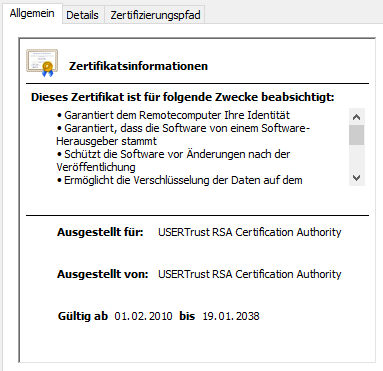
openssl s_client -showcerts -connect mirrors.netix.net:443 | openssl x509 -noout -dates
notBefore=Jan 17 00:00:00 2020 GMT
notAfter=Feb 15 23:59:59 2022 GMT
- But this is only the first certificate I guess. How to check the through the chain?
openssl x509 -noout -dates < /usr/share/ca-certificates/mozilla/USERTrust_RSA_Certification_Authority.crt
notBefore=Feb  1 00:00:00 2010 GMT
notAfter=Jan 18 23:59:59 2038 GMT
im using online services.
https://www.sslshopper.com/ssl-checker.html#hostname=mirrors.netix.net
https://www.digicert.com/help/
https://whatsmychaincert.com/?mirrors.netix.net
https://www.ssllabs.com/ssltest/analyze.html?d=mirrors.netix.net&s=87.121.121.2
jerryhopper
on 29 Jul 2020
Now the here string verifies it:
# openssl x509 -noout -dates <<< "-----BEGIN CERTIFICATE-----
> MIIFdzCCBF+gAwIBAgIQE+oocFv07O0MNmMJgGFDNjANBgkqhkiG9w0BAQwFADBv
> MQswCQYDVQQGEwJTRTEUMBIGA1UEChMLQWRkVHJ1c3QgQUIxJjAkBgNVBAsTHUFk
...
> Le9Gclc1Bb+7RrtubTeZtv8jkpHGbkD4jylW6l/VXxRTrPBPYer3IsynVgviuDQf
> Jtl7GQVoP7o81DgGotPmjw7jtHFtQELFhLRAlSv0ZaBIefYdgWOWnU914Ph85I6p
> 0fKtirOMxyHNwu8=
> -----END CERTIFICATE-----
> "
notBefore=May 30 10:48:38 2000 GMT
notAfter=May 30 10:48:38 2020 GMT
Strange that curl connects without complaining and my APT instances (two at least) as well. And why don't I see this expired CA cert in Windows? It looks like mirrors.netix.net ships an outdated root CA cert with its chain on requests while there is a valid one installed in the OS that is used for validation instead? I'm a bid confused. However yeah either way mirrors.netix.net should know and do something about it 😄.
_I give this issue the "Armbian" flag, not because its their fault or charge but because Armbian-based images (their repo) are affected._
MichaIng
on 29 Jul 2020
certificate is fixed by netix support. case closed, problem solved!
jerryhopper
on 29 Jul 2020
Related issues
MichaIng
·
3Comments
 Fourdee
·
3Comments
Fourdee
·
3Comments
 aesirteam
·
3Comments
aesirteam
·
3Comments
 bhaveshgohel
·
3Comments
bhaveshgohel
·
3Comments
 and09
·
3Comments
and09
·
3Comments
Most helpful comment
certificate is fixed by netix support. case closed, problem solved!