Dietpi: Pihole WebInterface Error Failed CORS: null
Required Information
DietPi version |
cat /boot/dietpi/.version
G_DIETPI_VERSION_CORE=6
G_DIETPI_VERSION_SUB=31
G_DIETPI_VERSION_RC=2
G_GITBRANCH='master'
G_GITOWNER='MichaIng'Distro version |
echo $G_DISTRO_NAMEorcat /etc/debian_version
9.12Kernel version |
uname -a
Linux DietPi 4.9.0-8-amd64 #1 SMP Debian 4.9.144-3.1 (2019-02-19) x86_64 GNU/LinuxSBC model |
echo $G_HW_MODEL_NAMEor (EG: RPi3)
Virtual Machine (x86_64)
Additional Information (if applicable)
I have several programs installed.
Might be an issue between pihole and nextcloud (based on apache)
Steps to reproduce
I just updated from
DiePi v6.28.0 -> v6.31.2
and
Pi-hole Version v4.3.2 -> v5.0
I think the update of Pi-hole caused this issue.
When I do anything on the WebInterface and save, I get this error:
Failed CORS: null vs 192.168.1.77, 2a03:c22:c015:9d00:20c:29ff:fe52:c3ba, 192.168.1.77, pi.hole, localhost
(192.168.1.77 is the ipadress of the dietpi machine)
A quick search looks like apache is not giving the right $server_origin back.
But I am not a programmer :)
Edit: I also found this issue on pihole... might help to locate the source if this issue:
https://discourse.pi-hole.net/t/web-interface-broken-failed-cors-null-vs-192-168-0-5/16108/6
 Phil1988
All 37 comments
Hi,
many thanks for your message. Hmm looks like PiHole did not support Appache2, at least according the statement of Dan. Maybe @MichaIng could have a look, if we could mitigate it from DietPi side 🤔
 Joulinar
on 15 Jul 2020
Joulinar
on 15 Jul 2020
I tested Apache2 after Pi-hole v5 release, to generally it works fine. Yes Pi-hole officially only supports their complete setup including Lighttpd install + own config + Pi-hole in webroot etc, so keeping an eye on other webservers compatibility is a task for us, respectively the part of the community which requires a different webserver setup.
I'm currently retesting.
... changed upstream DNS, hit save and got a nice feedback that it was successfully saved.
 MichaIng
on 15 Jul 2020
MichaIng
on 15 Jul 2020
Let me know if I can do anything for you to help.
EDIT after your "... changed upstream DNS, hit save and got a nice feedback that it was successfully saved.":
That is strange...
I will now roll back my snapshot from before the update and check if dietpi-update has something to do with it
EDIT again after restoring the snapshot:
The problem was already there before the updates :/
Sorry... now its the question what the problem causes.
Only thing that changed is my PC (and also my local IP adress).
Is pihole somehow restricted to only certain ip adresses?
Phil1988
on 15 Jul 2020
I checked which variable my browser/webserver ships and HTTP_ORIGIN is not included either:
Array
(
    [HTTP_HOST] => 192.168.1.22
    [HTTP_CONNECTION] => keep-alive
    [HTTP_CACHE_CONTROL] => max-age=0
    [HTTP_DNT] => 1
    [HTTP_UPGRADE_INSECURE_REQUESTS] => 1
    [HTTP_USER_AGENT] => Mozilla/5.0 (Windows NT 10.0; Win64; x64) AppleWebKit/537.36 (KHTML, like Gecko) Chrome/85.0.4181.8 Safari/537.36 OPR/71.0.3749.0 (Edition developer)
    [HTTP_ACCEPT] => text/html,application/xhtml+xml,application/xml;q=0.9,image/webp,image/apng,*/*;q=0.8,application/signed-exchange;v=b3;q=0.9
    [HTTP_ACCEPT_ENCODING] => gzip, deflate
    [HTTP_ACCEPT_LANGUAGE] => de,en-GB;q=0.9,en;q=0.8
    [HTTP_COOKIE] => PHPSESSID=ifj6hml8e3hvohtbva3kru31q3; UbooquityAdminSession=2172196095644944202; Squeezebox-player=08%3A00%3A27%3Af5%3A8c%3Acd; Squeezebox-enableHiDPI=1; Squeezebox-expandPlayerControl=true; Squeezebox-expanded-FAVORITES=0; Squeezebox-expanded-PLUGINS=0; Squeezebox-expanded-RADIO=1; Squeezebox-expanded-MY_MUSIC=1; Squeezebox-expanded-PLUGIN_MY_APPS_MODULE_NAME=1; Squeezebox-advancedsettings=settings/server/formatting.html%3F; Squeezebox-expanded-activePlugins=1; Squeezebox-expanded-inactivePlugins=1; Squeezebox-expanded-otherPlugins0=1; Squeezebox-playersettings=plugins/AudioScrobbler/settings/player.html%3F; meye_username=_; session_P5000=.eJxljs1qxDAMhN_F56XYsqXYuaW7yWsYOZJZwzYt-Tkspe_e0F4KhTkMM_PBfJpcV93upt_XQy8mNzG90RhkxpmxVF8oVXRKgSoixXQaAPClxFOuqwmkBrCqERwWiehAkXxKJbJ6F7hL4oMIpzAjV1EGIOctkIWZauF6csLeukg2CVsJZC6miS57258vfOz3vD8_1PTL8Xj8aX6uZpa3tpzAsema_0ebblt7X37H3TiOcZhcQGfDbfRDApqG2_Vqk5swvJqvb74_UIU.XwThUQ.Kq3UDYZ6hBqx9768DOql7gwWeys; advanced_toggle_checked=0; snatched_view=list; soon_view=thumb; suggest_view=thumb; late_view=list; wanted_view=thumb; SID=0B6L29O3l43w/fG8jIBssISYWnASZ/Ao
    [PATH] => /usr/local/sbin:/usr/local/bin:/usr/sbin:/usr/bin:/sbin:/bin
    [SERVER_SIGNATURE] =>
Apache/2.4.38 (Debian) Server at 192.168.1.22 Port 80


    [SERVER_SOFTWARE] => Apache/2.4.38 (Debian)
    [SERVER_NAME] => 192.168.1.22
    [SERVER_ADDR] => 192.168.1.22
    [SERVER_PORT] => 80
    [REMOTE_ADDR] => 192.168.1.10
    [DOCUMENT_ROOT] => /var/www
    [REQUEST_SCHEME] => http
    [CONTEXT_PREFIX] =>
    [CONTEXT_DOCUMENT_ROOT] => /var/www
    [SERVER_ADMIN] => webmaster@localhost
    [SCRIPT_FILENAME] => /var/www/test.php
    [REMOTE_PORT] => 58183
    [GATEWAY_INTERFACE] => CGI/1.1
    [SERVER_PROTOCOL] => HTTP/1.1
    [REQUEST_METHOD] => GET
    [QUERY_STRING] =>
    [REQUEST_URI] => /test.php
    [SCRIPT_NAME] => /test.php
    [PHP_SELF] => /test.php
    [REQUEST_TIME_FLOAT] => 1594830382.284
    [REQUEST_TIME] => 1594830382
)
Also it is not even an variable that can be expected: https://www.php.net/manual/en/reserved.variables.server.php
It was shipped once by Chrome, it seems: https://stackoverflow.com/questions/4566378/how-secure-is-http-origin
So the question is now why this is an issue in your case and non in my.
Checking the code, actually Pi-hole does not require the variable: https://github.com/pi-hole/AdminLTE/blob/master/scripts/pi-hole/php/auth.php#L74
It will only check it if it has been set.
The problem is not this variable itself but that a value null is not handled well. Not sure why a browser (which seems to be the origin) would ship the variable at all when only setting it to "null".
@Phil1988
Can you try to use another browser?
MichaIng
on 15 Jul 2020
I am doing so with latest edge and chrome and will report back.
EDIT: Same on Edge and Chrome.
Should I try uninstalling and install again via dietpi-software?
EDIT2: On installations process I see this:
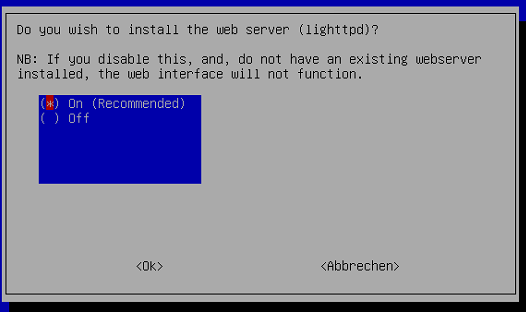
So there is a lighttpd installed.
Phil1988
on 15 Jul 2020
Did you install via dietpi-software? As there is is skipped. Otherwise you would have two conflicting webservers installed.
MichaIng
on 15 Jul 2020
Can you instead check this:
echo "<?php echo '<pre>'.print_r(\$_SERVER, true).'</pre>'; ?>" > /var/www/test.php
Then open your.domain.org/test.php in browser and see if HTTP_ORIGIN is set.
Checking further, probably the related function is not called on browser access but when the webserver itself does an internal request, e.g. POST.
MichaIng
on 15 Jul 2020
I will check this soon.
Meanwhile I tried to reinstall it via pihole -r and it gave me this:
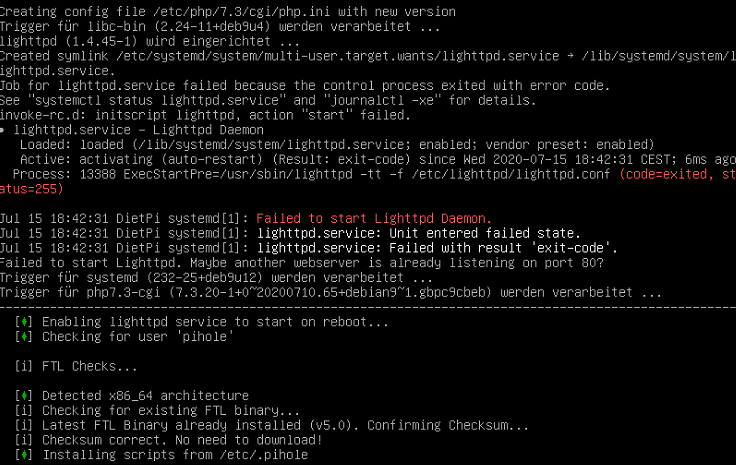
test.php gives me:
Array
(
    [SCRIPT_URL] => /test.php
    [SCRIPT_URI] => http://192.168.1.114/test.php
    [HTTP_HOST] => 192.168.1.114
    [HTTP_USER_AGENT] => Mozilla/5.0 (Windows NT 10.0; Win64; x64; rv:78.0) Gecko/20100101 Firefox/78.0
    [HTTP_ACCEPT] => text/html,application/xhtml+xml,application/xml;q=0.9,image/webp,*/*;q=0.8
    [HTTP_ACCEPT_LANGUAGE] => de,en-US;q=0.7,en;q=0.3
    [HTTP_ACCEPT_ENCODING] => gzip, deflate
    [HTTP_DNT] => 1
    [HTTP_CONNECTION] => keep-alive
    [HTTP_COOKIE] => PHPSESSID=dshif1tjo12cqo0g0cehdkp986
    [HTTP_UPGRADE_INSECURE_REQUESTS] => 1
    [PATH] => /usr/local/sbin:/usr/local/bin:/usr/sbin:/usr/bin:/sbin:/bin
    [SERVER_SIGNATURE] =>
Apache/2.4.25 (Debian) Server at 192.168.1.114 Port 80


    [SERVER_SOFTWARE] => Apache/2.4.25 (Debian)
    [SERVER_NAME] => 192.168.1.114
    [SERVER_ADDR] => 192.168.1.114
    [SERVER_PORT] => 80
    [REMOTE_ADDR] => 192.168.1.118
    [DOCUMENT_ROOT] => /var/www
    [REQUEST_SCHEME] => http
    [CONTEXT_PREFIX] =>
    [CONTEXT_DOCUMENT_ROOT] => /var/www
    [SERVER_ADMIN] => webmaster@localhost
    [SCRIPT_FILENAME] => /var/www/test.php
    [REMOTE_PORT] => 56449
    [GATEWAY_INTERFACE] => CGI/1.1
    [SERVER_PROTOCOL] => HTTP/1.1
    [REQUEST_METHOD] => GET
    [QUERY_STRING] =>
    [REQUEST_URI] => /test.php
    [SCRIPT_NAME] => /test.php
    [PHP_SELF] => /test.php
    [REQUEST_TIME_FLOAT] => 1594831691.339
    [REQUEST_TIME] => 1594831691
)
Jep that is expected. As said, two webservers cannot run concurrently on the same port. Hmm I guess now you really have to uninstall and reinstall as the Pi-hole installed, with webserver selected will alter webroot content etc.
MichaIng
on 15 Jul 2020
No problem.
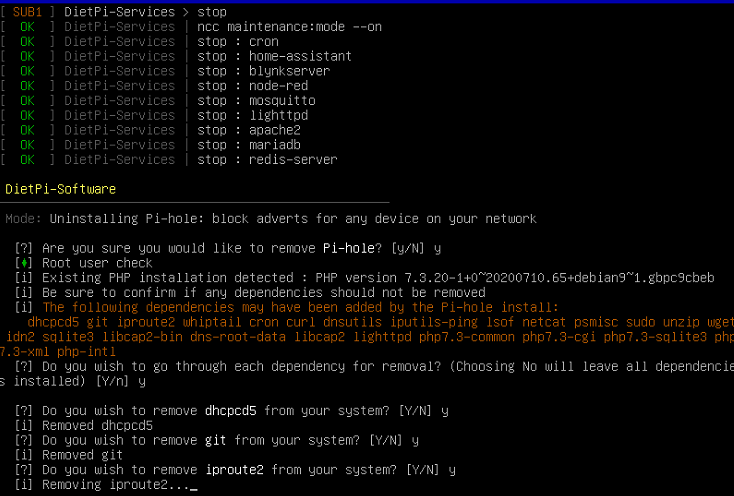
I will uninstall and reinstall via dietpi-software and feedback :)
not sure what to pick, but I will jsut uninstall all depencies for now:
Phil1988
on 15 Jul 2020
not sure what to pick, but I will jsut uninstall all depencies for now:
NOPE not do that! Leave all installed, there are important system packages inside as well. Hmm, I remember some discussion about that topic since Pi-hole devs are not to happy with it as well. E.g. iproute2 is an essential one, being required for basic network functionality.
MichaIng
on 15 Jul 2020
yeah... as soon as it asked me to uninstall cron I realizied its not "that good" :D
THe good point is... I have a snapshot and will start again from there :)
Phil1988
on 15 Jul 2020
THe good point is... I have a snapshot and will start again from there :)
Jep, keep and update that for any such things 👍.
But a good reminder that this uninstall point still needs action. At least instead of purging those packages, they could instead only being marked as "auto" installed, which allows apt-get autoremove to remove only those which are not required for anything else. On the other hand "sudo", "wget", "unzip", "whiptail", "ping", you want to keep that in any case... Probably this step should be completely skipped. Someone who knows what all this is will be able to uninstall manually non-required leftovers, someone who does not know, should not remove then anyway. Good about DietPi is that e.g. webserver, PHP, SQLite, Git are separate software IDs which can be uninstalled separately as well.
MichaIng
on 15 Jul 2020
uninstall worked flawless (i just hit "no" to the depencies removal).
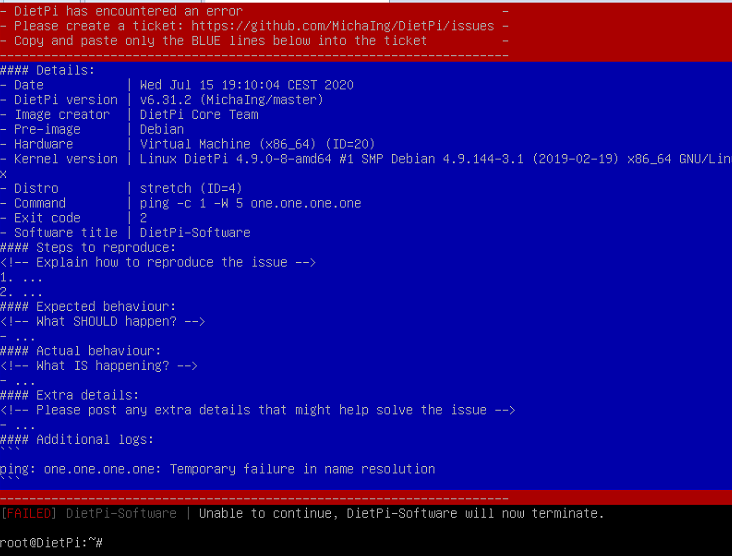
Installation gets to this:
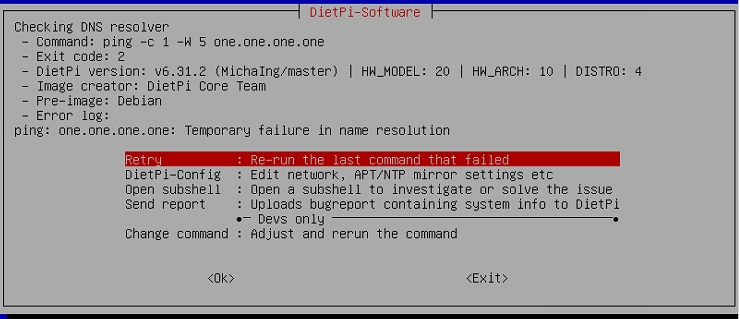
any advices what to do?
Phil1988
on 15 Jul 2020
Jep this is because "ping" was uninstalled. Please try the following:
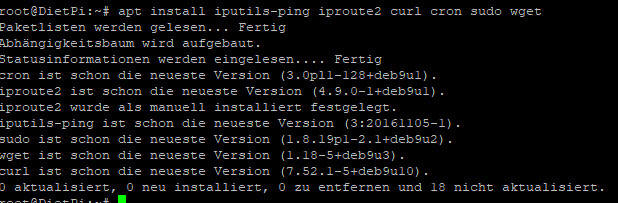
apt install iputils-ping iproute2 curl cron sudo wget
well...
I hit exit and got this:
installing ping etc. gave me this
Trying to start dietpi-software again gives me the error with the ping.... one.one.one again
should i go back to the snapshot and do anything different?
Phil1988
on 15 Jul 2020
Ah I guess because of Pi-hole uninstall the DNS nameserver entry was left invalid. Please try:
echo 'nameserver 1.1.1.1' > /etc/resolv.conf
Next test:
cat << _EOF_ > /var/www/post.php
<?php
\$url = 'http://localhost/test.php';
\$data = array('some' => 'content');

\$options = array(
    'http' => array(
        'header'  => "Content-type: application/x-www-form-urlencoded\r\n",
        'method'  => 'POST',
        'content' => http_build_query(\$data)));

\$response = file_get_contents(\$url, false, stream_context_create(\$options));

echo \$response;
?>
_EOF_
Then open your.domain.org/post.php in browser. This does a POST request, hence the origin is the webserver itself. In my case still no HTTP_ORIGIN.
MichaIng
on 15 Jul 2020
I will do this soon... I just rebooted the system and was able to start the installation of pihole
Phil1988
on 15 Jul 2020
Probably I should do those tests on Stretch to assure exact same environment 🤔.
MichaIng
on 15 Jul 2020
going to have dinner now and will report back when finished (eating ...)
I just got this error/message while installing:
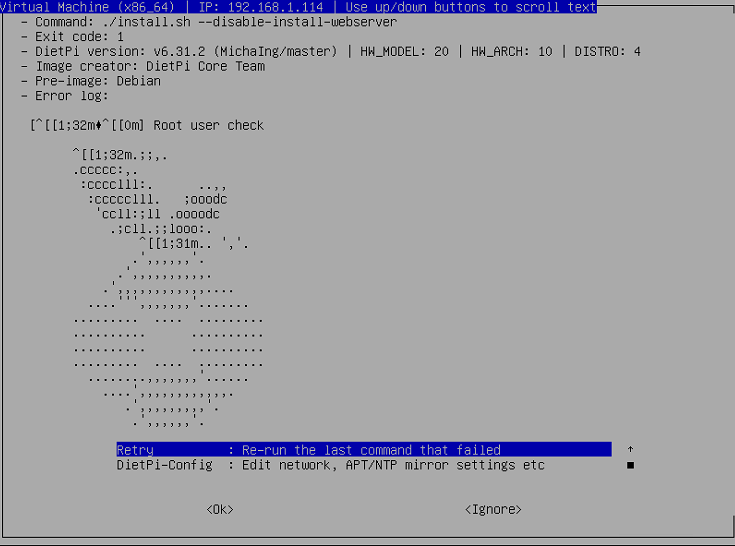
it said installation is completed anyway and rebooted
EDIT:
Its not working properly (cant connect to ip/admin nor to ip/pihole.
it gives me that:

I will to the echo 'nameserver 1.1.1.1' > /etc/resolv.conf stuff after eating.. .(sorry)
Phil1988
on 15 Jul 2020
If you selected "Ignore" then the install is left unfinished. If you can see the last output of the installer, that would be interesting. Else simply retry as dietpi-software has it not marked as installed. Will be quicker since all dependencies are installed already.
Further research about that CORS thing: https://subscription.packtpub.com/book/web_development/9781784393779/1/ch01lvl1sec09/how-cors-works-the-header-and-the-request
Techniques have been proposed to first match $_SERVER['HTTP_ORIGIN'] to an allowed list, then write the header that allows the matched origin. Since $_SERVER['HTTP_ORIGIN'] is not reliable, or the requesting domain may be served via a CDN that does not match the expected domain, this technique may not work.
Pi-hole exactly follows this approach, checking this variable first, then setting the header accordingly. However the article underlines that HTTP_ORIGIN is not reliable.
MichaIng
on 15 Jul 2020
I did
echo 'nameserver 1.1.1.1' > /etc/resolv.conf
and then
cat << _EOF_ > /var/www/post.php
<?php
\$url = 'http://localhost/test.php';
\$data = array('some' => 'content');

\$options = array(
    'http' => array(
        'header'  => "Content-type: application/x-www-form-urlencoded\r\n",
        'method'  => 'POST',
        'content' => http_build_query(\$data)));

\$response = file_get_contents(\$url, false, stream_context_create(\$options));

echo \$response;
?>
_EOF_
Going to URL/post.php shows an empty page
Phil1988
on 15 Jul 2020
echo "<?php echo '<pre>'.print_r(\$_SERVER, true).'</pre>'; ?>" > /var/www/test.php is still required, I guess that is missing due to recovered snapshot.
Okay I'll have to do a buying now, will check back in ~2 hours and test on Debian Stretch then as well.
MichaIng
on 15 Jul 2020
you are right :)
the test.php was missing.
Now the post.php gives this:
(
    [SCRIPT_URL] => /test.php
    [SCRIPT_URI] => http://localhost/test.php
    [HTTP_HOST] => localhost
    [HTTP_CONNECTION] => close
    [CONTENT_LENGTH] => 12
    [CONTENT_TYPE] => application/x-www-form-urlencoded
    [PATH] => /usr/local/sbin:/usr/local/bin:/usr/sbin:/usr/bin:/sbin:/bin
    [SERVER_SIGNATURE] =>
Apache/2.4.25 (Debian) Server at localhost Port 80


    [SERVER_SOFTWARE] => Apache/2.4.25 (Debian)
    [SERVER_NAME] => localhost
    [SERVER_ADDR] => ::1
    [SERVER_PORT] => 80
    [REMOTE_ADDR] => ::1
    [DOCUMENT_ROOT] => /var/www
    [REQUEST_SCHEME] => http
    [CONTEXT_PREFIX] =>
    [CONTEXT_DOCUMENT_ROOT] => /var/www
    [SERVER_ADMIN] => webmaster@localhost
    [SCRIPT_FILENAME] => /var/www/test.php
    [REMOTE_PORT] => 53496
    [GATEWAY_INTERFACE] => CGI/1.1
    [SERVER_PROTOCOL] => HTTP/1.0
    [REQUEST_METHOD] => POST
    [QUERY_STRING] =>
    [REQUEST_URI] => /test.php
    [SCRIPT_NAME] => /test.php
    [PHP_SELF] => /test.php
    [REQUEST_TIME_FLOAT] => 1594834475.345
    [REQUEST_TIME] => 1594834475
)
starting the pihole installation again to try to give you the last line of that error of ./install.sh
but I remember it was a loooooooong list.
good luck on that buying :)
EDIT:
failure is:
 Installing configs from /etc/.pihole...
   [i] Existing dnsmasq.conf found... it is not a Pi-hole file, leaving
 alone!
   [i] Copying 01-pihole.conf to /etc/dnsmasq.d/01-pihole.conf...^M^[[K  [✓]
 Copying 01-pihole.conf to /etc/dnsmasq.d/01-pihole.conf
   Error: Unable to initialize configuration file /etc/pihole/pihole-FTL.conf
   [✗] Failure in dependent config copy function.
 grep: /etc/pihole/setupVars.conf: No such file or directory
   [i] Testing if systemd-resolved is enabled
 ^M^[[K  [i] Systemd-resolved is not enabled
[i] Restarting services...
   [i] Enabling pihole-FTL service to start on reboot...^M^[[K  [✓] Enabling
 pihole-FTL service to start on reboot...
   [i] Restarting pihole-FTL service...^M^[[K  [✓] Restarting pihole-FTL
 service...
Installation Failure: /etc/pihole/setupVars.conf does not exist!
Please run 'pihole -r', and choose the 'reconfigure' option to fix.
soo I installed Pihole + Apache2 on a Stretch VM. Both are working fine without issues 🤔
Joulinar
on 15 Jul 2020
Im sure that a fresh install would solve all problems, but setting up and configure all the programs/servers I am using is a bit of work... (like a week for me :D )
so for the current state it looks that the installation of pihole is not possible because /etc/pihole/setupVars.conf is missing - which might have something to do with dnsmasq (what I often found but cant understand )
EDIT:
Looks like MichaIng is happy shopping or enjoying his well deserved rest.
I will go to bed now and be back here tomorrow at about 10 am.
Have a nice evening
Phil1988
on 15 Jul 2020
Looks like MichaIng is happy shopping or enjoying his well deserved rest.
Happy walking through the forest after rain stopped, slippy mud down the hill and loaded with food for the next days up the hill, so not the classic shopping joy, but good to get the required sport when sitting all the day 😄.
I also tested successfully on Stretch and as well the two test scripts show no HTTP_ORIGIN variable. Tomorrow I'll add some debug code to the Pi-hole script to check it there explicitly, as I'm still not sure if this variable can somehow be requested or is created/added only in certain circumstances.
MichaIng
on 16 Jul 2020
Haha! sounds like a healthy challenge ^^
If I can do any testings or verifying, just let me know.
I did a snapshot of the "after uninstall pihole and unable to reinstall because of missing /etc/pihole/setupVars.conf"-state :D
Now I am back to the state before I updated.
I am reallly curious what causes this issue and broke the WebInterface saving ability.
Sadly I had a full disk on my VM because nextcloud did not properly deleted the garbage collected.
Thats where I had to delete all the snapshots made to beeing able to backup and mirror the whole disk.
So I can not track it as I would normally.
I will randomly check here today whenever I have time.
Phil1988
on 16 Jul 2020
I am home now, so if I need to test something for you, let me know.
I am willing to follow your commands sir :)
Phil1988
on 16 Jul 2020
Ah sorry, was consumed by some website/meta tasks today. I'll do the additional testing tomorrow to see which results/commands are interesting/relevant.
MichaIng
on 16 Jul 2020
No problem. Just wanted to inform you, that testing would have been possible on my side.
Ill be gone over the weekend.
So maybe on sunday or monday :)
Phil1988
on 17 Jul 2020
I added code to the Pi-hole script and now found that $_SERVER['HTTP_ORIGIN'] is unset on regular requests but is only set when using hitting a save button in the web UI, so it must be somehow requested by Pi-hole/PHP scripts.
The value is the IP of the Pi-hole system, not the client IP, so it is a POST request indeed. Now the question is why in your case the the invalid value null.
Same issue found here, but only when doing cross-domain requests: https://stackoverflow.com/questions/22397072
Found it! Referrer-Policy "no-referrer" header is the culprit!
MichaIng
on 18 Jul 2020
@Phil1988
Please check your Apache2 config for Header set Referrer-Policy "no-referrer" oder Header always set Referrer-Policy "no-referrer", which makes Apache2 setting HTTP_ORIGIN to "null" for privacy reasons. But it breaks Pi-hole.
Currently verifying with a fresh Pi-hole install, only with their install (+Lighttpd) setting the same policy there.
Okay whether wanted or not, the way Pi-hole's lighttpd.conf setting sets the debug headers, all existing headers are effectively overwritten:
    setenv.add-response-header = (
        "X-Pi-hole" => "The Pi-hole Web interface is working!",
        "X-Frame-Options" => "DENY"
    )
To preserve existing headers it would need setenv.add-response-header += ( (the +). Why ever its called "add" 😄. So what we basically need to do is unsetting or resetting the header in our Apache2 Pi-hole config.
MichaIng
on 18 Jul 2020
Found an elegant solution: https://github.com/MichaIng/DietPi/commit/f2b8d2a47eaa41078df22026bda46d7c6509f058
Chanelog: https://github.com/MichaIng/DietPi/commit/75aa5b7e8c2ce2b69b85c5ea32b972402060ab4d
Checking Nginx...
...in Nginx headers are only applied from the deepest location directive, hence any "globally" assigned headers are ineffective.
MichaIng
on 18 Jul 2020
Hey MichaIng!
I will check the Header set Referrer-Policy "no-referrer thing, when I am back home--- like in 2-3 hours :)
EDIT:
I checked /etc/apache2/apache2.conf and found nothing regarding "referrer".
In /etc/apache2/sites-enabled/dietpi-nextcloud.conf
I found: Header set Referrer-Policy no-referrer
So it looks to me that you found a nice solution for this (as always!).
What would you suggest to solve this issue for me?
Just try to install pihole again (maybe a sudo update before?) or just add the
Header edit Referrer-Policy "no-referrer" "same-origin"
    Header always edit Referrer-Policy "no-referrer" "same-origin"
to the apache.pihole.conf by hand ?
Phil1988
on 20 Jul 2020
Yes edit /etc/apache2/sites-available/dietpi-pihole.conf and add the two lines just as in this commit: https://github.com/MichaIng/DietPi/commit/f2b8d2a47eaa41078df22026bda46d7c6509f058
Then reload Apache: systemctl reload apache2
That should be it.
MichaIng
on 20 Jul 2020
I went back to the according snapshot (DietPi v6.31.2, Pihole v5) and can confirm that the commit f2b8d2a is working flawless!
Good job again MichaIng!!
I will close this issue now.
If you need or want to reopen it (for tracking or adding something for your workflow) feel free to do so :)
Phil1988
on 21 Jul 2020
Related issues
 oshank
·
3Comments
oshank
·
3Comments
 Fourdee
·
3Comments
Fourdee
·
3Comments
 1021683053
·
3Comments
Fourdee
·
3Comments
1021683053
·
3Comments
Fourdee
·
3Comments
 bhaveshgohel
·
3Comments
bhaveshgohel
·
3Comments